
Redaction
Configure centralized, field-aware redaction independently for local history, buckets, and export destinations in DefenseClaw observability.
DefenseClaw redacts each record once, at the boundary between the record and a destination, using the profile chosen for that destination. One event can stay whole in local history, go whole to a forensic backend, and go with only sensitive substrings removed to a SOC backend. For the steps, see Redact before export.
A new install uses profile none everywhere, local SQLite included. Grafana and the bundled dashboards are consumers of the exported record, not another redaction boundary: they show every field that arrives.
Review the plan before you enable export
An enabled destination with no send or routes receives every signal it supports, from every bucket, with profile none. Run defenseclaw observability plan and defenseclaw doctor to find unredacted legs. On a managed install, an administrator runs sudo /opt/defenseclaw/bin/defenseclaw-gateway enterprise linux status on Linux, sudo /opt/cisco/defenseclaw/bin/defenseclaw-gateway enterprise macos status on macOS, or & 'C:\Program Files\Cisco\DefenseClaw\bin\defenseclaw.exe' enterprise windows status from an elevated PowerShell prompt on Windows; it lists each destination with its kind, signals and effective profile (destinations[] in --json). A standard user's commands are listed in Managed command availability.
Redact before export
A new install exports full content. This section sets a profile on one destination so it receives less, and leaves local history unredacted.
The four profiles are none, sensitive, content and strict. Built-in profiles say what each removes.
Before you start
- A destination is configured (Send to an OTLP collector).
- You know which buckets the destination needs. A global or bucket profile also redacts local history; a destination profile does not.
Steps
-
See what is unredacted now.
defenseclaw setup redaction statusDestinations local-sqlite: signals=logs redaction=unredacted (none) engineering: signals=logs,traces,metrics redaction=unredacted (none) Buckets BUCKET SIGNALS PROFILE compliance.activity logs,traces,metrics none security.finding logs,traces,metrics none … Every bucket uses profile 'none', so collected telemetry is sent unredacted. -
Preview a profile on one destination.
defenseclaw setup redaction destination send engineering \
  --signal logs --bucket security.finding --profile strict --dry-run
Redaction policy preview Scope: configurable observability log/trace projections only Effective legs changed: 29 Newly unredacted: 0 engineering/send security.finding logs: not-delivered -> strict …This also narrows
engineeringto the one bucket and signal you named. Everything else stops going to it. -
Apply it. Replace
--dry-runwith--yes.defenseclaw setup redaction destination send engineering \ --signal logs --bucket security.finding --profile strict --yesConfiguration updated and verified. Backup: ~/.defenseclaw/backups/config.yaml.before-redaction-1792566544163000669 The gateway will hot-reload supported policy changes; restart if required by the plan.
To apply one profile to every destination and to local history instead, run defenseclaw setup redaction apply --scope all-configurable --profile sensitive --yes. Run defenseclaw setup redaction with no arguments for the guided editor, or open Setup → Guardrail & scanning → Redaction in the TUI.
Check it worked
defenseclaw observability plan --bucket security.finding --signal logsBUCKET SIGNAL COLLECT DESTINATION DECISION ROUTE REDACTION
security.finding logs yes local-sqlite send all-collected-logs-and-mandatory-floor none
security.finding logs yes engineering send send strictThe destination should show the profile you chose. Local history keeps none.
Undo
Every change writes a backup. Restore it, or hand the destination back to the defaults:
defenseclaw setup redaction destination inherit engineering --yesTo turn redaction off everywhere, run defenseclaw setup redaction remove-all --yes. Prompts, responses, tool data and paths then reach every destination as recorded.
Guided CLI workflow
defenseclaw setup redaction works the same on macOS, Linux, and native Windows. With no subcommand it prints the effective policy and offers four choices: keep it, remove redaction, apply one profile everywhere, or change the global baseline. Show advanced settings? opens bucket collection, custom profiles, destination policy and ordered routes. Nothing is written until the final review compiles the staged policy, lists changed and newly unredacted legs, and asks you to confirm.
Your choices are written to observability.destinations[].routes[].selector.buckets and observability.redaction_profiles in config.yaml.
macOS, Linux, and native Windows
| Where | How |
|---|---|
| TUI | 0 Setup → Guardrail & scanning → Redaction. Quick actions default to dry-run; Open the complete guided workflow runs the editor in Activity. |
| macOS app | Logs → Redaction policy… shows the status and profiles; advanced changes default to dry-run and show their CLI command. |
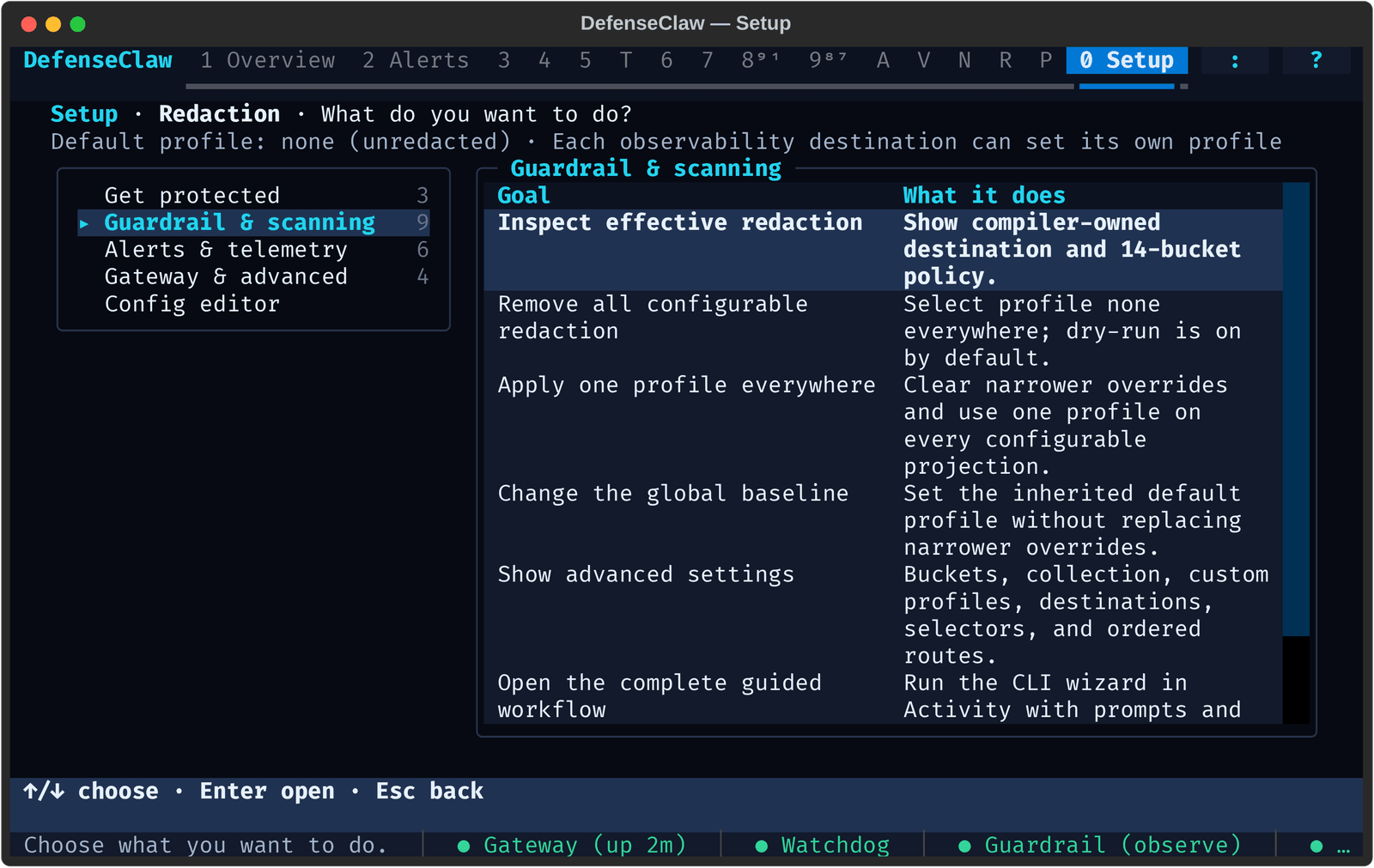
The simple remove-all command
To select profile none for every configurable log and trace projection:
defenseclaw setup redaction remove-all --dry-run
defenseclaw setup redaction remove-all --yes
remove-all sets the global baseline to none and removes bucket, send and route profile overrides. It leaves collection and routing unchanged. The managed enterprise destination stays locked to its managed profile. Stored and exported records are not rewritten. It does not disable the separate safety scrub on OS notifications and agent hook responses, which hide free-form reasons and matched literals.
remove-all permits raw content
Prompts, responses, tool data, evidence, paths and identifiers reach every configurable destination as recorded. Use it only when local history and every destination share an approved trust boundary.
Scripted policy commands
# Inspect
defenseclaw setup redaction status
defenseclaw setup redaction status --json

# Broad baselines
defenseclaw setup redaction apply --scope all-configurable --profile strict --dry-run
defenseclaw setup redaction apply --scope defaults --profile sensitive --yes
defenseclaw setup redaction defaults set --profile content --no-traces --yes

# Bucket overrides
defenseclaw setup redaction bucket list
defenseclaw setup redaction bucket set model.io --profile content --no-logs --yes
defenseclaw setup redaction bucket reset model.io --yes

# Custom profiles
defenseclaw setup redaction profile set soc \
  --extends sensitive \
  --detector pii --detector credentials --detector secrets \
  --field content=detect --field evidence=detect \
  --field path=hash --field credential=remove --yes
defenseclaw setup redaction profile show soc
defenseclaw setup redaction profile remove soc --replace-with sensitive --yes

# Concise destination policy
defenseclaw setup redaction destination send splunk-production \
  --signal logs --bucket security.finding --bucket enforcement.action \
  --profile sensitive --yes
defenseclaw setup redaction destination inherit splunk-production --yes

# Ordered routes (move needs at least two routes on the destination;
# position 2 is outside a one-route list and exits 2)
defenseclaw setup redaction route add splunk-production critical-findings \
  --position 1 --signal logs --bucket security.finding \
  --min-severity HIGH --route-action send --profile strict --yes
defenseclaw setup redaction route move splunk-production critical-findings --position 2 --yes
defenseclaw setup redaction route remove splunk-production critical-findings --yes
Mutation commands accept --dry-run, --json and --restart/--no-restart. By default a running gateway applies a verified change by itself, and --restart also restarts it. Scripted mutations need --dry-run or --yes. An omitted flag leaves that field unchanged; reset and inherit verbs remove the override. A JSON dry run reports applied: false; a confirmed write reports backup_path, verified_plan_digest and restarted.
Built-in profiles
| Profile | Behavior | Typical use |
|---|---|---|
none | Keeps every registered field and all supplied content. | A trusted lab or a controlled forensic backend. |
sensitive | Detects PII, credentials and secrets inside content-like fields and keeps the surrounding structure. | Internal operations and SOC investigation. |
content | Replaces whole prompt, response, tool, document and evidence bodies. Keeps safe metadata and join identifiers. | Shared production observability. |
strict | Removes or transforms content, credentials, paths, reasons, evidence and error detail. Also removes the user principal, Kerberos principal, client address, tenant ID and email. | Least-data external export. |
Upgrading a redacting v7 install writes an ordinary custom profile named v7-compatible with the v7 field-class modes. One class differs: identifiers are preserved in every v8 profile, because they join records. A custom profile that tries to redact them is rejected at load.
Only strict removes personal identifiers
user.id, defenseclaw.user.id_kind and defenseclaw.user.name stay in every profile so records still join. The five identifiers that name a person (defenseclaw.user.principal, defenseclaw.session.kerberos_principal, client.address, defenseclaw.user.tenant_id, defenseclaw.user.email) are removed by strict, and by a custom profile that extends it. none, sensitive and content keep them as plaintext. ai_discovery.include_user_principal and ai_discovery.include_user_email decide whether the gateway attaches them at all. See Telemetry identity.
Resolution order
For each delivered log or trace, the most specific profile wins:
send.redaction_profile, or the first matching route'sredaction_profileobservability.buckets.<bucket>.redaction_profileobservability.defaults.redaction_profile- The bucket catalog default,
none
Metrics have no content fields and take no profile.
config_version: 9
observability:
  defaults:
    redaction_profile: content
  buckets:
    compliance.activity:
      redaction_profile: sensitive
  destinations:
    - name: forensic
      kind: otlp
      protocol: grpc
      endpoint: forensic.example.com:4317
      send:
        signals: [logs, traces, metrics]
        buckets: ['*']
        redaction_profile: none
    - name: soc
      kind: splunk_hec
      endpoint: https://splunk.example.com:8088/services/collector/event
      token_env: SPLUNK_HEC_TOKEN
      send:
        signals: [logs]
        buckets: [compliance.activity, security.finding, enforcement.action]
        redaction_profile: sensitive
observability.defaults.redaction_profile also applies to local SQLite, so local history is content here. To keep local history unredacted, leave out the default and set profiles only on remote destinations. A destination can set none explicitly; the plan then shows none / unredacted.
Custom profiles
A custom profile extends one redacting built-in: sensitive, content or strict.
observability:
  redaction_profiles:
    soc:
      extends: sensitive
      detectors: [pii, credentials, secrets]
      field_classes:
        metadata: preserve
        identifier: preserve
        content: detect
        reason: detect
        evidence: detect
        error: detect
        path: hash
credential: remove| Detector group | Detects |
|---|---|
pii | Email addresses, phone numbers, national identifiers, payment-card candidates and other registered personal-data patterns. |
credentials | Authorization material, API keys and tokens, passwords, private keys and registered credential forms. |
secrets | High-confidence secret patterns not already classified as credentials. |
Unknown groups fail validation. Detection is bounded and runs only on classes whose mode is detect.
Field classes and modes
| Class | Examples |
|---|---|
metadata | Operation, provider, status and policy metadata |
identifier | Trace, span, agent, session, evaluation and asset identifiers |
content | Prompts, completions, tool arguments and results, retrieved documents |
reason | Verdict explanations, policy or operator reasons |
evidence | Matched snippets and evidence summaries |
error | Bounded exception and failure detail |
path | File, workspace, repository and executable paths |
credential | Tokens, keys, authorization material, secret values |
| Mode | Result |
|---|---|
preserve | Keeps the bounded value. |
detect | Replaces only detector matches. |
whole | Replaces the whole value with a typed marker. |
hash | Emits a keyed, nonreversible token for same-install correlation. |
remove | Omits the field from that destination. |
What field-aware redaction looks like
For the model input Send the report to alice@example.com using token sk-live-example., none keeps the sentence, detect with pii,credentials keeps it and replaces the email and token with typed markers, whole leaves one marker, and remove leaves no field. Treat markers and tokens as opaque strings. The key material lives under the data directory; the algorithm, scan limits and marker format are not settings.
Credential-bearing URL queries
URL detectors normalize query-key case and bounded percent-encoding, so tok%65n and api%5Fkey are protected like token and api_key. A malformed or over-encoded query item is never treated as safe: the whole item is replaced, or an unparseable URL is replaced with a placeholder. This applies to logs, telemetry and audit projections only.
Process command lines
A process command line is content. Before it leaves the process that read it (sandbox process tree, the Linux sensor helper, the sandbox kernel feed), DefenseClaw replaces secrets, and the destination's profile then applies. The replacement runs the same way twice. It covers:
- an argument that names a secret and carries it (
--token=...,api_key=...,--password value), where the name containstoken,secret,password,api key,auth,credentialorprivate key - the value after
Authorization:(the scheme word stays) or after a header with such a name - the password of
user:passwordaftercurl -u,--userand--proxy-user, a MySQL-pPASSWORD, and the password inscheme://user:password@host - a bare argument shaped like a key: 32 or more letters, digits and key punctuation, with both letters and digits and no slash
- the words of a script or
evalargument, including nested scripts
A Codex notify program keeps only its program words; its last argument, the agent turn JSON, becomes [argv withheld: agent turn payload]. Placeholders look like <redacted len=23 prefix="d" sha=5f84a2a8>.
Multiple destinations
Redaction is resolved per destination and never changes the record or another destination's copy:
canonical security.finding log
  +-> local SQLite     profile none       full registered projection
  +-> Splunk HEC      profile sensitive  only sensitive substrings replaced
  +-> archive OTLP    profile content    whole governed content removed
Fail-closed behavior
| Failure | Result |
|---|---|
| Detection, key use, a scalar transformation or a field limit fails | The complete field is replaced with a failed_closed token. Other fields continue. |
| Classification is missing or ambiguous, traversal is unsafe, the projection context mismatches, or the record cannot be bounded and serialized | That destination receives no projection. Other destinations continue. Local SQLite writes a minimal content-safe failure record. |
Profile none | Keeps values but still enforces schema, type, size and serialization limits. |
No error path falls back from a redacting profile to raw output. The failure report never includes the rejected value, a secret, an endpoint, a path or exception text.
Importing an old install (upgrades only)
Only an install older than 0.8.5 has v7 redaction settings. The 1.x installer converts their effective behavior into the none built-in or a v7-compatible custom profile and retires the old inputs. A gateway rejects legacy observability and redaction blocks with an upgrade message. A privacy section left in config.yaml is dropped and recorded in migration-v9.json, which notes when it had turned redaction off. DEFENSECLAW_REVEAL_PII remains an operator display setting where supported; it does not change destination projections. This section stays while the installer imports 0.x installs older than 0.8.5. See Upgrade DefenseClaw.
Write and activation safety
The command writes through the same config writer as defenseclaw config set: the shared config.yaml.lock, a refusal on a managed standalone device, and a new entry in config.generation.json. Each mutation runs the Python source validator and the Go compiler before writing. A changed, non-dry-run write compares the live file with the preview digest, installs a private backup, replaces config.yaml atomically, checks the installed plan digest, and records a setup-redaction-policy audit action and a config-update Activity row.
| Platform | Backup path |
|---|---|
| macOS, Linux | ~/.defenseclaw/backups/config.yaml.before-redaction-<nanosecond-timestamp> |
| Windows | %USERPROFILE%\.defenseclaw\backups\config.yaml.before-redaction-<nanosecond-timestamp> |
New parent directories and backups are owner-private: 0700/0600 on POSIX, a protected current-user/SYSTEM DACL on Windows. If the gateway is not running, the change is still verified, but the canonical audit event is not recorded and the CLI warns on stderr.
To edit by hand, change only ~/.defenseclaw/config.yaml, keep a backup, and validate. A global or bucket profile also affects local SQLite; use destination send or a route profile to redact only one remote destination.
umask 077
cp "$HOME/.defenseclaw/config.yaml" "$HOME/.defenseclaw/config.yaml.before-redaction-edit"

defenseclaw config validate && \
defenseclaw config show --effective --section observability && \
defenseclaw observability plan && \
defenseclaw doctor
Endpoints and secret references are masked in plan, doctor, TUI and migration output.
See also
- Observability: buckets, destinations and routing.
- Telemetry identity: the user fields only
strictremoves.
Webhook alerts
Configure Slack, PagerDuty, Webex, and generic HMAC webhooks so the gateway can ping a chat or incident channel when high-severity events fire.
Terminal UI (TUI)
The DefenseClaw terminal UI — a keyboard-driven dashboard over the defenseclaw CLI. How to open it, a tour of the panels, the config generation and policy digest it shows, block and allow actions, the Policies panel, Setup and the config editor, and the Sandboxes panel for OpenShell sandboxes.