
Agent360 dashboard
Drill from any observed agent into lifecycle, executions, model and tool activity, tokens, cost, security decisions, hook enforcement/recovery paths, traces, and agent topology.
Agent360 is the per-agent drill-down in the bundled Grafana stack. It answers three questions from one stable identity: what is this agent doing now, what did it call, and where did time, tokens, cost, or failures accumulate? New root agents and subagents appear automatically as hook events arrive; no dashboard file is generated per agent.
The dashboard is protected by the generated local-observability-v1 consumer
profile. Complete coverage requires the named local OTLP destination to retain
logs, traces, metrics, and the required agent/model/tool/security/health
buckets. defenseclaw observability plan reports partial coverage if an
operator intentionally narrows that route.
Open an agent
- Start the local observability stack.
- Open Grafana at http://localhost:3000.
- Open DefenseClaw → Agent identity and select an Agent ID in Runtime Agent Directory.
- The link opens DefenseClaw → Agent360 with the connector, stable agent identity, and time range carried into the dashboard.
You can also open Agent360 directly and use its variables:
| Variable | Use |
|---|---|
| Connector | Separate Codex, Claude Code, and other hook connectors. |
| Agent | Select the durable root or delegated agent identity. |
| Scope | This agent isolates one agent; Agent tree includes every correlated descendant. |
| Lifecycle (drilldown) | Restrict execution-detail panels to one stable agent lifecycle. Structural tree panels intentionally ignore this filter so descendants with their own lifecycle IDs remain visible. |
| Execution (drilldown) | Restrict execution-detail panels to one concrete attempt within a lifecycle. |
| Trace ID | Pivot the lower section to one Tempo execution trace. |
Read the overview
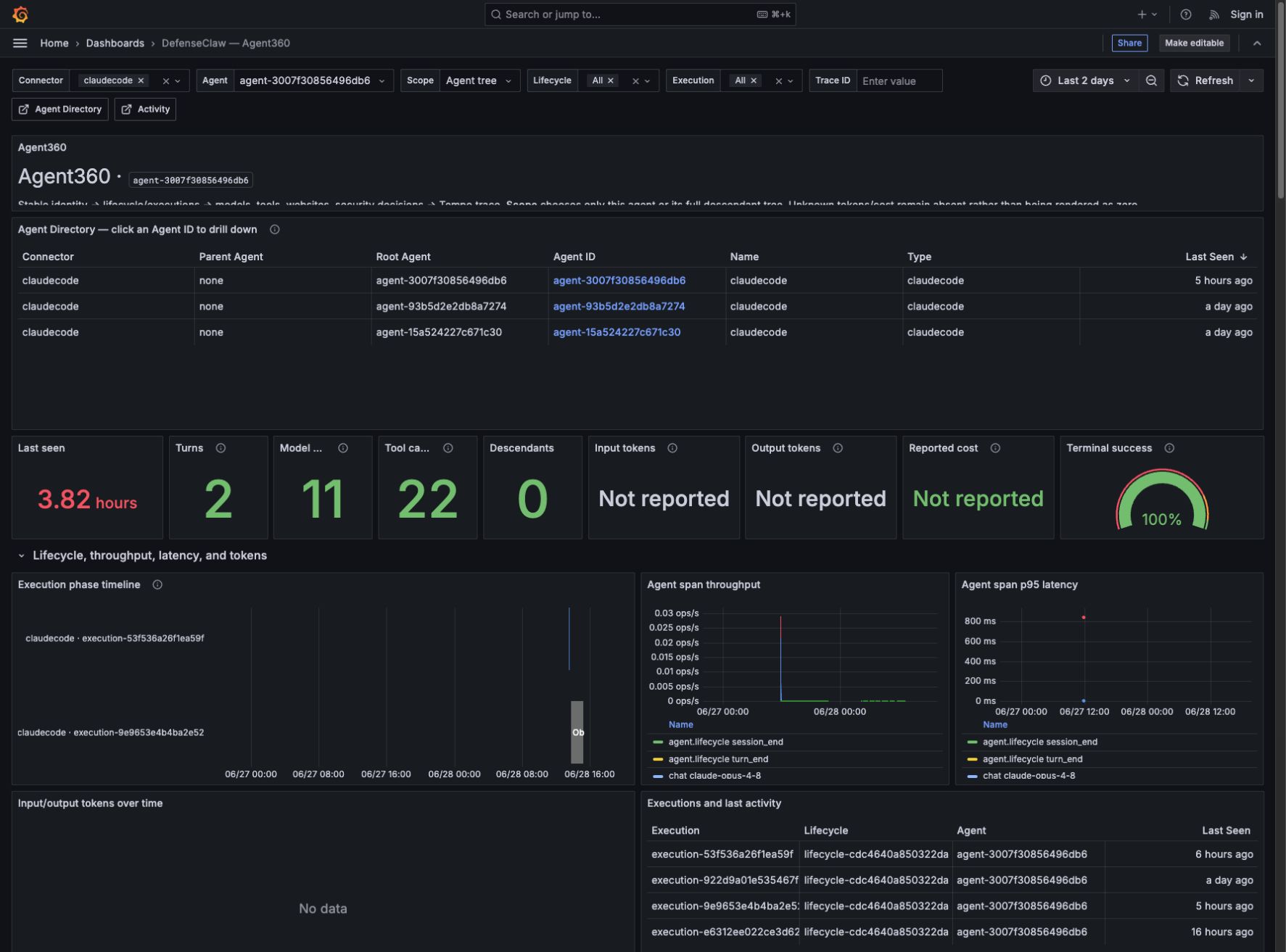
The top of the dashboard is deliberately ordered from identity to health to execution detail:
| Panel | What it means | Why it is useful |
|---|---|---|
| Agent Directory | Agents observed for the selected connector and time range, including root/parent relationships and last-seen time. | Confirms discovery and provides a one-click drill-down to another agent. |
| Last seen | Age of the newest correlated signal. | Finds silent, disconnected, or unexpectedly idle agents. |
| Turns | Distinct logical completed conversational turns. | Exact hook/native mirrors count once while every raw observation remains inspectable. |
| Model calls | Distinct logical completed chat/model operations. | Separates real model work from mirrored telemetry records. |
| Tool calls | Distinct logical completed tool operations. | Reveals automation intensity without mirror inflation. |
| Descendants in selected root tree | Correlated transitive child agents under the selected root. | Detects delegation and unexpected fan-out at any observed depth. |
| Input/output tokens | Connector- or provider-reported usage only. | Tracks context growth and response volume without inventing estimates. |
| Reported cost | Cost reported by the connector, normalized for cumulative and per-call semantics. | Supports cost investigation while preserving the source's meaning. |
| Terminal event success rate | Successful terminal events divided by all terminal outcomes. | Measures completed versus failed/interrupted lifecycles; it is not the latest root agent's state, and notification-only events do not inflate it. |
| Enforced hook blocks | Final hook decisions returned to a connector as block. | Separates a real prevented action from a scanner-only or observe-mode result. |
| Observe-mode would-blocks | Guardrail blocks that were returned as advisory/allow because enforcement was unavailable or disabled. | Shows where a policy would stop work before switching a connector to action mode. |
The Execution phase timeline shows the current phase for each selected execution. Throughput and p95 latency show whether activity is increasing and which operation class is slow. Executions and last activity keeps the lifecycle and execution IDs visible and links each row back into the matching drilldown, so a resumed long-running agent does not look like an unrelated process.
Follow the complete lifecycle
Use two complementary panels instead of expecting one trace to represent an agent's entire lifetime:
- Lifecycle DAG — prompt → agents → work → outcomes is the structural view. It keeps every observed descendant in the selected root tree even though each child owns a different lifecycle and execution ID. Repeated work is summarized per owning agent: one model node per provider/model pair and one tool node per normalized tool family, with total call counts and click-through to the underlying canonical records.
- Ordered lifecycle and work sequence — root to terminal is the causal chronology. It combines root/session starts, exact prompt submissions, subagent starts and stops, model requests/responses, tool calls/results, approvals, egress, guardrail decisions, phase transitions, and terminal outcomes in timestamp order. Every line includes all reported current/root/parent session and agent identities, lineage provenance, lifecycle/execution/request/turn/run/ operation correlation, model/tool/approval identity, and trace/span IDs.
Sequence numbers are monotonic within an execution, not globally across a root tree. Use timestamps plus root/parent/depth fields to read interleaved sibling work. A missing trace ID does not sever the lifecycle: asynchronous hook deliveries are joined through root agent, root session, lifecycle, execution, and operation identities rather than fabricated span parentage.
Explain logical grouping and relationship evidence
The Correlation identity and relationship evidence row keeps two views side by side:
- Logical events counts distinct
defenseclaw.logical_event.idvalues. Exact hook, proxy, and native-OTLP mirrors can share one ID. When an observation has not yet joined a logical group, Agent360 falls back to its semantic event ID and then its record ID so unresolved observations are never dropped. - Raw observations counts every canonical Loki record. Each accepted source
occurrence keeps its own
defenseclaw.semantic_event.id; Agent360 never deletes or hides a mirror. - Relationship evidence and conflict chronology renders content-free
correlation.relationship.changedrecords in Loki timestamp order. Expand a row to inspect relationship type, typed source and target node kinds, method, status, stable rule ID and version, confidence, cumulative durable evidence count, semantic/logical identity, and any exact trace/span pivot.
Relationship methods are reported, trace_exact, derived, or inferred.
Statuses such as unresolved, conflicted, superseded, and rejected stay
visible instead of being silently folded into the graph. Agent lineage is accepted
from reported or explicitly derived relationship evidence; a shared trace ID or
span parent alone never creates a parent/child agent edge.
For automation or exact durable-state investigation, use one authenticated, read-only endpoint with exactly one anchor:
GET /api/v1/correlation/graph
GET /api/v1/correlation/explain
GET /api/v1/correlation/timeline
GET /api/v1/correlation/conflicts
The Grafana row reads the corresponding relationship-change log stream so the local stack needs no direct SQLite access. Prometheus remains aggregate-only: semantic, logical, request, turn, tool, and relationship IDs are never metric labels.
Follow an enforced or alternative path
The Hook enforcement and recovery paths section answers a different question from the verdict list: what did DefenseClaw actually return to the agent, and what did the agent do next?
Each hook delivery emits a durable hook_decision record after connector
capability and enforcement-mode mapping. It carries the same agent, root,
lifecycle, execution, operation, trace, evaluation, and rule identifiers as
the surrounding lifecycle, model, and tool records.
| Field | Meaning |
|---|---|
| Action | The final response sent to the connector. block means the hook was enforced. |
| Raw action | The guardrail result before connector/mode mapping. |
| Enforced | true only when the connector was actually told to stop. |
| Would block | true when a raw block became advisory/allow, such as observe mode or a non-enforceable hook surface. |
| Evaluation / rule IDs | Join keys for the matching verdict and individual scanner findings. |
Start with a spike in Hook action outcomes over time, then read Decision → recovery path from top to bottom. Every row is scoped to the selected lifecycle and execution. The rows immediately after a decision are the observed path: a new tool call indicates an alternative tool attempt, a new prompt/model response indicates the agent reconsidered, another decision shows a retry, and a terminal lifecycle event shows that the session ended.
An enforced block does not guarantee that an agent retries; when no later row appears, DefenseClaw did not observe another hook event in that execution. It does not infer a retry from a missing signal.
Follow models, tools, destinations, and cost
The analytics row breaks the selected agent or tree down by:
- model calls and execution-lifetime p95 latency by provider/model;
- top tools, tool p95 latency, and website/network destinations;
- reported input/output tokens and reported cost by model and over time;
- lifecycle funnel, span error rate, latency heatmap, and active agents.
Use these panels together. A high tool count with a normal tool p95 usually means expected automation; a low call count with a high p95 points to a single blocking tool. A rising model-call count without turns completing points to a retry loop or an agent that is still active.
Inspect the lifecycle DAG
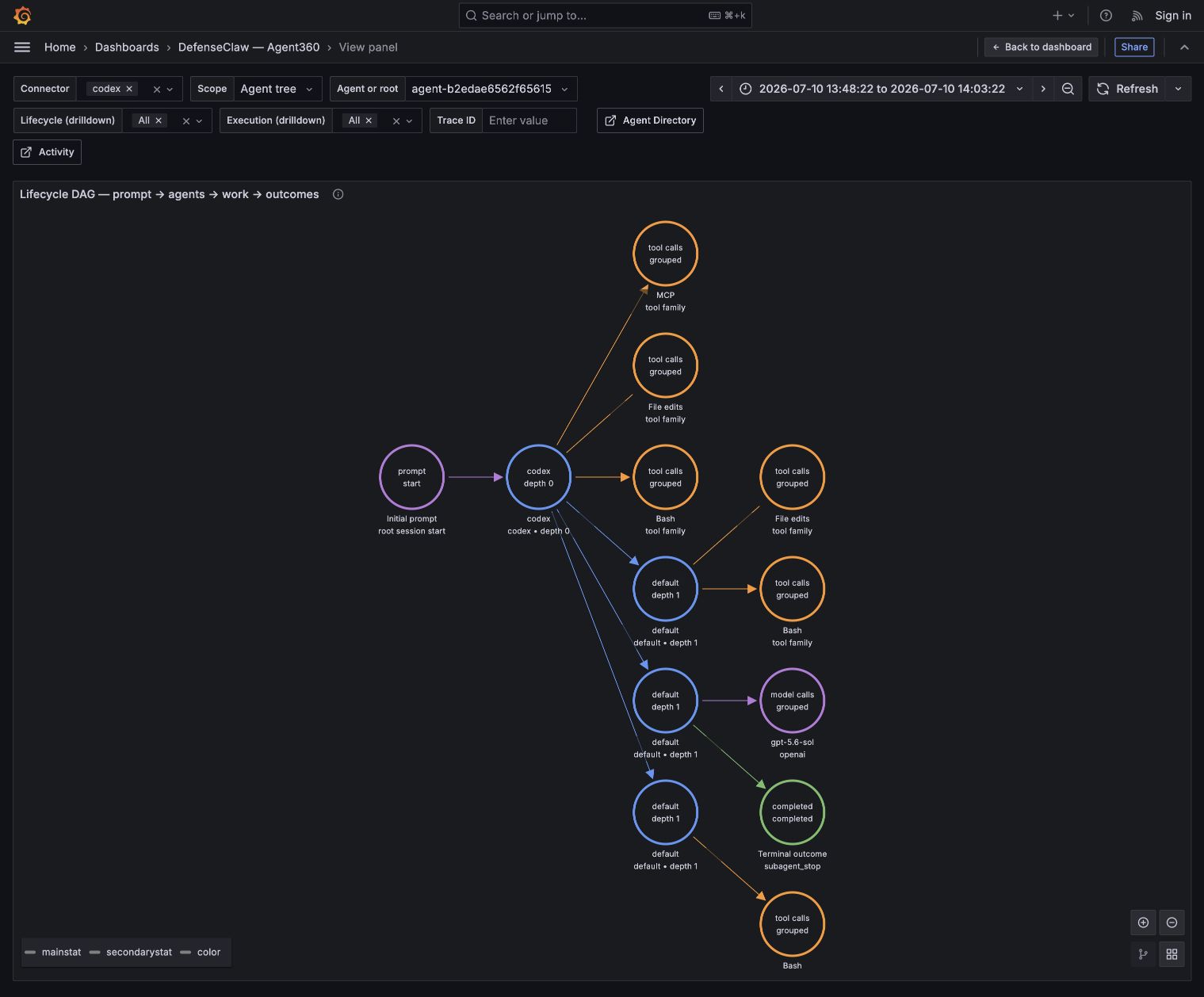
The Lifecycle DAG — prompt → agents → work → outcomes is built from canonical
Loki events and durable relationship evidence, never trace parentage or raw
subagent parent fields. An active typed parent_of relationship is read in its
reported direction; an active typed delegated_by relationship is read in the
inverse direction. Work and outcomes use the selected time range. Session and
durable lineage anchors may be recovered from the prior 24 hours so a boundary
window does not leave an edge endpoint missing; a recovered lineage edge remains
only when that child has graph-eligible activity in the selected range. Its arrows
are causal or ownership relationships that DefenseClaw can prove:
Some Codex versions complete a spawn tool call without emitting SubagentStart.
DefenseClaw correlates a previously unseen child's first event only when one
completed same-session spawn uniquely owns it, then emits an inferred canonical
start with lineage provenance. Ambiguous concurrent spawns remain unresolved, so
no false parent-child edge is drawn.
- the separate Session start anchor points to the root agent observed at
session_startwithout claiming that the session event contains prompt text; - canonical depth-zero prompt submissions increment one grouped Prompt inputs
node for the root; Codex uses connector-source
UserPromptSubmitfacts while keeping native OTLPmodel.requestmirrors in the ordered/raw views; - a parent agent points to each child established by an active durable typed
parent_ofor inversedelegated_byrelationship; - an agent points to one summary node for each observed provider/model pair;
- an agent points to one summary node for each normalized tool family: Bash, MCP,
Skills, Collaboration, File edits, Web/browser, Visual, or Task control; an
unrecognized tool keeps its reported name; exact
collaboration.send_messagerequests are excluded from this generic family so they appear only as message groups, while other collaboration tools remain; - an agent points to real
collaboration.send_messageupdates, an approval observed in that agent's execution, turn outcomes, and session/subagent terminal outcomes.
The Session start circle is a lifecycle anchor, not an invented prompt. For
Codex, Prompt inputs comes from canonical connector-source UserPromptSubmit
facts, not session_start; recognized prompt hooks and model.request fallback
keep other connectors visible. Each observation family deduplicates by turn ID,
model-request ID, request ID, operation ID, then occurrence ID, and the summary
shows the largest source total. When a connector includes prompt content or any other field in canonical OTEL,
Agent360 shows it in click
detail or links to the exact raw record; the dashboard does not remove, truncate,
or mask it.
Model summary identity is the owning agent plus provider/model and counts
model.request records. It sums within each observation source and shows the
largest source total, preventing connector/native mirrors from double-counting a
call while retaining source-only observations. Tool summary identity is the owning agent plus normalized
family and counts tool.invocation.requested records. Repeated requests increase
the total instead of widening the graph, so a request without a terminal counterpart
remains visible. That total is not a pending gauge or terminal-status breakdown.
Exact operation, request/response, tool-call, status, outcome, trace, and payload
metadata remain available through click details and filtered drill-down across the
requested and terminal records. Root
agent calls are not treated specially: if the root emitted matching records in
the selected range, its model/tool family summaries appear under the root just
like a subagent's summaries.
Read depth and identity
Depth is zero-based lineage, not a count of anonymous workers:
| Depth | Meaning | Golden validation identity |
|---|---|---|
0 | Root agent for the selected tree. | golden-root (agent_type=root) |
1 | Direct child spawned by the root. | golden-direct (agent_type=direct) |
2 | Child spawned by the depth-1 agent. | golden-nested (agent_type=nested) |
3 | Child spawned by the depth-2 agent. | golden-leaf (agent_type=leaf) |
The deterministic golden contract fixture covers four agent levels total: one
root plus three subagent generations. It validates query and correlation behavior;
it is not evidence that a particular live connector run created four levels. The
lifecycle contract accepts recursive lineage from depth 0 through depth 64;
a real graph shows only levels actually reported or explicitly marked as inferred
in the selected range.
Click an agent node to see its full stable agent ID, name, type, depth,
root/parent agent IDs, and connector rather than relying on the short label in the
circle. Optional current/root/parent session fields remain on the session,
lifecycle, ordered, and raw surfaces; they are deliberately not agent-node
grouping keys, so missing or late session metadata cannot split one agent's total.
The golden workload is deliberately asymmetric so ownership is testable: depth 0 emits model and file work; depth 1 emits separate model work; a nested agent emits a real collaboration update; and the leaf emits shell work plus approval. Work by different owners remains separate, while repeated calls by one owner increment a grouped node. Every agent then emits its own terminal outcome. This is fixture evidence for the contract, not a claim about the depth or tool use of a live run.
Interpret updates and approvals honestly
An update node exists only for an actual collaboration.send_message tool record.
For each sender, /root and /root/* targets collapse into one Messages to
root node whose target agent ID resolves to the exported root. Exact root task
paths, calls, and terminal results remain in the ordered and raw drill-downs. A
non-root task path remains an exact group and is not converted to an opaque agent
ID unless canonical telemetry supplies that mapping. Generic lifecycle events are
never relabeled as updates. The node total counts grouped send requests; use its
filtered raw records and call IDs to inspect any terminal result.
Approval records likewise do not carry an exact tool-call ID. Their dashed edge is agent/execution-scoped, and the click details say so; the graph does not invent a tool-to-approval join. The ordered sequence and shared execution/operation/trace fields provide the most precise available correlation.
Click for evidence and drill-down
Click any node or edge to inspect its grouping key, total count, and canonical OTEL detail available for that summary or relationship. Depending on node type, Grafana exposes agent lineage and depth, session hierarchy, lifecycle/execution and sequence, operation/tool-call/request/response or approval identities, model/provider or tool family/status/exit code, outcome, session source/resume state, connector, trace/span/turn IDs, and known correlation limitations. When several records are grouped, the node links to the filtered exact raw Loki/OTEL records so every distinct canonical field, payload, and call identity actually exported remains inspectable. The menu also links to the owning agent, prompt/model detail, ordered lifecycle sequence, related Tempo traces, and an exact Tempo waterfall when a trace ID was actually reported. Links preserve the dashboard time range.
The DAG intentionally ignores lifecycle/execution drilldown variables so the selected root tree does not lose children that own different lifecycle IDs. It is not a total event timeline. Use it to answer who spawned whom and which agent owned each observed work/outcome?, the ordered Loki sequence for cross-request chronology, and Tempo for one request-bounded operation's synchronous children.
Drill into logs and traces
The lower dashboard correlates all three local backends:
| Backend | Agent360 uses it for |
|---|---|
| Prometheus | Directory, counts, state, throughput, latency, token/cost totals, and phase edges. |
| Loki | The lifecycle DAG, ordered cross-request lifecycle/work sequence, and model, tool, network, error, verdict, judge, finding, final hook decision, and approval details. |
| Tempo | Completed request-bounded operation/enforcement traces and the selected waterfall. Tempo does not claim that an asynchronous agent lifetime is one trace. |
Select a Trace ID in Operation and enforcement traces — click a Trace ID. The data link preserves the selected connector, agent, scope, lifecycle, execution, and time range while replacing only the trace ID; it does not carry an empty trace variable. The selected-trace waterfall then shows the hook attempt alongside its child operation spans. If the trace is outside the current dashboard time range, widen the time picker before selecting it.
For a fleet-level entry point, open Agent Activity and choose a Root session. Its selected-session token, hook, decision, and ordered timeline panels match the root-session field as well as current/direct-parent session fields, so arbitrary observed descendant generations remain in one drilldown. Agent and Root Agent cells link back to this dashboard with the connector and time range preserved.
Interpret missing values correctly
Agent360 does not fabricate telemetry:
| Display | Meaning |
|---|---|
| 0 | The signal is supported and no matching event was observed in the selected scope and time range. |
| No data | No matching series/log/trace exists for that panel, often because the selected operation never occurred. |
| Not reported | The connector did not provide that optional value, such as tokens or cost. |
For example, Claude Code can expose completed model operations without reporting token or price fields for that hook. Agent360 shows model calls while leaving tokens and cost as Not reported. This is more accurate than estimating usage from message length. Older data collected before a schema or dashboard upgrade is not backfilled; generate a new turn after upgrading to validate newly supported fields.
Token range panels include a first-publication fallback because Prometheus
increase() cannot see a counter's initial nonzero sample. A series first
published inside the range contributes its reported cumulative value once;
established series use their normal counter increase.
Common investigation paths
| Question | Start here | Then drill into |
|---|---|---|
| Why is an agent still running? | Last seen + execution phase timeline | Lifecycle logs and the newest Tempo trace. |
| Which tool made the execution slow? | Top tools + tool p95 | Selected trace waterfall and ordered sequence. |
| Did a subagent cause the failure? | Agent tree + lifecycle DAG | Child agent ID, owned work/outcome nodes, errors/decisions, then its trace. |
| Why did tokens or cost spike? | Tokens/cost over time | Provider/model breakdown and LLM turn details. |
| Was the action blocked, advisory, or approved—and what happened next? | Hook enforcement and recovery paths | Decision → recovery path, verdict/finding details, then the matching Tempo trace. |
| Why is a panel empty? | Scope and time-range variables | Use the table above, then confirm the connector reported the field. |
Dashboards display the canonical OTEL projection as received
Grafana, Loki, Tempo, and the dashboard queries perform no additional redaction,
masking, or field hiding. DefenseClaw applies centralized v8 redaction before it
exports the canonical OTEL projection to the local destination. Agent360 displays
or links every field actually present in that projection; a field removed or
transformed by DefenseClaw cannot be recovered by the dashboard. Fresh v8
configuration defaults to none (unredacted), so raw prompt, completion, tool
argument/result, and evidence fields appear when a producer supplies them.
Configure sensitive, content, strict, or a custom profile before using the
stack across a shared or multi-tenant trust boundary.
Grafana dashboard catalog
A complete map of the DefenseClaw Grafana dashboards, who each board is for, which telemetry rail it uses, how drill-downs connect, and how to interpret empty panels.
Galileo
Send DefenseClaw GenAI traces to Galileo Cloud or self-hosted Galileo while keeping local observability enabled.