
Local observability stack
One-command OpenTelemetry + Loki + Tempo + Prometheus + Grafana stack, pre-wired to the DefenseClaw gateway. Grafana on :3000, dashboards seeded, no manual config.
defenseclaw setup local-observability brings up a full local OpenTelemetry stack and wires the gateway to it in one shot. It's what the project itself uses for development, demos, and rule-pack tuning.
Native Windows has a narrower optional-stack contract
Core DefenseClaw does not require Docker. The certified Windows local-stack
path requires native x64 Windows Pro, Enterprise, or Education; Hyper-V;
machine-installed Docker Desktop using Linux containers; Compose v2; and a
real absolute docker.exe. WSL2/per-user Docker engines, Windows containers,
and .cmd/.bat/shell shims are not certified. See
Windows install requirements.
What it brings up
The stack runs from bundles/local_observability_stack/docker-compose.yml:
| Service | Image / role | Default port |
|---|---|---|
otel-collector | OpenTelemetry Collector — fans out to Prom/Loki/Tempo | 4317 (gRPC), 4318 (HTTP) |
prometheus | Metrics store | 9090 |
loki | Log store (gateway audit + sink failures) | 3100 |
tempo | Trace store (per-decision spans) | 3200 |
grafana | UI with seeded DefenseClaw dashboards | 3000 |
All five run under one Compose project (defenseclaw-observability). They share a Docker network and the bundled Grafana datasources point at each container by service name.
Bring it up
Start the stack.
defenseclaw setup local-observability upThe openclaw-observability-bridge binary (shipped in bundles/local_observability_stack/bin/) drives Compose, waits for healthchecks, and writes one kind: otlp destination under observability.destinations in ~/.defenseclaw/config.yaml.
A running gateway hot-reloads that destination in process without changing
its PID or interrupting active agent sessions. This remains true when
gateway.config_reload.mode is restart; that mode is reserved for edits
that actually cross a restart boundary. If the gateway is stopped, the
destination is used on its next normal start.
Open Grafana. http://localhost:3000. A new
managed stack requires the admin login and stores its generated password
at ~/.defenseclaw/observability-stack/.grafana-admin-password. Existing
anonymous stacks keep their current no-password behavior across upgrade;
the setup summary always reports the effective mode. Use --password to
move a legacy stack to login mode or --no-password to opt a loopback-only
local stack into anonymous Admin access. The selected mode persists.
Verify the destination handshake. Probe the named destination without adding the probe payload to ordinary event history or dashboard counts:
defenseclaw observability destination test local-observabilityThe default test is a non-mutating protocol handshake. Even the explicit
--write-probe bypasses normal collection, routing, SQLite event history,
and dashboard counts. The command does persist a separate bounded,
local-only compliance record of the attempt and outcome. Use
defenseclaw setup observability list first if you renamed the destination.
Notifier webhooks use
defenseclaw setup webhook test <name> instead.
Generate real traffic, then inspect the relevant dashboard. Run a DefenseClaw-managed agent turn, tool call, scan, or approval flow. Panels populate only for families that traffic actually emits; there is no fixed dashboard-population order.
up also refreshes the host-mounted stack copy in ~/.defenseclaw/observability-stack/ from the bundled version before Compose starts. That includes Grafana dashboards, Prometheus rules, Loki, Tempo, and OTel Collector config. Deleting Docker containers is not enough to update those files because they live on the host; pass --no-refresh-config only when you intentionally want to keep local edits.
Useful flags
The up subcommand exposes the bridge configuration directly:
defenseclaw setup local-observability up \
  --endpoint 127.0.0.1:4317 \
  --signals traces,metrics,logs \
  --service-name defenseclaw-gateway \
--timeout 90| Flag | What it does |
|---|---|
--endpoint | OTLP endpoint the gateway writes into config.yaml. Defaults to whatever the bridge published (127.0.0.1:4317). |
--signals | Comma-separated subset of traces,metrics,logs. Omitting it selects all three, which is required for complete bundled-dashboard coverage. |
--service-name | Resource attribute set on every emitted span. Defaults to defenseclaw. |
--no-config | Bring containers up but do not modify config.yaml. Useful when you manage gateway config out-of-band. |
--password / --no-password | Require the managed Grafana admin credential, or explicitly allow anonymous Admin access on the managed loopback bind. New stacks default to password; previously used anonymous stacks are grandfathered until you pass --password. |
--refresh-config / --no-refresh-config | Refresh bundled Grafana dashboards, Prometheus rules, Loki, Tempo, and OTel Collector config by default; opt out to preserve local edits. |
--no-wait | Don't block on healthchecks — fire-and-forget. |
--timeout | Seconds to wait for healthchecks. Default 180. |
The OTLP protocol is read from the bridge readiness contract (currently grpc); there is no --protocol flag on up. To use http/protobuf, configure that protocol on the named local-observability destination.
V7 compatibility flag
Older releases exposed --with-audit-sink/--no-audit-sink because logs and OTel
signals used separate audit_sinks and otel blocks. Config v8 has one
destination capable of logs, traces, and metrics, so new configuration does not
need or write a second audit sink.
No-password mode is local trust, not authentication
--no-password gives every process on the workstation anonymous Grafana Admin
access. The managed controller still rejects any effective Grafana port bind
other than 127.0.0.1, verifies the selected runtime mode, and prints a warning.
Raw docker compose up retains the historical anonymous behavior for
compatibility and can bypass that managed bind check; do not expose it with
HOST_BIND without an external access-control boundary.
What ends up in config.yaml
The example below is the result of the sample up command using
--service-name defenseclaw-gateway; without that flag, service.name is
defenseclaw.
config_version: 8
observability:
  resource:
    attributes:
      service.name: defenseclaw-gateway
  destinations:
    - name: local-observability
      kind: otlp
      endpoint: 127.0.0.1:4317
      protocol: grpc
      network_safety:
        allow_private_networks: true
Because send and routes are omitted, this OTLP destination receives all
reviewed buckets and all three signals, unredacted. That is both the v8
capability default and the complete local-observability-v1 dashboard profile.
If a destination with the same name already exists, the bridge updates it in
place rather than adding a duplicate. Other telemetry destinations and notifier
webhooks are left untouched.
Bundled Grafana dashboards
The bundle ships a full board set in bundles/local_observability_stack/grafana/dashboards/ — every *.json file here is auto-loaded:
| Dashboard (UID) | What it shows |
|---|---|
Overview (defenseclaw-overview) | KPI strip + firing alerts + SLO gauges; the landing board. |
Agent Activity (Live) (defenseclaw-activity) | Cross-agent prompts, models, tools, destinations, and session correlation. |
Connectors / Hook Connectors (defenseclaw-connectors) | Primary multi-connector view. Cross-connector compare: per-connector traffic, blocks, redactions, errors, hooks-vs-OTel drift. Filterable by the connector template variable. |
Connector Detail (defenseclaw-connector-detail) | Single-connector deep dive driven by $connector: identity, ingest, hooks, verdicts, judge, findings, HITL, scoped Loki streams. |
Guardrail Evaluations / Security (defenseclaw-security) | Verdict funnel by stage × action, severity breakdown, per-connector breakdown; connector-filterable. |
Policy decisions (defenseclaw-policy-decisions) | OPA verdicts by domain × verdict, egress branch, block-list hits. |
HITL (defenseclaw-hitl) | Chat HILT + exec approvals: approval/denial/timeout rates, pending gauge, MTTD. |
Findings (defenseclaw-findings) | Top rules, per-rule activity over time, finding-to-verdict correlation. |
Proxy & LLM Guard (defenseclaw-traffic) | HTTP surface latency/status, OTel ingest rates, trace samples. |
Scanners (defenseclaw-scanners) | Sparse-safe scan throughput and duration, errors by type, findings, and quarantine actions. |
Runtime & Reliability (defenseclaw-runtime) | Process, SQLite, v8 destination/exporter, queue, and canonical gateway-error health. |
Agent identity (defenseclaw-agent-identity) | Three-tier agent identity correlation, churn, discovery latency, per-connector header presence. |
Agent360 (defenseclaw-agent-360) | Automatic Agent Directory plus one-click per-agent/tree lifecycle, initial and grouped follow-up prompts, descendants, per-agent model/tool-family summaries, updates, approvals, outcomes, inputs/outputs, reported tokens/cost, security decisions, and Tempo waterfall. |
AI Agent Usage & Detection (defenseclaw-ai-discovery) | Continuous AI inventory loop: active signals, per-vendor/product tables, confidence. |
See the complete Grafana dashboard catalog for the owner and purpose of every board, the drill-down map, backend usage, and the exact difference between 0, No data, and Not reported.
For a multi-connector gateway, start on Connectors (Overview) to compare connectors side by side, then click a connector cell to drill into Connector Detail.
Agent Directory and Agent360
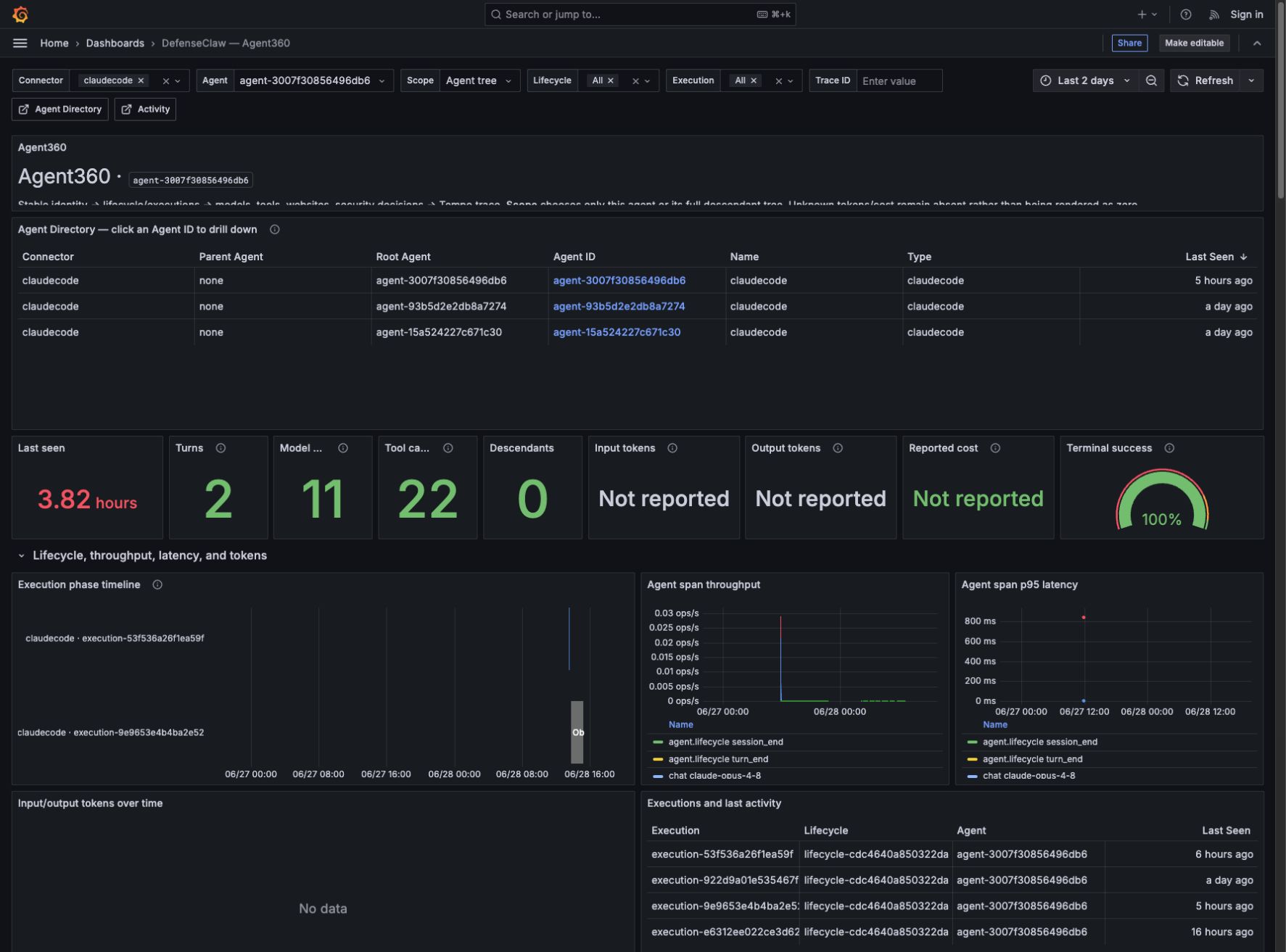
Open Agent identity → Runtime Agent Directory. Every hook lifecycle
transition updates the stable defenseclaw.agent.last_seen inventory metric,
so a newly observed root agent or subagent appears automatically. Click its
Agent ID to open the reusable Agent360 dashboard; DefenseClaw does not
create or provision a separate dashboard file for each agent.
Agent360 correlates the same stable fields across all three backends:
| Correlation | Purpose |
|---|---|
gen_ai.agent.id | One logical root or delegated agent. |
defenseclaw.agent.root.id / parent.id | Full descendant tree and direct parent relationship. |
defenseclaw.agent.lifecycle.id | Durable identity across gateway restarts and resumed sessions. |
defenseclaw.agent.execution.id | One concrete execution attempt. |
trace_id | Direct pivot from a log/operation that actually reports W3C trace identity into the Tempo waterfall. Aggregate metrics do not fabricate trace IDs. |
Use Scope = This agent for a single agent, or Agent tree to include
all descendants. Prometheus supplies directory, state, throughput, latency,
token, reported-cost totals, and directed phase aggregates. Loki supplies the
prompt-to-outcome lifecycle DAG plus compact lifecycle/model/tool/network/security
summaries with the full event available in log details. Session and durable
lineage anchors may be recovered from the prior 24 hours so selected-range
boundaries remain renderable; a recovered relationship edge is kept only when its
child has graph-eligible activity in the selected range. Active typed parent_of
and inverse delegated_by relationship records establish agent parentage; raw
parent fields and trace topology do not. Repeated model work is
grouped per owning agent, provider, and model. Repeated tools are grouped per
owning agent as Bash, MCP, Skills, Collaboration, File edits, Web/browser, Visual,
or Task control; an unrecognized tool keeps its reported name. Exact
collaboration.send_message requests are excluded from generic Collaboration
summaries so they appear only as message groups; other collaboration tools remain.
Summary nodes show total requests and link to every exact raw canonical OTEL record,
including their terminal counterparts. Stable agent nodes use agent/root/parent
identity, name, type, depth, and connector; optional session fields stay in
lifecycle/session/ordered/raw detail rather than splitting one agent's total. One
per-root Prompt inputs node counts distinct depth-zero
model.request facts, with replay-safe turn/model-request/request/operation/occurrence identity;
Session start remains a separate lifecycle anchor. The ordered/raw views retain
the individual initial and follow-up request records.
For each sender, real collaboration updates to /root or /root/* collapse
into one Messages to root node that resolves the exported root agent ID. Exact
root task paths and calls remain in ordered/raw drill-downs; non-root targets
remain exact groups without an invented target-agent mapping. Tempo
supplies request-bounded waterfalls; it does not pretend an asynchronous lifetime
is one trace. Select a row in Operation
and enforcement traces to populate the waterfall. Token and cost panels only
display values explicitly reported by the connector. Input tokens include the
prompt/context usage reported by the provider and may be much larger than
output for long-context agents. Missing values remain Not reported and are
never estimated.
The local stack performs no additional redaction, masking, or field hiding. DefenseClaw applies the selected v8 profile centrally before canonical OTEL export. Grafana displays or links every field that Loki or Tempo actually receives, including content when the producer supplies it; fields removed or transformed before export are not recoverable in a dashboard.
See the Agent360 dashboard guide for a visual tour of every section, the prompt-to-agent lifecycle DAG, trace drill-down, and the difference between 0, No data, and Not reported.
They're auto-provisioned via bundles/local_observability_stack/grafana/provisioning/. The folder is named "DefenseClaw" inside Grafana so they're easy to find. Edits you make in the UI are not persisted back to disk by default — copy them out with Dashboard → JSON Model if you want to keep them.
Managed AI Defense fail-open monitoring
Managed-enterprise mode deliberately allows a request when the authoritative
AI Defense inspection cannot return a verdict. DefenseClaw exposes every such
decision through the generated OpenTelemetry counter
defenseclaw.managed_aid.fail_open.decisions (int64, unit {decision},
delta temporality). The counter has one bounded defenseclaw.metric.reason
attribute; the local-observability projection exports it as the Prometheus
reason label on defenseclaw_managed_aid_fail_open_decisions_total.
reason | Meaning | Paging treatment |
|---|---|---|
inspector_unwired | The gateway entered managed inspection without an AI Defense inspector. | Page when sustained. |
aid_unavailable | AI Defense returned no verdict, including transport, timeout, or token failures. | Page when sustained. |
no_content | The request contained no inspectable messages. | Diagnostic only; never page. |
unknown | A future or invalid producer reason was normalized at the metric boundary. | Diagnostic only; investigate producer drift. |
The bundled DefenseClawManagedAIDFailOpenSustained rule uses a positive
availability-reason allowlist, so no_content and unknown cannot accidentally
become paging conditions:
sum by (reason) (
  rate(defenseclaw_managed_aid_fail_open_decisions_total{reason=~"inspector_unwired|aid_unavailable"}[5m])
) > 0
The expression must remain true for 10 minutes before the critical alert fires. It is traffic-gated by construction: an idle gateway produces no fail-open decisions and does not page. If it fires, verify that the gateway is running in the intended deployment mode, confirm the managed inspector was wired at startup, test AI Defense credentials and endpoint reachability, and check the provider status. The allow behavior is intentional during recovery; restore authoritative inspection before considering the incident resolved.
Tear it down
defenseclaw setup local-observability downStops all five containers and removes the Compose project. Dashboards and Grafana state live in named Docker volumes so they survive down/up cycles.
To wipe everything including the volumes:
defenseclaw setup local-observability reset --yesreset is destructive — your historical traces, logs, and metrics
go with it. Splunk HEC and JSONL destinations are unaffected. down only stops
the containers; named Docker volumes survive across down/up cycles
until you run reset.
Status and logs
defenseclaw setup local-observability status
defenseclaw setup local-observability logs --service grafana --follow
status shows container health and the resolved OTLP endpoint. logs --service <name> tails one of the five containers — useful when Grafana isn't picking up dashboards or the OTel collector is dropping spans. Drop --service to fan out logs from every container at once.
Use it alongside Splunk
Local observability and Splunk are independent destinations. A common pattern:
- Engineers and SREs use the local Grafana stack for live investigation.
- The same gateway also forwards every event to the org Splunk for retention and SOC.
Just run both setup commands. They add separate entries to the same
observability.destinations list:
defenseclaw setup local-observability up
defenseclaw setup splunk --enterprise --hec-endpoint ... --hec-token ...
See Splunk integration for the dashboards we ship for the local Splunk app and for tips on building your own SPL queries against the gateway sourcetypes.
Troubleshooting
End-user identity
Understand how DefenseClaw attributes v8 telemetry to endpoint users, which identity sources are trusted, and how to opt in to connector email collection.
Grafana dashboard catalog
A complete map of the DefenseClaw Grafana dashboards, who each board is for, which telemetry rail it uses, how drill-downs connect, and how to interpret empty panels.