
OpenShell sandboxes
Run Claude Code, Codex and other coding agents in skip-permissions mode inside NVIDIA OpenShell sandboxes on Linux and Apple-silicon Macs, with DefenseClaw judging every tool call and every site.
Coding agents are fastest when they stop asking before every command. Claude
Code calls that --dangerously-skip-permissions, and Codex calls it
--dangerously-bypass-approvals-and-sandbox. On your own machine, that mode
lets a prompt injection or a bad guess touch everything you can touch.
defenseclaw sandbox run gives the agent that mode inside an
NVIDIA OpenShell sandbox instead. The
agent sees only your project folder. DefenseClaw still checks every tool call
and every site the agent contacts, and at the end of the session you review
what changed and keep it, undo it or pull it back.
cd ~/code/myapp
defenseclaw sandbox run claude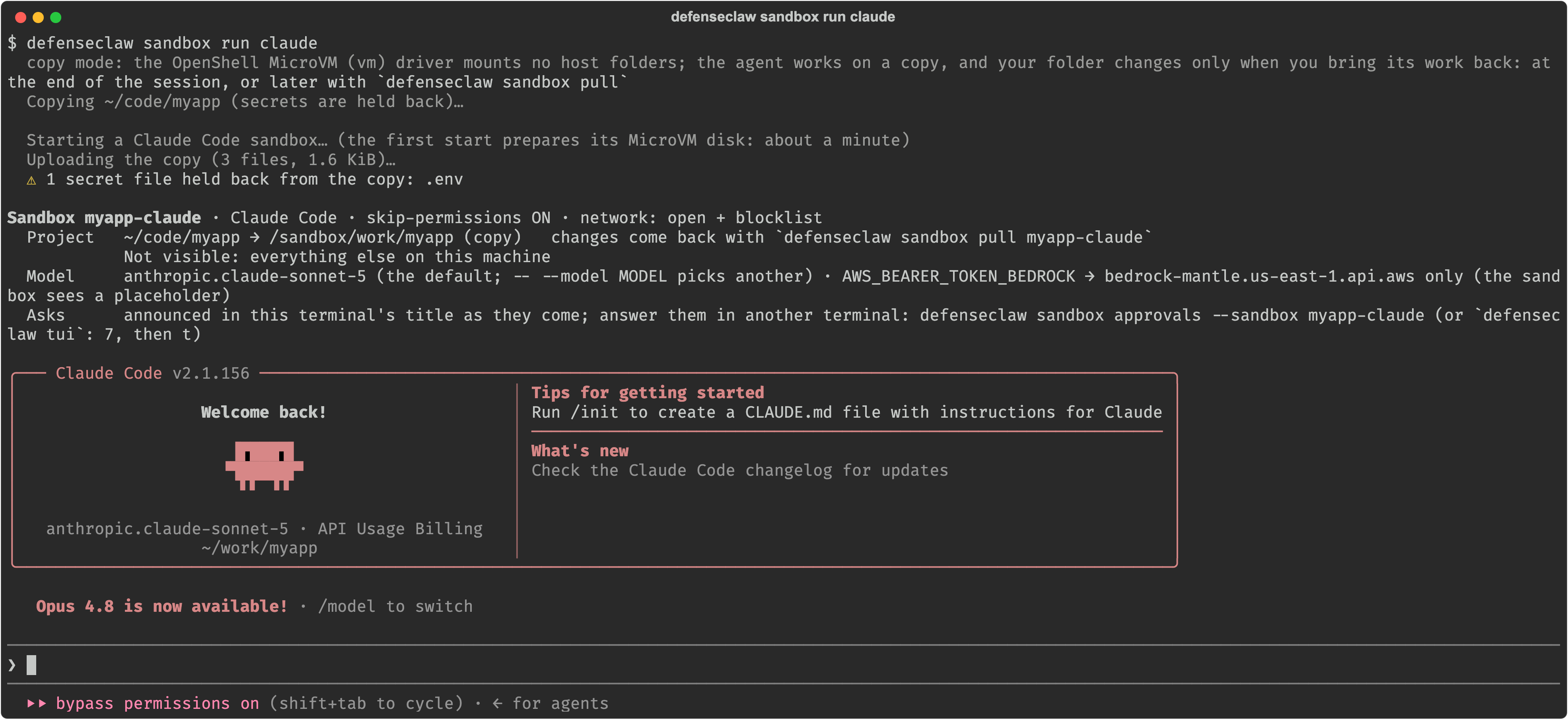
The mental model
Think of the sandbox as a locked room that holds only your project folder. Two layers build it:
- OpenShell builds the room. On Linux each sandbox is a container; on a Mac it is a small virtual machine (a MicroVM) with its own Linux kernel. Either way the workload has no network of its own, runs as your uid with no capabilities, and is held in by Landlock filesystem rules and seccomp. Its only way out is OpenShell's supervisor.
- DefenseClaw adds the judgment. Its hooks run inside the sandbox and send every tool call to the DefenseClaw daemon, which checks it with the same rule packs, guardrails and judge as outside a sandbox. Its egress proxy decides and logs every site. It hides secret files, protects git internals, snapshots the folder and reviews what changed.
| Inside the room, the agent can | Outside the room, it cannot |
|---|---|
| Edit your project, run tests, build and install packages. | See your home directory, ~/.ssh, ~/.aws, other repositories or the rest of the system. |
| Browse the web through DefenseClaw's egress proxy. | Reach paste sites, file drops, webhook catchers, tunnels and anonymizers on the blocklist. |
| Use your model credential through a placeholder. | Read the real key: OpenShell adds it only on requests to the model provider. |
Reach a port on your machine you name with --host-port, once you approve it. | Reach DefenseClaw's own API or the OpenShell gateway, ever. Reach your local network unless you approve it. |
The sandbox reaches your machine only at host.openshell.internal, which
OpenShell maps to your machine's loopback address. The hooks arrive there on
a dedicated hook ingress port, and web traffic leaves through the
egress proxy port. The DefenseClaw daemon's main API is never one of
them. With the default API port 18970, the ingress is 18971 and the egress
proxy 18972.
Linux and macOS at a glance
Sandboxes run on Linux (amd64 and arm64) and on Macs with Apple silicon. They
are not supported on Windows or WSL2, on Intel Macs, in managed_enterprise
deployments, or when you run DefenseClaw as root.
| Linux | macOS (Apple silicon) | |
|---|---|---|
| OpenShell driver | Docker driver: one container per sandbox | MicroVM driver (vm): one virtual machine per sandbox, on Apple's Hypervisor. OpenShell calls it experimental. |
| Isolation | Linux namespaces, Landlock (kernel 6.2 or newer), seccomp, your uid | The same, inside a MicroVM with its own Linux kernel |
| OpenShell gateway | openshell-gateway systemd user service | Homebrew's nvidia/openshell/openshell service |
| Your project folder | Mounted live at /work/<folder>. --copy works on a copy. | Always a copy, at /sandbox/work/<folder>. A MicroVM mounts no host folders. |
| Secret files | Appear empty inside | Held back from the copy |
| Git internals | .git/hooks and .git/config are read-only | The agent's work comes back as git objects |
| End of session | Keep the changes, or undo them | Bring the changes back (apply, branch or patch), or leave them in the sandbox |
| Undo | sandbox undo restores the pre-session snapshot | sandbox undo reverts the last sandbox pull --apply |
| First start of an image | A few seconds | About a minute, to prepare a MicroVM disk of about 5 GB |
| Harness images | Built in Docker | Built in Docker Desktop, then booted as MicroVMs |
Everything else is the same on both: the hooks, the policy packs, the egress proxy and its blocklist, asks, credential placeholders, telemetry and tamper detection.
Why not Docker Desktop on a Mac?
OpenShell's supervisor needs Landlock. Docker Desktop's Linux VM kernel does not run it, so a sandbox on OpenShell's Docker driver fails to start there. DefenseClaw refuses that combination and sets the Mac's gateway to the MicroVM driver instead. Docker Desktop is still used to build the harness images.
Choose your path
Set up on Linux
Docker Engine, Landlock and the OpenShell gateway as a systemd user service. Your project is mounted live, with a snapshot for undo.
Set up on macOS
Apple silicon, Homebrew and OpenShell MicroVMs. Every run works on a copy that you pull back.
Your first session
A guided tour: the banner, the activity feed, a block and its unblock, the end-of-session review, then undo or pull.
Network and egress
How the egress proxy decides each site, the open, balanced and strict packs, unblocks, asks and large uploads.
TUI and macOS app
Watch and manage sandboxes from the terminal UI's Sandboxes panel or the macOS app.
Full sandbox guide
Every option, variation and troubleshooting entry in one long reference guide.
The session lifecycle
- Setup checks the machine, installs OpenShell 0.1 when you agree, configures its gateway, and builds the harness images. You run it once.
- Run creates a sandbox for the folder you are in, or resumes the one that already holds it, and gives the harness your terminal.
- During the session every tool call goes through DefenseClaw's hooks and every site through its egress proxy. Blocks and asks appear in the activity feed.
- At the end you get a summary and a review of the changed files that could run code on your machine.
- Keep, undo or pull. On Linux you keep the changes or undo them. On a
Mac, or with
--copy, you apply them, put them on a branch, write a patch, or leave them in the sandbox forsandbox pull. - Stop or delete. The sandbox is stopped and kept, so
defenseclaw sandbox connect NAMEresumes it.defenseclaw sandbox delete NAMEremoves it.
Which agents can run
Claude Code and Codex are set up by default, and both use root-owned managed hook files that the agent cannot change. GitHub Copilot CLI, OpenCode, Kiro CLI, Hermes Agent, OpenHands, OmniGent and Antigravity also run. DefenseClaw uses a harness image only after it proves that its hooks fire and block in it. See which harnesses can run and the capability matrix.
Where to go next
- Full sandbox guide: every run flag, copy mode, parallel runs, MCP servers, shell wrappers, teardown and troubleshooting.
- Sandbox policy packs and admin controls: write a custom pack and set organization-wide limits.
- Sandbox CLI reference: every
defenseclaw sandboxcommand and flag. - OpenShell sandbox settings:
every
openshell:key inconfig.yaml.
First guardrail in 5 minutes
An end-to-end walkthrough — install, pick Claude Code, switch to action mode, and safely verify a destructive-command rule against a disposable path.
Sandboxes on Linux
Set up NVIDIA OpenShell sandboxes on Linux with Docker Engine, Landlock and the openshell-gateway systemd user service, check the machine with sandbox doctor, and run your first agent on a live project folder.