
Sandboxes on macOS
Set up NVIDIA OpenShell sandboxes on an Apple-silicon Mac, where each sandbox is a MicroVM with its own Linux kernel, the agent works on a copy of your project, and you pull its changes back.
On a Mac, each sandbox is a small virtual machine, a MicroVM, that
OpenShell's MicroVM driver (vm) boots on Apple's Hypervisor. It has a Linux
kernel of its own, which runs the Landlock rules OpenShell needs. A MicroVM
mounts no folders from your Mac, so the agent always works on a copy of your
project, and you bring its changes back when you are happy with them.
OpenShell calls the MicroVM driver experimental.
How it fits together
The hooks, policy packs, egress proxy, blocklist, asks, credential placeholders, telemetry and tamper detection work as on Linux. What differs is where the sandbox runs and how your project gets in and out.
Before you start
| You need | Details |
|---|---|
| A Mac with Apple silicon | The MicroVM driver runs on Apple silicon only. On an Intel Mac sandboxes are refused. If you run the Intel build of DefenseClaw under Rosetta, install the arm64 build. |
| DefenseClaw | Installed and initialized (see the quickstart), with the daemon running. The macOS app starts it for you. Run everything as your own user. |
| Homebrew | OpenShell installs from NVIDIA's nvidia/openshell Homebrew formula, and its gateway runs as a Homebrew service. |
| Xcode or the Command Line Tools | The formula may build from source, and Homebrew then wants current developer tools for your macOS release. See developer tools below. |
e2fsprogs | The MicroVM driver formats each MicroVM's disks with its mke2fs and debugfs. Setup offers to install it (brew install e2fsprogs). |
| Docker Desktop, running | DefenseClaw builds the harness images in Docker, and the MicroVM driver reads them from it. Its buildx plugin is included. |
| Disk | At least 5 GiB free for Docker, 10 GiB recommended. The first image build downloads about 3 GB. The MicroVM driver also keeps a prepared disk of about 5 GB for each image it has started. |
DefenseClaw does not check for a minimum macOS release itself. What matters is that Homebrew supports your release and that your developer tools are current for it.
Developer tools
When NVIDIA's tap has no prebuilt package for your macOS release, Homebrew
builds the formula and first checks your developer tools. It stops when
Xcode or the Command Line Tools are older than it wants, with a line such as
Your Xcode (26.2) … is too outdated. Update them as Homebrew says (Xcode
from the App Store, the Command Line Tools from Software Update), then run
setup again.
Homebrew checks Xcode.app even when you use the Command Line Tools
Homebrew looks at /Applications/Xcode.app even when xcode-select selects
the Command Line Tools. If those tools are current but that Xcode is old,
setup says Homebrew checks Xcode 26.2 at /Applications/Xcode.app even so.
Update that Xcode or delete it. Updating the Command Line Tools does not
help.
Set up
defenseclaw sandbox setupSetup checks the machine, then asks before each change. On a new Mac the first lines look like this:
DefenseClaw sandbox setup
  Checking this machine…  ✓ darwin/arm64  ✓ Landlock (MicroVM)  ✓ Docker 29.1.5  ✗ OpenShell and its MicroVM driver not installed
Install OpenShell 0.1.1 with NVIDIA's installer? (Homebrew; sha256 verified) [y/N] y
Then it:
-
Installs OpenShell 0.1.1 from the
nvidia/openshellHomebrew formula, withoutsudo. NVIDIA's installer script is checked against a pinned SHA-256 before it runs. The plan lists what else changes: Homebrew may update itself first, and the gateway is registered asopenshellin~/.config/openshell. With the same consent it installse2fsprogswhen it is missing. -
Switches the gateway to MicroVMs. It asks:
Run sandboxes in OpenShell MicroVMs? macOS needs them: Docker Desktop's Linux kernel has no Landlock. (sets compute_driver = "vm" in ~/.config/openshell/gateway.toml and restarts the gateway; OpenShell calls this driver experimental) [Y/n]Yes writes the driver, your uid and gid as the MicroVM sandbox user, and more resources for each MicroVM (4 vCPUs, up to 4 GiB of memory and a 16 GiB disk for its changes, which is sparse and costs nothing until used) into
gateway.toml, with a timestamped backup, then restarts the gateway once. These settings apply to every sandbox on the gateway, and the question says so. -
Records the harnesses and turns
openshell.enabledon. -
Builds the harness images in Docker Desktop, if you agree, and checks that each one's hooks fire and block before it is used.
It ends with:
  ✓ gateway configured and restarted: it runs sandboxes in OpenShell MicroVMs
  every run works on a copy (the MicroVM driver mounts no host folders); `defenseclaw sandbox pull` brings the changes back
  the first run of each image prepares its MicroVM disk (about a minute, and about 5 GB, which OpenShell keeps)

  ✓ Done →  cd <project> && defenseclaw sandbox run claude
There is no mounts question and no telemetry question on a Mac. The
Homebrew gateway runs under launchd, which does not read the gateway.env
file setup edits on Linux, so setup leaves OpenShell's anonymous usage
telemetry as it is. To turn it off, set OPENSHELL_TELEMETRY_ENABLED=false
in ~/.config/openshell/gateway.env and run
brew services restart nvidia/openshell/openshell.
Open the TUI with defenseclaw tui, press 0 for Setup, and choose
Sandboxes (OpenShell) under Guardrail & scanning. The wizard first
checks the machine with defenseclaw sandbox doctor, then shows the
questions as fields: the harnesses, whether to install OpenShell (it
installs the nvidia/openshell Homebrew formula; no sudo), shell wrappers
and whether to build the images now. Its MicroVMs section says that
every run works on a copy.
Your answers are the consent: the wizard runs
defenseclaw sandbox setup --non-interactive with the matching flags.
Choose doctor as the action to check the machine without changing
anything.
In the DefenseClaw macOS app, open Setup and choose Sandbox. Pick
setup or doctor as the action, tick Claude Code, Codex or both,
choose whether to install the shell wrappers and whether to build the images
now, then run it. The app runs the same
defenseclaw sandbox setup --non-interactive command.
The app never installs OpenShell itself. If OpenShell is missing, run this in a terminal first:
defenseclaw sandbox setup --install-openshellCheck the Mac
defenseclaw sandbox doctor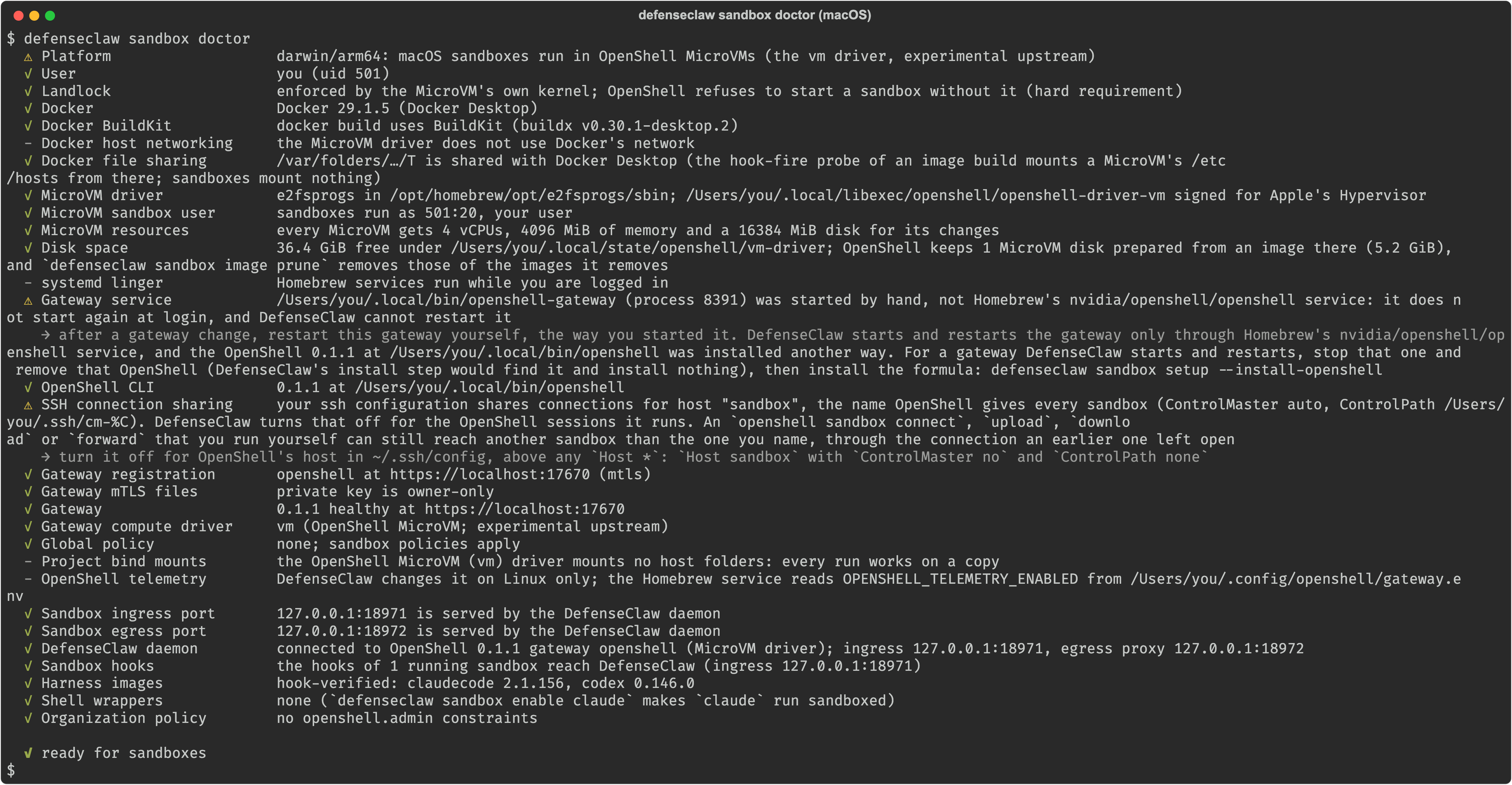
On a Mac set up through Homebrew, the output looks like this:
  ⚠ Platform                   darwin/arm64: macOS sandboxes run in OpenShell MicroVMs (the vm driver, experimental upstream)
  ✓ User                       alice (uid 501)
  ✓ Landlock                   enforced by the MicroVM's own kernel; OpenShell refuses to start a sandbox without it (hard requirement)
  ✓ Docker                     Docker 29.1.5 (Docker Desktop)
  ✓ Docker BuildKit            docker build uses BuildKit (buildx v0.30.1-desktop.2)
  - Docker host networking     the MicroVM driver does not use Docker's network
  ✓ Docker file sharing        /var/folders/…/T is shared with Docker Desktop (the hook-fire probe of an image build mounts a MicroVM's /etc/hosts from there; sandboxes mount nothing)
  ✓ MicroVM driver             e2fsprogs in /opt/homebrew/opt/e2fsprogs/sbin; /opt/homebrew/opt/openshell/libexec/openshell-driver-vm signed for Apple's Hypervisor
  ✓ MicroVM sandbox user       sandboxes run as 501:20, your user
  ✓ MicroVM resources          every MicroVM gets 4 vCPUs, 4096 MiB of memory and a 16384 MiB disk for its changes
  ✓ Disk space                 37.8 GiB free under ~/.local/state/openshell/vm-driver
  - systemd linger             Homebrew services run while you are logged in
  ✓ Gateway service            nvidia/openshell/openshell started
  ✓ OpenShell CLI              0.1.1 at /opt/homebrew/bin/openshell
  ✓ SSH connection sharing     off for the OpenShell sessions DefenseClaw runs (ssh -o ControlMaster=no -o ControlPath=none -o ControlPersist=no); your ssh configuration shares none for host sandbox either
  ✓ Gateway registration       openshell at https://localhost:17670 (mtls)
  ✓ Gateway mTLS files         private key is owner-only
  ✓ Gateway                    0.1.1 healthy at https://localhost:17670
  ✓ Gateway compute driver     vm (OpenShell MicroVM; experimental upstream)
  ✓ Global policy              none; sandbox policies apply
  - Project bind mounts        the OpenShell MicroVM (vm) driver mounts no host folders: every run works on a copy
  - OpenShell telemetry        DefenseClaw changes it on Linux only; the Homebrew service reads OPENSHELL_TELEMETRY_ENABLED from ~/.config/openshell/gateway.env
  ✓ Sandbox ingress port       127.0.0.1:18971 is served by the DefenseClaw daemon
  ✓ Sandbox egress port        127.0.0.1:18972 is served by the DefenseClaw daemon
  ✓ DefenseClaw daemon         connected to OpenShell 0.1.1 gateway openshell (MicroVM driver); ingress 127.0.0.1:18971, egress proxy 127.0.0.1:18972
  ✓ Sandbox hooks              no sandbox is running
  ✓ Harness images             hook-verified: claudecode 2.1.156, codex 0.146.0
  ✓ Shell wrappers             none (`defenseclaw sandbox enable claude` makes `claude` run sandboxed)
  ✓ Organization policy        no openshell.admin constraints

  ✓ ready for sandboxes
The Platform warning is expected on every Mac: it says that the
MicroVM driver is experimental upstream. The checks marked - do not apply
to MicroVMs. defenseclaw sandbox doctor --fix applies the fixes that need
only your user, after asking.
A gateway you started yourself
DefenseClaw starts and restarts the OpenShell gateway only through Homebrew's
nvidia/openshell/openshell service. If you installed OpenShell another way
and started its gateway by hand, the doctor warns:
⚠ Gateway service ~/…/bin/openshell-gateway (process 4666) was started by hand, not Homebrew's nvidia/openshell/openshell service: it does not start again at login, and DefenseClaw cannot restart itSandboxes still run on that gateway. When setup needs a gateway change, it
writes the change and asks you to restart the gateway yourself, the way you
started it. Stop the sandboxes running on it first with
defenseclaw sandbox stop NAME, which saves their disks. For a gateway
DefenseClaw can manage, stop that gateway, remove that OpenShell, and run
defenseclaw sandbox setup --install-openshell.
Run on a copy
cd ~/code/myapp
defenseclaw sandbox run claude
The run says it works on a copy before it copies anything:
  copy mode: the OpenShell MicroVM (vm) driver mounts no host folders; the agent works on a copy, and your folder changes only when you bring its work back: at the end of the session, or later with `defenseclaw sandbox pull`
  Copying ~/code/myapp (secrets are held back)…

  Starting a Claude Code sandbox… (the first start prepares its MicroVM disk: about a minute)
  Uploading the copy (412 files, 3.1 MiB)…

Sandbox myapp-1c2d · Claude Code · skip-permissions ON · network: open + blocklist
  Project   ~/code/myapp → /sandbox/work/myapp (copy)   changes come back with `defenseclaw sandbox pull myapp-1c2d`
            Not visible: everything else on this machine
  Model     ANTHROPIC_API_KEY → api.anthropic.com only (the sandbox sees a placeholder)
  Asks      announced in this terminal's title as they come; answer them in another terminal: defenseclaw sandbox approvals --sandbox myapp-1c2d (or `defenseclaw tui`: 7, then t)
The copy is a shallow git clone of your project plus your working tree, with
secret files such as .env, keys and certificates held back. Your folder
does not change while the agent works.
The first start of each image takes about a minute while the driver prepares its MicroVM disk. It keeps that disk, so later starts take a few seconds.
Bring the changes back
When the session ends, DefenseClaw pulls the agent's work out of the MicroVM, scans the changed files for secrets and insecure code, and asks what to do:
  Pulling myapp-1c2d's work…
Session ended · 14 tool calls · 2 new sites contacted · 3 files changed (+41 −6)
Bring the changes back? [A] apply (3-way) [b] branch dc/myapp-1c2d [p] patch file [s] skip (then Enter)| Answer | What happens |
|---|---|
A apply | A three-way merge into your working tree. Your previous working tree is kept first, so defenseclaw sandbox undo myapp-1c2d reverts the apply. |
b branch | The work goes on a new branch, dc/myapp-1c2d, and your working tree is not touched. |
p patch file | The work is written to a patch file for you to read and apply yourself. |
s skip | Nothing changes. The work stays in the sandbox for later. |
Changes that can run code on your machine, such as git hooks, build scripts and editor settings, or that hold what looks like a secret, are applied only after a second yes.
After an apply:
  ✓ applied 3 changes to ~/code/myapp
  your previous working tree is kept at refs/defenseclaw/copy/myapp-1c2d/pre-apply; `defenseclaw sandbox undo myapp-1c2d` reverts the apply
  Sandbox kept (stopped) → resume: defenseclaw sandbox connect myapp-1c2d   delete: defenseclaw sandbox delete myapp-1c2d
Pull later, from any terminal, whenever you like:
defenseclaw sandbox review myapp-1c2d
defenseclaw sandbox pull myapp-1c2d --apply
defenseclaw sandbox pull myapp-1c2d --branch
defenseclaw sandbox pull myapp-1c2d --patch-out fix.patch
review previews what pull would bring back. A run with no terminal to
ask on, or with --yes, applies nothing and prints the pull command
instead. --rm does not delete a sandbox whose work was not brought back.
MicroVM specifics
| What to know | |
|---|---|
| Resources | Every MicroVM on the gateway gets the same vCPUs, memory and disk, set under [openshell.drivers.vm] in ~/.config/openshell/gateway.toml. The run flags --cpu and --memory have no effect. The doctor warns when the disk for changes is under 8 GiB. |
| The sandbox user | Set for the whole gateway: every MicroVM on it runs as your uid and gid. |
| Disk use | About 5 GB per image the driver has started, in ~/.local/state/openshell/vm-driver. defenseclaw sandbox image prune and sandbox image rm remove images you no longer use, and their disks. |
| Per-run settings | Claude Code and Codex settings are baked, root-owned and read-only, into a small run image for each sandbox. A run with other --env, credentials or model provider prepares another disk. |
localhost | A MicroVM's /etc/hosts is empty in OpenShell 0.1.1, so DefenseClaw's images answer localhost themselves. A harness that resolves names on its own cannot resolve localhost in a MicroVM; its image build says so, and it is refused on a Mac. |
| Checks after start | After each create and start, DefenseClaw checks inside the MicroVM that it runs as your uid with no capabilities and that its hooks and settings are the files DefenseClaw prepared. A sandbox that is not as prepared is stopped. |
| Stopping | defenseclaw sandbox stop NAME saves the MicroVM's disk. A gateway restart stops every MicroVM on it, and setup asks before it restarts a gateway with sandboxes running. |
Limits on a Mac
- Always a copy. There is no live mount and no pre-session snapshot.
sandbox undoreverts the lastpull --applyinstead. - Some run flags do not apply.
--contextis refused, and--no-snapshot,--cpuand--memoryhave no effect. - Experimental driver. OpenShell calls the MicroVM driver experimental, and the doctor says so on every run.
- Not every harness runs. A harness is used only after its image proves that its hooks fire in a MicroVM. See which harnesses can run.
- The Docker driver is refused on Docker Desktop. Docker Desktop's Linux
VM has no Landlock. A Mac set up by an earlier DefenseClaw whose gateway
still runs the Docker driver is refused before anything is built, and
defenseclaw sandbox setupoffers the switch. Sandboxes made on the Docker driver cannot start on MicroVMs, so setup lists them first; after the switch they can only be deleted.
Common problems
| You see | Do this |
|---|---|
install OpenShell: Homebrew could not install the nvidia/openshell formula | Read Homebrew's Error: line above it. Most often your developer tools are too old: see developer tools. |
MicroVM driver fails: e2fsprogs is not installed where the MicroVM driver looks for it | brew install e2fsprogs, or run defenseclaw sandbox setup and let it install it. |
| MicroVM driver fails: the driver is not signed for Apple's Hypervisor | brew postinstall nvidia/openshell/openshell. Setup runs it for you when you agree. |
| Docker fails | Start Docker Desktop. |
| Docker file sharing fails: your temporary folder is not shared with Docker Desktop | Add the folder it names in Docker Desktop → Settings → Resources → File sharing. /var/folders and /tmp are shared by default. |
no sandbox can start on this gateway: it runs sandboxes on the docker driver | Run defenseclaw sandbox setup and answer yes to the MicroVM question. |
The first run seems to hang at Starting a Claude Code sandbox… | The first start of an image prepares a MicroVM disk of about 5 GB, which takes about a minute. |
| MicroVM resources warns that an agent that builds code may need more | Raise vcpus, mem_mib or overlay_disk_mib under [openshell.drivers.vm] in ~/.config/openshell/gateway.toml, then restart the gateway (brew services restart nvidia/openshell/openshell). |
The troubleshooting table in the full guide covers the rest.
Sandboxes on Linux
Set up NVIDIA OpenShell sandboxes on Linux with Docker Engine, Landlock and the openshell-gateway systemd user service, check the machine with sandbox doctor, and run your first agent on a live project folder.
Your first sandboxed session
A guided tour of one DefenseClaw sandbox session, from the launch banner through the activity feed, a blocked site and its unblock, to the end-of-session review and undo or pull.