
Your first sandboxed session
A guided tour of one DefenseClaw sandbox session, from the launch banner through the activity feed, a blocked site and its unblock, to the end-of-session review and undo or pull.
This page walks through one session from start to finish. It assumes you
have finished setup on Linux or
macOS and that defenseclaw sandbox doctor ends
with ready for sandboxes.
Where Linux and macOS differ, the page shows both. The short version: on Linux the agent edits your folder live and you can undo it; on a Mac it edits a copy and you pull the changes back.
Start the run
Go to your project and start Claude Code in a sandbox:
cd ~/code/myapp
defenseclaw sandbox run claude
codex works the same way. The sandbox is named after the folder, such as
myapp-7f3a, unless you pass --name. Arguments after -- go to the
harness:
defenseclaw sandbox run claude -- --model sonnetThe first run of a harness builds its image if setup did not. That takes a few minutes and downloads about 3 GB. On a Mac, the first start of each image also prepares a MicroVM disk, which takes about a minute.
Read the banner
Before the harness takes over your terminal, DefenseClaw prints what the sandbox can see and use.
Sandbox myapp-7f3a · Claude Code · skip-permissions ON · network: open + blocklist
  Project   ~/code/myapp → /work/myapp (live)   snapshot taken → `defenseclaw sandbox undo myapp-7f3a` restores it
  Hidden    .env  certs/dev.pem  (secret files appear empty inside; --unmask PATH to share)
  Protected .git/hooks .git/config .git/config.worktree (read-only)
            Not visible: everything else on this machine
  Model     ANTHROPIC_API_KEY → api.anthropic.com only (the sandbox sees a placeholder)
Sandbox myapp-1c2d · Claude Code · skip-permissions ON · network: open + blocklist
Project ~/code/myapp → /sandbox/work/myapp (copy) changes come back with `defenseclaw sandbox pull myapp-1c2d`
Not visible: everything else on this machine
Model ANTHROPIC_API_KEY → api.anthropic.com only (the sandbox sees a placeholder)
Asks announced in this terminal's title as they come; answer them in another terminal: defenseclaw sandbox approvals --sandbox myapp-1c2d (or `defenseclaw tui`: 7, then t)| Line | What it tells you |
|---|---|
Sandbox … | The name, the harness, and the permission mode. skip-permissions ON means the harness's own prompts are off. --safe keeps them. |
network: … | The network profile: open + blocklist (the default), allowlist (balanced) or provider hosts only (strict). See network and egress. |
Project | Your folder and where it appears inside. (live) means the agent edits your folder directly; (copy) means it edits a copy. |
Hidden | Secret files that appear empty inside a live mount. On a copy they are held back instead. |
Protected | Git internals that are read-only inside, so the agent cannot plant a hook that runs on your machine. |
Model | Which credential the harness uses. The sandbox gets a placeholder; OpenShell adds the real key only on requests to the model provider. |
Watch the activity feed
The agent now works in skip-permissions mode. DefenseClaw stays out of the way unless something needs you. To see what it is doing, open a second terminal:
defenseclaw sandbox activity -f14:02:11 myapp-7f3a ✓ registry.npmjs.org
14:02:13 myapp-7f3a ✓ docs.python.org
14:02:20 myapp-7f3a ⚠ Bash: Allowed but flagged by DefenseClaw rule C2-WEBHOOK-SITE: webhook.site (known exfil). The action was allowed; DefenseClaw recorded the finding for the user's review.
14:02:20 myapp-7f3a ✗ webhook.site (webhook catcher) → unblock: defenseclaw sandbox unblock webhook.site --sandbox myapp-7f3a
14:06:02 myapp-7f3a ✗ tool Bash blocked: <the rule's reason>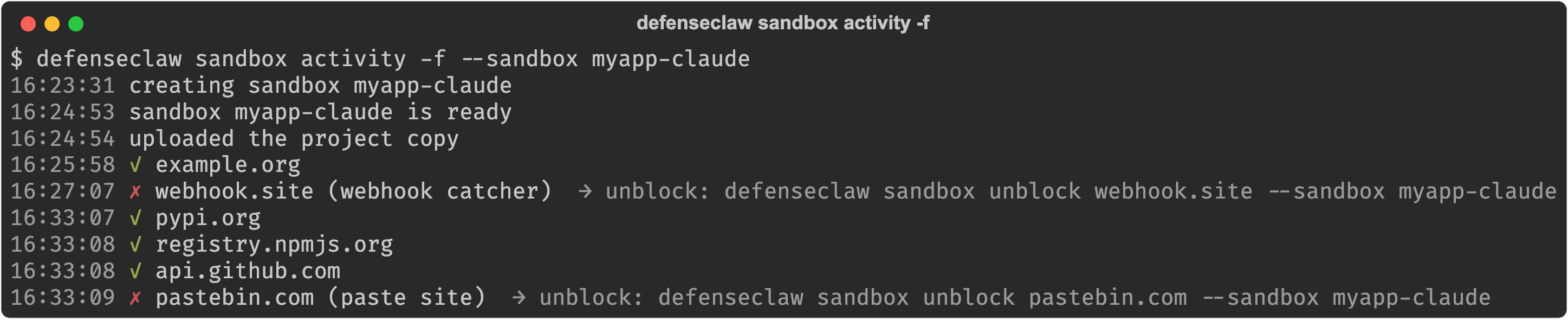
| Mark | Meaning |
|---|---|
✓ host | The sandbox reached a site through the egress proxy. |
✗ host (why) | The egress proxy blocked a site. The line ends with the unblock command when the block can be lifted. |
⚠ | A finding: DefenseClaw allowed a tool call but recorded something for your review. |
✗ tool … blocked | DefenseClaw's hooks blocked a tool call. The harness shows the reason too. |
? ask … | The sandbox asks to reach something only you can open, such as a port on your machine. |
--sandbox NAME limits the feed to one sandbox. The same feed appears in the
TUI's Sandboxes panel and in the macOS app (see
TUI and macOS app).
For a one-screen summary of a sandbox:
defenseclaw sandbox status myapp-7f3aIts Hook traffic and Hook events rows show that the hooks are reaching
DefenseClaw, such as PreToolUse 10 · PostToolUse 8 · …, and its Egress
row counts the sites contacted and blocked.
Handle a block
Say the task really needs a site the blocklist covers. Here is what happens:
CONNECT webhook.site:443
403, blocked (webhook catcher)
✗ in the feed and a notice
after the tool call: blocked, why, unblock
sandbox unblock webhook.site
retry
allowed
-
The proxy refuses the connection. For plain HTTP the agent gets a 403 with a JSON body that says what was blocked and how you can unblock it. For HTTPS a tool sees only a failed connection, so after the tool call DefenseClaw's hooks tell the agent which site was blocked and why. Claude Code, Codex, Copilot CLI, Cursor and Devin read that note; for the other harnesses the feed and your terminal report the block.
-
The feed shows the
✗line with the unblock command. The macOS app also notifies you. -
If you decide the site is fine, unblock it for this sandbox only:
defenseclaw sandbox unblock webhook.site --sandbox myapp-7f3aThe feed confirms it, and the next request goes through:
14:03:44 myapp-7f3a unblocked webhook.site for sandbox myapp-7f3a
14:03:51 myapp-7f3a ✓ webhook.site
--always unblocks the site in every sandbox. An unblock never opens your
machine, your private network or cloud metadata addresses, and never
overrides your own block list or your organization's. See
unblocks.
Answer an ask, if one comes
Most sessions have none. DefenseClaw decides most requests on its own and
asks you only for doors into your machine or your network: a port on this
machine you named with --host-port, a private address, or an intranet
name. Asks appear in the feed and in your terminal's title:
defenseclaw sandbox approvals
defenseclaw sandbox approve myapp-7f3a ap_5f2c9a1e7b3d4c60
defenseclaw sandbox reject myapp-7f3a ap_5f2c9a1e7b3d4c60
In the TUI, press 7, then t until the Asks view shows, and use a
to approve, A to always approve, or x to reject.
End the session and review
Exit the harness as you normally would. DefenseClaw then summarizes the
session and flags the changed files that can run code on your machine the
next time you open, build, install or commit: npm lifecycle scripts,
.envrc, editor tasks, git hook managers, build files, new executables and
the like.
Session ended · 57 tool calls (1 blocked: <the rule's reason>) · 23 new sites contacted · 1 site blocked · 8 files changed (+212 −37)
✗ DefenseClaw blocked webhook.site (webhook catcher); unblocked since
⚠ Changed files that can run code on your machine: package.json, .envrc  → review before running
Keep changes? [Y] keep  [u] undo everything  [d] show diff
Sandbox kept (stopped) → resume: defenseclaw sandbox connect myapp-7f3a delete: defenseclaw sandbox delete myapp-7f3a- Enter or
ykeeps the changes. urestores the folder to its pre-session snapshot.dshows the diff, then asks again.
  Pulling myapp-1c2d's work…
Session ended · 14 tool calls · 2 new sites contacted · 3 files changed (+41 −6)
Bring the changes back? [A] apply (3-way)  [b] branch dc/myapp-1c2d  [p] patch file  [s] skip (then Enter)
  ✓ applied 3 changes to ~/code/myapp
  your previous working tree is kept at refs/defenseclaw/copy/myapp-1c2d/pre-apply; `defenseclaw sandbox undo myapp-1c2d` reverts the apply
Sandbox kept (stopped) → resume: defenseclaw sandbox connect myapp-1c2d delete: defenseclaw sandbox delete myapp-1c2dAmerges the work into your working tree.bputs it on a new branch,dc/myapp-1c2d.pwrites a patch file.sleaves it in the sandbox for a latersandbox pull.

Look again later, with the full list and the diff:
defenseclaw sandbox review myapp-7f3a --diffUndo, or pull later
Changed your mind? Undo works after you kept the changes, even days later.
defenseclaw sandbox undo myapp-7f3aUndo restores the folder to its snapshot from the start of the session: in
a git project the working tree, HEAD, the branch and the staging area too.
It saves what the session created first, so an undo can be undone. Files git
ignores, such as node_modules/, are not in the snapshot; undo names each
one it cannot restore.
defenseclaw sandbox undo myapp-1c2dOn a copy, undo reverts the last sandbox pull --apply, from the working
tree kept at refs/defenseclaw/copy/<name>/pre-apply. If you skipped the
question, bring the work back whenever you like:
defenseclaw sandbox pull myapp-1c2d --apply
defenseclaw sandbox pull myapp-1c2d --branch
defenseclaw sandbox pull myapp-1c2d --patch-out fix.patch
Resume or clean up
The sandbox is stopped and kept, with the agent's state inside it. Resume it, and continue Claude Code's conversation:
defenseclaw sandbox connect myapp-7f3a -- --continueList your sandboxes, and delete the ones you are done with:
defenseclaw sandbox list
defenseclaw sandbox delete myapp-7f3a
--rm on sandbox run deletes the sandbox at the end instead. It does not
delete a copy whose work you did not bring back.
Run without a terminal
--prompt runs the harness headless with one prompt and streams its output.
The sandbox is deleted at the end unless you pass --keep:
defenseclaw sandbox run codex --prompt "fix the failing tests"--detach starts a run in the background. sandbox logs shows its output,
and keeps the end of it after the sandbox stops:
defenseclaw sandbox run claude --detach --prompt "update the changelog"
defenseclaw sandbox logs myapp-7f3a -f
myapp-7f3a is stopped; this is the log of its detached run started 07:15, kept when it stopped (07:16)
…
⚠ the run did not finish: the sandbox stopped while it ranIf the hooks cannot reach DefenseClaw
The sandbox hooks fail closed. If DefenseClaw's daemon stops during a session, every tool call is blocked, and your terminal says so:
[defenseclaw] ⚠ DefenseClaw hooks are not reaching the daemon; every tool call is being blocked (<reason>). Run: defenseclaw sandbox doctorStart the daemon again (defenseclaw-gateway start) and the agent can carry
on. The end-of-session summary repeats the warning, and the run exits with
status 69 when not one hook got through.
Next
- Network and egress: what the proxy allows and how to tighten it.
- TUI and macOS app: the same session, managed from a panel.
- Full sandbox guide: nested repositories, tamper alerts, MCP servers and more.
Sandboxes on macOS
Set up NVIDIA OpenShell sandboxes on an Apple-silicon Mac, where each sandbox is a MicroVM with its own Linux kernel, the agent works on a copy of your project, and you pull its changes back.
Network and egress
How DefenseClaw's egress proxy decides every site a sandboxed agent contacts, the open, balanced and strict network profiles, the blocklist, unblocks, asks, large-upload alerts and what the agent is told when it is blocked.