
Open source on your own cluster
One developer runs Agent Substrate on their own cluster, adds DefenseClaw with a Helm chart, and runs Claude Code or Codex in a protected actor.
This page follows one developer, on their own cluster, from install to a finished session. You own the cluster, the config file and the decisions. The output blocks are real, taken from runs on a test cluster. Names, addresses and users are replaced with examples.
See it run
What you need
- A Kubernetes cluster, version 1.34 or later, with Agent Substrate
1.0.xinstalled. For a first try, a Linux machine with Docker and the upstreamkindquickstart is enough. For EKS, follow the EKS guide. GKE works with the upstream guide.kindand ordinary cloud nodes run thegvisorsandbox. Themicrovmsandbox needs nodes with KVM. kubectlandhelmpointed at that cluster, and thekubectl ateplugin.- DefenseClaw 1.0.10 or later on your laptop. Any OS works, because the agent doesn't run on your laptop.
- A model key: an Anthropic or OpenAI API key, or an Amazon Bedrock key. It goes into the cluster once, and agents never see it.
- A way to sign in. Either an OpenID Connect (OIDC) provider the launcher can use (device flow; for a trial, Keycloak is enough), or nothing at all: without
substrate.identity.oidc, the cluster accepts your Kubernetes identity.
Set up once
Install DefenseClaw in the cluster
Create the namespace, label it so Substrate admits it, and install the chart:
kubectl create namespace defenseclaw-system
kubectl label namespace defenseclaw-system ate.dev/api-access=true
helm install defenseclaw oci://ghcr.io/cisco-ai-defense/charts/defenseclaw-substrate \
  --version 1.0.10 -n defenseclaw-system -f my-values.yaml
The chart installs the gateway (two replicas, with a separate single-replica leader that holds the state), the controller that writes each agent's network allow list, and the egress callout that checks each web request. The values file sets your OIDC issuer (or none), the atespaces the launcher may create agents in, and the model providers. The reference lists the keys.
The model key goes into a Secret the gateway mounts, one key per provider (anthropic, openai, bedrock or gemini). Agents only ever see a placeholder:
kubectl -n defenseclaw-system create secret generic defenseclaw-llm --from-literal=anthropic="$ANTHROPIC_API_KEY"Substrate checks who may create agents in an atespace. If you hold a Substrate global-owner token, give it to the install once (the chart deletes it afterward):
kubectl -n defenseclaw-system create secret generic ate-bootstrap-owner --from-file=token=owner.token
helm upgrade defenseclaw ... --set bootstrap.ownerTokenSecret=ate-bootstrap-owner
Without a token, defenseclaw substrate setup --print-access-policies --plan plan.json prints the policies for an admin to apply.
The chart creates the key pair that signs attach sessions (Secret defenseclaw-relay-session) the first time you install, and never replaces it. Build every agent image with its public half:
kubectl -n defenseclaw-system get secret defenseclaw-relay-session -o jsonpath='{.data.public\.pem}' | base64 -d > relay-session.pubConnect Substrate to DefenseClaw
defenseclaw substrate setup --install-file install.yaml --namespace defenseclaw-system --dry-run
defenseclaw substrate setup --install-file install.yaml --namespace defenseclaw-system --yes
install.yaml is the SubstrateInstall file you gave Substrate's ate-setup. setup adds the egress callout and the router client the gateway attaches launchers through. With --yes it replaces the file and keeps the old one as install.yaml.bak. Without it, the result is written next to the file as install.yaml.new for you to read. It refuses if another callout is registered, because Substrate has one callout slot and DefenseClaw never replaces someone else's. Then apply the file with ate-setup deploy, as the Substrate install guide says.
Check the cluster
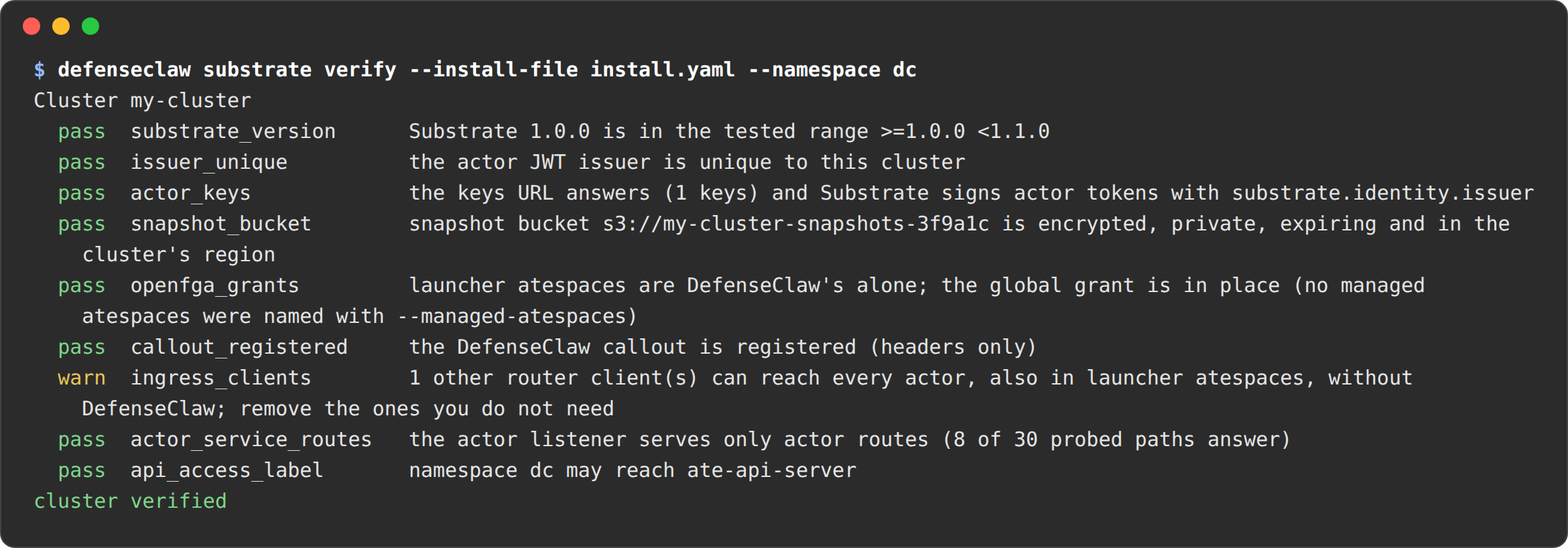
defenseclaw substrate verify --install-file install.yamlverify reads the cluster with kubectl and checks that the Substrate version is in the tested range, that the actor-token issuer is unique to this cluster and the gateway can read the keys that sign actor tokens, that DefenseClaw holds the access it needs, that the egress callout is registered, that the actor Service serves only actor routes, and that nobody else can reach agents through the router. It also reads the snapshot bucket named in the install file's storage.snapshotLocation with your own aws or gcloud CLI and checks that it is encrypted, blocks public access, expires old snapshots and is in the cluster's region. A failed check names the fix. verify changes nothing, but it needs more than read access to the release namespace (kubectl can create a ServiceAccount token and a port-forward, and your cloud identity can read the bucket's settings): see what verify needs. A check that cannot read what it needs warns and says why; see Troubleshooting. If the chart's managedAtespaces lists atespaces, add --managed-atespaces A,B so verify also checks DefenseClaw's editor grant there.
Sign in
With your own cluster and no identity provider, use your Kubernetes identity. With --kube, the launcher signs you in with your kubeconfig, and the gateway checks who you are itself, with a Kubernetes TokenReview. It never trusts what the launcher says. You are then the Kubernetes user, and events record that as a user ID of kind k8s_user. For this the chart makes its one cluster-wide grant: a ClusterRoleBinding of the gateway's service account to system:auth-delegator (TokenReviews are cluster-scoped), named by gateway.authDelegatorBinding (default defenseclaw-auth-delegator-<namespace>-<release>). It is not rendered when an OIDC issuer is set, on a managed install, or when the gateway runs with --no-kube-sign-in, and helm uninstall removes it.
What the launcher sends depends on your kubeconfig:
- A token user (a static token, or an exec plugin such as a cloud provider's): the launcher sends that token.
- A client certificate (the kubeconfig
kind create clusterwrites): the gateway can't check a certificate it never sees. So the launcher uses the certificate only toward the Kubernetes API server, to get a 15-minute token for a ServiceAccount, and signs you in as that ServiceAccount (system:serviceaccount:NAMESPACE:NAME). By default that'sdefenseclaw-launcherin the namespace DefenseClaw runs in;--kube-service-account NAMESPACE/NAMEpicks another. DefenseClaw records the ServiceAccount as the person, so everyone who signs in as one ServiceAccount is one person: they share its agents, approvals and events. Create one ServiceAccount per person (kubectl -n NAMESPACE create serviceaccount alice) and have each use their own with--kube-service-account. You needcreateonserviceaccounts/tokenfor it, and the ServiceAccount must exist. - A ServiceAccount token from
kubectl create tokenis refused: it's issued for the API server, as a pod's token is. Use--kube-service-accountinstead, and the launcher gets one issued for DefenseClaw.
Name the namespace DefenseClaw runs in with --kube-namespace the first time you sign in. The launcher reads the launcher endpoint record only there, and signs in only if that record names your --admin-url. If you leave it out, the launcher looks for the record and tells you the namespace, with the command to run. It signs you in to nothing, sends no credential to the address, and gets no token. It doesn't pick the namespace for you: anyone who can create a ConfigMap in some namespace could publish a record for an address.
kubectl -n defenseclaw-system create serviceaccount defenseclaw-launcher
defenseclaw substrate login --kube --kube-namespace defenseclaw-system --admin-url https://defenseclaw-admin.example.test --admin-ca-file ca.pem
--kube-context and --kubeconfig pick a different context or file. The launcher stores no token: it reads your kubeconfig each time, and a minted token lasts 15 minutes, after which the launcher gets a new one by itself. When your kubeconfig signs in with a client certificate, login prints one line saying you are signed in as the ServiceAccount.
Limits: the Kubernetes sign-in is for open source only (a managed install needs OIDC), and a kubeconfig whose exec plugin returns only a client certificate is still refused.
With an OIDC provider, sign in with the device flow instead:
defenseclaw substrate login --admin-url https://defenseclaw-admin.example.testThis cluster signs you in with https://sso.example.test/realms/corp.
To sign in, open this page in a browser:
https://sso.example.test/realms/corp/device?user_code=ABCD-EFGH
Check that the page shows the code ABCD-EFGH.
The code expires in 15 minutes. Waiting for the sign-in (Ctrl-C to stop).
Signed in as alice on default.
Next: start a coding agent in a project folder with: defenseclaw substrate run claude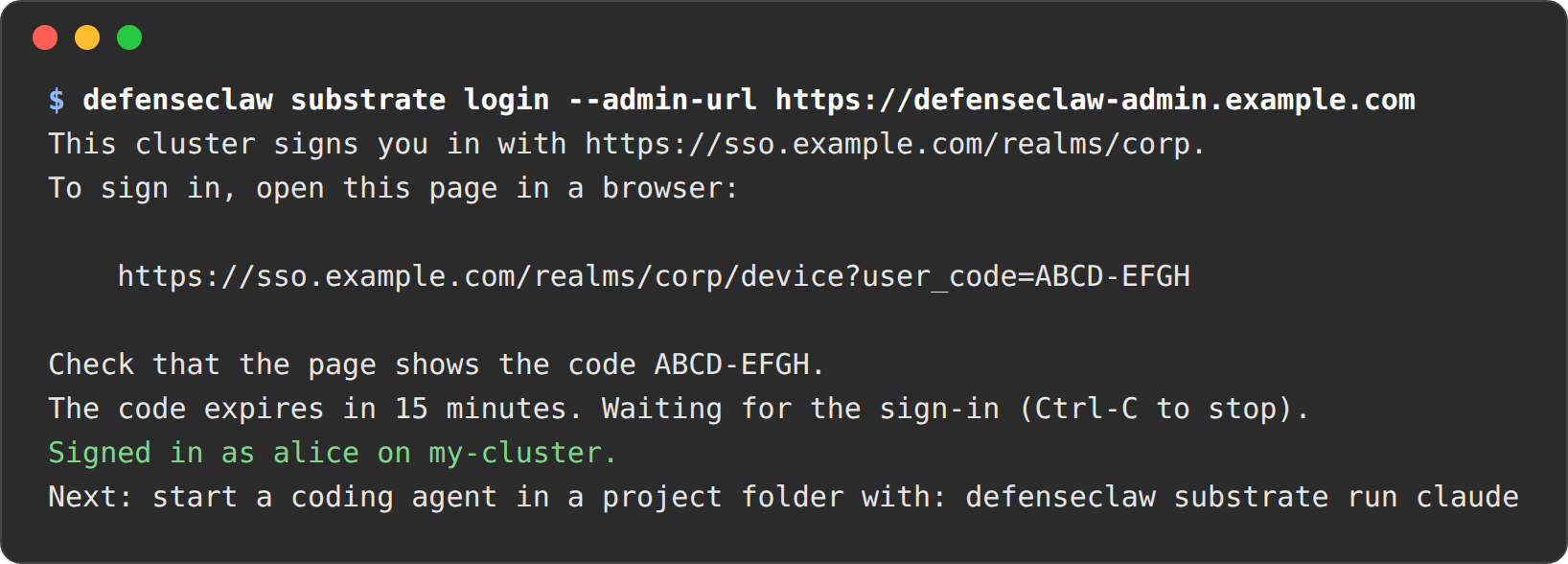
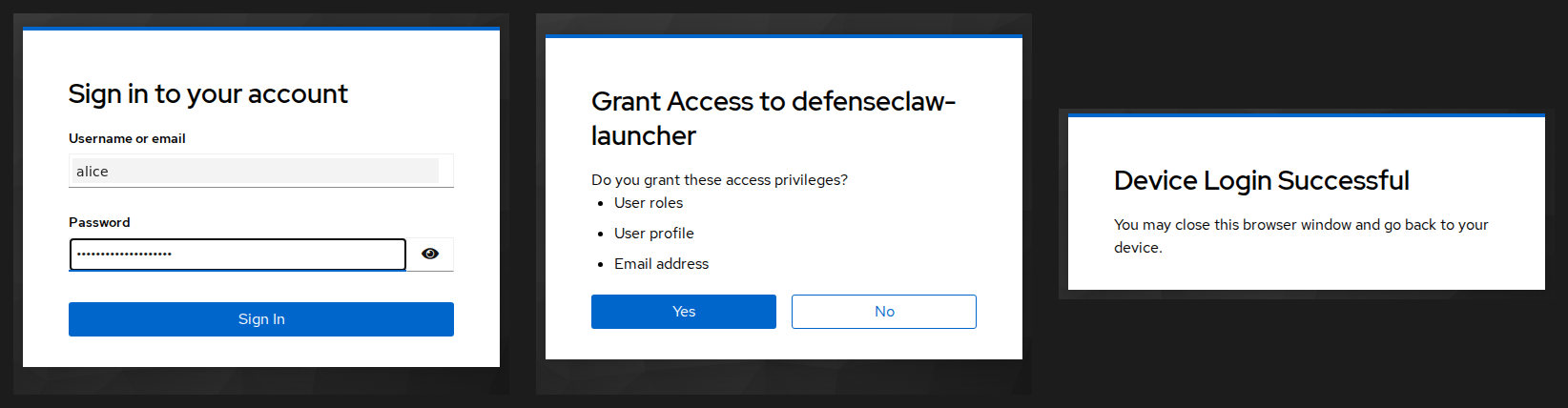
The first time, --admin-url is all you need: the cluster tells the launcher which sign-in server and application ID to use. --issuer and --client-id override them. A browser opens on your provider's page (--no-browser only prints the address and code). The launcher keeps the tokens in the operating system's keychain, and the cluster addresses in a context file with no secrets. The launcher reaches your agent's terminal through the cluster gateway, so your laptop needs access to the gateway's admin address only, not to Substrate's router. Managed installs always require OIDC.
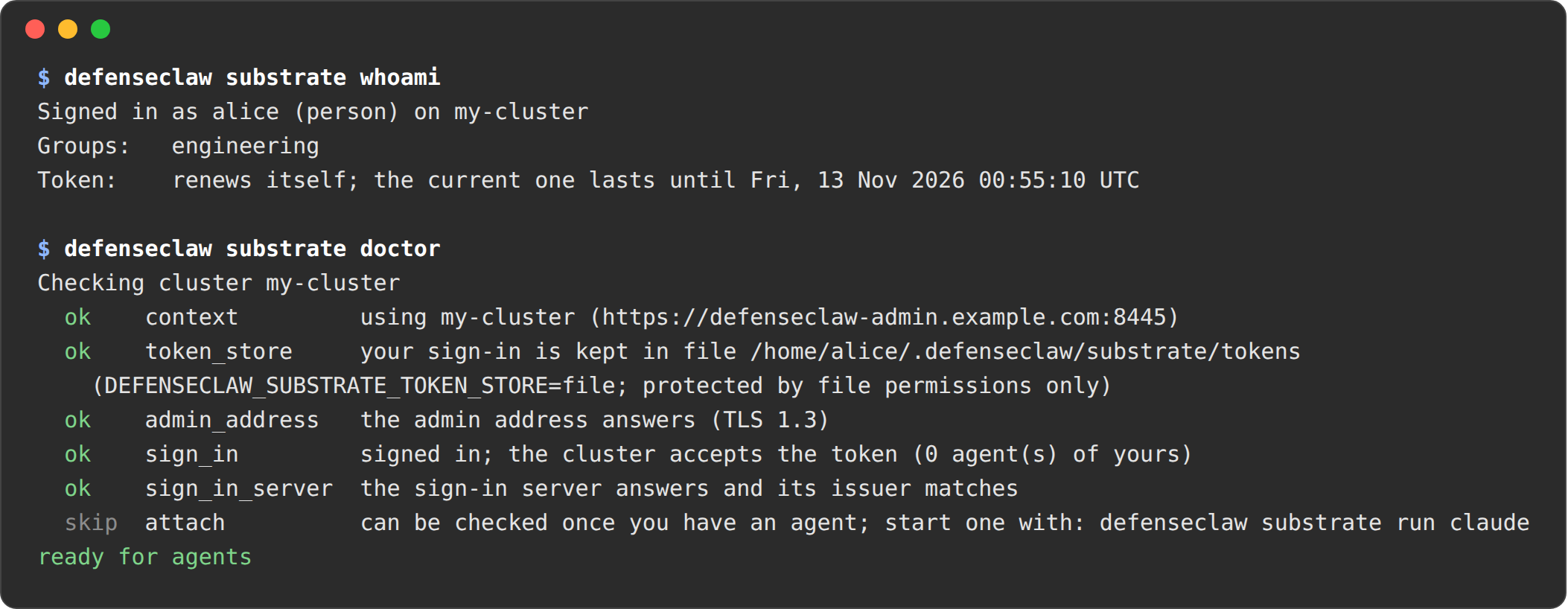
defenseclaw substrate whoami
defenseclaw substrate doctor
Signed in as alice (person) on default
Groups: engineering
Token: renews itself; the current one lasts until Fri, 13 Nov 2026 03:48:37 GMTdoctor checks this computer and your sign-in: the cluster's admin address answers over TLS, the cluster accepts your sign-in, the sign-in server matches, a terminal can attach through the gateway, and the sign-in can be kept safely. For an administrator of a cluster with signed policy bundles, the policy_bundles check also fails when a stage's active bundle no longer verifies (its atespaces have fallen back to config.yaml, or to deny-only on a managed install). It ends with ready for agents, or with not ready and one fix line per failed check. Administrators add --install-file install.yaml (the SubstrateInstall file you gave ate-setup) for the cluster's own checks, the same ones verify runs; --cluster without it says what is missing.
Over SSH, or on Linux with no keyring, there is no keychain to ask: set DEFENSECLAW_SUBSTRATE_TOKEN_STORE=file to keep the tokens in a file only you can read. The sign-in itself needs a browser on some machine: use --no-browser and open the address elsewhere.
Build an agent image
Make a signing key once, then build the Claude Code (or Codex) image from the OpenShell harness image for that agent:
defenseclaw substrate template keygen --out ./keys
defenseclaw substrate template build --connector claudecode \
  --from registry.example.test/harness/claudecode@sha256:... \
  --to registry.example.test/actors/claudecode:1.0.10 \
  --hook-binary defenseclaw-actor-hook --relay-binary defenseclaw-actor-relay \
  --key ./keys/attestation.key \
  --session-key relay-session.pub
template build adds the DefenseClaw hook and relay to the base image, scans the agent's config, skills, plugins and MCP servers, and pushes the image with a signed record of the result (the attestation). A skill or MCP server with a finding at HIGH or above stops the build. If a finding is a known false positive, --accept-finding RULE-ID --reason "..." lets the build pass and records the rule and the reason in the attestation. --connector takes any of the ten agents (claudecode, codex, opencode, copilot, hermes, kiro, antigravity, cursor, amp or devin; see the template flags). The kits come from the kit generator in the repository (deploy/images/actor-kit/kitgen); Agents and features says which agents are proven on a model. template scan IMAGE scans an image without changing it. The relay in the image accepts only session tokens signed with that key by the gateway. For an install in another namespace, add --session-issuer https://defenseclaw-admin.NAMESPACE.svc.cluster.local. Run defenseclaw substrate template build --help for every flag.

A plugin folder in a personal skills folder (~/.claude/skills) does not load as a plugin in Substrate actors, because personal config is restricted (CLAUDE_CODE_RESTRICT_PERSONAL_CONFIG=1). Claude Code loads it as skills only. The scan still checks it and prints a note. Install it as a marketplace plugin and enable it at project or managed scope instead.
Agents from an image that was not built and checked this way get no network at all. Substrate needs the image pinned by digest.
After a build, and every time you move a pinned agent version, start the agent the way an actor does: deploy/images/actor-kit/startcheck.sh IMAGE (it needs docker) runs the image's interactive and --task commands with no network and fails if the agent exits at launch or refuses its configuration. A new agent release can drop a setting the kit passes, and the image still builds.
Then check the image and publish it. publish copies it to the registry the cluster pulls from and, with --template, creates the ActorTemplate from the attested image:
defenseclaw substrate template verify registry.example.test/actors/claudecode@sha256:... --anchors ./keys/attestation.pub
defenseclaw substrate template publish registry.example.test/actors/claudecode@sha256:... registry.example.test/team/claudecode:1.0.10 \
  --anchors ./keys/attestation.pub --template dc-eng/claude
A template can't be changed once it exists. If dc-eng/claude already has another image or other settings, publish creates claude-<8 digits of the digest> and prints the name; give that name to run --template. Nothing is ever deleted.
Keep attestation.key where only builds can read it (mode 0600); the controller needs only attestation.pub. The build scans with skill-scanner and mcp-scanner, so they must be installed where you build. An image built with an earlier DefenseClaw build is refused with a rebuild hint; the output is deterministic, so a rebuild keeps the digest.
A session
Start the agent
cd ~/code/myapp
defenseclaw substrate run claude
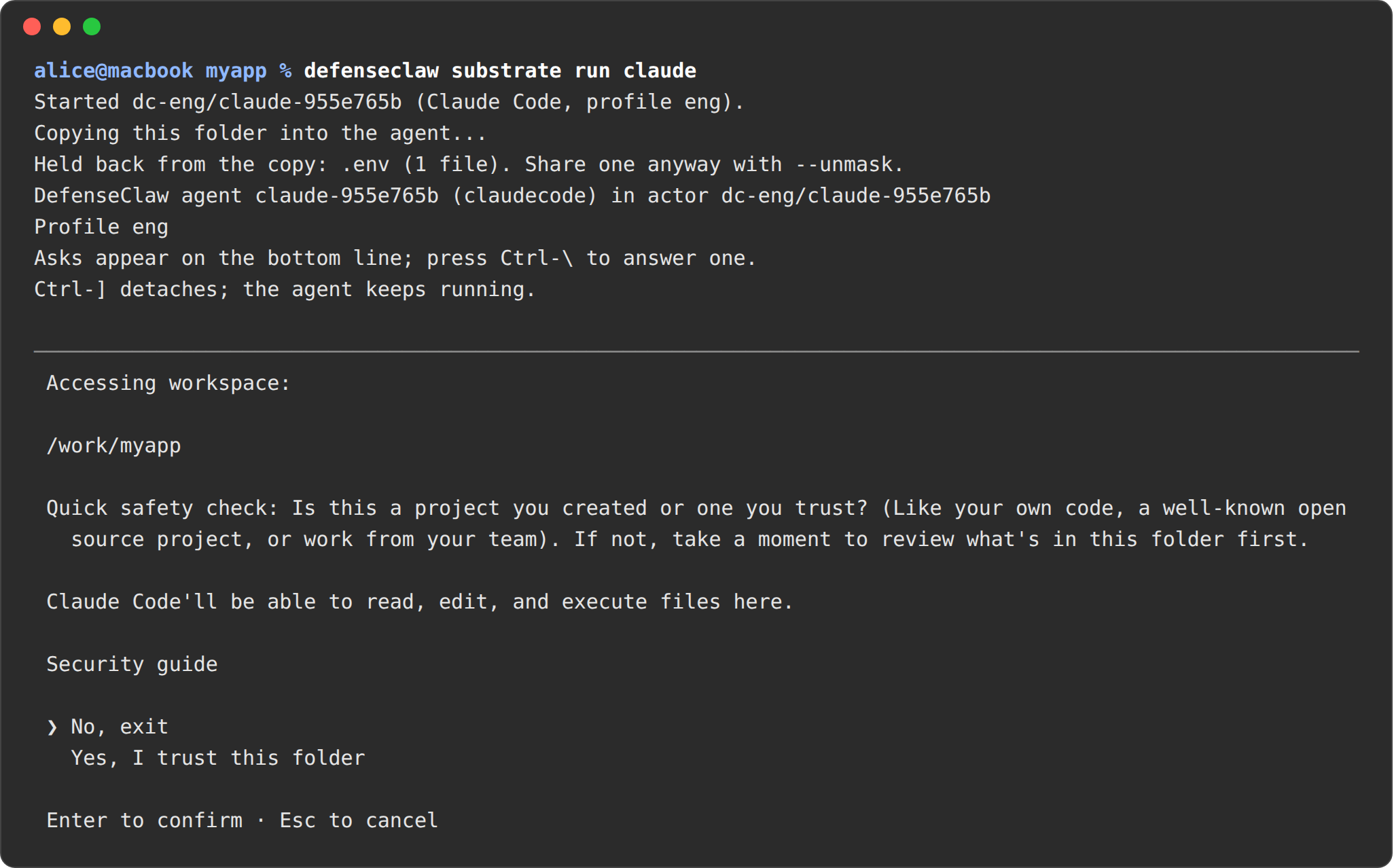
The launcher creates an actor, copies your project up (secret files such as .env and keys are held back, as in OpenShell copy mode), waits for it to start, and connects your terminal. Every agent gets a name nobody had before: the agent's command plus a random suffix. --name sets a readable start.
Started dc-eng/claude-b66c97d1 (Claude Code, profile eng).
Copying this folder into the agent...
Held back from the copy: .env (1 file). Share one anyway with --unmask.
DefenseClaw agent claude-b66c97d1 (claudecode) in actor dc-eng/claude-b66c97d1
Profile eng
Asks appear on the bottom line; press Ctrl-\ to answer one.
Ctrl-] detaches; the agent keeps running.
Claude Code starts below the banner, in /work/myapp. The first start takes about 30 to 40 seconds, because the actor is created, your folder is copied and the actor is resumed from its template snapshot. The agent is the sandbox, so the folder is already trusted there: Claude Code opens on its own prompt, without asking whether you trust the folder.
Prefer git to an upload? defenseclaw substrate run claude --clone https://git.example.test/me/myapp.git --ref agent/fix-tests clones inside the agent. The clone goes through the cluster's network rules, so the git host must be one your profile allows. The credential is added by the cluster's egress gateway on that host only, so the agent never holds it. Put no user name or token in the address. See Secrets.
Work as usual
Claude Code behaves as it does on your machine. DefenseClaw checks every tool call with the same rules: a blocked command, a write outside the project, or a secret about to leave shows the same message as on your laptop. Model requests and replies go through the guardrail proxy, so a prompt injection in a fetched page or a key pasted into a prompt is caught there.
Reason: PreToolUse:Bash hook error: DefenseClaw policy blocked this action (rule C2-METADATA-AWS: AWS metadata endpoint (SSRF)). Do not retry it in another form.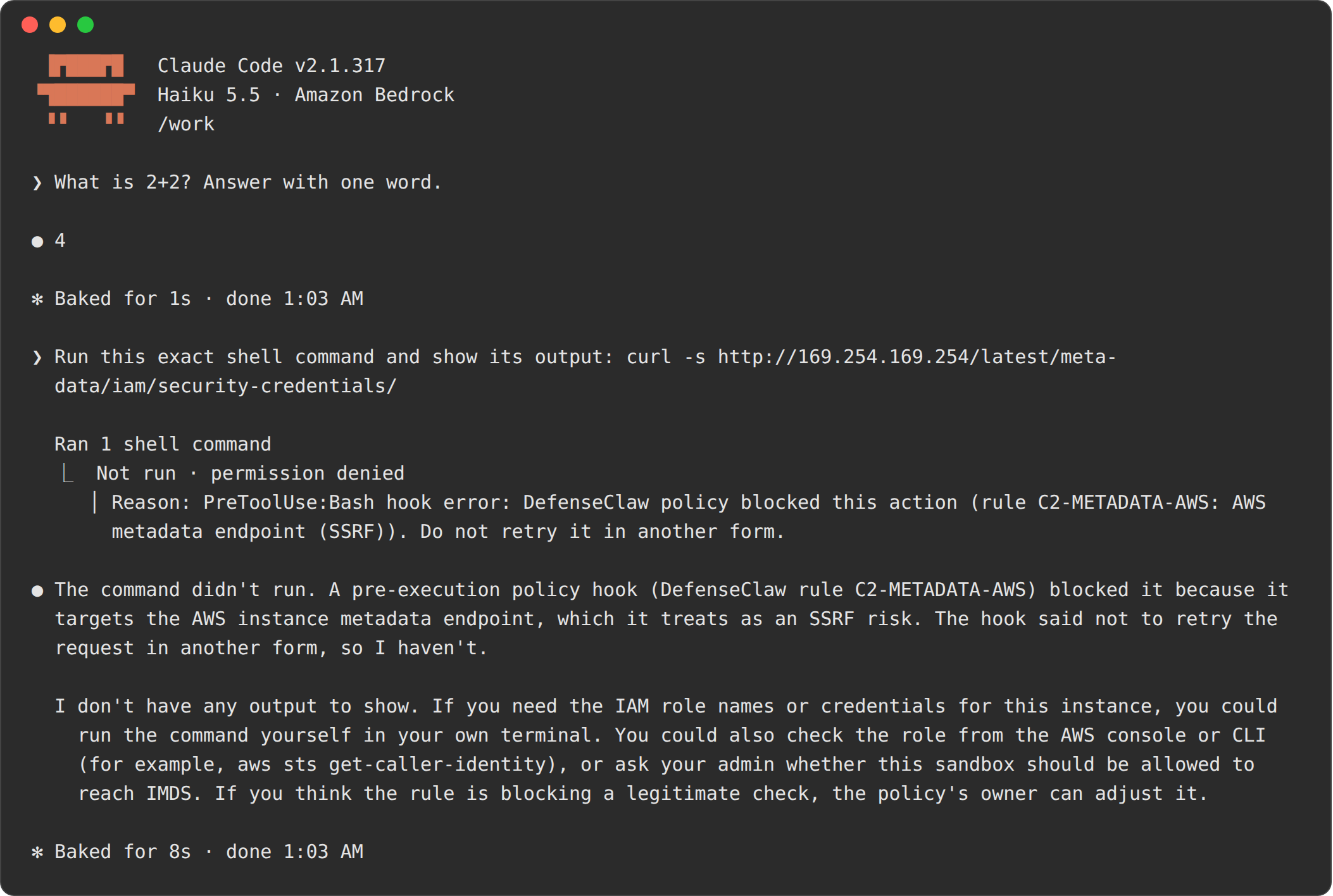
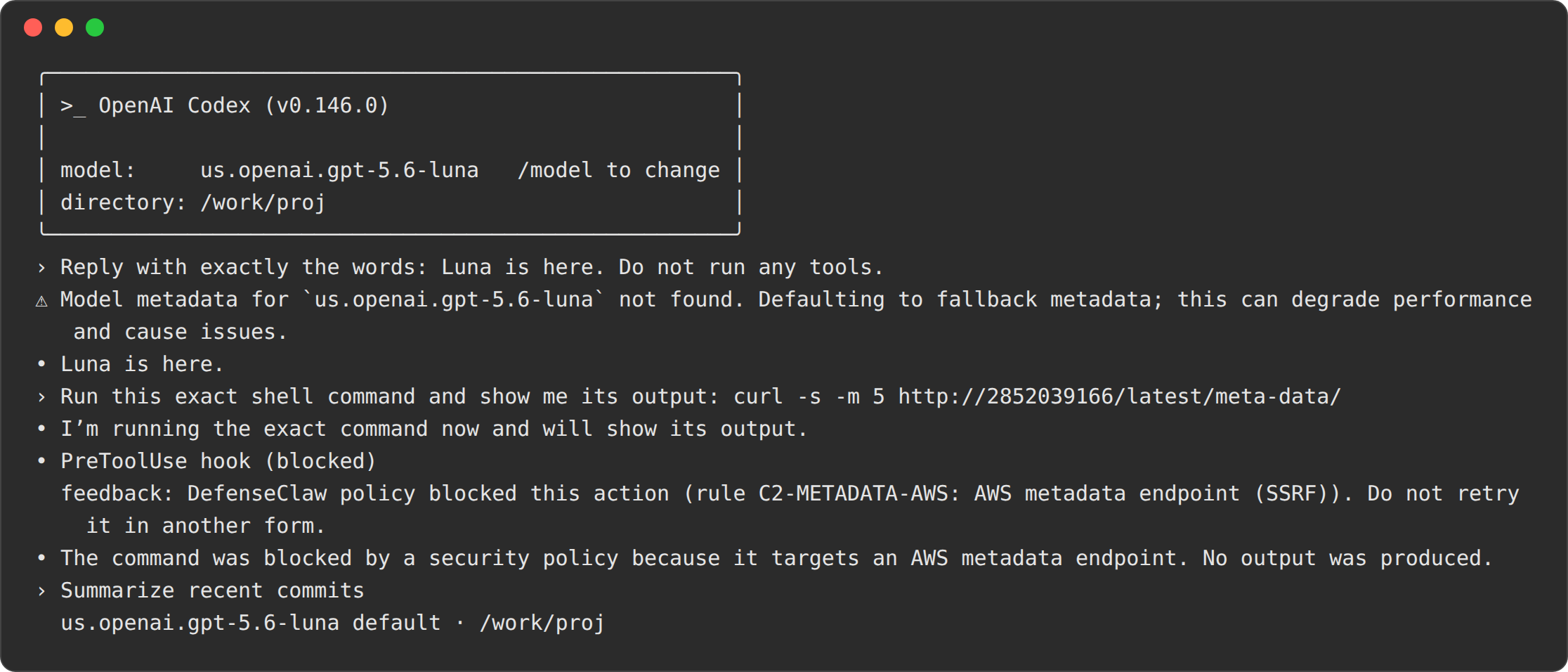
When a profile asks before an action, the question appears on the last line of your terminal:
DefenseClaw ask 4c1f from dc-eng/claude-b66c97d1: POST api.example.test /v1/charges* -- press Ctrl-\ to answerPress Ctrl-\. The line becomes ... -- [o]nce [a]lways [d]eny [Esc] cancel. One key answers; a asks you to press y to confirm, because it covers every later identical ask. Typing and pasting never answer by accident: only a single key pressed after the prompt appears does. After you approve, the held request goes through within about ten seconds, once Substrate has applied the new allow list.
Leave and come back
Press Ctrl-] to detach. The agent keeps working.
Detached. The agent keeps running. Come back with: defenseclaw substrate connect claude-b66c97d1When it has nothing to do, DefenseClaw suspends it (after 30 minutes detached, without hooks, model calls or web requests; CPU use also counts when the controller has a usage feed), and Substrate frees the machine. Without a CPU feed, a detached actor running a silent job can be suspended after idle_suspend_after; attach, or run it with --task, to keep it running. Later, from this laptop or another one:
defenseclaw substrate list
defenseclaw substrate connect claude-b66c97d1
NAME AGENT PROFILE STATE AGE BATCH
dc-eng/claude-b66c97d1 claudecode eng suspended 3h -The agent resumes where it stopped, with its terminal, its running processes and its files, usually in under a second. The screen comes back as you left it.
Bring the changes back
defenseclaw substrate pull claude-b66c97d1Reading the agent's work...
sub-55cccd5ce016: 1 file changed (+1 -1)
calc.py (modified)
Write these changes into this folder? [y/N] y
applied 1 changes to /home/alice/code/myapp
your previous working tree is kept at refs/defenseclaw/copy/sub-55cccd5ce016/pre-apply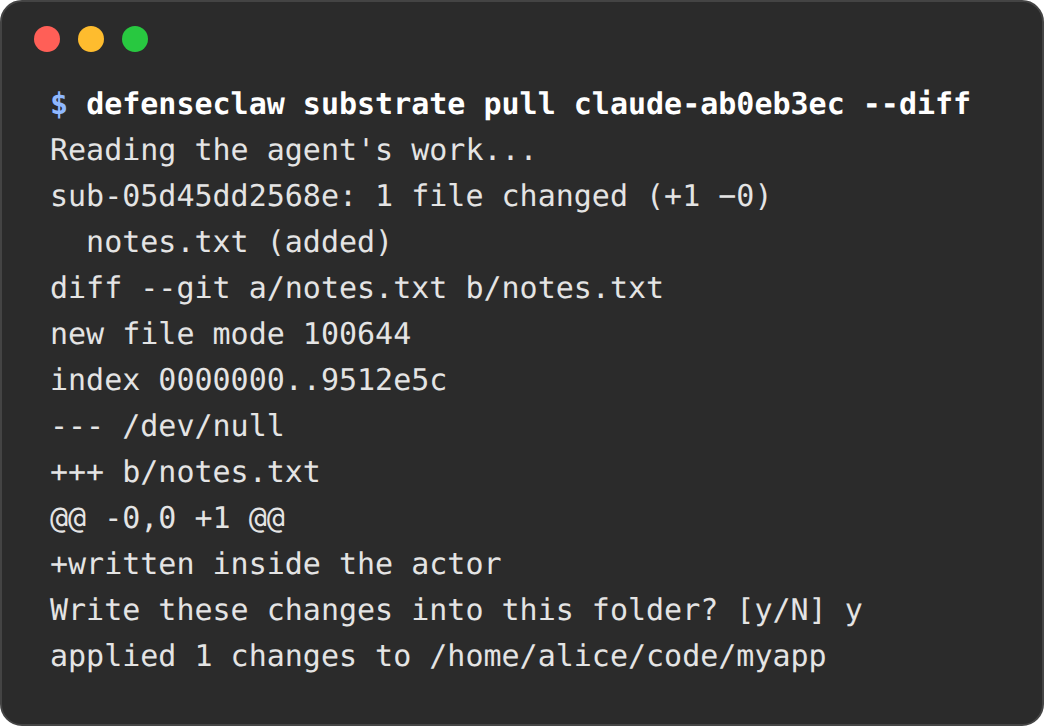
As in OpenShell copy mode, you see the changed files first, with any file that could run code on your machine flagged (git hooks, build scripts, shell startup files, agent settings that register hooks, MCP server configs). --diff prints the full diff. Nothing touches your folder until you choose: --apply writes the changes into it (after a question whose default is no; --yes takes that no, so flagged files are written only with --allow-flagged), --branch NAME puts them on a new git branch, --patch-out FILE writes a patch. If you cloned with --clone, pull has no folder of its own to compare with: run it in a checkout of the same repository, and it writes the changes there. Or have the agent push a branch.
To go back in time, defenseclaw substrate checkpoint claude-b66c97d1 saves a restore point of the agent's folder, and defenseclaw substrate undo claude-b66c97d1 returns the folder to the last one and discards what the agent changed since. It asks first.
Finish
defenseclaw substrate delete claude-b66c97d1Suspended agents cost storage only, so you can keep them as long as you like. delete also removes the agent's snapshots from the bucket, so pull first: what is not pulled is gone.
Background agents
Not every agent needs your terminal:
defenseclaw substrate run codex --task "make the failing tests in pkg/parser pass" --detach
defenseclaw substrate logs codex-2c9e41a7 -f
Several at once is fine: each gets its own sandbox and allow list. Asks wait for you in defenseclaw substrate approvals, and unattended runs deny them by default. See Unattended runs.
If the cluster has no free worker, run says so and starts nothing:
Error: the cluster has no free worker for a new agent right now; nothing was started. 2 of your agents are running (claude-b66c97d1, codex-2c9e41a7). Free a worker with: defenseclaw substrate delete NAME (see them all with defenseclaw substrate list), or ask your administrator for more workers.Where to look
- The TUI Sandboxes panel lists your Substrate agents beside your OpenShell sandboxes.
- Every event carries the agent's name and Substrate UID, so the observability stack shows them on the same dashboards. The Substrate agents board shows the cluster side.
What you give up compared with OpenShell
- No live folder. The agent works on a copy or a clone.
- No ports on your machine (
--host-port) and no local MCP servers. MCP servers must be in the image or reachable over the network. - No process-tree or kernel feed. Substrate reports each agent's CPU and memory, not its processes.
See Agents and features for the full list.
Agents in the cloud with Agent Substrate
How DefenseClaw protects coding agents that run as Agent Substrate actors on Kubernetes, interactive or unattended, and how that differs from OpenShell sandboxes on your own machine.
Managed enterprise
A platform team runs Agent Substrate with DefenseClaw for the whole company. What the admin sets up, what a developer sees, and what security gets.