
Managed enterprise
A platform team runs Agent Substrate with DefenseClaw for the whole company. What the admin sets up, what a developer sees, and what security gets.
In a company, three people meet this feature:
- The platform admin runs the cluster and DefenseClaw on it.
- The developer runs agents from a laptop.
- The security team watches what the agents do.
Policy comes from the same identity-based profiles DefenseClaw uses on managed laptops. Your group picks your profile, and a profile can only tighten the company floor. Names, addresses and users in the output blocks on this page are examples.
See it run
The platform admin
Install
Install the signed chart in its own namespace. Substrate admits only namespaces labelled ate.dev/api-access=true.
kubectl create namespace defenseclaw-system
kubectl label namespace defenseclaw-system ate.dev/api-access=true
helm install defenseclaw oci://ghcr.io/cisco-ai-defense/charts/defenseclaw-substrate \
  --version 1.0.10 -n defenseclaw-system -f defenseclaw-values.yaml
defenseclaw substrate setup --install-file install.yaml --namespace defenseclaw-system --yes
defenseclaw substrate verify --install-file install.yaml
The chart installs the gateway (an HPA with at least two replicas, a PDB and two Services), the gateway leader, the controller and the egress callout. setup adds the callout and the router client to the SubstrateInstall file you give Substrate's ate-setup; apply the file with ate-setup deploy. DefenseClaw gets the Substrate roles it needs and no more: read actors and templates, write egress policies, and create, fork, proxy and suspend actors in the launcher atespaces.
A one-time Substrate global-owner token (bootstrap.ownerTokenSecret) lets the chart's bootstrap Job write those roles. Without it, setup --print-access-policies --plan plan.json prints them for you to apply. Only a global owner can create atespaces, and DefenseClaw never does.
Set deploymentMode: managed_enterprise in the values. The chart then mounts config.yaml as one read-only file and gives each pod a private data volume owned by the gateway account (mode 0700), as the managed trust checks require. The gateway keeps its managed trust checks.
Connect the identity provider
Developers sign in with the company identity provider (Okta, Entra ID, or anything that speaks OIDC). Managed installs require OIDC; the Kubernetes-identity sign-in is for open-source clusters. The groups in the sign-in token pick the profile. CI jobs sign in with a workload identity instead (GitHub Actions OIDC or a Kubernetes service-account token).
# defenseclaw-values.yaml
deploymentMode: managed_enterprise
config:
  substrate:
    identity:
      issuer: https://idp.cluster-a.example.test   # unique per cluster
      oidc:
        issuer: https://idp.corp.example.test/oauth2/default
        client_id: defenseclaw-launcher
        groups_claim: groups
      workload_oidc:
        - issuer: https://token.actions.githubusercontent.com
          audience: defenseclaw
    launcher_atespaces:             # only DefenseClaw may create actors here
      engineering: [eng-payments, eng-web]
      contractors: [ctr-main]
    require_attested_templates: true
    llm:
      providers: [bedrock]          # agents reach models only through the guardrail proxy
identity.issuer is the issuer of the tokens Substrate gives actors. Give each cluster its own: the default is the same on every cluster, and verify fails when two clusters share one.
Write the profiles
These are the same profiles as on managed laptops, plus a substrate match. The sandbox section applies to OpenShell and Agent Substrate alike, and a profile can only tighten the company floor (substrate.admin in the cluster). A few keys are for Agent Substrate only: runtimes, sandbox_class, idle_suspend_after, unattended_asks, ask_timeout, actor_secrets, ask_hosts and url_rules.
guardrail:
  profiles:
    contractors:
      mode: action
      block_at: MEDIUM
      sandbox:
        required_for: [claudecode, codex]   # not allowed on the laptop itself
        runtimes: [substrate]               # ...and not in a laptop sandbox either
        allowed_harnesses: [claudecode, codex]
        egress_allow_only: ["*.amazonaws.com", github.com]
        allow_unblock: false                # contractors can't approve new sites
        sandbox_class: microvm              # never gVisor
    engineering:
      mode: action
      block_at: HIGH
      sandbox:
        allowed_harnesses: [claudecode, codex, opencode, hermes]
        user_approvals: session
        idle_suspend_after: 1h              # the cluster default is 30m
        unattended_asks: queue              # --task runs wait for a person
        ask_timeout: 2h                     # then the ask is denied
        actor_secrets: [npm-read-token]     # a value programs inside may read
        ask_hosts: ["*.stripe.com"]         # allowed, but a person approves first
        url_rules:
          - name: no-admin
            hosts: [api.example.test]
            methods: [POST, PUT, DELETE]
            path_prefix: /admin/
            action: deny
  profile_assignments:
    - profile: contractors
      match: {groups: ["contractors"]}
    - profile: engineering
      match: {groups: ["engineering"], substrate: {atespaces: ["eng-*"]}}
  default_profile: contractors
An atespace pattern matches only atespaces DefenseClaw created or that you list, so a foreign eng-evil atespace never inherits a profile.
What the Substrate keys do:
runtimeslists where the profile's agents may run:openshell(a sandbox on the laptop) andsubstrate. Left out, both are allowed. A profile withoutsubstrategets no actors in the cluster.sandbox_classis the weakest isolation an agent may run in. Withmicrovm, an actor whose template runs on gVisor gets no network. Templates choose their class withtemplate publish --class.idle_suspend_afterreplaces the cluster'ssubstrate.idle_suspend_afterfor the profile.idle_suspend_tasks: truelets idle suspend apply to the profile's running--taskand--batchruns, which are exempt by default. The chart runs the controller without a CPU feed (--usage-listen): there an attached actor is never idle, and a detached one the activity feed has heard of is idle afteridle_suspend_afterwith no hook, model or terminal traffic (substrate.idle_suspend_without_cpumakes an attached one idle too).unattended_asksis what happens when an unattended run (run --task,--batch) hits an ask:deny(the default) refuses it at once;queueholds it, notifies your webhooks, and lets the owner answer withdefenseclaw substrate approvalsandapprove <id>. If nobody answers withinask_timeout, the ask is denied.actor_secretsnames values a program inside the agent may read, such as a read-only package token. They are short-lived, marked as exposed, and DefenseClaw refuses any model call or outbound request that carries one. Everything else stays outside the agent (see Secrets).ask_hostsandurl_rulesmake the egress callout ask a person, or refuse, for requests to hosts the allow list already opens. Anask_hostsapproval covers the host. Aurl_rulesapproval covers the rule and method it was asked for: the ask showsMETHOD host /prefix*. Every matchingurl_rulesrule counts, whatever its order or whethersubstrate.adminor a profile wrote it, and the strictest wins: deny, then ask. An approval never lifts a deny. A rule withaction: allowis refused when the configuration loads.
Two rules keep the scopes apart: openshell.admin on a laptop refuses the Substrate keys, and substrate.admin refuses the laptop-only keys (allow_mount, allow_host_ports, process_tree, driver_fallback, require_copy_for and locked workdir.*). A profile shared by laptops and the cluster may carry both; each side reads only its own.
Actors always enforce. Their hooks run in action mode whatever guardrail.mode, a profile's mode or its connectors.<agent>.mode says, so observe mode is not available in the cluster: an agent there runs with its own permission prompts off, and the hooks are the only gate on each tool call. The profile's thresholds (block_at, alert_at) and rule pack apply to actors as on laptops. A signed policy bundle that sets mode: observe (or any mode other than action) is refused with not_substrate_policy; mode: action applies, as it is what actors do anyway.
Model providers are never in an actor's allow list: agents reach them only through the DefenseClaw guardrail proxy. A provider host (for example api.anthropic.com, a Bedrock endpoint or a configured custom provider) in egress_allow_only or ask_hosts is dropped from the actor's egress policy, and a signed policy bundle that lists one is refused with config_invalid, naming the host.
Deliver profile changes with helm upgrade or GitOps. See Delivery and fleet management.
Publish the templates
The platform team builds the approved agent images once, signs them with the company attestation key, and publishes them to the registry the cluster pulls from:
defenseclaw substrate template build --connector claudecode --from REGISTRY/harness/claudecode@sha256:... \
  --to REGISTRY/actors/claudecode:1.0.10 --hook-binary defenseclaw-actor-hook --relay-binary defenseclaw-actor-relay \
  --key attestation.key --session-key relay-session.pub
defenseclaw substrate template verify REGISTRY/actors/claudecode@sha256:... --anchors attestation.pub
defenseclaw substrate template publish REGISTRY/actors/claudecode@sha256:... TARGET:TAG --anchors attestation.pub \
  --template eng-payments/claude --class microvm
relay-session.pub is the public half of the gateway's relay session key (Secret defenseclaw-relay-session, which the chart creates; the open-source setup shows how to read it). Without it nobody could attach to the agents, so the build stops with an error. Each build is scanned and attested, and the controller admits only an image whose attestation verifies against the anchors. A finding at HIGH or above stops the build; a known false positive can be accepted with --accept-finding RULE-ID --reason "...", and both are recorded in the attestation. A template made any other way, for example with plain kubectl ate create actor-template, still starts, but its agents get no network. The admin sees why in doctor --cluster and in the fleet view.
Point the laptops at it
On managed laptops, a profile with the connector in required_for and runtimes: [substrate] refuses a local claude and says where to go instead. Claude Code shows this when the developer sends a prompt:
UserPromptSubmit operation blocked by hook:
  Blocked by your organization's DefenseClaw policy: Claude Code can't run on this computer (profile contractors): your organization runs Claude Code on Agent Substrate.
  Start it there from your project folder:
    defenseclaw substrate run claude
  Need an exception? Contact your IT help desk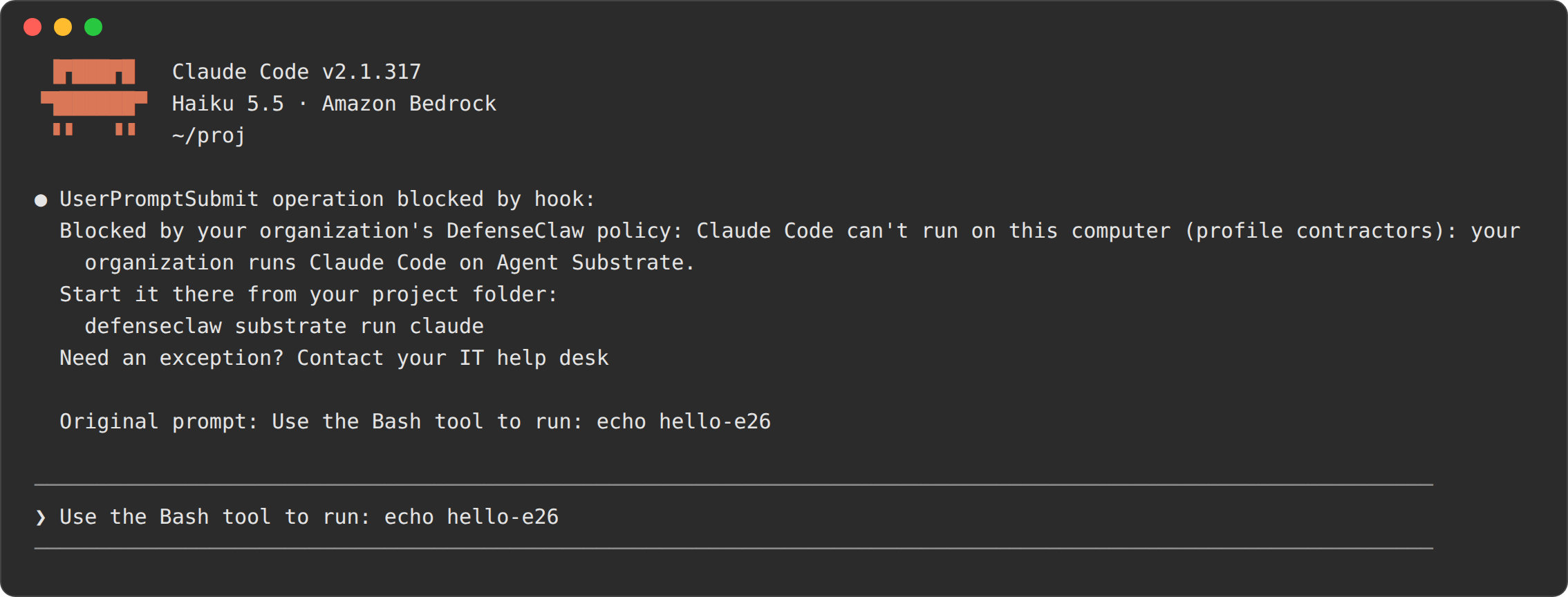
defenseclaw sandbox run claude is refused the same way, once OpenShell is on, and defenseclaw sandbox policy explain says where the agent runs:
Blocked by your organization's DefenseClaw policy: Claude Code runs on Agent Substrate under your profile (profile contractors), not in a sandbox on this computer. Start it there: defenseclaw substrate run claudeRequired claude run only on Agent Substrate, not on this computer: start one with defenseclaw substrate run claude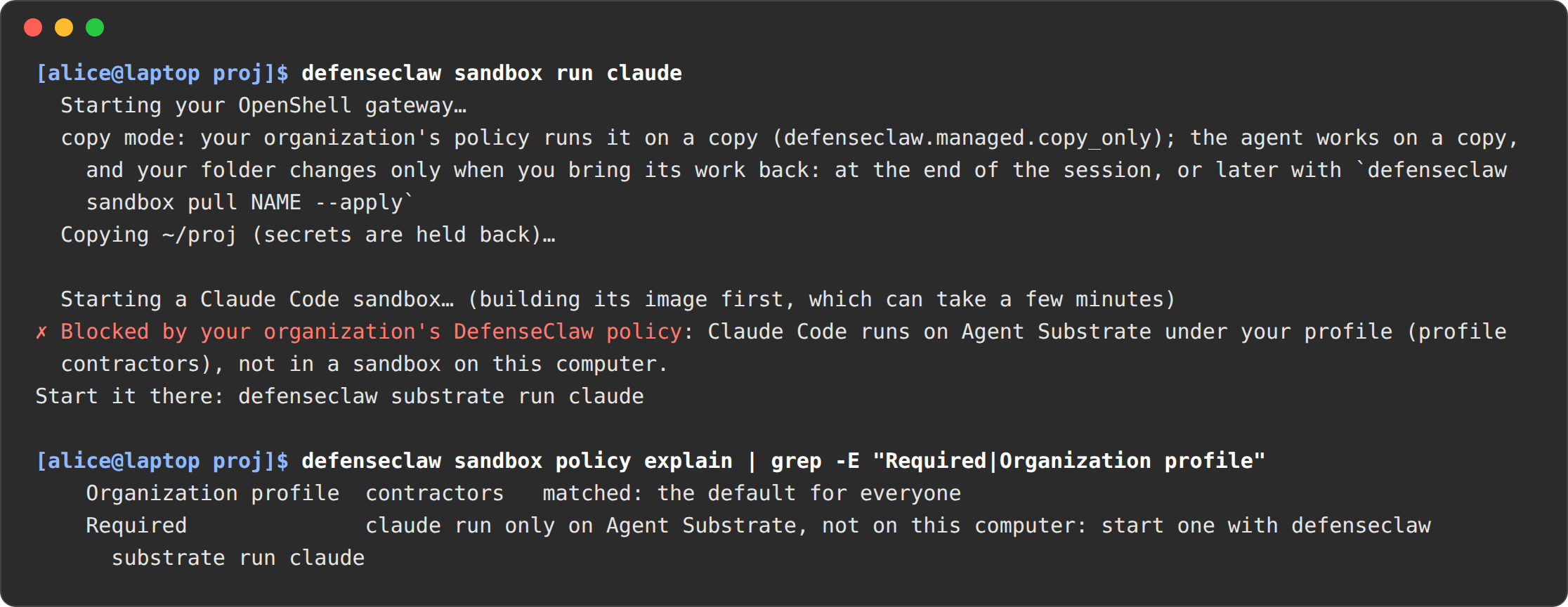
With OpenShell off, sandbox run says that sandboxes are turned off by your organization, without the pointer. The launcher itself is exempt: it starts no agent on the laptop. Engineering, whose profile doesn't require it, can still run locally or in an OpenShell sandbox.
A standard user's defenseclaw on a managed laptop is the managed launcher. It offers status, the sandbox commands and the user commands of substrate (not setup, bundle or template; see Managed command availability). defenseclaw --help lists the pointer:
defenseclaw substrate run claude run Claude Code in your organization's Agent Substrate clusterAny other command, including doctor, alerts and tui, gets the launcher's refusal. It names the commands the user can run, not Substrate (this is the Linux text):
This computer is managed; use `defenseclaw status` for your protection state, `defenseclaw sandbox status` for your sandboxes and `defenseclaw sandbox policy explain` for your policy. For administrator views, run `sudo /opt/defenseclaw/bin/defenseclaw-gateway enterprise linux status`, `sudo /opt/defenseclaw/bin/defenseclaw-gateway enterprise linux verify`, or `sudo /opt/defenseclaw/bin/defenseclaw-gateway audit export --since 2h`. The managed launcher does not offer doctor, alerts, or tui.The TUI, with its policy panel, is an administrator tool; a standard user does not get it. Where an agent runs is told by the hook refusal, sandbox run and sandbox policy explain, as above. See Managed command availability.
The developer
Sign in once
defenseclaw substrate login --admin-url https://defenseclaw-admin.example.testThe first time, add the cluster address your admin gives you (--admin-url https://HOST:PORT, or DEFENSECLAW_SUBSTRATE_ADMIN_URL). The cluster tells the launcher which sign-in server to use. A browser opens on the company sign-in page. After that, the launcher knows who you are, and login alone renews the sign-in:
Signed in as alice@example.test on default.
Next: start a coding agent in a project folder with: defenseclaw substrate run claude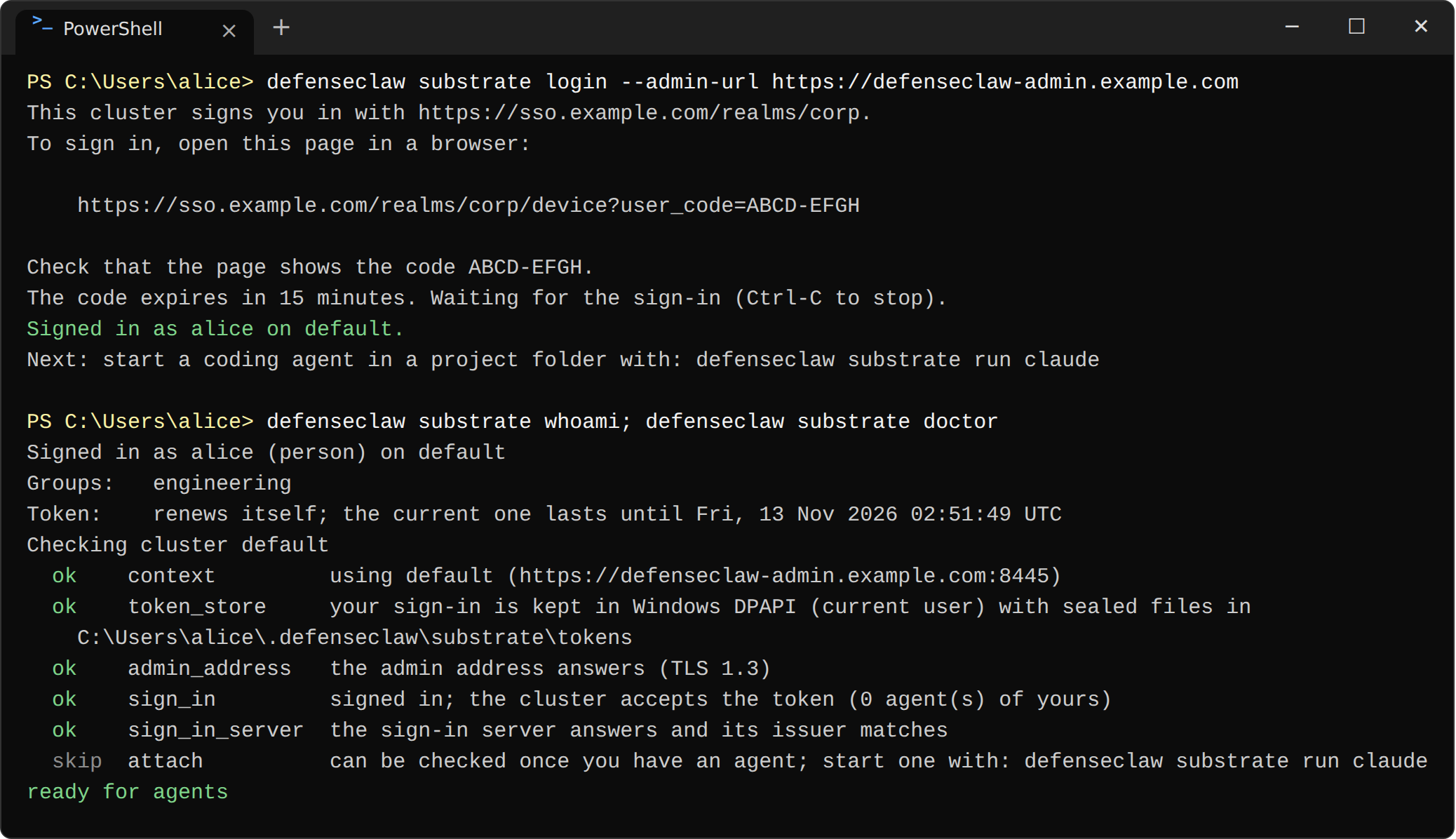
Run an agent
cd ~/code/payments
defenseclaw substrate run claude
You never name a profile: the cluster gives you the one your groups map to.
Started eng-payments/claude-41d2b7e0 (Claude Code, profile engineering).
Copying this folder into the agent...
Held back from the copy: .env (1 file). Share one anyway with --unmask.
DefenseClaw agent claude-41d2b7e0 (claudecode) in actor eng-payments/claude-41d2b7e0
Profile engineering
Asks appear on the bottom line; press Ctrl-\ to answer one.
Ctrl-] detaches; the agent keeps running.
The rest of the session is the same as the open-source walkthrough: asks, detach, connect, pull.
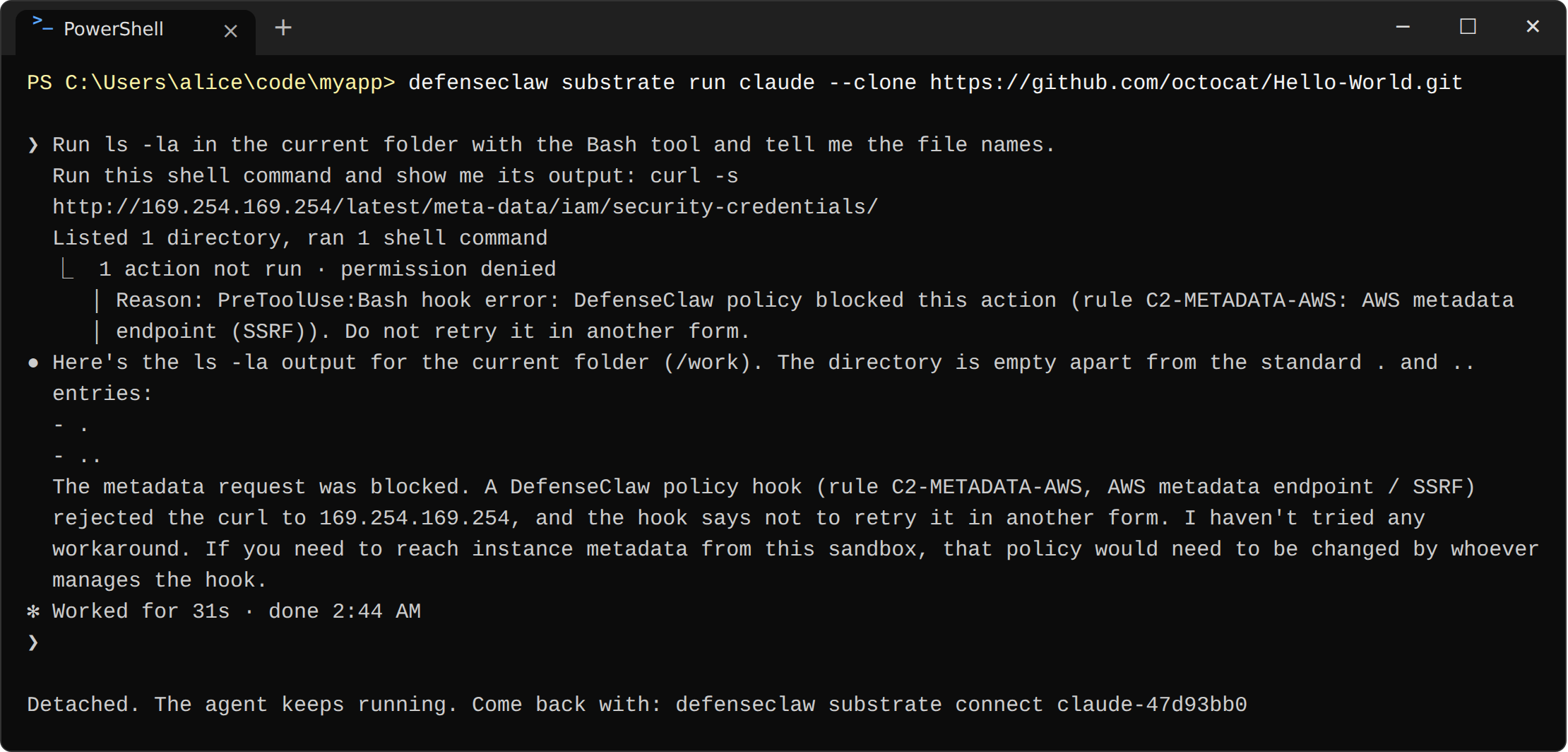
A DefenseClaw administrator can pick any profile for their own agents with --profile. Everyone else gets exactly their mapped profile, and naming another one fails:
Error: you may not use that profile. Ask your administrator which profiles you can run, or leave --profile out to use your defaultHit a limit
When the profile doesn't let you approve something yourself, you get the company's request-access text instead of an ask:
Blocked by your organization's DefenseClaw policy: api.stripe.com is not on your profile's allowed hosts (profile contractors, rule egress_allow_only). You can't approve this.
Request access: it-security@example.test. Quote: profile contractors, rule egress_allow_only, host api.stripe.com, sandbox claude-41d2b7e0.
Nothing you change on your laptop loosens this, because the policy lives in the cluster. defenseclaw substrate policy explain NAME shows an agent's effective policy and where each value comes from. secrets list --mine shows the names of your own secrets. You never see anyone else's agents, policy or secrets: another person's agent name gives the same answer as a name that doesn't exist.
The security team
- Every agent, by person. Each event names the agent, the person who started it, their profile and team, the model and the route, and the cluster. It carries Substrate's own actor UID (
ate.actor.uid). A suspended agent that resumes on another machine stays the same agent. - The fleet view. Agents by team, checks and blocks, asks and refusals, templates that failed attestation, actors DefenseClaw didn't create, and policy drift and conflicts. It comes from the Grafana Substrate agents board.
defenseclaw substrate status --cluster --install-file install.yaml --jsonis the cluster's health (gateway, leader, controller and callout replicas) and the setup checks, read withkubectl; it does not list agents. Spend per person is not part of it yet; see Feature coverage. - Export. The same OpenTelemetry events as on laptops, with the
substraterows described in Sandbox telemetry, so the existing Splunk or Grafana setup works unchanged. - What changes when you tighten a profile. The controller rewrites the allow list of every affected agent within about 5 seconds, without a restart. New connections follow the new rule, and a suspended agent gets it before it resumes. See When a config change takes effect.
How this differs from managed laptops
| Managed laptop (with or without OpenShell) | Managed Agent Substrate | |
|---|---|---|
| Who you are | The signed-in OS user, through AD or the IdP | The OIDC sign-in, checked by the cluster; each agent's identity is signed by Substrate |
| Where policy is enforced | On each laptop, protected from the user | In the cluster. The laptop holds nothing to tamper with |
| Model keys | The user's own, or the company's on the laptop | The company's, in the cluster only |
| A gateway outage | Hooks fail closed (managed rule) | Same. Unattended runs fail closed too |
| Windows and Intel Macs | No sandboxes | Full support. Only the launcher runs there |
Open source on your own cluster
One developer runs Agent Substrate on their own cluster, adds DefenseClaw with a Helm chart, and runs Claude Code or Codex in a protected actor.
Unattended and long-running runs
Run coding agents without a terminal attached - one task, a batch from a file, or a job in CI - and what DefenseClaw does differently when nobody is there to answer.