
Troubleshooting Agent Substrate
Symptoms, causes and fixes for DefenseClaw on Agent Substrate - no free worker, the ask delay, unattended templates, drift and policy conflicts, another callout, version, issuer, bucket and kit skew - and a section written for the agents themselves.
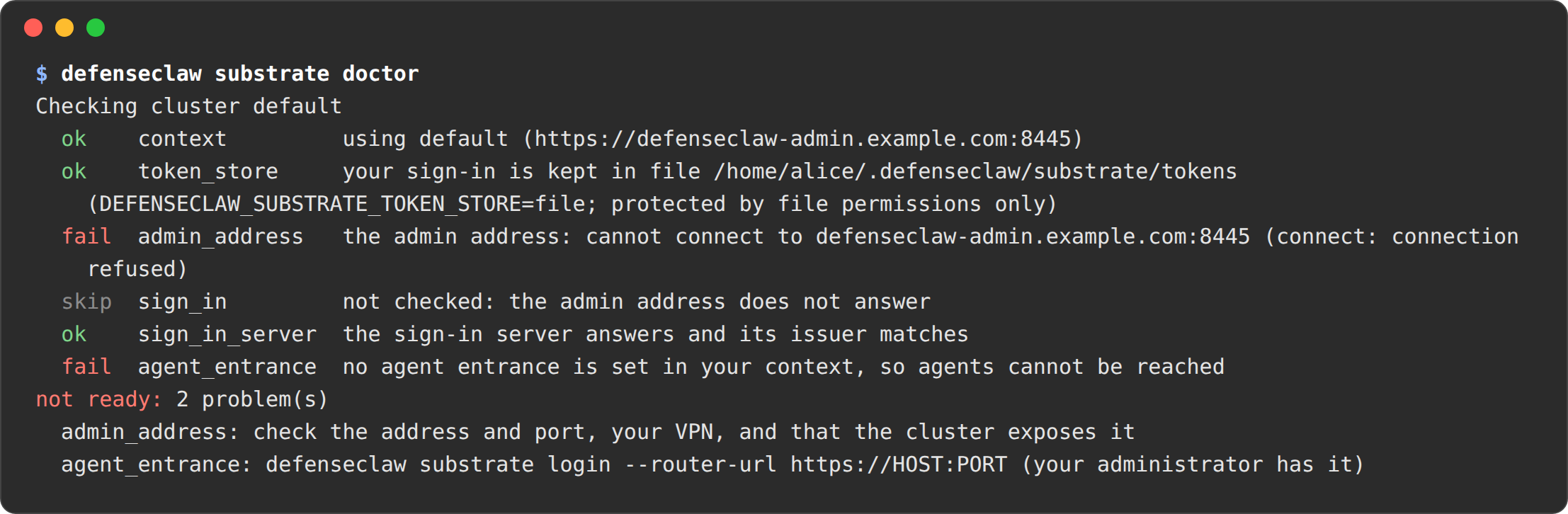
Start with defenseclaw substrate doctor. It checks your computer and your sign-in and says how to fix each failure. Administrators add --install-file FILE (the SubstrateInstall file given to ate-setup) for the cluster's own checks, the same ones verify runs; --cluster without it says what is missing. Exit codes are in the reference. The quoted messages below are what the launcher and gateway print; run and connect show them after Error:.
Symptoms
Not signed in, or the sign-in can't be kept
you are not signed in; run: defenseclaw substrate login. Add the reason in brackets when the issuer ended it:you are not signed in (the issuer ended the sign-in: Session not active); run: defenseclaw substrate login. Exit code 4.the cluster did not accept your sign-in (token refused). Sign in again with: defenseclaw substrate login.the cluster did not accept your sign-in (subject)afterlogin --kubewith a ServiceAccount token: the token was issued for the API server. Sign in with--kube-service-account NAMESPACE/NAMEinstead.the ServiceAccount NS/defenseclaw-launcher does not exist ...(login --kube): your kubeconfig signs in with a client certificate. Runkubectl -n NS create serviceaccount defenseclaw-launcher, or name another with--kube-service-account.the launcher endpoint record that names ... is in namespace NS; nothing was sent to it ...(exit code 2): you left out--kube-namespace. If DefenseClaw runs in NS, run the command the message prints, which adds--kube-namespace NS.the kubeconfig user ... may not list ConfigMaps in every namespace ...: you left out--kube-namespace, and you may not list ConfigMaps across namespaces. Give--kube-namespace NAME(ask your administrator for the namespace).the cluster certificate is not trusted; give the certificate authority with: defenseclaw substrate login --admin-ca-file FILE. A private CA also needs--issuer-ca-filefor the sign-in server. Your browser may show its own certificate warning on the sign-in page; that is the browser, not the launcher.- macOS, over SSH or with the keychain locked:
the macOS keychain is locked and this session cannot ask you to unlock it (for example over SSH); unlock it with: security unlock-keychain. If you declined the question:you declined the macOS keychain request; run the command again and allow DefenseClaw. - Linux without a keyring:
token_store: no OS keychain is usable: secret-tool is not on PATH; install it (package libsecret-tools or libsecret) with a running Secret Service such as GNOME Keyring; or set DEFENSECLAW_SUBSTRATE_TOKEN_STORE=file. Set the variable in every shell, or in CI. The sign-in itself still needs a browser on some machine:login --no-browserprints the address and code.
"no network route to the cluster address" on macOS
The launcher's connection got "no route to host". If nc or curl reach the same address from the same session, macOS Local Network privacy refused the launcher: it gives that error to a program it has not allowed to reach a private address, and Apple's own tools are exempt. This happens when the launcher runs from a session with no terminal app to ask for it, for example under launchctl asuser or a background job. Run it once from Terminal and allow it, or allow the app you run it from in System Settings > Privacy & Security > Local Network.
No free worker for a new agent
the cluster has no free worker for a new agent right now; nothing was started. 2 of your agents are running (claude-b66c97d1, codex-2c9e41a7). Free a worker with: defenseclaw substrate delete NAME (see them all with defenseclaw substrate list), or ask your administrator for more workers.Substrate answers 503 with the reason no_free_worker when no worker has room for the actor. run starts nothing and says which of your agents hold workers. Delete the ones you don't need (list has a STATE column), or add workers to the pool. A finished --task agent gives its worker back about a minute after its task ends (it is suspended, not deleted), and a batch task waits up to 15 minutes for a free worker before it reports this. If none of your agents are running, other work holds the pool. A golden-snapshot build also takes a worker. Lowering a worker pool's replica count while it hosts a running actor crashes that actor. Revert it with kubectl ate revert.
A request to a new site hangs for several seconds after I approved it
After an approval, DefenseClaw updates the agent's allow list and Substrate applies it. The held request is retried for about ten seconds, so a delay of that order is expected. If it never goes through, run defenseclaw substrate policy explain NAME and check that your profile lets you approve (allow_unblock).
"could not read the template's attestation", "not attested" or "names no agent connector" when I start an agent
the cluster could not read the template's attestation, so it started nothing; try again in a minute, and if it stays, ask your administrator to check the template with defenseclaw substrate template verify
On a managed cluster, DefenseClaw starts an agent only from a template whose attestation it has verified and that names the agent it runs. It checks the sign-in rules on that agent; the connector you named is not taken on trust. Nothing starts when:
- the attestation could not be checked right now, for example because the registry is unreachable. The message says "retryable". Try again in a minute;
- the template is not attested, for example a bad signature or an image that is not the attested one. An administrator rebuilds and publishes it with
defenseclaw substrate template build; - the attestation names no agent connector. An administrator rebuilds the template.
defenseclaw substrate template verify shows the reason. On an open-source cluster the agent starts with a warning instead.
The cluster refused to start the agent
the cluster refused to start this agent: <reason> (<code>). Nothing was started. If this is unexpected, give your administrator the agent id .... This is the reasonactor_refused: the actor would get no network policy, for example an unattested template or a kit that is too old. The agent id lets an administrator find it in the events.you may not use that profile. Ask your administrator which profiles you can run, or leave --profile out to use your default(profile_not_allowed). Only a DefenseClaw administrator can name another profile.that group of agents is not open to you; ask your administrator(atespace_not_allowed).- The reason
connector_mismatch(400): you named an agent that differs from the one the template runs. Leave the agent name out of the request or use the template that matches.connector_requiredmeans neither the template nor the request names an agent. - The reason
subscription_signin_refused(403), on a managed cluster: the agent signs in with a vendor account, so its token would sit in the actor and its snapshots. The message tells the user to ask an administrator to bind the agent's key (for exampleCURSOR_API_KEY) as a Substrate secret, or to use an agent that runs through the DefenseClaw model route.agent_hook_tamper_refusedis the same for Amp, whose hook registration can't be protected. See Agents and features. Nothing is created: the refusal comes before the actor. NAME is not verified yet, so it does not run: the launcher starts only the ten agents the kit builds images for. See Agents and features.
My agent can't reach anything
An actor with no allow list has no network. The usual causes:
- The template isn't attested. The template was made with plain
kubectl ate, or its attestation doesn't match, or its signing key was revoked. The controller's events sayuntrusted_signerorno_attestation, and the create path refuses withsandbox.template_unverified. Rebuild it withdefenseclaw substrate template build, ortemplate verify. - The template is attested but its registry is private. The controller and the gateway read the attestation from the registry and get HTTP 401, so the template is refused as
sandbox.template_unverified. Give them a registry login: see Attested templates in a private registry. - The controller is down. Existing actors keep their policy; new ones have none. Check
kubectl -n defenseclaw-system get deploy defenseclaw-controller. - The profile has no matching assignment. You get
default_profile.policy explain NAMEshows which one. - Someone else made the actor. An actor in a launcher atespace that DefenseClaw didn't create is removed from policy (
sandbox.foreign_actor,sandbox.policy.removed).
An unattended run stopped on an ask
Unattended runs deny asks by default. Either allow the site in the profile, or set unattended_asks: queue to hold the ask for up to ask_timeout, and answer with defenseclaw substrate approvals. When nobody answers, the agent is told: "Nobody answered the approval this host needs in time." If a person rejects it: "The owner denied the approval this host needs."
An actor is marked policy_conflict
Another writer reverted DefenseClaw's egress policy three times in ten minutes, usually a GitOps tool or a script that owns EgressPolicy objects. The controller then raised the sandbox.policy_conflict event and put the actor on deny-only: it keeps only the DefenseClaw rule, so its hooks still reach DefenseClaw and every other destination is denied. It never adds access: each later change by the other writer is replaced with deny-only again (no new alert), so a foreign policy never stays in force. Find the other writer in the actor's audit records (drift and policy_conflict lifecycle records name the change) and stop it. The conflict clears (sandbox.policy_conflict.cleared) when another writer restores DefenseClaw's policy. An administrator can also clear it with defenseclaw substrate policy reset ATESPACE/NAME, which is audited (sandbox.policy_conflict.reset): the controller then writes the full policy again and the count of three reverts starts over. list, status NAME and policy explain show the conflict, doctor names it (red with --cluster), and verify and status --cluster count it per atespace (policy_conflicts in --json) and fail the policy_conflict check; they count every agent only with an administrator's sign-in, and otherwise say the count is unknown.
A recreated agent is refused for a few minutes
Substrate's egress gateway caches an actor's identity token by the actor's name. A new actor with the same name as a deleted one is refused until the old token expires (actor_uid_mismatch, up to 5 minutes), and the controller raises sandbox.actor.recreated_same_name. defenseclaw substrate run never reuses a name, so you only meet this with actors you create by hand with the same name. Use a new name, or wait.
A request is refused with chain_unchecked
The callout checks each request against the actor's earlier tool calls (a secret read, then a send). If the check can't answer (the gateway leader is down or slow), the answer depends on the request and the policy: an unattended actor, and any actor on a managed install, is refused with "DefenseClaw could not check this request against the actor's earlier tool calls in time, and this actor's policy refuses unchecked egress." and the request can be retried. On other installs a GET or HEAD request goes through and an alert records chain_unchecked, but a request that can carry data out (one with a body, or any method other than GET and HEAD) is refused in every mode, retryable, with a message that names the cause, for example "DefenseClaw's gateway leader, which keeps this actor's earlier tool calls, can't be reached or failed the check, so DefenseClaw can't tell whether it read a secret earlier." A laptop's chain check needs no cluster, so it never lets such a request through unchecked, and neither does the callout. A check whose miss would refuse the request waits up to substrate.extproc.chain.send_budget (250 ms by default): such a request, any request of an unattended actor, on a managed install or with failure_mode: closed, and a request that reuses the actor's cached registration, which only the leader's answer confirms. Only an attended GET or HEAD whose miss goes through with an alert waits check_budget (20 ms). So a slow but healthy leader still answers HTTPS git clone, git fetch and git push (a GET of info/refs, then a POST to git-upload-pack or git-receive-pack). They are refused only when the leader is down or slower than that (an actor's checks wait for one of 8 slots within the same budget, so many parallel requests on a slow leader can miss it too), and git doesn't retry them: retry by hand, and if checks often miss the budget, raise send_budget (at most 500 ms; an ask on a slow leader then gets less of its ask.hold, since both fit in the callout's 1.8 s). Data an agent puts in a GET's URL or headers is alerted, not refused, while the check is missing. For 15 seconds after a new gateway leader answers its first check, the check counts as missing too, so that a tool call a gateway could not record during the outage (a secret read) reaches the leader before a send is let through. The reason unrecorded_step means something else: one of the actor's earlier tool calls could not be recorded in its chain window (the hook finding SUBSTRATE-CHAIN-UNRECORDED says why), so the check would see an incomplete window; it lasts for the chain's window (30 minutes of the actor's running time). While it lasts, sends (a body, or any method but GET and HEAD) are refused in every mode, and GET and HEAD follow the policy above. Retry first. If it keeps happening, check that the gateway leader is up (kubectl -n defenseclaw-system get deploy defenseclaw-gateway-leader) and not overloaded; substrate.extproc.chain.check_budget and .send_budget bound the wait.
setup says another callout is registered
Substrate has one slot for an egress callout. DefenseClaw refuses to replace another, because that would turn off someone's checks. Chain them on the other callout's side, or remove it deliberately. setup --dry-run shows what is registered.
verify says the Substrate version is outside the tested range
DefenseClaw 1.0.10 supports Substrate >=1.0.0 <1.1.0. Other versions may work but aren't supported, so substrate_version warns and verify still exits 0; a supported_versions range that does not parse fails. Upgrade or downgrade Substrate with the upstream runbook, then run setup and verify.
verify says two clusters share an issuer
issuer_unique compares this cluster's issuer with the other DefenseClaw clusters your kubeconfig reaches: every other context, or the ones --fleet-contexts A,B names (--fleet-contexts none reads this cluster only). It fails when another cluster has the same issuer, or when this one uses the default issuer and another DefenseClaw cluster exists. A cluster that does not answer within 8 seconds is counted in the warning, not compared.
The default actor-token issuer is the same on every cluster. Give each cluster its own: run defenseclaw substrate setup --install-file install.yaml --issuer https://UNIQUE-HOST --yes, then ate-setup deploy ate-system --config install.yaml, and set the same value in substrate.identity.issuer. The issuer need not resolve.
Every hook and model call is refused, and run --task says "The task did not run"
The launcher prints The task did not run: the cluster gateway refused its tool and model calls (keyset_unavailable: ...) and exits with code 1. The gateway can't check agent tokens, and that holds for every agent on the cluster. The reason in brackets says why:
keyset_unavailable: the gateway can't read the keys URL. Checksubstrate.identity.keys_url(chart valuesubstrate.actorKeys.url) and its CA (substrate.identity.keys_ca_file, chart valuesubstrate.actorKeys.caConfigMap).defenseclaw substrate verify --install-file install.yaml(administrators) shows theactor_keyscheck.issuer: Substrate signs with another issuer thansubstrate.identity.issuer. Use the same value insetup --issuer(thenate-setup deploy) and in the configuration.verifier_unavailable: the gateway can't reach the Substrate control API.
Ask your administrator to run defenseclaw substrate verify and look at actor_keys.
verify cannot read the snapshot bucket
snapshot_bucket is skipped only when the install file names no s3:// or gs:// snapshot location. It warns "could not be read from here" when the aws or gcloud CLI is missing, has no credentials, or your identity may not read the bucket's settings (the permissions are in the reference). Run verify again with an identity that can. "does not exist" is a failure: Substrate cannot store snapshots there. On Cloud Storage, a bucket whose public access prevention is inherited gets a warning, because verify does not read the organization policy. Snapshots hold everything an actor held, so fix a failure before you run agents. delete removes an agent's snapshots.
Nobody can sign in, and verify says sign_in_server fails
The gateway checks the OIDC sign-in server (substrate.identity.oidc.issuer) from its own network every minute, and a failed check is made once more two seconds later: only a failure that repeats is reported, so one timeout or server error is not. A real outage shows within about 1 min 12 s (the next check, the pause and two 5 s fetches). The gateway's own doctor runs the same check with the same retry: it hides a one-off failure too, and shows an outage within about 12 s. verify, status --cluster and doctor --install-file show the result as sign_in_server. A sign-in the gateway cannot check is refused with the same cause, so the launcher says which one. The causes:
issuer_unreachable: no answer (DNS, connection or timeout). The issuer's address may have changed, for example after the host restarted with a new public name; setsubstrate.identity.oidc.issuerto the address it answers on now, or see the network policy below.issuer_tls_name: the certificate does not name the issuer host. Issue a certificate whose names include it.issuer_tls_untrusted: the certificate does not verify against the gateway's trust bundle. Setgateway.oidcCAto the CA that signed it, or renew an expired certificate.issuer_unavailable: the sign-in server answers with server errors (5xx or 429). The address is right; check the server's health and logs (for Keycloak, the realm and its database).issuer_http: the address does not serve a discovery document. Use the address that ends before/.well-known(for Keycloak,.../realms/REALM).issuer_mismatch: the discovery document names another issuer. Set the issuer to exactly that value.issuer_keys: the key set (jwks_uri) does not load.
The detail (the address, the certificate's names) is in the gateway log (kubectl logs deploy/defenseclaw-gateway | grep oidc_issuer) and in the gateway's substrate.oidc_issuer doctor row; people who cannot sign in see only the cause.
Sign-in fails with a timeout to the OIDC issuer
The cluster uses a private OIDC issuer (substrate.identity.oidc.issuer), and the gateway can't reach it: the launcher can't finish signing in, or the cluster refuses the sign-in right after, and the gateway log shows a timeout to the issuer's address. The chart's default NetworkPolicy lets the gateway reach DNS, the Kubernetes and Substrate APIs, its own Services, OTLP and model providers on 443, and nothing else. Add the issuer's address and port to networkPolicy.egress.extra (an example is on the EKS page), and check that the issuer's security group admits the node and pod subnets. A private CA also needs gateway.oidcCA.
verify cannot read the access policies or the actor routes
openfga_grants and actor_service_routes warn with the reason when kubectl may not create the gateway's token or port-forward (see what verify needs). With the access they pass or fail on what they read: openfga_grants fails when Substrate refuses the access policies to the gateway's own ServiceAccount (it lost its global viewer grant, so inventory and live actor checks fail), when someone else edits or owns a launcher atespace, when DefenseClaw is not an editor in a managed atespace you named with --managed-atespaces, or when it is not a global viewer. actor_service_routes fails when the actor Service answers any route that is not a hook, notify, inspect, model, OTLP or relay check route.
verify warns that other router clients can reach every actor
ingress_clients warns N other router client(s) can reach every actor. That is real: another client in ingressAllowedSPIFFEIDs of the SubstrateInstall file can reach every actor without DefenseClaw. Remove the clients you don't need, then run ate-setup deploy again. On a fresh install, with the access in the reference, every other check passes: a fail is real, and actor_keys and issuer_unique should pass.
Model calls to Bedrock fail through a VPC endpoint
A Bedrock interface endpoint with private DNS resolves to a private address, and the guardrail proxy refuses private upstreams by default. Add the endpoint's address to guardrail.allow_private_upstreams (individual IPs, not ranges). The endpoint's security group must also admit the node security group on 443, or calls time out with a 503.
The first start on a new node fails once
The first agent on a node that has never run the template can fail once with a message that says the resume failed. The start timed out while the node pulled the template image (about 1.6 GiB) and fetched the golden snapshot, and the agent is removed. Run the command again. Pulling the image beforehand is not needed.
A new actor is briefly offline
An actor created and resumed outside DefenseClaw, inside one poll interval, gets its policy just after the resume. Until then it has no network (default deny). Actors started with defenseclaw substrate run get their policy before the first resume.
A kit version refusal with a migrate hint
The gateway accepts the kit from its own release and the one before. Rebuild the template with template build, then defenseclaw substrate migrate NAME.
The agent stopped with "DefenseClaw's hook-folder integrity guard stopped this agent"
Antigravity keeps DefenseClaw's hook registration in ~/.gemini, a root-owned folder in a home the agent owns. When that folder is renamed, replaced or removed, the relay stops the agent and every process it started, because Antigravity could then load hooks without DefenseClaw's, and writes a HIGH audit row (relay_guard_tamper). The agent can't be attached to or given a task again; connect says so ("was stopped by DefenseClaw's hook-folder integrity guard"): delete it (defenseclaw substrate delete NAME) and start a new one. Pull what you need first. If nobody renamed the folder on purpose, treat it as a prompt-injection attempt and read the session's audit rows. When the folder is missing as the relay starts, the relay refuses to start the agent at all with "DefenseClaw's hook folder is not in place": rebuild the template with template build. When the relay cannot watch the folder (inotify limits such as fs.inotify.max_user_watches on the node, or a filesystem without inotify), it refuses to start the agent with "the guard cannot watch the hook folder", logs relay.guard_degraded and writes the same HIGH audit row; a watch that ends while the agent runs stops the agent like a move. Raise the node's inotify limits, or run the actor on a runtime that supports inotify, and start a new agent.
The agent did not start: "a volume is mounted at, above or below"
The relay found a mount at, above or below DefenseClaw's files (the kit library under /usr/local/lib/defenseclaw, /etc/defenseclaw, the connector's managed settings such as /etc/claude-code or /etc/codex, the empty /etc/machine-id, the pinned agent build under /opt/defenseclaw-harness, or a guarded home folder or the home above it), so the agent could run without its hooks. A mount table it cannot read, one without the root mount, or one with a second mount at / (it lies over the whole image) is refused the same way, and so is a data mount that lands, through a symlink, in a folder whose files programs load (/usr, /etc, /lib, /lib64, /bin, /sbin); the files the runtime binds there (/etc/hosts, /etc/resolv.conf, /etc/hostname) are not. It refuses to start the agent, logs relay.mount_refused and writes a HIGH audit row. Admission normally refuses such a template first (volume_mounts[N].mount_path is at, above or below a path DefenseClaw attested); template build refuses a symlink in the image that leads there, and the relay catches a mount that reaches those paths through a symlink in an image volume. Mount data volumes at or below the image WORKDIR (/work), and make sure the image has no symlink there that points into the kit's folders.
A task ended with exit code 124
The relay ended a --task run that made no progress for 10 minutes: no output except retry notices, and almost no CPU or I/O. logs NAME shows the reason and whether the cluster gateway answered at that moment. If it did not, check the gateway Deployments and the defenseclaw-actor Service. If it did, the agent was stuck on a connection of its own, typically a model call cut off by a gateway restart: run the task again. The end is also in the audit log: a substrate row with event task_end. See When a run stops making progress.
A task ended with exit code 75
The cluster gateway did not answer some hook calls of a --task run, so those calls failed closed and the steps they guarded may not have run, yet the agent exited 0. The relay reports such a run with exit code 75 instead of a success. logs NAME shows how many hook calls got no answer and when the first one was; the audit log has the same reason in the substrate row with event task_end. Check the gateway Deployments for a restart or an outage at that time, then run the task again.
verify warns worker_drain, or actors crashed after a worker pool roll
A worker pool roll is in progress: some workers are draining and actors still run on them. The controller suspends the actors DefenseClaw manages and resumes them on another worker (the controller log has sandbox.worker_drain.suspend and sandbox.worker_drain.resume); if no worker has room yet it says so and tries again on each pass, and connect also resumes the actor. Suspend other actors yourself before the old workers stop. An actor that crashed anyway needs kubectl ate revert actor NAME -a ATESPACE (an administrator), then connect. If the controller says it cannot list Substrate workers, it needs the global viewer grant that the chart bootstrap gives it.
Hooks fail with "gateway unreachable"
The hook retries once, then follows the fail mode. Check that the defenseclaw-actor Service has ready endpoints, that the NetworkPolicy admits Substrate's egress gateway, and that the agent's settings use the full Service name (defenseclaw-actor.defenseclaw-system.svc.cluster.local): an actor resolves only the names in its allow list. Some CNIs apply a NetworkPolicy a moment after a pod starts.
HTTPS calls from tools inside the actor fail certificate checks
Egress inspects HTTPS, so tools must trust Substrate's bundle. Kit images set SSL_CERT_FILE, NODE_EXTRA_CA_CERTS, REQUESTS_CA_BUNDLE, CURL_CA_BUNDLE and GIT_SSL_CAINFO to the bundle the template projects (/run/ate/trust-bundle.pem); a template may not set them to anything else (the actor allowlist). A tool that ignores all five needs its own setting in the image.
A template is refused with env_not_permitted or "is not the attested entrypoint"
DefenseClaw 1.0.10 admits only the environment and entrypoint that were attested: the kit's own variables (with the kit's value where it fixes one) and ordinary base-image settings, and the image's own entrypoint and arguments. The refusal names the variable or the field (env, command, args). Remove it from the template (or the image), publish again, and recreate the actors. defenseclaw substrate doctor --cluster lists every template that fails (substrate.template_allowlist). In 1.0.10 a template admitted before the upgrade keeps its running actors with a warning row; its new actors are refused, and the next release refuses the running ones too.
The relay logs "the agent runs as the relay's own user"
The template was built before 1.0.10: the relay and the agent run as one user, so on gVisor the agent can stop the relay. The controller names such templates once in an audit warning (sandbox.relay_unseparated) and doctor --cluster lists them (substrate.relay_separation). Rebuild the template with template build; its image then runs the relay as root and the agent as its own user. "lacks CAP_SETUID, CAP_SETGID or CAP_KILL" (and the golden actor crashes, GoldenActorCrashed) means the template's container does not add SETUID and SETGID to Substrate's default set: publish it again with defenseclaw substrate template publish ... --template ATESPACE/NAME, which writes security_context.capabilities (add: [SETUID, SETGID], drop: [AUDIT_WRITE, NET_BIND_SERVICE]). The relay refuses to start the agent rather than run it as root or leave it unstoppable; admission refuses such a template first. Admission also refuses a template that adds SETUID and SETGID but keeps Substrate's other defaults ("security_context.capabilities leaves the container AUDIT_WRITE"): the relay needs exactly KILL, SETGID and SETUID, so publish the template again, or drop AUDIT_WRITE and NET_BIND_SERVICE in it. Write capability names as Substrate spells them, upper case without CAP_ (SETUID), and ALL to drop all of them: admission refuses other spellings ("is not a capability as Substrate spells it"). "could not set no_new_privs on every thread" means a relay built with cgo: build it with CGO_ENABLED=0, as the release does.
An agent that uses WebSockets can't connect (Amp)
Substrate 1.0.0 refuses every HTTP/1.1 WebSocket upgrade on an inspected or http rule, even to a host in the allow list. The agent gets 403 Forbidden with the body WebSocket egress is not supported, and Amp keeps saying "Reconnecting". The workaround is to add the host to substrate.allow_passthrough_for (for Amp, ampcode.com). That host is then forwarded without inspection: DefenseClaw doesn't check its requests and doesn't inject a secret there, so the agent's key or sign-in has to be in the actor. An open-source install warns about that, and a managed install refuses agents that hold their own sign-in. The refused upgrade is answered by Substrate's egress gateway before DefenseClaw's callout sees the request, so it leaves no DefenseClaw audit row; read the egress gateway's access log for it.
An MCP call is refused with body_uninspectable or path_ambiguous
DefenseClaw reads the requests sent to MCP and listed hosts as the server will. It decodes gzip and deflate bodies and drops a UTF-8 byte order mark. With extproc.failure_mode: closed (the default) it refuses a body it can't read: another encoding, a charset that isn't UTF-8, or, for MCP, a body that isn't JSON (NaN in the arguments, for example). With open it allows the request and raises an alert. path_ambiguous is a path that servers can read in more than one way, such as an encoded slash or semicolon, a .. segment or ..;, on a host that has path rules. Send the resolved form (/public/x, not /admin/../public/x).
A request is blocked with egress_blocked
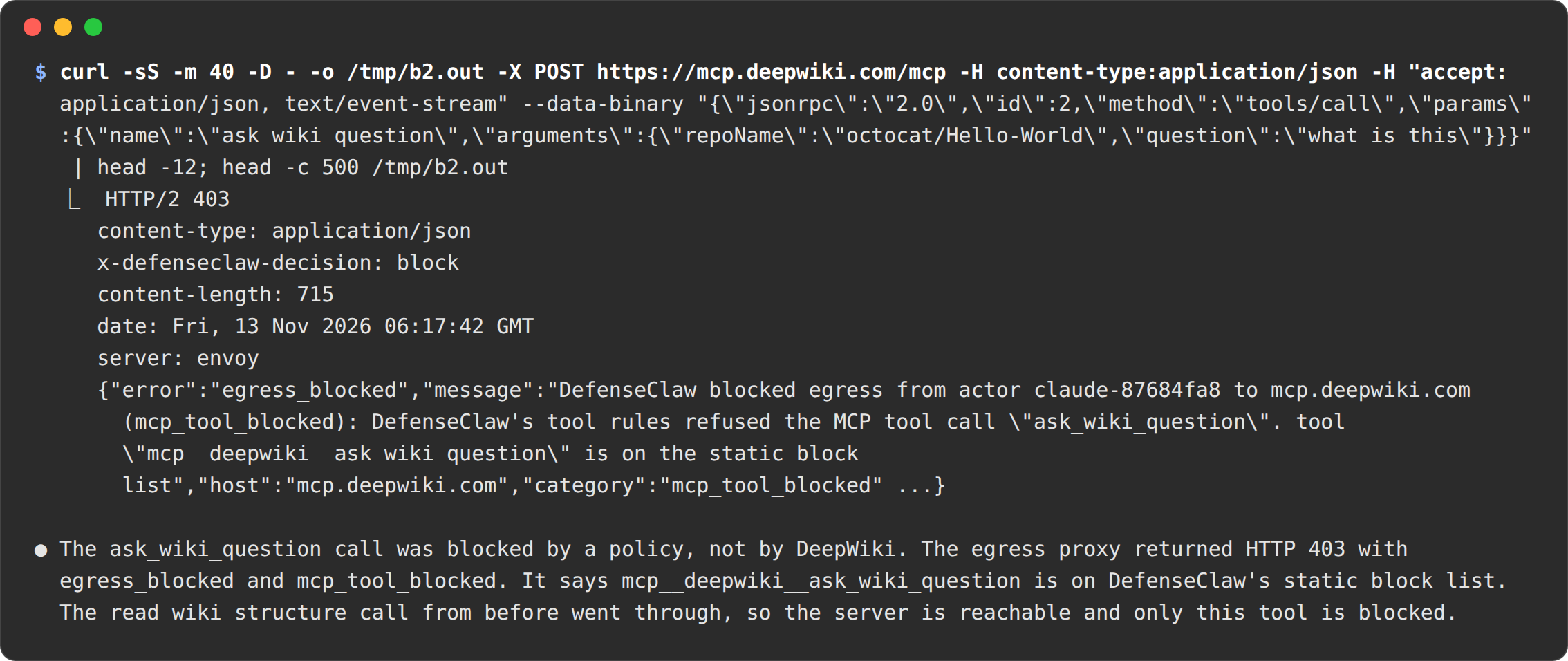
The callout's refusal is a JSON body with error: egress_blocked, a message that starts "DefenseClaw blocked egress from actor NAME to HOST (CATEGORY): ...", the category (for example url_rule, ask_denied, ask_pending, chain_egress, mcp_tool_blocked, body_uninspectable, path_ambiguous, actor_not_live), the rule and a how_to_unblock hint. A message that starts "Blocked by your organization's DefenseClaw policy:" is your profile refusing something you can't approve; it names the request-access contact.
A secret placeholder shows up in a tool's output
The placeholder was sent to a host the secret isn't bound to, so nothing was swapped. That is working as intended. Bind the secret to the right host, or stop the tool from echoing it.
If a tool's output shows the real value instead, the secret is bound to a host that echoes requests (for example httpbin.org or postman-echo.com): egress swapped it in and the service sent it back. The callout never reads responses, so it can't mask the value on the way back. Remove that host from the secret's inject.hosts (Bind a secret to hosts) and rotate the value; the gateway's start-up warning names every secret bound to a well-known echo host. See Hosts that echo tokens.
Credential injection returns 403 "atespace not permitted"
The Kubernetes credential provider hadn't picked up its namespace policy. The chart's bootstrap grants the launcher atespaces; restart the provider (kubectl -n ate-system rollout restart deploy/k8s-credential-provider) after any manual change.
secrets set or rm fails with secret_not_managed_by_defenseclaw
The Kubernetes Secret named by the secret's source already exists, and DefenseClaw didn't create it: it has no app.kubernetes.io/managed-by: defenseclaw label. The gateway answers 409 and changes nothing, because it only touches Secrets it created. Point the source at a new Secret name, or remove the existing Secret if it is yours. The chart gives the gateway a Role only in the namespaces your Kubernetes sources name (create, and get and patch on the named Secret), so a failure with a 502 (secret_not_stored) usually means the source's namespace has no Role yet: upgrade the chart after adding a source. Keep per-person sources ({person} in the Secret name) in a namespace of their own. See Secrets.
template build blocks every skill: "no verdict: the skill scanner cannot run on this host"
template build runs skill-scanner on the host it runs on, in a PID and user namespace of its own, so nothing the scanner starts outlives the scan. This host refused those namespaces: user namespaces are off (user.max_user_namespaces=0), a namespace limit is reached, or a seccomp profile or sandbox refuses them (a container under its runtime's default profile, for example). The message names which. No skill was scanned, so the build blocks without a verdict on any skill and attests nothing. Run template build on a host or builder that allows unprivileged user namespaces: sysctl user.max_user_namespaces above 0, and in a container a profile that allows them. Ubuntu's restriction of unprivileged user namespaces (kernel.apparmor_restrict_unprivileged_userns=1) does not stop the scan.
A skill I added in the session was refused
A gateway whose image has skill-scanner but runs where user namespaces are refused (a pod under the default seccomp profile) cannot contain the scan, so it counts as having no scanner and the fail mode below decides.
skill-scanner does not run in the cluster. A skill in the attested template is trusted by its digest. A skill added mid-session is not scanned, so it follows the fail mode: managed installs and the strict tier refuse it and raise an alert; open source allows it and raises an alert. To use the skill everywhere, put it in the image and rebuild the template with template build.
Pull says there is no record of the folder
pull compares the agent's work with the folder you sent. It can only do that from the computer you ran run on. From another computer, connect to the agent and git push from inside it.
The gateway pods restart with observability v8 bootstrap failed
The gateway could not start an export destination in config.observability.destinations. The error names the destination and the cause after destination "NAME":, and the line before it in the log says the same with the path or host. Fix that setting, or remove the destination, then run helm upgrade with the fixed values. A destination that only lacks network_safety.allow_private_networks does not stop the gateway: it runs without it and logs the option to set. See Turn on OTLP export.
For agents
This section is for a coding agent, or an LLM working for one, that hits a DefenseClaw refusal inside an actor. A person usually reads the same messages.
- A hook answer says blocked. Don't retry the same call. The reason names the rule. Choose a different approach, or ask the user.
- An egress request returns
403from the callout. The body names the rule or feed. Don't try another host to reach the same service, or send the data through a model call or an MCP server. Ask the user to approve the host. - A tool call is waiting on an ask. Wait. Don't poll in a loop, and don't switch to another tool to get around it. If this is an unattended run, asks are denied by default, so finish what you can without the call and say what you needed. On a profile with
unattended_asks: queuethe403says a person has been asked and until when: don't end the task, wait about 30 seconds and send the same request again until it goes through or is denied. - A
429. Back off forRetry-Afterseconds. Don't open parallel connections. - A secret is a placeholder.
DC_SECRET_...values are not real. Don't print, store or transform them. The network layer swaps them on the right host. - You have no network at all. The template wasn't attested, or the policy isn't written yet. Stop and tell the user.
- Your terminal is detached. That is normal. The run continues. Write results to the repository or the task's output, not to your terminal.
- You were suspended and resumed. Your clock may have jumped and your connections may have been reset. Check the time, reopen connections, and don't assume a long-running command is still running.
- Never try to read or change the hook settings, the root-owned managed settings or the kit. They are outside your user, and changes are reported.
defenseclaw substrate reference
Every defenseclaw substrate command, its exit codes and environment variables, the substrate configuration section, the chart values that matter, and the files the launcher keeps.
Agent Substrate on Amazon EKS
What differs from kind and GKE when you run Agent Substrate v1.0.0 on EKS for DefenseClaw - private nodes, S3 snapshots, microVM nodes, ECR images, credential injection and a unique token issuer.