
Cowork VM sensor
The DefenseClaw sensor that Claude Desktop installs inside the Claude Cowork Linux VM. What it sees, where its events go, how an administrator delivers it on managed macOS and Windows, every setting, and its limits.
The Cowork VM sensor is a second, separate protection for Claude Cowork. Cowork runs shell commands inside a Linux virtual machine that Claude Desktop starts on the computer. The hook route sees a tool call before it runs. It cannot see what a command did inside the VM. The sensor can: it runs inside the VM and watches processes, files and network connections there.
Claude Desktop has a setting for this, Anthropic's Cowork EDR integration. An administrator tells Claude Desktop which vendor package to install in the VM. At each VM start, Claude Desktop unpacks the package and runs its install.sh as root. DefenseClaw ships such a package, defenseclaw-cowork-<arch>.tar.gz, and the standalone enterprise lifecycle puts it and its settings on the computer.
Preview
The Cowork VM sensor is Preview: it is available but may change. Claude Desktop installs only signed packages from a vendor that Anthropic lists. The 1.0.9 and 1.0.10 releases carry the two packages and no signature, so Claude Desktop does not install DefenseClaw's sensor from them until the package is signed with a vendor key that Anthropic lists.
The hook route and the sensor
| Hook route | VM sensor | |
|---|---|---|
| Where it runs | On the computer, as the user | Inside the Cowork Linux VM: a root helper and an unprivileged gateway |
| What it sees | Each prompt and tool call, with its arguments, before it runs | Linux processes, files, network connections and DNS answers in the VM, as they happen |
| Can it stop something | Yes, in action mode: a policy hit blocks the call | No. It observes and reports. See What it can and cannot stop |
| Where events go | The DefenseClaw gateway on the computer: audit log, alerts, TUI | Your own OTLP collector. Not the computer's gateway |
| Who sets it up | The user (open source) or the administrator (managed) | The administrator, on managed standalone macOS or Windows only |
| Needs | The Claude Code connector | Nothing from the hook route. The two are set up separately |
Use the hook route to stop a command. Use the sensor to learn what happened after a command was allowed.
What it can and cannot stop
The sensor is detection only. Its configuration turns the guardrail off, and the package sets nothing that blocks a process, a file or a connection (packaging/cowork-vm/config.yaml.tmpl). The install script starts it "in detection-only mode" and names the service "DefenseClaw Cowork VM sensor (detection only)". It reports a finding after the action. A command that reads a credential file in the VM still reads it. Blocking in Cowork is the job of the hook route.
The sensor sees only the VM. It does not see the computer's processes or files, and it does not see Cowork's web fetch, which runs on Anthropic's side. It does not read prompts, tool calls or model replies.
What it watches in the VM
The package starts the same runtime planes that AI Discovery runs on a host, with all three on, DNS capture on, and the inventory scan in passive mode. A small root helper holds the privilege the planes need. The gateway runs as the system account defenseclaw-cowork and asks the helper for what it cannot read itself.
| Source | What it observes | How |
|---|---|---|
| Plane A, inference heartbeat | Sustained CPU in a scriptable runtime, or memory large enough to hold model weights | /proc |
| Plane B, shadow egress | Which process holds a connection to which peer, and the DNS answers that name the peer | /proc/net, /proc/<pid>/fd, and a packet socket for DNS |
| Plane C, agent actions | Process exec and exit with arguments, user and group changes, and file reads and writes on watched credential paths | Process connector (cn_proc) and fanotify, through the helper |
| AI Discovery inventory | AI agents, models, MCP servers and packages found in the session homes (/home/*, /sessions/*), every 10 minutes; running processes every 30 seconds | Passive file and process scan |
Every Cowork session is its own Linux user with a home under /sessions. The helper re-reads the homes while it runs, so a session created after the VM started is watched.
Plane C reports a finding only for a process that has an AI agent above it in the process tree. The same read of ~/.aws/credentials by a person's shell produces nothing. Findings carry one of six tactics and its MITRE ATT&CK technique:
| Tactic | Technique | Example |
|---|---|---|
credential_access | T1552 | An agent's shell reads ~/.aws/credentials, ~/.ssh/id_rsa, .env or .npmrc |
identity_creation | T1136 | An agent creates an account or an access key |
privilege_escalation | T1548 | An agent runs sudo |
persistence | T1543 | An agent writes a place that runs again later |
exfiltration | T1567 | An agent uploads to a web service |
local_inference | T1059 | An agent runs a model on the machine |
Settings of the inventory scan in the package: no shell history, no environment variable names, no user email, no raw local paths, no online model lookup, at most 1,000 files per scan and 512 KiB per file. Environment variable values are never read. Process arguments are read, and they are classed as content, which a destination's redaction profile governs (see Redaction). The package's collector destination sets no redaction option.
A finding is reported at risk 30 or more (the default min_risk_to_report).
Where events go and what you see
List view for small screens. Use the expand button to open the drawing.
- administrator1.Package, signature,settings
- deliversClaude Desktop
- managed computer2.Claude Desktopreads the settings
- installs at VM startDefenseClaw sensor
- Cowork VM3.DefenseClaw sensorobserves only
- exports over HTTPSYour OTLP
- yours4.Your OTLPcollector
The VM sensor's events go to your collector. The sensor exports OTLP over HTTPS (http/protobuf) to https://<collector>. It sends log records: ai.runtime.finding, ai.runtime.activity and ai.runtime.plane_health, and the inventory records of AI Discovery. Every record carries these resource attributes:
| Attribute | Value |
|---|---|
service.name | defenseclaw-cowork-vm |
cowork.sensor_version | The package version, the DefenseClaw release |
cowork.tenant | tenant from your config |
cowork.device_id | device from your config, or this computer's own ID |
cowork.vm_arch | amd64 or arm64, the architecture of the VM |
The connection verifies the collector's certificate. The release packages carry no private CA, so the collector needs a certificate that the VM already trusts. A package built with --collector-ca carries one (see Build your own package). The sensor keeps a queue of up to 4,096 records or 32 MiB, sends a batch every 2 seconds, and gives each request 10 seconds. Private network addresses are allowed for the collector. Carrier-grade NAT addresses are not.
The computer's DefenseClaw does not receive these events. They are not in the computer's audit log, alerts, TUI, defenseclaw status or defenseclaw doctor, and they are not in the computer's AI Discovery. AI Discovery lists the Cowork VM bundle on the computer, but not what the sensor saw in the VM. Read the records at your collector.
What an administrator sees on the computer is delivery only. enterprise macos status, enterprise macos verify and the Windows enterprise windows status and verify print one row:
  Cowork VM sensor: off
  Cowork VM sensor: host_ready=true settings_ready=true
  Cowork VM sensor: host_ready=true settings_ready=false (mdm_settings_not_ready)
The JSON result has a cowork_vm_sensor member (absent under Secure Client):
| Field | Meaning |
|---|---|
enabled | enterprise.cowork_vm_sensor.mode is on in the installed config |
host_ready | The package for this architecture, its signature and the install arguments are in place with the pinned content, and ordinary users can read them but not change them |
settings_ready | The two Claude Desktop settings, coworkEDRIntegration and coworkEDRIntegrationVendor, hold the package path and the vendor |
package_path | Where Claude Desktop is told to find the package |
reason_codes | Why a flag is false |
Neither flag proves that Claude Desktop accepted the package or that it runs in the VM. The row reports the host only.
When the sensor is on and the host is not ready, status and verify add the warning cowork_vm_sensor_incomplete and mark coverage and security incomplete. verify fails (on Windows it adds an error of the same code). Reason codes:
| Code | OS | Meaning and next step |
|---|---|---|
package_not_ready | macOS | The package is missing, changed, or does not match package_sha256. Run ensure with the release's package |
signature_not_ready | macOS | The .sig file is missing, changed, or does not match signature_sha256 |
arguments_not_ready | macOS, Windows | The install arguments file is missing or differs from the config |
permissions_not_ready | macOS | A macOS access-control entry on a delivered file or folder grants unsafe access or stops users from reading it. Run repair |
mdm_settings_not_ready | macOS | The managed preferences of Claude Desktop do not set the two keys to the package path and the vendor. Deploy the profile in your MDM |
package_or_signature_not_ready | Windows | The package or the signature is missing, changed, unpinned or unreadable by ordinary users |
destination_untrusted | Windows | C:\Program Files\Claude\edr-integration, or a parent such as Program Files, is writable by others or not owned by an administrator. Only an administrator can fix it |
destination_permissions_not_ready | Windows | The folder is missing or its access list drifted. ensure repairs it |
machine_settings_not_ready | Windows | The two HKLM values are missing, or HKLM\SOFTWARE\Policies\Claude is refused. See Windows |
host_inspection_failed | Windows | The host could not be inspected, for example on an unsupported machine type |
platform_unsupported, architecture_unsupported | macOS, Linux | Linux, or an architecture that is neither amd64 nor arm64 |
Two more codes come from ensure: cowork_vm_sensor_unsupported (mode on on Linux) and cowork_vm_sensor_device_unavailable (a Mac whose hardware UUID cannot be read while device is unset).
To confirm that Claude Desktop accepted the package, read the Claude diagnostic report's cowork-edr-integration.txt. It says whether both settings were set by device management, the decision (go or dormant), the vendor ID, and how each VM start ended (for example refused_guest reason=vendor_unknown). Claude shows the last 4 KB of the install script's output in that file.
Where it works
| Computer | Supported | Package | How the two Claude Desktop settings arrive |
|---|---|---|---|
| macOS, managed standalone (pkg) | Yes | defenseclaw-cowork-arm64.tar.gz on Apple silicon, -amd64 on Intel. A translated Intel process on Apple silicon still gets arm64 | Your MDM deploys a profile. DefenseClaw never writes Claude Desktop's preferences. It only checks them |
| Windows, managed standalone (Setup) | Yes, x64 only | defenseclaw-cowork-amd64.tar.gz | DefenseClaw writes two REG_SZ values under HKLM\SOFTWARE\Policies\Claude |
| Linux, managed standalone | No | mode: on is refused with cowork_vm_sensor_unsupported. Claude Desktop for Linux is a beta and Cowork on Linux is not certified | |
| Secure Client profile | No | The key is refused outside the standalone profile | |
| Per-user open-source install | No | The key is refused outside the standalone profile. Use the hook route |
The VM is a Linux VM on every host OS. The package inside it must match the VM's architecture. install.sh refuses a package of the other architecture with exit 12.
What you need first
- A vendor ID from Anthropic. Claude Desktop runs a vendor package only for a vendor that Anthropic lists, with a signature that verifies.
vendorin the config is the lowercase identifier Anthropic assigned. A vendor that is not listed getsrefused_guest reason=vendor_unknownat each VM start. - A signed package. Claude Desktop installs only a package with a detached binary OpenPGP signature (
<package>.sig) that follows Anthropic's rules: no notation, no policy URL, no key server, expiry at most 730 days after signing. DefenseClaw'ssign.shmakes and checks such a signature. The 1.0.9 and 1.0.10 releases on GitHub listdefenseclaw-cowork-amd64.tar.gzanddefenseclaw-cowork-arm64.tar.gz(about 94 MB and 84 MB in 1.0.10), with their SHA-256 inchecksums.txt, and no.sigfile and no signing key. Without a signature,host_readystays false (signature_not_readyorpackage_or_signature_not_ready). The release workflow can sign a published release's packages later, when the Cowork-only key is available. Check the release's file list for the.sigfiles before you plan a rollout. - A collector. An OTLP/HTTP endpoint, reachable from the VM over HTTPS, with a certificate the VM trusts.
- The managed standalone profile with
deployment_mode: managed_enterpriseandenterprise.profile: standalone. See Enterprise.
Turn it on
Add the block to the administrator config. Quote "on": the CLI's YAML reader reads a bare on as a boolean, and every value here must be a string.
deployment_mode: managed_enterprise
enterprise:
  profile: standalone
  cowork_vm_sensor:
    mode: "on"
    tenant: example-tenant
    collector: otel.example.com:4318
    vendor: your-vendor-id
    source_dir: /opt/cisco/defenseclaw/share/cowork
    package_sha256: <sha256 of the package for this architecture>
    signature_sha256: <sha256 of the .sig file>
package_sha256 and signature_sha256 pin the files. DefenseClaw refuses a package or signature whose digest differs, and the pin selects one architecture, so use one config per architecture or a device group per architecture. Leave device out: each computer then derives its own ID.
macOS
-
Put the package and its signature somewhere only root can write. Every folder above them must be root-owned and not writable by group or others, and neither file may be a link. A package up to 512 MiB and a signature up to 1 MiB are accepted. The package must be named for this Mac's VM architecture.
-
Apply the config and pass the two files. With the MDM wrapper:
sudo ./defenseclaw-enterprise.sh --action ensure --config-file ./config.yaml \
  --cowork-package ./defenseclaw-cowork-arm64.tar.gz \
  --cowork-signature ./defenseclaw-cowork-arm64.tar.gz.sig
Without the wrapper,
sudo /opt/cisco/defenseclaw/bin/defenseclaw-gateway enterprise macos ensure --config ... --cowork-package ... --cowork-signature ...does the same.--cowork-packageand--cowork-signaturework withinstall,upgrade,repairandensure. When you pass them,source_dirmust be the lifecycle cache,/opt/cisco/defenseclaw/share/cowork. DefenseClaw copies the files into it. Without the flags, put the files insource_diryourself, asdefenseclaw-cowork-<arch>.tar.gzand.sig. The flags cannot be combined with a signed policy bundle: deliver the sensor with an administrator config. -
DefenseClaw writes these files,
root:wheel, mode 0644, in/Library/Application Support/Cisco/DefenseClaw/Cowork/: the package,<package>.sig, and<package>.args. The last one holdstenant=...,device=...,collector=...as one ASCII line, at most 256 bytes. -
In your MDM, deploy the profile from the MDM kit,
cowork-vm-sensor.mobileconfig.tmpl. Replace__ARCH__withamd64orarm64and__VENDOR_ID__with your vendor ID. It sets two keys in thecom.anthropic.claudefordesktopdomain:Key Value coworkEDRIntegration/Library/Application Support/Cisco/DefenseClaw/Cowork/defenseclaw-cowork-<arch>.tar.gzcoworkEDRIntegrationVendorYour vendor ID verifyfails withmdm_settings_not_readyuntil Claude Desktop's managed preferences hold both values. A per-user profile can override the machine profile for a key. DefenseClaw reads those too. -
Run
sudo /opt/cisco/defenseclaw/bin/defenseclaw-gateway enterprise macos verify. The row readshost_ready=true settings_ready=true. -
Restart Claude Desktop, start a Cowork task, and read the diagnostic report.
Windows
-
Put the package and signature in a local folder that standard users cannot write. DefenseClaw refuses a source folder that
Authenticated Userscan write.source_diris a local drive path with backslashes, such asC:\ProgramData\Example\edr. -
Run Setup with the config and the files:
DefenseClawSetup-Enterprise-Standalone-x64.exe /ensure CONFIG=C:\path\config.yaml COWORKPACKAGE=C:\path\defenseclaw-cowork-amd64.tar.gz COWORKSIGNATURE=C:\path\defenseclaw-cowork-amd64.tar.gz.sigCOWORKPACKAGE=andCOWORKSIGNATURE=work with/ensure,/install,/upgradeand/repair, not withBUNDLE=. With them,source_dirmust be the cache foldercowork-cache, next tocowork-host.jsonin the lifecycle folder underC:\ProgramData\Cisco\DefenseClaw\install. -
DefenseClaw writes
defenseclaw-cowork-amd64.tar.gz, its.sigandinstall.argsinC:\Program Files\Claude\edr-integration, readable by users and writable by administrators only. It then setscoworkEDRIntegration(the package path) andcoworkEDRIntegrationVendorasREG_SZinHKLM\SOFTWARE\Policies\Claude. -
Read
HKLM\SOFTWARE\Policies\Claudebefore you turn the sensor on. Any value in that key makes Claude Desktop ignore every account'sHKCUpolicy and local third-party configuration. DefenseClaw therefore refuses (machine_settings_not_ready) when the key holds no machine policy, unless you setenterprise.machine_policy.windows_wsl.claude_desktop_key: create. It also refuses while an account has local third-party configuration (Claude-3p\configLibrary): move that configuration into machine policy first. DefenseClaw also writes its WSL gate valuedisableWslSessionsonce the key holds policy. See Agent sessions in WSL. -
From an elevated PowerShell prompt, run
& 'C:\Program Files\Cisco\DefenseClaw\bin\defenseclaw.exe' enterprise windows verify --profile standalone. Then restart Claude Desktop and read the diagnostic report.
Linux
Not supported. The Linux ensure has no --cowork-package flag, and mode: on is refused. An unmanaged Linux computer that runs Claude Desktop is covered by the hook route alone.
Settings
All keys are under enterprise.cowork_vm_sensor in the administrator config. Every value is a string. An unknown key, a non-string value, or the block outside the managed standalone profile is refused when the config loads. The block is off when absent.
| Key | Default | Allowed values | Notes |
|---|---|---|---|
mode | off | off, on | off or an absent block does no delivery. With off, the --cowork-package and --cowork-signature inputs are refused |
tenant | none; required when on | Up to 128 characters of A-Z a-z 0-9 . _ -, starting with a letter or digit | Goes to the VM as tenant= and into cowork.tenant. An identifier, never a secret |
device | unset; each computer derives its own | Same characters and limit as tenant | Unset: the Mac's IOPlatformUUID or the PC's MachineGuid, with every other character removed, at most 64 characters. Set it only to override. One fleet-wide config then gives every computer a different ID |
collector | none; required when on | host:port of at most 253 characters in all, the host made of A-Z a-z 0-9 . -, the port 1 to 65535 | No https://, no path, no spaces. The sensor adds https://. The host must end in a letter or digit, or the VM exits 14. The VM also refuses a value longer than 200 characters, and the whole arguments line must fit 256 bytes |
vendor | none; required when on | Lowercase letters, digits, _ and -, starting with a letter, up to 64 | The identifier Anthropic assigned. Sets coworkEDRIntegrationVendor |
source_dir | none; required when on | An absolute path, up to 4,096 characters, no spaces at either end | macOS: a canonical / path. Windows: a local drive path with backslashes. With explicit inputs: the lifecycle cache |
package_sha256 | none; required when on | 64 lowercase hexadecimal characters | SHA-256 of the package for this computer's architecture |
signature_sha256 | unset | 64 lowercase hexadecimal characters | SHA-256 of the .sig file. Optional only while the signing key is pending: host_ready stays false until the signature is delivered and pinned |
The arguments the VM receives are tenant=<tenant>,device=<device>,collector=<collector>: one ASCII line of at most 256 bytes, with no byte-order mark. DefenseClaw checks that the longest derived device ID still fits. install.sh accepts only these three keys and refuses any other with exit 13.
What the install script does in the VM
Claude Desktop runs install.sh as root, with no arguments, at each VM start (at most once per boot). It is safe to run again: an unchanged package leaves a healthy sensor running, and a run that fails before the start step leaves the previous sensor running.
- It creates the system account
defenseclaw-coworkif missing, and installs binaries and rule packs in/opt/defenseclaw-cowork(root-owned). The sensor's configuration and data live in/etc/defenseclaw-coworkand/var/lib/defenseclaw-cowork, owned by the account. Root never writes inside those two folders. - It starts two services. The helper runs as root with six capabilities, no network, and a syscall filter (systemd). The gateway runs as
defenseclaw-coworkwith no capabilities and exports OTLP. - Both run in one systemd slice that the kernel holds to 1 CPU core and 800 MB of memory (
MemoryHigh700 MB). A VM without systemd gets detached processes in a cgroup v2 group when the kernel offers one, and a warning when it does not. - It waits up to 60 seconds for the gateway to report healthy on
127.0.0.1:18970, with Plane C running through the helper. The last line of output names any failure. Claude reserves exit codes 200 to 243, so the script never uses them.
| Exit | Meaning |
|---|---|
| 0 | The sensor is running and healthy |
| 11 | Not run as root |
| 12 | The package architecture does not match the VM |
| 13 | A bad or unknown install argument, or an argument to install.sh |
| 14 | No collector, or it is not host:port |
| 15 | The rendered configuration does not validate |
| 16 | The sensor could not be started |
| 17 | The sensor did not report healthy within 60 seconds |
| 18 | The package files, account or folders could not be installed |
The configuration is rendered again at every VM start, so an edit made inside the VM does not survive a restart.
Upgrade, turn off and remove
Upgrade. A new DefenseClaw release has new packages. Download them, stage them as above, put the new digests in package_sha256 and signature_sha256, and run ensure. DefenseClaw replaces its own files. At the next VM start Claude Desktop unpacks the new package, and install.sh restarts the sensor when anything in the package changed. Upgrading the DefenseClaw pkg or Setup does not fetch a new sensor package by itself. The sensor version is the version of the package you delivered.
Repair. ensure puts back a deleted or changed package, signature or arguments file, and on Windows the two registry values. On macOS it cannot put back the MDM profile: that is yours.
Turn off. Set mode: "off" (or remove the block) and run ensure. DefenseClaw removes the package, signature and arguments files it wrote, its cache copies, and the folders it created once they are empty. On Windows it also removes the two registry values it wrote. A file you added is kept. On macOS a delivered file that you changed is kept too, with the warning cowork_vm_sensor_incomplete. On macOS the profile stays until you remove it in your MDM. Removing the files does not remove a sensor that a VM already installed. Whether Claude Desktop removes an installed sensor when its setting goes away is up to Claude Desktop.
Uninstall. uninstall removes the same owned files. It leaves what an administrator changed or added, and your MDM's profile.
A failed ensure is rolled back, files and registry values together.
Build your own package
A customer who needs a private collector CA, or their own vendor key, builds from the repository. packaging/cowork-vm/build.sh --arch <amd64|arm64> --version <V> --gateway <linux gateway> --helper <linux sensor helper> [--policies DIR] [--collector-ca FILE] makes defenseclaw-cowork-<arch>.tar.gz: regular files only, install.sh at the top, owner 0, fixed timestamps, so the same inputs give the same bytes. check-package.py enforces Anthropic's size limits (512 MiB packed, 1 GiB unpacked). sign.sh signs with a Cowork-only key and verify-signature.py checks a signature against Anthropic's rules. Only a vendor that Anthropic lists, with its own key, gets the package installed.
See it run
The recording below starts on a managed Mac with Claude Desktop, where Claude Desktop does not install the sensor, and ends on a stand-in Linux VM (Ubuntu 24.04, amd64) that runs the sensor package. A stand-in VM is used because Claude Desktop installs the sensor only for a vendor that Anthropic lists. On the stand-in VM the package is defenseclaw-cowork-amd64.tar.gz from the 1.0.10 release. A small loader does what the install script says Claude Desktop does: it unpacks the package, then runs install.sh as root with no arguments and with the install arguments in COWORK_EDR_INTEGRATION_ARGS. The loader does not check a signature or a vendor list.
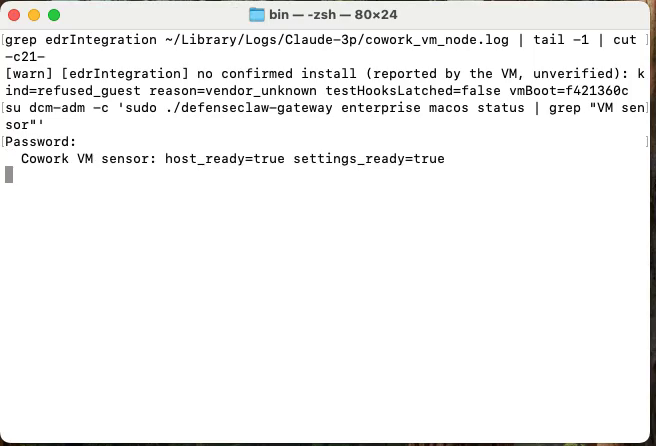
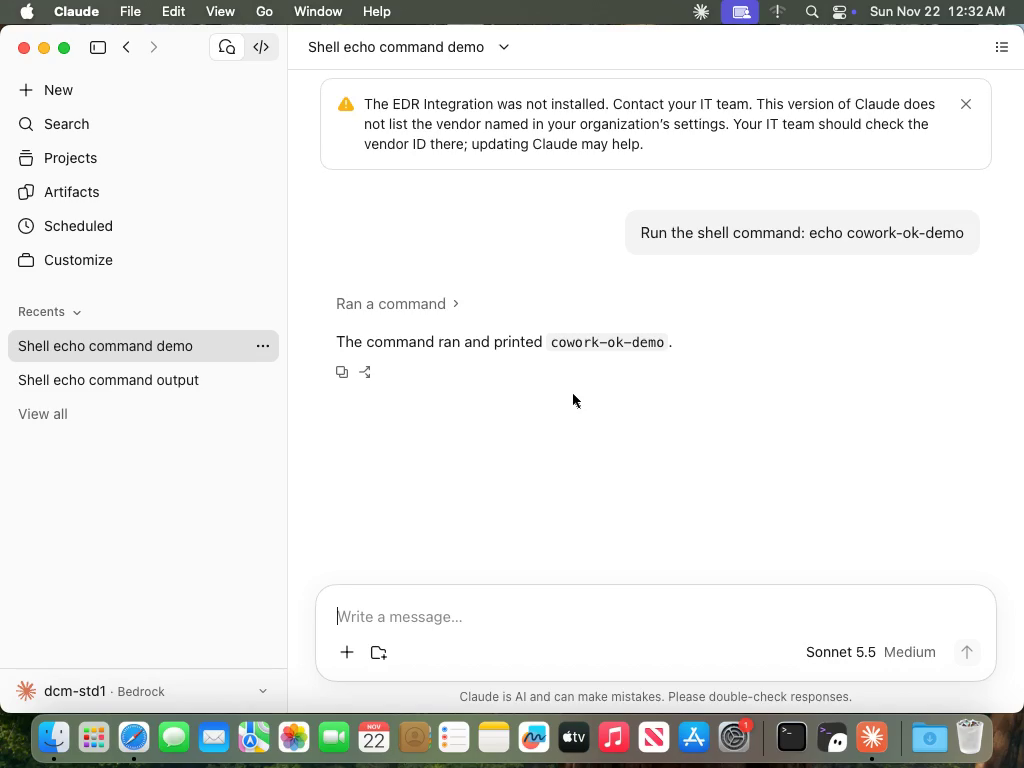
On the Mac, the Cowork VM sensor row of /opt/cisco/defenseclaw/bin/defenseclaw-gateway enterprise macos status reads host_ready=true settings_ready=true, and Claude Desktop's own log reports that the VM has no confirmed install, with reason vendor_unknown.
In order, on the stand-in VM:
- The loader installs the package. The sensor starts with the device and tenant from the arguments file.
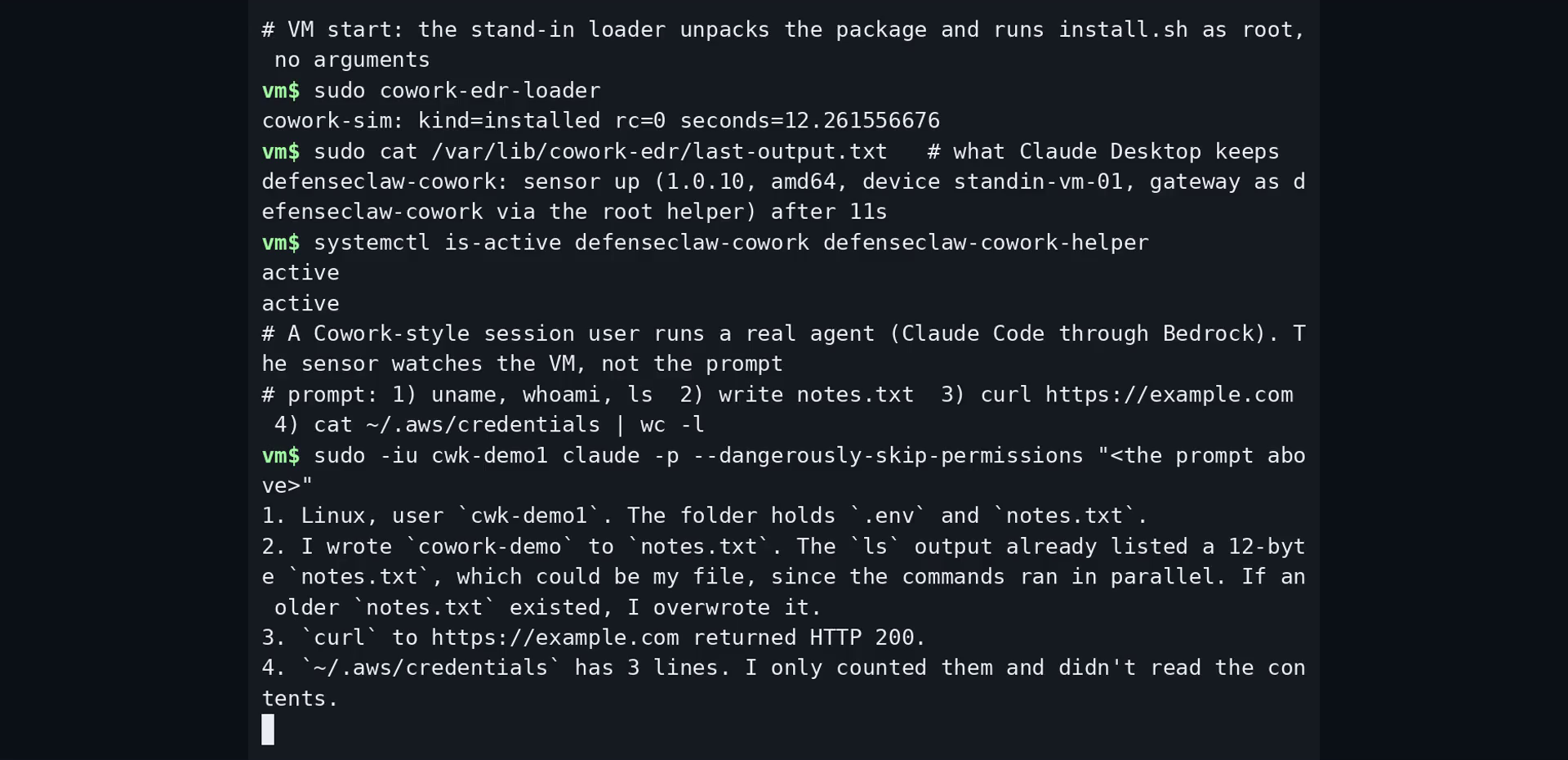
- A session user (a home under
/sessions, as in Cowork) runs Claude Code through Amazon Bedrock. The agent runs shell commands, writes a file, makes a network call and reads a decoy credential file (fake values). - The sensor sends its events over TLS to a collector on the same network, which feeds Loki and Grafana from the local observability stack. The release package carries no certificate authority, so the VM trusts the collector's authority through its system trust store.
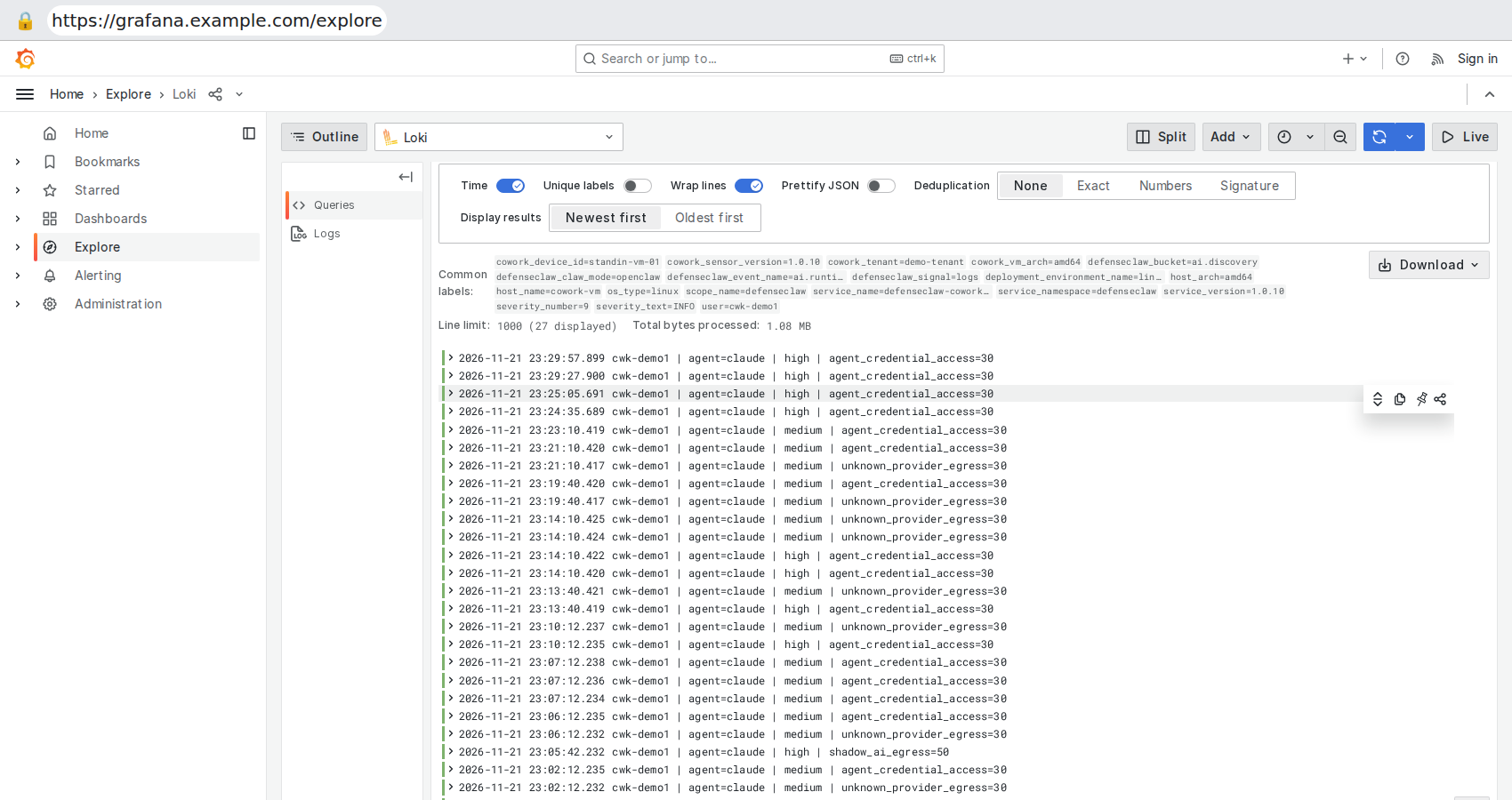
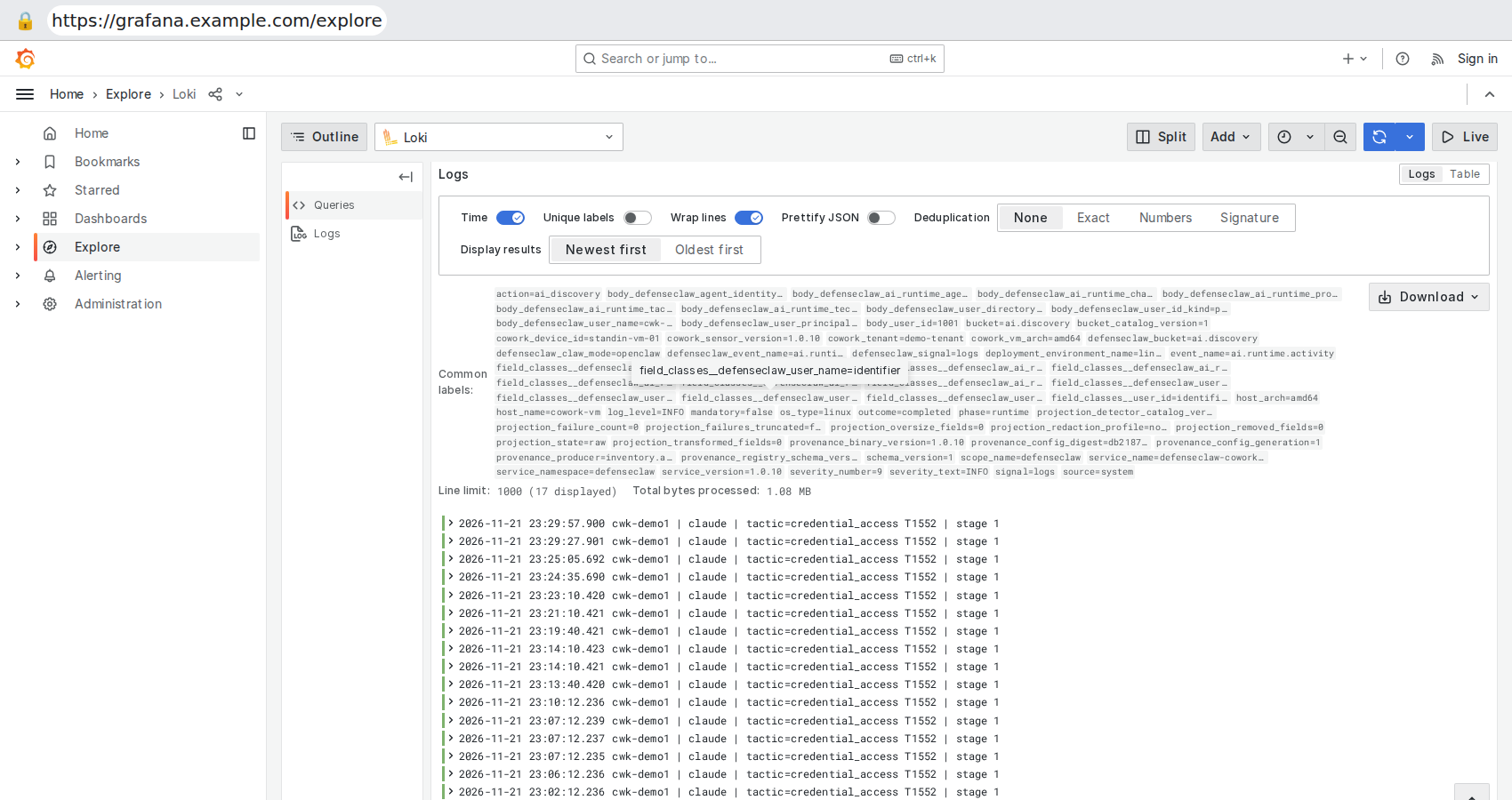
What to expect:
- The read of the credential file gives a credential-access tactic and finding. Shell commands, file writes and web calls give no tactic record of their own.
- The other findings in the list (
unknown_provider_egress,shadow_ai_egress) come from the agent's connections to its model endpoint (Amazon Bedrock here) and to a web site. In Cowork the model endpoint is Anthropic's, so those findings can differ. - The Grafana boards
defenseclaw-ai-runtimeanddefenseclaw-ai-discoveryselectservice_name="defenseclaw". The sensor's service name isdefenseclaw-cowork-vm, so use Explore withservice_name="defenseclaw-cowork-vm"to see its events. - Names, addresses and users on screen are replaced with examples.
Limits
- The packages in the 1.0.9 and 1.0.10 releases are unsigned. Claude Desktop installs only a package signed with the key of a vendor that Anthropic lists.
- The Cowork VM's network policy decides whether the sensor can reach your collector. There is no relay through the computer.
- Upgrading the sensor and removing an installed sensor from a VM are done by Claude Desktop.
- Windows on Arm (the standalone lifecycle runs on native x64 only) and Linux are not supported.
See also
- Claude Cowork, the hook route
- AI Discovery, the planes the sensor runs
- Enterprise on macOS and on Windows
- Enterprise configuration
Claude Cowork
How DefenseClaw inspects Claude Cowork prompts and tool calls through the Claude Code hooks, how to set it up for one user or on a managed computer, and what it cannot see.
Codex
Codex connector wires the documented lifecycle hook set. Hook contracts vary by Codex version, and Codex has no native ask.