
Claude Cowork
How DefenseClaw inspects Claude Cowork prompts and tool calls through the Claude Code hooks, how to set it up for one user or on a managed computer, and what it cannot see.
Claude Cowork is the agent mode of Claude Desktop. Its agent loop runs on your computer, as you, with the Claude Code engine that Claude Desktop bundles. That engine runs Claude Code hooks, so DefenseClaw inspects Cowork through the same hooks it uses for the Claude Code connector. Cowork is a surface of that connector, not a connector of its own.
Status in 1.0.8
Measured in the 1.0.8 tests on managed macOS and Windows with Claude Desktop 4.16336.0 (engine 2.1.317) using third-party inference through Amazon Bedrock: Cowork's hook calls reached the DefenseClaw gateway with surface cowork, and an administrator deny rule blocked mcp__workspace__bash. A read of a .env file was not blocked, in action mode too: its contents reached the model, which chose not to repeat the key (DefenseClaw did not withhold it), and on macOS DefenseClaw recorded the secret after the read. To prevent such a read, deny the path at PreToolUse: see Secrets in tool results. On managed macOS, the allowManagedHooksOnly lock kept an organization plugin's hooks out, and a stopped gateway blocked Cowork prompts. On Linux the managed drop-in and per-user setup were verified, but Cowork itself was not run. The hook route itself was first measured on macOS with Claude Desktop 4.4212.0, using test hooks. Where a statement was not covered by those tests, this page says so.
How Cowork runs
What the measurement on a real Cowork computer showed (macOS, Apple silicon, Claude Desktop 4.4212.0, engine 2.1.309):
| Question | Answer |
|---|---|
| Where the agent loop runs | On your computer, as you. Claude Desktop keeps the engine in its own data folder. Each turn is a short session: SessionStart to SessionEnd. |
| Where hooks run | On your computer, as children of the loop. They can reach 127.0.0.1, where the DefenseClaw gateway listens. |
| Where the file tools run | Read, Write, Edit, Glob and Grep run on your computer. A hook built into Cowork keeps them to the connected folders (a read of /etc/hosts was refused). |
| Where the shell runs | mcp__workspace__bash runs in the Cowork Linux VM, also when the computer runs Windows. Each Cowork session is its own Linux user in that VM. |
| Where web fetch runs | mcp__workspace__web_fetch runs on Anthropic's side, not in the VM and not on your computer. |
| Whether a deny holds | A PreToolUse deny from a test hook was honored for a VM shell command and for a computer-side file write. Neither ran. |
| What the VM can reach | Nothing on your computer. A direct connection to the computer's address and to 127.0.0.1 failed. Outbound traffic goes through Anthropic's proxy, which enforces an allowlist. |
| Where Cowork reads hooks | Not from ~/.claude/settings.json. It reads Claude Code machine policy (managed settings) and the plugins of your Claude account. |
This table was measured on macOS. The 1.0.8 tests also ran Cowork on managed Windows. On Linux, Cowork was not run: Claude Desktop for Linux is a beta, and Cowork on Linux is not certified.
Choose a route
| Per user (open source) | Managed computer (enterprise standalone) | |
|---|---|---|
| How Cowork reaches DefenseClaw | A DefenseClaw plugin that the user uploads to their Claude account | The Claude Code machine policy drop-in that DefenseClaw already writes |
| Who sets it up | The user, with defenseclaw setup cowork | The administrator. There is nothing to configure for Cowork itself |
| Mode | The Claude Code connector's mode: observe (the default on first setup) or action | The Claude Code connector's mode in the managed config |
| Removal | The user, in Claude Desktop | The administrator, in the managed config (guardrail.connectors.claudecode.enabled: false removes the connector) |
| Secure Client profile | Not applicable | Cowork tools keep the generic MCP path. The mapping on this page does not apply |
What DefenseClaw inspects and can block
Cowork runs ten hook events. DefenseClaw registers all ten for the plugin route.
| Event | What DefenseClaw sees | Effect |
|---|---|---|
UserPromptSubmit | The prompt | Recorded. On a managed computer a stopped gateway blocks the prompt (fail closed, enterprise_managed_gateway_not_running), measured on macOS. The 1.0.8 tests did not cover a policy block of a prompt |
PreToolUse, PermissionRequest | Each tool call with its arguments, before it runs | Can block. In the 1.0.8 tests on managed macOS and Windows, an administrator deny rule blocked mcp__workspace__bash |
PostToolUse, PostToolUseFailure | The tool result or the error | Recorded, with secrets redacted. The result has already reached the model, so these cannot block it or take it back |
SubagentStart, SubagentStop | Sub-agent lineage. Tool calls of a sub-agent carry an agent_id | Recorded |
SessionStart, Stop, SessionEnd | Session boundaries and the Cowork session id | Recorded |
Whether a policy hit blocks depends on the Claude Code connector's mode. In observe mode DefenseClaw records what it would block and lets the call run. In action mode a policy hit is blocked. A first defenseclaw setup claude-code starts in observe mode: turn blocking on with defenseclaw setup claude-code --mode action.
Shell commands get the same analysis, rule packs and judge as Claude Code Bash. Two replays back this:
- DefenseClaw's corpus of 478 POSIX shell commands, replayed under the Cowork tool name, gave the same action, severity and findings as under
Bashfor all 5,736 verdicts (three policies, observe and action mode, two events). No benign command became a block. - 83 sanitized events captured from a real Cowork session on engine 2.1.309 gave the same verdicts as the same calls sent as
BashorWebFetch.
Cowork tools
DefenseClaw maps a closed list of Cowork tool names, measured on engines 2.1.309 and 2.1.317. A tool that is not on the list, including any other mcp__workspace__* tool, takes the generic MCP tool path. It is inspected and never allowed without inspection. A tool counts as Cowork's own only when the hook payload says the engine hosts its server (source is sdk). A server that a user adds under the same name keeps its MCP identity and MCP policy.
| Tool | Runs | DefenseClaw treatment | Input keys |
|---|---|---|---|
Read, Write, Edit, Glob, Grep | Your computer, connected folders | The Claude Code file rules, unchanged | As Claude Code |
mcp__workspace__bash | Cowork VM | Judged as Bash. The POSIX shell rules apply on every host OS, because the shell is Linux | command. Captured on 2.1.309 |
mcp__workspace__web_fetch | Anthropic's side | Judged as WebFetch: URL and egress rules | url. Captured on 2.1.309 |
Agent | Your computer | Sub-agent lineage through SubagentStart and SubagentStop | As Claude Code |
mcp__Claude_Browser__navigate | Claude Desktop's browser | URL facts as WebFetch when the input is url with an optional tabId. Any other input shape keeps the generic path | Not available in the tested 3P build; inspected by the generic MCP tool path if present |
mcp__Claude_Browser__javascript_tool | Browser tab | Secret rules on the script. CodeGuard JavaScript rules alert and never block | Not available in the tested 3P build; inspected by the generic MCP tool path if present |
mcp__Claude_Browser__form_input | Browser tab | Secret rules on the typed value, so a live token typed into a page is treated like a token in a prompt. Email and phone numbers are not checked | Not available in the tested 3P build; inspected by the generic MCP tool path if present |
Other mcp__Claude_Browser__* tools | Browser tab | Generic MCP path, audited with class browser | Not read. Not available in the tested 3P build |
mcp__cowork__save_skill | Claude Desktop | The skill asset policy: a denied or disabled skill name refuses the save | name, description, content, captured on 2.1.317. DefenseClaw reads name (or skill_name, title) |
mcp__plugins__suggest_plugin_install | Claude Desktop | The plugin asset policy | Reads plugin_name, plugin_id, plugin or name. Not captured: Cowork did not call it in the 1.0.8 tests |
mcp__plugins__search_plugins, search_connectors and other mcp__plugins__* tools | Claude Desktop | Class plugin_admission. Generic MCP path: rules, AI Defense and the judge apply. A search names no plugin, so the plugin asset policy does not apply | keywords, trigger, userIntent, captured on 2.1.317 |
mcp__scheduled-tasks__create_scheduled_task, update_scheduled_task | Claude Desktop | Class persistence. Generic MCP path: rules, AI Defense and the judge apply | Not read |
mcp__cowork__allow_cowork_file_delete | Claude Desktop | Class destructive. Generic MCP path | Not read |
mcp__cowork__request_cowork_directory | Claude Desktop | Class scope_change. Generic MCP path | Not read |
mcp__session_info__read_transcript, list_sessions | Claude Desktop | Class transcript_access. Generic MCP path | Not read |
mcp__mcp-registry__* | Claude Desktop | Class mcp_admission. Generic MCP path | Not read |
mcp__<connector id>__* | Your connectors | The existing MCP tool rules | As MCP |
Asked for a plugin in the 1.0.8 tests, Claude called search_plugins and search_connectors, not suggest_plugin_install. Claude Desktop 4.16336.0 in third-party (Amazon Bedrock) mode does not offer the mcp__Claude_Browser__* tools to Cowork: a tool search for them found nothing.
For the tools on the generic path, the audit row carries the class as cowork_tool_class. Nothing in this group blocks by default, because creating a scheduled task or approving a delete is ordinary Cowork work. An administrator can block any of them by name with the tool block list in the asset policy (asset_policy.tool).
Set up for one user
Use this on a per-user (open-source) install. It needs a DefenseClaw install that has run defenseclaw init, and Claude Desktop signed in to an account that has Cowork. A managed computer refuses it, see Managed computers.
DefenseClaw cannot add a plugin to your Claude account. defenseclaw setup cowork builds the plugin, and you upload it once.
-
Run the setup command.
defenseclaw setup coworkYou do not need the
claudeCLI. On an account that has only Claude Desktop, DefenseClaw counts the Claude Code engine Claude Desktop keeps in its data folder (the newest build,ClaudeorClaude-3p) as the Claude Code installation, andsetup,status,doctorandagent discoversay "Claude Desktop engine". Action mode (defenseclaw setup claude-code --mode action) works the same way. When theclaudeCLI is installed, its version is used.If the Claude Code connector is off, setup offers to set it up first, because the plugin runs that connector's hook.
--yesanswers yes. Setup then writescowork/defenseclaw-cowork-plugin.zipin your DefenseClaw data folder (~/.defenseclaw, or%USERPROFILE%\.defenseclawon Windows, orDEFENSECLAW_HOME), prints the full path and the steps below, and offers to open Claude Desktop. -
In Claude Desktop, open Customize > Plugins > Add > Upload plugin.
-
Choose the zip file. How to enter its path in the file dialog:
OS In the file dialog macOS Press Cmd+Shift+G and paste the path Windows Paste the path into the File name box Linux Press Ctrl+L and paste the path -
Wait until Claude finishes checking the plugin. That took about 2 minutes in the measurement. Then start a Cowork task.
-
Setup, still waiting, prints
Cowork is protectedwith the time of the first Cowork event, and the Claude Code mode. If you pressed Ctrl+C or used--no-wait, check withdefenseclaw status.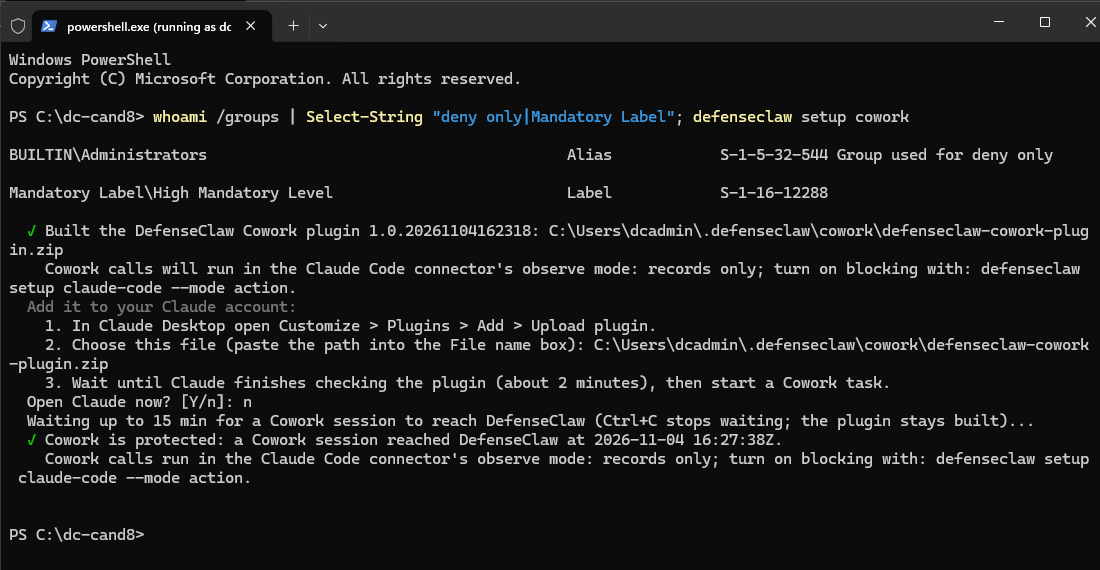
Options:
| Option | Effect |
|---|---|
--yes, -y, --non-interactive | Answers yes to setting up the Claude Code connector. Does not open Claude and does not wait, unless you ask for it |
--open-claude / --no-open-claude | Opens Claude Desktop after the build. Without either, setup asks |
--wait / --no-wait | Waits for the first Cowork event. The default is to wait |
--timeout SECONDS | How long to wait. Default 900, from 10 to 3600 |
What the plugin contains: .claude-plugin/plugin.json and hooks/hooks.json, nothing else. It has no bin/ folder, because Cowork refuses a plugin that has one. The hooks call the DefenseClaw hook that the Claude Code connector already installed, with the same matchers and timeouts, for the ten events above. Its version is 1.0. followed by the build time, and it rises on every run.
Check it
defenseclaw status and defenseclaw doctor show a Cowork row. status --json has a cowork object with protected, detail, step, reason_code, last_event_at, plugin_version and plugin_zip. The doctor check id is doctor.cowork; it passes when protected and warns otherwise.
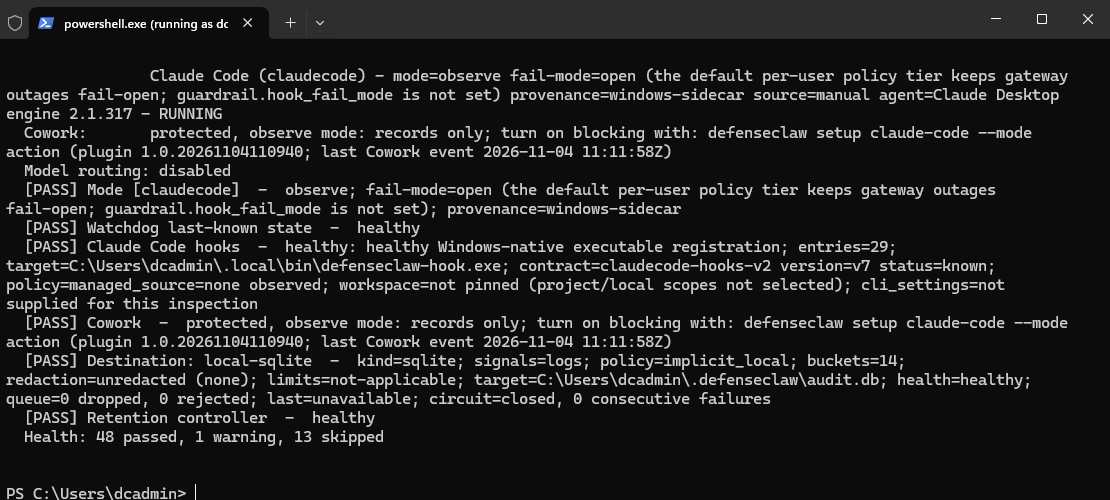
| Row says | Reason code | What to do |
|---|---|---|
| protected, with the mode, plugin version and last Cowork event | none | Nothing |
| protected, with "none since the gateway restarted": the last Cowork event came before the gateway restarted | none | Nothing. The next Cowork task updates it |
| not protected: Claude Desktop is installed, but Cowork has no DefenseClaw plugin | cowork_plugin_not_built | defenseclaw setup cowork |
| not protected yet: no Cowork event since the plugin was built | cowork_no_events | Upload the zip, wait for the check, start a Cowork task |
| not protected: the Claude Code connector is off | cowork_claudecode_off | defenseclaw setup claude-code |
| not protected while the sidecar is not answering | cowork_gateway_down | defenseclaw-gateway start |
| not protected: the gateway skipped the Claude Code connector when it started | cowork_claudecode_not_started | defenseclaw doctor |
| not confirmed: the gateway's authenticated status is unavailable | cowork_health_unavailable | defenseclaw-gateway status |
The row appears only when Claude Desktop is present or a plugin was built. It does not appear on a managed computer. "Protected" means a Cowork hook call reached this account's gateway after the current build. It is evidence that the route works, and Cowork's surface marker is caller-reported (see Limits).
Update or rebuild
Run defenseclaw setup cowork again after you move the data folder or reinstall DefenseClaw. It rebuilds the zip with a newer version and clears the earlier confirmation, so the row reads "not protected yet" until a Cowork event reaches the new build. Upload the new zip. The earlier plugin keeps working until the new one is live. If Claude then lists two DefenseClaw plugins, uninstall the older one.
Do not publish this zip to your whole organization from Claude's organization settings. It holds the absolute paths of one account's DefenseClaw install. Organizations use the managed route.
Remove
In Claude Desktop, open Customize > Plugins, then the ... menu on DefenseClaw, and choose Remove. DefenseClaw cannot remove an account plugin.
Remove the plugin before you uninstall DefenseClaw. If the hook script is gone and the plugin is still installed, the plugin's hook blocks Cowork tool calls with "DefenseClaw blocked this: its Claude Code hook script is missing or cannot be run". The message tells you to reinstall DefenseClaw and run defenseclaw setup cowork, or to remove the plugin in Claude.
How each command treats the plugin:
| Command | What it does about the plugin |
|---|---|
defenseclaw uninstall, defenseclaw uninstall --dry-run | Prints the removal step when setup cowork built a plugin from this data folder. The dry run lists it with the plan |
defenseclaw reset | Deletes the data folder, the hook script and the Cowork state with it. It reads the state first and prints the same removal step when a plugin was built, because the plugin now blocks Cowork tool calls |
defenseclaw setup remove claudecode | Turns off the Claude Code hooks. It does not touch the plugin in your Claude account and prints no Cowork step. Remove the plugin in Claude too, because Cowork is no longer protected through it |
All three leave the plugin in your Claude account. Only you can remove it.
Managed computers
On a managed standalone install, DefenseClaw's Claude Code machine policy drop-in covers Cowork, because Cowork's host loop reads Claude Code machine policy. In a measurement on macOS, test hooks in /Library/Application Support/ClaudeCode/managed-settings.json and in a managed-settings.d/90-*.json drop-in (the layout DefenseClaw writes as 90-defenseclaw.json) fired in Cowork turns, and a managed deny was honored. A managed deny wins before plugin hooks.
| OS | Drop-in |
|---|---|
| macOS | /Library/Application Support/ClaudeCode/managed-settings.d/90-defenseclaw.json |
| Windows | C:\Program Files\ClaudeCode\managed-settings.d\90-defenseclaw.json |
| Linux | /etc/claude-code/managed-settings.d/90-defenseclaw.json |
defenseclaw setup cowork does not run on a managed computer. It exits 3, writes an audit row and changes nothing.
Configured versus covered
status and verify print a cowork line and a cowork JSON member. In 1.0.8 the member is configured, not covered, because DefenseClaw can check its own side but not what Cowork runs.

| Field or line | Meaning |
|---|---|
cowork: configured | The Claude Code connector is enabled, its machine policy hooks are in place, and the Claude Desktop surface is not refused by enterprise.enrollment.unverified_versions: refuse. It says nothing about calls: the same line says how many hook calls reported themselves as Cowork since the gateway started and when the last one came, or that none has yet |
cowork <account>: last Cowork event <time or never> | The last hook call from that account that reported itself as Cowork. This is the evidence that the hook ran. Root or an administrator sees it |
reason | Why configured is false: claudecode_not_enabled, claudecode_machine_policy_not_in_place or claudecode_desktop_surface_refused |
managed_hooks_only | Whether the allowManagedHooksOnly lock is on |
requests, last_event_at | Hook calls that reported themselves as Cowork since the gateway started, machine-wide |
accounts_known | true when the audit store answered the per-account lookup, so the account list can be trusted. When it is false, the per-account last-event lines are missing, not "never" |
accounts_truncated | More than 64 accounts have Cowork rows, so the list is cut |
claude_desktop | For each included account: its Claude Desktop data folders (1p, 3p), the newest engine build in each and its trust (trusted, untrusted, unsigned, not_found), with the counts of each. An account whose folders were not checked has a reason (on Windows, for example, no signed-in session during an MDM run). Read from disk; only root or an elevated administrator sees it |
Account names stay on the computer and are not in the data that is forwarded. The TUI shows only the gateway's machine-wide Cowork count on the Claude Code connector. In the 1.0.8 tests on managed macOS and Windows, Cowork's hook calls reached the gateway with surface cowork under the drop-in, and an administrator deny rule blocked mcp__workspace__bash.
allowManagedHooksOnly
enterprise.machine_policy.connectors.claudecode.managed_hooks_only controls the allowManagedHooksOnly lock. The administrator can set it, and it is on by default.
| Value | What it does |
|---|---|
enforce (default) | Writes allowManagedHooksOnly: true in the drop-in. Anthropic documents that Claude Code then runs only the hooks in managed settings, in Cowork as in the terminal. Hooks in Cowork plugins do not run: plugins your users upload, marketplace plugins and organization plugins. The skills, commands and MCP servers of those plugins are not affected. Measured on managed macOS: an organization plugin's hooks did not run, DefenseClaw's did |
preserve | Leaves the lock out. Customers' own plugin hooks run too, and a plugin hook can change a tool call's input after DefenseClaw inspected it. The foreign-hook guard is on, and it does not read Cowork plugins. Measured on managed macOS: the organization plugin's hooks ran, and so did DefenseClaw's |
To let your users' Cowork plugin hooks run, set preserve for Claude Code only, then apply the config (ensure on Linux and macOS, Setup /ensure on Windows):
enterprise:
  machine_policy:
    connectors:
      claudecode:
        managed_hooks_only: preserve
These results are from managed macOS with Claude Desktop 4.16336.0 in third-party (Amazon Bedrock) mode, using an organization plugin with a test hook. Windows has not been measured yet. Claude Desktop 4.16336.0 installs an organization plugin only when its .claude-plugin/plugin.json sets "installationPreference": "required"; without it the plugin is only listed as available, and its hooks never run under either value.
The 1.0.8 tests did not cover whether enforce leaves Cowork's own built-in folder-scoping hook (the one that refused the read of /etc/hosts) in place. Do not rely on the lock to change Cowork's own confinement.
The engine build
Claude Desktop keeps the engine in the user's own data folder, under claude-code/<version>/, which the user can write to. Each deployment (signed in to Claude, or third-party inference) has its own data folder; Machine policy lists them per OS. DefenseClaw trusts a build by its code signature, not by its folder, and in each data folder takes the newest build that verifies.
| OS | What DefenseClaw checks |
|---|---|
| macOS | A valid Developer ID signature of Anthropic (team Q6L2SF6YDW, identifier com.anthropic.claude-code), and an Info.plist version equal to the folder |
| Windows | A valid Authenticode signature by Anthropic, PBC (or Anthropic PBC) on claude.exe, whose file version equals the folder |
| Linux | No signature: Linux builds carry none. A build counts only when its version folder holds an executable claude. It is reported as unsigned, and as unidentified while it runs, so verify fails while Cowork or the Code tab runs |
status and verify use the verified version to check coverage, as for the Claude Code CLI. Engine 2.1.309 resolves to a known contract (claudecode-hooks-v2), and a newer engine is followed. A build whose signature does not verify is reported as surface_unverified, and as managed_launch_uninspected while it runs.
What you see afterwards
| Where | What |
|---|---|
| Audit rows and the gateway log | surface is cowork, with cowork_session_id, prompt_id and cowork_tool_class |
| Connected folders | workspace_host_paths in the v8 audit body, with the path redaction class: a strict redaction profile removes them and a sensitive one hashes them |
| Hook decision telemetry | The attribute defenseclaw.agent.surface is cowork. It is absent for a terminal call |
| Gateway health | connectors[name=claudecode].surfaces.cowork with requests, last_activity_at and last_session_start_at. It appears after the first Cowork call |
| AI Discovery | Claude Desktop, whether Cowork is set up on the machine, the engine version, the VM bundle and its size, and the Cowork plugin names. See AI Discovery |
| Cowork's own window | No DefenseClaw hook warning or notice. Check defenseclaw status, defenseclaw doctor or the TUI instead. See Limits |
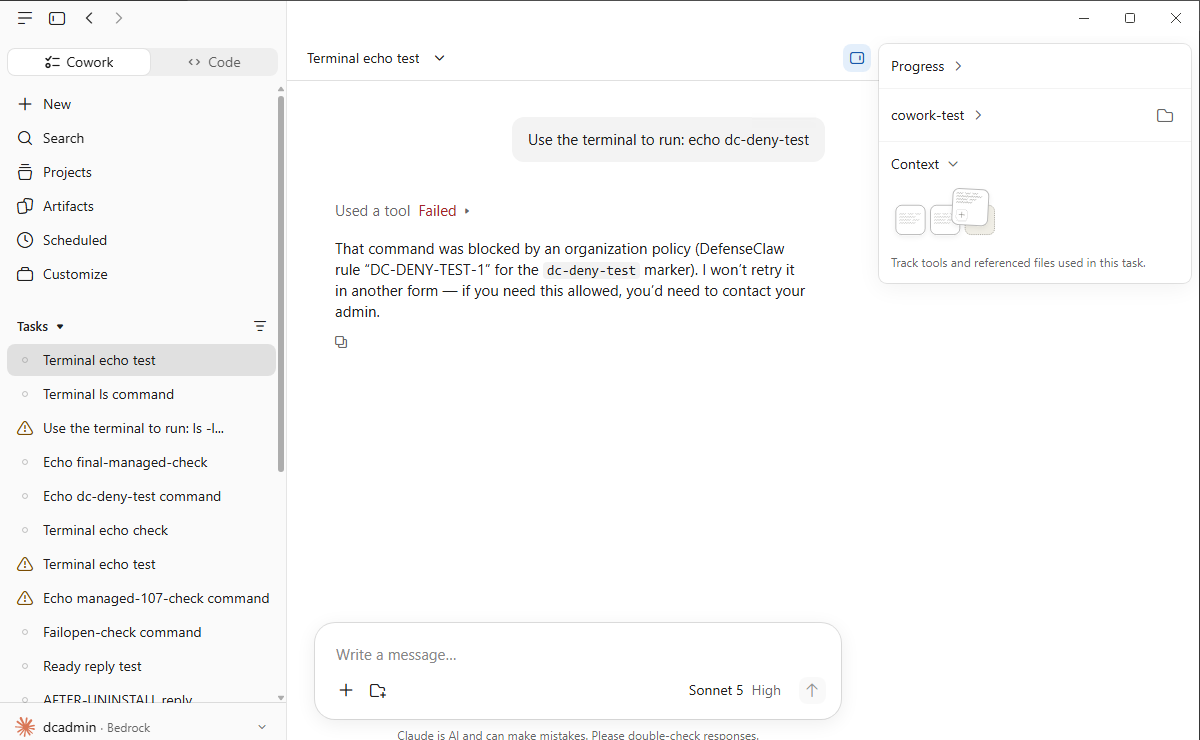
In the example below, an administrator deny rule blocked a shell command in a Cowork task on a managed Windows computer. Cowork's window shows no notice from DefenseClaw. The block shows in the model's reply, which names the rule.
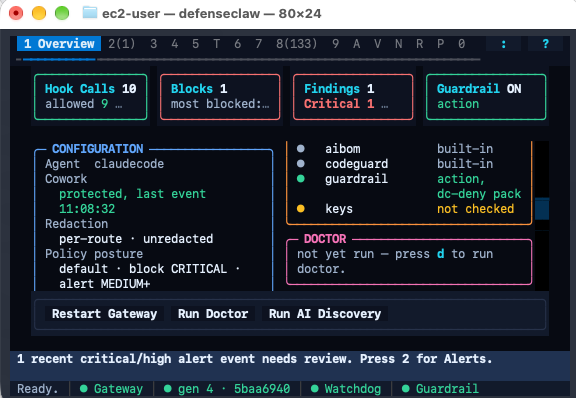
On a per-user install the TUI Overview shows the same state in its Configuration panel.
The user's identity comes from the operating system, never from Cowork's environment.
Limits
| Limit | Detail |
|---|---|
| Web fetch runs on Anthropic's side | Host egress controls on your computer do not see it. DefenseClaw sees the URL in the hook, before the call, and can block it by URL rule |
| The VM shell goes through Anthropic's proxy | Outbound traffic from the VM leaves through Anthropic's proxy and its allowlist. DefenseClaw's host egress controls do not apply to it |
| DefenseClaw's hook sees tool calls, not what a command did | What a shell command ran inside the VM is not visible from the hook |
| The Cowork surface is caller-reported | The hook marks a call as Cowork when CLAUDE_CODE_IS_COWORK=1 is set and the agent is the Desktop engine. Any local process can send that marker. It is used for attribution, never for identity, so "protected" and "last Cowork event" are evidence and not proof |
| Unmeasured input shapes | The 1.0.8 tests captured the input of save_skill, search_plugins and search_connectors. They did not capture suggest_plugin_install, which Cowork did not call, or form_input, javascript_tool and navigate, which the tested third-party build does not offer, or the format of CLAUDE_CODE_WORKSPACE_HOST_PATHS. A call with a shape DefenseClaw does not read keeps the generic MCP path |
| Unmeasured folders | Some Claude Desktop folders on Windows and Linux, such as the VM bundle and the Linux ~/.config/Claude-3p folder, are not measured yet. AI Discovery lists them |
| Detection gaps | No built-in rule flags JavaScript that exfiltrates data, such as fetch(url + document.cookie) in javascript_tool, or a download-and-execute instruction in a scheduled task prompt |
| Secrets in tool results | A secret in a file Cowork reads, such as a key in a .env file, is detected and recorded after the read, not prevented, in action mode too. The model is told the rule, never the value. To prevent the read, block it at PreToolUse with a path rule: see Secrets in tool results |
| Gateway outage | The hook follows the Claude Code connector's fail mode. On a managed computer that is closed by default: on managed macOS, with the gateway service stopped, Cowork blocked the prompt with enterprise_managed_gateway_not_running. See Fail modes |
| Notices | Cowork does not show DefenseClaw's hook warnings and notices anywhere in its window: not in the reply, the tool details or a banner (measured with Claude Desktop 4.16336.0 on macOS and Windows). When the gateway is down, Cowork keeps working without a visible warning; a plugin left after an uninstall blocks Cowork tool calls until you remove it. See DefenseClaw's state with defenseclaw status or defenseclaw doctor (the gateway and the Cowork row), in the TUI, and in the audit log: ~/.defenseclaw/logs/hook-failures.jsonl lists each call the hook let run unchecked. What an outage does is in the capability matrix |
See also
- Claude Code connector
- Machine policy, for the drop-in files and
managed_hooks_only - AI Discovery