
Tetragon on a Linux fleet
Roll DefenseClaw out to Linux computers that already run Tetragon - harden Tetragon, turn on Plane C, see your own policies' events from AI agents, observe, approve and enforce ring by ring, check the fleet, and troubleshoot - with tested Ansible and shell examples.
Where this applies
Linux, standalone enterprise profile, computers that run
Tetragon. The Secure Client profile refuses the
enterprise.tetragon block, macOS and Windows accept and ignore it, and the
open-source per-user product never connects to Tetragon.
If your Linux computers already run Tetragon, DefenseClaw's root sensor helper can read its events as Plane C's source of what AI agents did to the computer. It can also report the events of your own Tetragon policies when they hit an AI agent, and, only when you approve it, deny two fixed actions in the kernel. This page is the task flow for an administrator who pushes configuration with Ansible, Puppet, Chef, Satellite, or an MDM tool. The reference for every mode, cap and file is at the end of the page.
What DefenseClaw never does to your Tetragon
DefenseClaw does not install, update or configure Tetragon, and never writes
under /etc/tetragon. It never changes or deletes a policy of yours, and it
never connects to a TCP address. The sensor helper reads events over
Tetragon's root-owned unix socket. In observe and enforce it also loads its
own defenseclaw-* policies, and only those: it touches a policy only if it
recorded loading that exact name itself.
List view for small screens. Use the expand button to open the drawing.
- Config managementAnsible, Puppet, Chef
- pushesconfig.yaml
- config.yamlenterprise.tetragon
- triggersensure
- runs as rootensureapplies the config
- restartsSensor helper
- runs as rootSensor helperreads Tetragon
- reads, unix socketTetragon
- reportsGateway
- Gatewayrecords and exports
- exportsGrafana and Splunk
- yoursTetragonand your policies
- Grafana and Splunkalerts, dashboards
What you get
Each step adds to the one before it, and you can stop at any step.
| Step | Mode | What you get | What it changes on the computer |
|---|---|---|---|
| 1 | consume | Plane C reads Tetragon's process events: short-lived processes keep their names and arguments, native Claude Code is identified by its executable, and container processes are never mistaken for host agents | Nothing in Tetragon. Needs Plane C turned on |
| 2 | consume, customer_events: agent | The events of your own kprobe and LSM policies, when they hit an AI agent, tagged with the policy name and tied to the agent, the user and the hook decision | Nothing in Tetragon. Your policies are read, never changed |
| 3 | observe | DefenseClaw's own read-only policies, and two kernel controls in monitor mode that count what they would have denied | Loads three defenseclaw-* policies |
| 4 | enforce | The two controls return Operation not permitted after a measured burn-in and your approval, for one user per computer whose agent is a native binary (see the limits) | The same policies; the controls move to enforce mode |
How this fits with hooks, sandboxes and the egress proxy is on Agent segmentation, visibility and enforcement.
Before you start
| Need | Detail |
|---|---|
| DefenseClaw | The standalone enterprise package installed with the Linux configuration management recipes, or the lifecycle in Linux. Users and agents enrolled. The examples on this page need a release with the Tetragon integration: it reads config_version: 9 and enterprise.tetragon. A computer that runs 1.0.0 refuses this config (config_version_unsupported), so upgrade it with its current config (config_version: 8) first, then push this one |
| Tetragon | 1.7.x on RHEL 9 x86_64 supports consume, observe and enforce. 1.6.x supports consume only. Ubuntu 22.04 and 24.04 and arm64: consume only. All of these are expected to work and not verified yet. RHEL 8 (kernel 4.18) is not supported. Other versions fall back to cn_proc and fanotify and report tetragon_unsupported_version |
| Kernel | consume works wherever Tetragon runs. enforce needs BPF LSM: bpf in the kernel's lsm= list |
| Root | Every command below runs as root. The DefenseClaw binaries are not on PATH, so the commands spell out /opt/defenseclaw/bin |
Run this read-only check on one computer first, as root:
jq -r .server_address /var/run/tetragon/tetragon-info.json   # want unix:///var/run/tetragon/tetragon.sock
stat -c '%U:%G %a %n' /var/run/tetragon /var/run/tetragon/tetragon.sock   # want root:root, not world-writable
tetra version                       # want 1.7.x for observe and enforce (1.6.x: consume only)
cat /sys/kernel/security/lsm        # enforce needs bpf in the list
ls /etc/tetragon/tetragon.conf.d/ # your settings; DefenseClaw never writes here| Output | Meaning | If it is not as wanted |
|---|---|---|
server_address | Tetragon's API address. A unix:// path is what DefenseClaw uses. Tetragon's packaged default is a TCP port on localhost, which any local account can use to load kernel policies | Set server-address in Harden Tetragon |
stat | The socket and its folder must belong to root and not be writable by others; the info file tetragon-info.json and its folder (the same /var/run/tetragon) must belong to root and be writable only by root, so a group-writable folder is refused too. Otherwise the helper refuses to connect (tetragon_untrusted_endpoint), and tetragon status and verify name the path | Restart Tetragon so it recreates the socket, and fix any other owner or group write bit of the folder (sudo chmod go-w /var/run/tetragon) |
tetra version | The supported window for each mode | Keep mode: consume on 1.6.x, or install 1.7.x |
lsm | BPF LSM is what lets a kernel control return an error | Add bpf to the lsm= boot parameter and reboot before you enforce |
tetragon.conf.d | Your own settings, one file per flag | Nothing: DefenseClaw reads Tetragon and never edits these files |
Harden Tetragon
The helper trusts Tetragon's API only as far as it can verify it. The settings
are files in /etc/tetragon/tetragon.conf.d, one file per setting, named for
the flag.
A restart of Tetragon drops policies added with tetra
Restarting Tetragon drops every policy that was added over its API, yours and
DefenseClaw's. Policies in /etc/tetragon/tetragon.tp.d reload. DefenseClaw's
own policies come back within about a minute. Policies you added by hand with
tetra do not, so put the ones you keep in tetragon.tp.d, and restart in a
maintenance window, a few computers at a time.
Required
| Setting | Value | When | Why |
|---|---|---|---|
server-address | unix:///var/run/tetragon/tetragon.sock | every mode | The default TCP port lets any local account load kernel policies. The helper never connects to TCP: it stays on cn_proc and fanotify, and status reports tetragon_tcp_api |
| Socket ownership | root:root, mode 0660, in a root-owned folder | every mode | The helper connects only when the socket and its folder belong to root, and the server behind the socket runs as root and is the process named in /var/run/tetragon/tetragon-info.json |
keep-sensors-on-exit | false (Tetragon's default) | enforce | With true, stopping Tetragon leaves its programs enforcing with nobody updating their scope. enforce is refused and the controls stay in monitor mode (tetragon_persistent_sensors) |
| BPF LSM | bpf in the kernel's lsm= boot parameter | enforce | The controls are LSM programs. Without it they cannot deny (kernel_lsm_unavailable) |
| Version | Tetragon 1.7.x | observe, enforce | 1.6.x supports consume only |
Recommended
| Setting | Value | Why |
|---|---|---|
health-server-address | 127.0.0.1:6789 | The default listens on every interface |
metrics-server | 127.0.0.1:2112 | The helper reads loss counters only from a loopback address whose listener is Tetragon. Without it, "events lost" reads unknown. The counts are shown, never acted on |
redaction-filters | Your filters for secrets in command lines | Tetragon's own export file holds every user's arguments. DefenseClaw never reads or widens it |
Not needed
| Setting | Why |
|---|---|
enable-ancestors | The helper requests no ancestors on its own stream, and ancestors cost CPU on every event. Leave your setting as it is, but DefenseClaw does not depend on it |
Policies that use uprobe (for example DNS naming through getaddrinfo) pin
about 137 MB of kernel memory. DefenseClaw loads none.
echo unix:///var/run/tetragon/tetragon.sock | sudo tee /etc/tetragon/tetragon.conf.d/server-address
echo 127.0.0.1:6789 | sudo tee /etc/tetragon/tetragon.conf.d/health-server-address
echo 127.0.0.1:2112 | sudo tee /etc/tetragon/tetragon.conf.d/metrics-server
# Only on computers that will enforce:
echo false | sudo tee /etc/tetragon/tetragon.conf.d/keep-sensors-on-exit
# This drops policies added with tetra; tetragon.tp.d policies reload.
sudo systemctl restart tetragon
harden-tetragon.yml writes the same files, restarts Tetragon only when a file
changed, and on rings that will enforce also checks that BPF LSM is on. Run it
twice: the second run changes nothing.
# Harden the Tetragon you already run so the DefenseClaw sensor helper can
# read it. This play is yours: DefenseClaw never writes under /etc/tetragon.
#
# Restarting Tetragon drops every policy added over its API with `tetra`
# (DefenseClaw's and yours). Policies in /etc/tetragon/tetragon.tp.d reload.
# Run it in a maintenance window, a few hosts at a time (tetragon_serial).
#
#   ansible-playbook -i inventory harden-tetragon.yml
#   ansible-playbook -i inventory harden-tetragon.yml -e tetragon_for_enforce=true
- name: Harden Tetragon for DefenseClaw
  hosts: tetragon_hosts
  become: true
  serial: "{{ tetragon_serial | default(5) }}"
  vars:
    tetragon_conf_dir: /etc/tetragon/tetragon.conf.d
    # Set to true on the rings that will enforce.
    tetragon_for_enforce: false
    # Required in every mode: the API is a root-owned unix socket, never TCP.
    tetragon_required:
      server-address: "unix:///var/run/tetragon/tetragon.sock"
    # Required to enforce: stopping Tetragon must not leave programs enforcing
    # with nobody updating them.
    tetragon_required_for_enforce:
      keep-sensors-on-exit: "false"
    # Recommended: listeners on loopback only.
    tetragon_recommended:
      metrics-server: "127.0.0.1:2112"
      health-server-address: "127.0.0.1:6789"
    # Not needed: enable-ancestors. DefenseClaw requests no ancestors and
    # they cost CPU on every event.
  tasks:
    - name: Create the Tetragon settings folder
      ansible.builtin.file:
        path: "{{ tetragon_conf_dir }}"
        state: directory
        owner: root
        group: root
        mode: "0755"

    - name: Write the required settings
      ansible.builtin.copy:
        content: "{{ item.value }}\n"
        dest: "{{ tetragon_conf_dir }}/{{ item.key }}"
        owner: root
        group: root
        mode: "0644"
      loop: "{{ tetragon_required | dict2items }}"
      notify: Restart Tetragon

    - name: Write the settings that enforcement needs
      ansible.builtin.copy:
        content: "{{ item.value }}\n"
        dest: "{{ tetragon_conf_dir }}/{{ item.key }}"
        owner: root
        group: root
        mode: "0644"
      loop: "{{ tetragon_required_for_enforce | dict2items }}"
      when: tetragon_for_enforce | bool
      notify: Restart Tetragon

    - name: Write the recommended settings
      ansible.builtin.copy:
        content: "{{ item.value }}\n"
        dest: "{{ tetragon_conf_dir }}/{{ item.key }}"
        owner: root
        group: root
        mode: "0644"
      loop: "{{ tetragon_recommended | dict2items }}"
      notify: Restart Tetragon

    - name: Restart Tetragon now, so the checks below see the new settings
      ansible.builtin.meta: flush_handlers

    - name: Read the kernel's list of security modules
      ansible.builtin.command: cat /sys/kernel/security/lsm
      register: tetragon_lsm
      changed_when: false
      when: tetragon_for_enforce | bool

    - name: Require BPF LSM on hosts that will enforce
      ansible.builtin.assert:
        that: "'bpf' in tetragon_lsm.stdout"
        fail_msg: "bpf is not in the kernel's lsm= list. Add it to the boot parameters and reboot before you enforce."
        quiet: true
      when: tetragon_for_enforce | bool

  handlers:
    - name: Restart Tetragon
      ansible.builtin.systemd:
        name: tetragon
        state: restarted
Step 1: Turn on Plane C and consume
consume is the default mode, but it does nothing until Plane C is on, and
Plane C is opt-in. With Plane C off, the effective mode is off and status
reports tetragon_plane_c_off. Merge this into the admin config you already
push:
ai_discovery:
  runtime:
    enabled: true
    enable_host_plane: true      # Plane C; without it the Tetragon mode is off
enterprise:
  profile: standalone
  tetragon:
    mode: consume                # consume | observe | enforce | off
    customer_events: agent       # your policies' events from AI agents: agent | off
Push it the way you push the rest of the config. The package's ensure step
validates the candidate, applies it, and rolls back on failure; see
the procedure every recipe follows.
A change to enterprise.tetragon is rendered into a drop-in for the sensor
helper, and the helper restarts into it. The gateway re-attaches to the
restarted helper within seconds and Plane C records again; until its next poll
(30 seconds by default), tetragon verify warns that the gateway records
nothing from Plane C. A warning never fails the gate.
defenseclaw-tetragon.yml installs the package, renders the candidate config
from config.yaml.j2 for the ring, runs ensure and verify, and then gates
the ring on tetragon verify. The gate retries for up to two minutes: the
helper applies a new mode at its first pass after ensure restarted it, within
a minute, and until then verify can fail defenseclaw.policies and
defenseclaw.agents. The play takes one ring at a time and stops at
the first computer that fails (serial and any_errors_fatal). The ring
variables go in group_vars, as the play's header shows.
# Install DefenseClaw standalone enterprise and set its Tetragon mode, ring by
# ring. Ring variables live in group_vars, one file per ring group:
#
#   group_vars/defenseclaw_ring_pilot.yml
#     defenseclaw_tetragon_mode: observe
#     defenseclaw_tetragon_burn_in: 40h
#   group_vars/defenseclaw_ring_broad.yml
#     defenseclaw_tetragon_mode: enforce
#     defenseclaw_tetragon_enforce_ack: sha256:08b71155b713   # from `tetragon verify --ready-for enforce`
#     defenseclaw_guardrail_mode: action   # the kernel controls deny only for connectors in action mode
#
# Run one ring at a time, and stop at the first host that fails its checks:
#
#   ansible-playbook -i inventory defenseclaw-tetragon.yml -e defenseclaw_ring=defenseclaw_ring_pilot
- name: DefenseClaw standalone enterprise with Tetragon
  hosts: "{{ defenseclaw_ring | default('defenseclaw_linux') }}"
  become: true
  serial: "{{ defenseclaw_serial | default(5) }}"
  any_errors_fatal: true
  vars:
    # The release you deploy. It must include the Tetragon integration: it
    # reads config_version 9 and enterprise.tetragon, which 1.0.0 refuses.
    defenseclaw_version: "<version>"
    # SHA-256 values from the release's cosign-verified checksums.txt
    defenseclaw_pins:
      defenseclaw-enterprise-<version>-linux-amd64.deb: "<sha256>"
      defenseclaw-enterprise-<version>-linux-amd64.rpm: "<sha256>"
      defenseclaw-enterprise-<version>-linux-arm64.deb: "<sha256>"
      defenseclaw-enterprise-<version>-linux-arm64.rpm: "<sha256>"
    defenseclaw_arch: "{{ {'x86_64': 'amd64', 'aarch64': 'arm64'}[ansible_facts['architecture']] }}"
    defenseclaw_format: "{{ 'deb' if ansible_facts['pkg_mgr'] == 'apt' else 'rpm' }}"
    defenseclaw_package: "defenseclaw-enterprise-{{ defenseclaw_version }}-linux-{{ defenseclaw_arch }}.{{ defenseclaw_format }}"
    defenseclaw_gateway: /opt/defenseclaw/bin/defenseclaw-gateway
    # The ring variables are not set here: play vars outrank group_vars, so a
    # ring's mode would never take effect. They default where they are read.
  tasks:
    - name: Create the root-only staging folder
      ansible.builtin.file:
        path: /etc/mdm/defenseclaw
        state: directory
        owner: root
        group: root
        mode: "0700"

    - name: Render the candidate config for this ring
      ansible.builtin.template:
        src: config.yaml.j2
        dest: /etc/mdm/defenseclaw/config.yaml
        owner: root
        group: root
        mode: "0600"

    - name: Create the config folder
      ansible.builtin.file:
        path: /etc/defenseclaw
        state: directory
        owner: root
        group: root
        mode: "0755"

    - name: Put the config in place before the first install
      ansible.builtin.template:
        src: config.yaml.j2
        dest: /etc/defenseclaw/config.yaml
        owner: root
        mode: "0640"
        force: false

    - name: Download the package and check its SHA-256
      ansible.builtin.get_url:
        url: "https://github.com/cisco-ai-defense/defenseclaw/releases/download/{{ defenseclaw_version }}/{{ defenseclaw_package }}"
        dest: "/var/cache/{{ defenseclaw_package }}"
        checksum: "sha256:{{ defenseclaw_pins[defenseclaw_package] }}"
        owner: root
        group: root
        mode: "0644"

    - name: Install or upgrade the package (Debian, Ubuntu)
      ansible.builtin.apt:
        deb: "/var/cache/{{ defenseclaw_package }}"
      when: ansible_facts['pkg_mgr'] == 'apt'

    - name: Install or upgrade the package (RHEL family)
      ansible.builtin.dnf:
        name: "/var/cache/{{ defenseclaw_package }}"
        state: present
        # The rpm has no embedded signature; the SHA-256 check above proves it.
        disable_gpg_check: true
      when: ansible_facts['pkg_mgr'] in ['dnf', 'dnf5']

    - name: Apply the config and converge
      ansible.builtin.command:
        argv:
          - "{{ defenseclaw_gateway }}"
          - enterprise
          - linux
          - ensure
          - --from-package
          - --config
          - /etc/mdm/defenseclaw/config.yaml
          - --json
      register: defenseclaw_ensure
      until: defenseclaw_ensure.rc != 75
      retries: 5
      delay: 30
      changed_when: defenseclaw_ensure.rc == 0 and not (defenseclaw_ensure.stdout | from_json).noop
      failed_when: defenseclaw_ensure.rc != 0

    - name: Verify the deployment
      ansible.builtin.command:
        argv: ["{{ defenseclaw_gateway }}", enterprise, linux, verify, --json]
      changed_when: false

    - name: Gate the ring on Tetragon readiness for its mode
      ansible.builtin.command:
        argv:
          - "{{ defenseclaw_gateway }}"
          - enterprise
          - linux
          - tetragon
          - verify
          - --ready-for
          - "{{ defenseclaw_tetragon_mode | default('consume') }}"
      register: defenseclaw_tetragon_ready
      # ensure restarts the sensor helper into a new mode, and the helper
      # loads that mode's policies at its first pass, within a minute: the
      # gate waits for it rather than failing on the first look.
      until: defenseclaw_tetragon_ready.rc == 0
      retries: 6
      delay: 20
      changed_when: false
      failed_when: defenseclaw_tetragon_ready.rc != 0
when: (defenseclaw_tetragon_mode | default('consume')) != 'off'# Candidate DefenseClaw admin config, rendered per ring by defenseclaw-tetragon.yml.
# Merge the ai_discovery and enterprise.tetragon parts into the config you already push.
config_version: 9
deployment_mode: managed_enterprise
data_dir: /var/lib/defenseclaw
policy_dir: /etc/defenseclaw/policies
gateway:
api_bind: 127.0.0.1
api_port: 18970
guardrail:
enabled: true
mode: "{{ defenseclaw_guardrail_mode | default('observe') }}" # observe | action; a kernel control denies only for a connector in action mode
connectors:
claudecode: {}
codex: {}
ai_discovery:
runtime:
enabled: true
enable_host_plane: true # Plane C; without it the Tetragon mode is off
enterprise:
profile: standalone
tetragon:
mode: "{{ defenseclaw_tetragon_mode | default('consume') }}" # consume | observe | enforce | off
customer_events: "{{ defenseclaw_tetragon_customer_events | default('agent') }}" # your policies' events from AI agents: agent | off
{% if defenseclaw_tetragon_burn_in | default('') | string != '' %}
burn_in: {{ defenseclaw_tetragon_burn_in }} # covered agent-hours per user; 0, or 24h to 2160h
{% endif %}
{% if defenseclaw_tetragon_enforce_ack | default('') | length > 0 %}
enforce_ack: {{ defenseclaw_tetragon_enforce_ack | tojson }} # one digest, or a list of up to 4 during a ring upgrade
{% endif %}Template
They run the same three commands: ensure, verify and tetragon verify.
Stage the config file the way the recipes
do, and run the commands only when it changes. The readiness check retries for
up to two minutes, as the play's gate does: the helper applies a new mode at
its first pass after ensure restarted it.
$gateway = '/opt/defenseclaw/bin/defenseclaw-gateway'
exec { 'defenseclaw ensure':
  command     => "${gateway} enterprise linux ensure --from-package --config /etc/mdm/defenseclaw/config.yaml --json",
  refreshonly => true,
  subscribe   => File['/etc/mdm/defenseclaw/config.yaml'],
}
exec { 'defenseclaw tetragon verify':
  command     => "${gateway} enterprise linux tetragon verify --ready-for observe",
  refreshonly => true,
  tries       => 6,
  try_sleep   => 20,
  subscribe   => Exec['defenseclaw ensure'],
}
execute 'defenseclaw ensure' do
command '/opt/defenseclaw/bin/defenseclaw-gateway enterprise linux ensure --from-package --config /etc/mdm/defenseclaw/config.yaml --json'
action :nothing
subscribes :run, 'template[/etc/mdm/defenseclaw/config.yaml]', :immediately
end
execute 'defenseclaw tetragon verify' do
command '/opt/defenseclaw/bin/defenseclaw-gateway enterprise linux tetragon verify --ready-for observe'
retries 6
retry_delay 20
action :nothing
subscribes :run, 'execute[defenseclaw ensure]', :immediately
enddefenseclaw-ensure:
cmd.run:
- name: /opt/defenseclaw/bin/defenseclaw-gateway enterprise linux ensure --from-package --config /etc/mdm/defenseclaw/config.yaml --json
- onchanges:
- file: /etc/mdm/defenseclaw/config.yaml
defenseclaw-tetragon-ready:
cmd.run:
- name: /opt/defenseclaw/bin/defenseclaw-gateway enterprise linux tetragon verify --ready-for observe
- retry:
attempts: 6
interval: 20
- onchanges:
- cmd: defenseclaw-ensureCheck one computer by hand. verify never changes anything and never connects
to Tetragon. It reads the installed config, the helper's state, Tetragon's info
file and the unit states, and it exits 0 when no check fails and 1 when one
does. Warnings never fail it, so your tool can gate on the exit code.
sudo /opt/defenseclaw/bin/defenseclaw-gateway enterprise linux tetragon verify --ready-for consume
sudo /opt/defenseclaw/bin/defenseclaw-gateway enterprise linux tetragon status
Each line is a pass (✓), a warning (!), a failure (✗) or information
(i). A failure prints the exact command that fixes it. The checks, in
order: Tetragon is installed and running, its API is a root-owned unix socket,
its version is in the window for the mode, the helper's stream is connected
(and not on the cn_proc fallback), the metrics and health listeners are on
loopback, Plane C is on and the gateway records it, and your policies are
counted. status shows
Tetragon's version in consume too. The gateway's own
defenseclaw-gateway status ends its Subsystems list with one line, Kernel sensor: Tetragon v1.7.1 (consume), and adds ; kernel controls: ... once
DefenseClaw's controls are loaded. On the fallback it reads Kernel sensor: cn_proc and fanotify (Tetragon not used: <reason>).
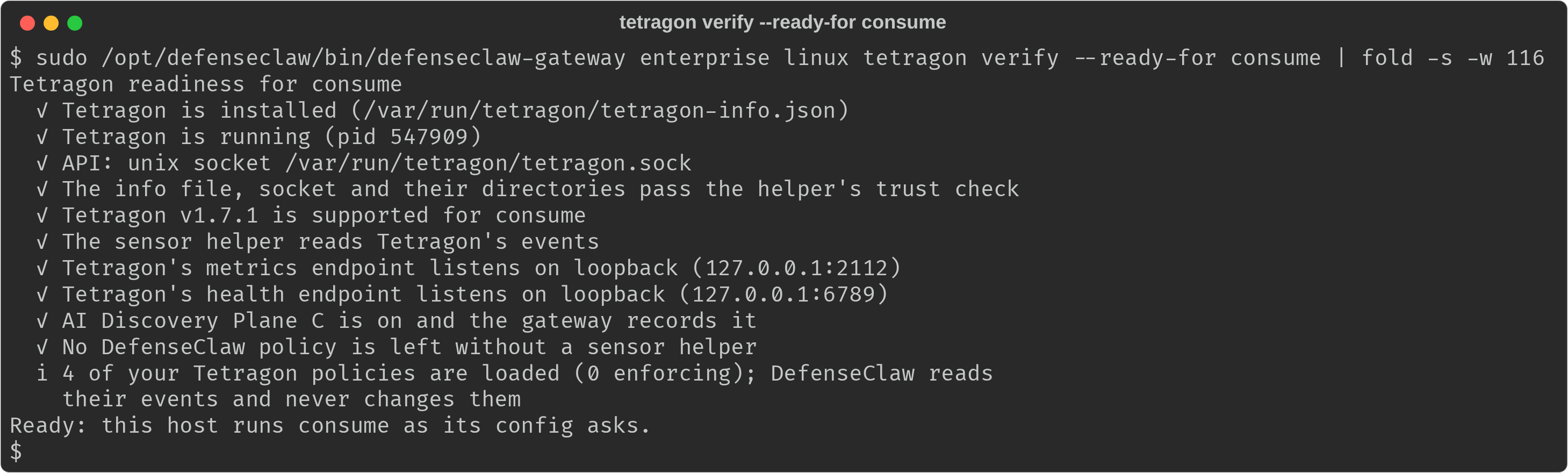
The same computer, as a replay: the readiness check, then status, which in
consume shows Tetragon's version and your own policies and says the computer
is ready for observe.
consume with Tetragon 1.7.1 and four policies of the administrator loaded. The event counts keep growing as the administrator's policies fire.Step 2: See your own policies' events
If you already run Tetragon policies on kprobe or LSM hooks, for example one
that watches opens of ~/.aws/credentials or one that watches tcp_connect,
DefenseClaw reports their events when they hit an AI agent. It does this in
consume, observe and enforce, and it never manages, changes or deletes
your policies. Item by item:
- Ownership is by record. A policy is DefenseClaw's only when this helper
recorded loading it. Everything else is yours, including a policy named
defenseclaw-controls-deadbeef(which also raisestetragon_foreign_defenseclaw_name). - Only agent events become records. The gateway attributes each event to
the agent's process lineage, the user, and the hook decision for that tool
call when there is one (
hook_joinisexactortemporal). Events from the user's normal shell, from other processes and from containers are counted per policy and never exported one by one. - Not scored. Your events are not part of DefenseClaw's risk scores or findings, so a noisy policy of yours cannot inflate them.
What is forwarded, per event of a kprobe or LSM policy:
| Field | Detail |
|---|---|
| Policy | Name, hook type (kprobe or lsm), function, tags and message |
| Action and mode | Tetragon's action (post, override, sigkill, signal, ...) and the policy's mode. Mode is refreshed every 15 seconds, so an event within 15 seconds of a mode change may carry the old one |
| Outcome | observed, would_block (an enforcing action in a monitor-mode policy) or blocked (an enforcing action in an enforce-mode policy) |
| Target | The first file or binary path, or the peer of a socket, as one field. It is a content field: each destination's redaction profile decides whether it leaves the host |
| Process | Pid, exec id, executable, user, start time and the command line, redacted as for every other event |
| Count | Repeats of the same policy, process, function, action and target within 60 seconds fold into one record with a count |
Never forwarded: string and byte arguments, integers, capabilities and
credentials, kernel and user stack traces, return values, ancestors and the raw
event. Each policy has a budget of 20 events a second (a burst of 100) and the
host 200; the overflow is counted, and status warns
tetragon_customer_events_capped for the hour it happens.
Where you see them:
| Surface | What |
|---|---|
tetragon status | A section "Your Tetragon policies": name, mode, state, events seen, forwarded, blocked, last event |
enterprise linux discovery | One line: how many policies are loaded and enforcing, and how many agent events were forwarded since the sensor helper started |
| Telemetry | The ai.runtime.kernel_event log family and the defenseclaw.kernel.events metric with owner=customer |
| Grafana and Splunk | The row "Your Tetragon policies: events from AI agents" |
| Developer | A block by your policy is explained in the agent's next answer, like a DefenseClaw block |
To forward nothing and keep only the counts, set customer_events: off.
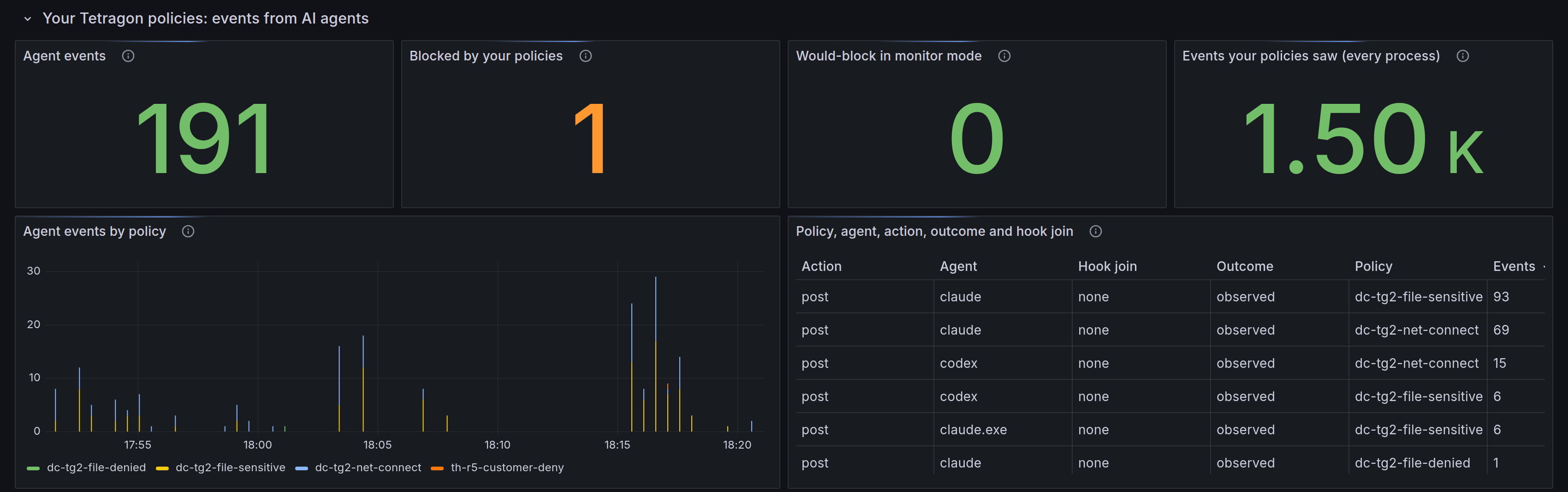
The tiles split what your policies saw: the last tile counts every process,
the first only the events below an AI agent. The table keeps one row per
policy, agent, action, outcome and hook join (exact, temporal or none).
A real run over about half an hour on the lab computer.
Step 3: Observe on a pilot ring
observe loads three DefenseClaw policies in Tetragon (defenseclaw-observe,
defenseclaw-connect and defenseclaw-controls, the last in monitor mode) and
counts what the two kernel controls would have denied. Nothing is denied.
The ring decides the mode through the ring variables. A pilot ring that
accumulates burn-in in days uses a short burn_in:
defenseclaw_tetragon_mode: observe
defenseclaw_tetragon_burn_in: 40h
Who is enrolled for the kernel controls: every user with a row in
targets.yaml, and, for the connectors that reach users through vendor machine
policy (Claude Code, Codex, Cursor, Copilot CLI and OpenCode), every eligible
account of enterprise.enrollment, which has no row for them. You do not need
to change enterprise.enrollment.unenrolled_users. A targets.yaml row for the
same user and connector, enabled or not, decides for that pair. status marks
a connector a user is enrolled for through machine policy with *.
168h is 168 hours of agent use, not a week
burn_in counts covered agent-hours per user and computer. Time accrues only
while an anchored agent of that user is running and the Tetragon stream is
connected, so 168h is about five to six working weeks for a full-time agent
user. The guide's pilot uses 40h. The default stays 168h; shorten it for a
pilot, and keep it long for the rings that follow.
Run the play for the pilot ring, then watch it for a working session. From
observe on, verify also checks that Tetragon loaded DefenseClaw's own
policies (defenseclaw.policies): a policy Tetragon refused (load_error)
or a pass that did not apply them fails the gate, with the commands that show
why. Watch it with:
sudo /opt/defenseclaw/bin/defenseclaw-gateway enterprise linux tetragon verify --ready-for observe
sudo /opt/defenseclaw/bin/defenseclaw-gateway enterprise linux tetragon status
What to read in status:
- Users. One row per enrolled user: whether they are
enforcing, in burn-in, reset by a hit, or monitor-only and why, and their burn-in as progress, percent and an estimate. The estimate appears after the window is 24 hours old; before that it reads "measuring". - A hit. A would-block hit is an agent that did what a control would deny: it opened an SSH private key, or wrote a shell profile. It lists the control, the user's path, the binary and the time, and it sends that user back to the start of a fresh window. Read it as a question: was the tool expected to do this? If it was, this user cannot be enforced for this control in this release, and other users are not affected.
- Observed, not enforced. Sessions the controls will never cover, with the reason in words: an IDE terminal, a process that looks like an agent only by its name, a user who is not enrolled, or a connector in observe mode.
- Users with no agent. A user with no command-line agent installed has no
control at all.
verifynames them.
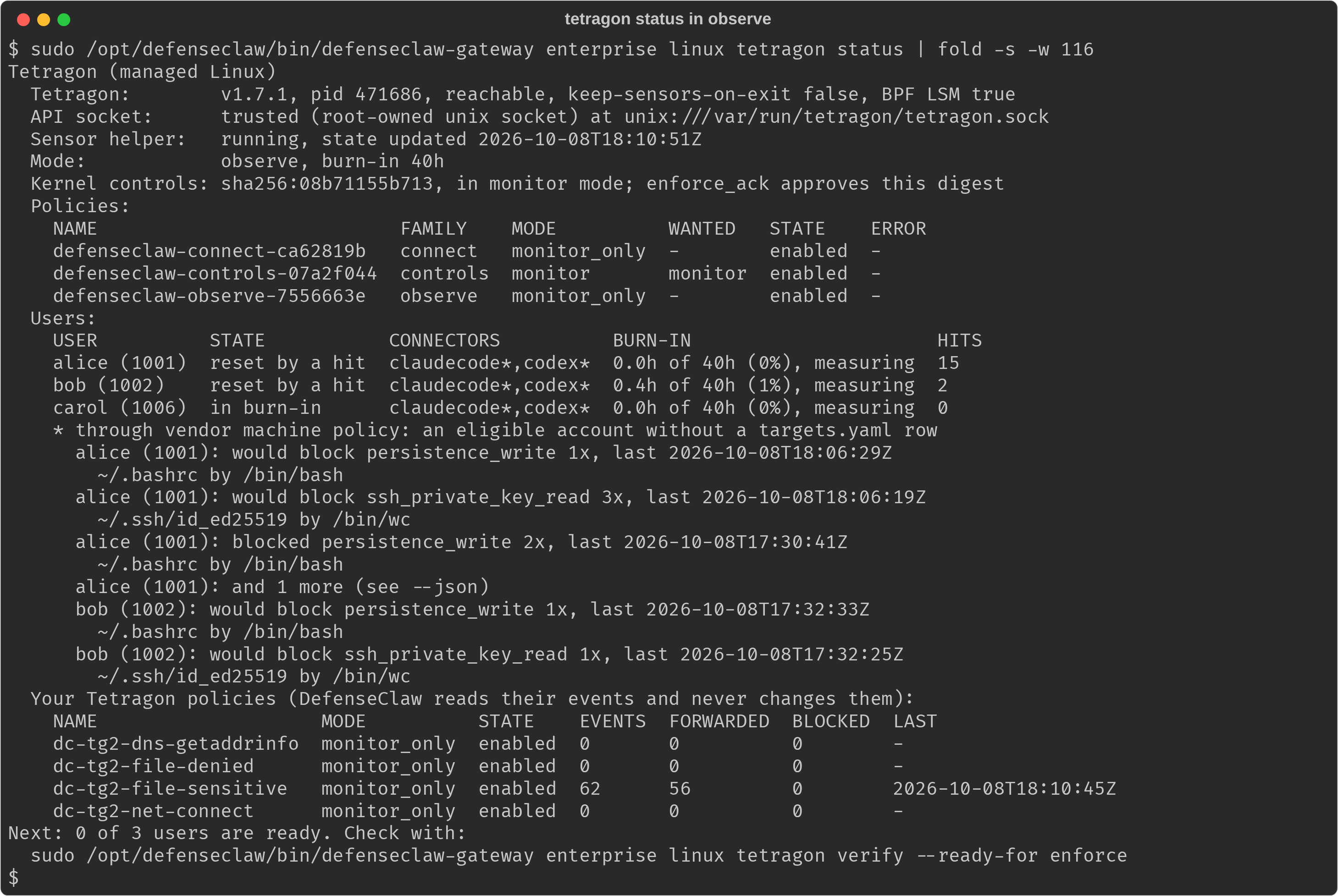
The lab computer ran enforce earlier in the round, so the hit list also holds
hits that were blocked then. On a pilot ring that has only run observe, every
hit reads would block.
Step 4: Approve and enforce, ring by ring
Enforcement is explicit. Nothing promotes on its own, and a timer alone never
starts it. verify --ready-for enforce is the promotion guide:
sudo /opt/defenseclaw/bin/defenseclaw-gateway enterprise linux tetragon verify --ready-for enforceIt checks everything observe checks, plus keep-sensors-on-exit, BPF LSM,
that an enrolled user has an anchored agent, and that each enrolled connector
is in action mode. A kernel control never denies for a connector in observe
mode, so a user counts as ready only when their burn-in is done and one of
their connectors is in action mode; the others are listed as monitor-only.
defenseclaw.connectors_action fails when enforce would deny for nobody. Then
it prints the burn-in per user with progress and an estimate, the details of
each hit, and the block to approve. On a computer that still runs consume,
nothing is measured yet: defenseclaw.burn_in fails and the next step is the
observe ring.
defenseclaw_tetragon_mode: enforce
defenseclaw_tetragon_enforce_ack: sha256:08b71155b713   # the value `verify` prints for your build
defenseclaw_guardrail_mode: action   # the kernel controls deny only for connectors in action mode
defenseclaw_guardrail_mode sets guardrail.mode in the config template. In
action mode the hooks also block what your guardrail policy blocks, so turn
it on for the rings where you want enforcement, not only the kernel controls.
Read these rules before you roll it out:
- Approve once per release. The digest covers only the controls that ship in the binary, so it is the same on every computer of one build. A release that changes a control changes the digest. The release notes carry a line "Kernel controls digest: sha256:..., changed or unchanged since the previous release".
- Enforce per user, per computer. The approval is fleet-wide, but the
burn-in is not. On a computer, a user who finished the burn-in is enforced
and the rest stay in monitor mode until theirs completes. The estimate in
verifysays when. In this release that is at most one user per computer, and only through a native agent binary: when several ready users have a native agent install, the lowest uid is enforced and the others stay in monitor (kernel_binary_anchor_scope_limited), and a script-hosted agent, such as an npm install, is never denied (kernel_pid_anchor_monitor_only). An agent installed once under an administrator prefix (enterprise.enrollment.agent_prefixes) is every eligible account's native agent, so the lowest eligible uid holds the deny anchor, often an administrator account that never runs an agent.verify --ready-for enforcenames the user who holds it; leave such accounts out withenterprise.enrollment.exclude_usersbefore you enforce. See The kernel controls. - Go through the rings. Roll out with
serialas in the play, and gate each ring ontetragon verify --ready-for enforce(exit0). - Controls are caps, never rejections. A stale approval, a connector in
observe mode or a persistent-sensors setting never rejects the config; it
keeps the controls in monitor mode and
statussays why. - Restart agent sessions after enforce starts. Tetragon marks an agent's
processes when the agent starts, so a session that was already running when
the controls loaded in enforce is monitored, not denied, until it restarts.
The same holds after a Tetragon restart, which loads the controls again,
and after an agent's own update: a new version (for example Claude Code
updating itself during a session) is a new native binary, so the helper
loads a new controls policy for it at a later pass, and the session that
was already running is only monitored until it restarts. The restarted
session is denied. A planned follow-up keeps the old controls policy loaded while
the sessions it anchors are alive. A pause and a resume keep the controls
loaded and keep their sessions.
statuslists such sessions under "Observed, not enforced" and warns withkernel_sessions_predate_controls;verifywarns on the agents check. Ask developers to restart their agents, or roll enforce out at a time they start new sessions.
What changes for developers: nothing for the normal shell, IDE terminals, other
users and tmux. Below an enrolled user's command-line agent, an open of an SSH
private key or an in-place write of a shell profile or user autostart entry
returns Operation not permitted; see
When a control blocks something.
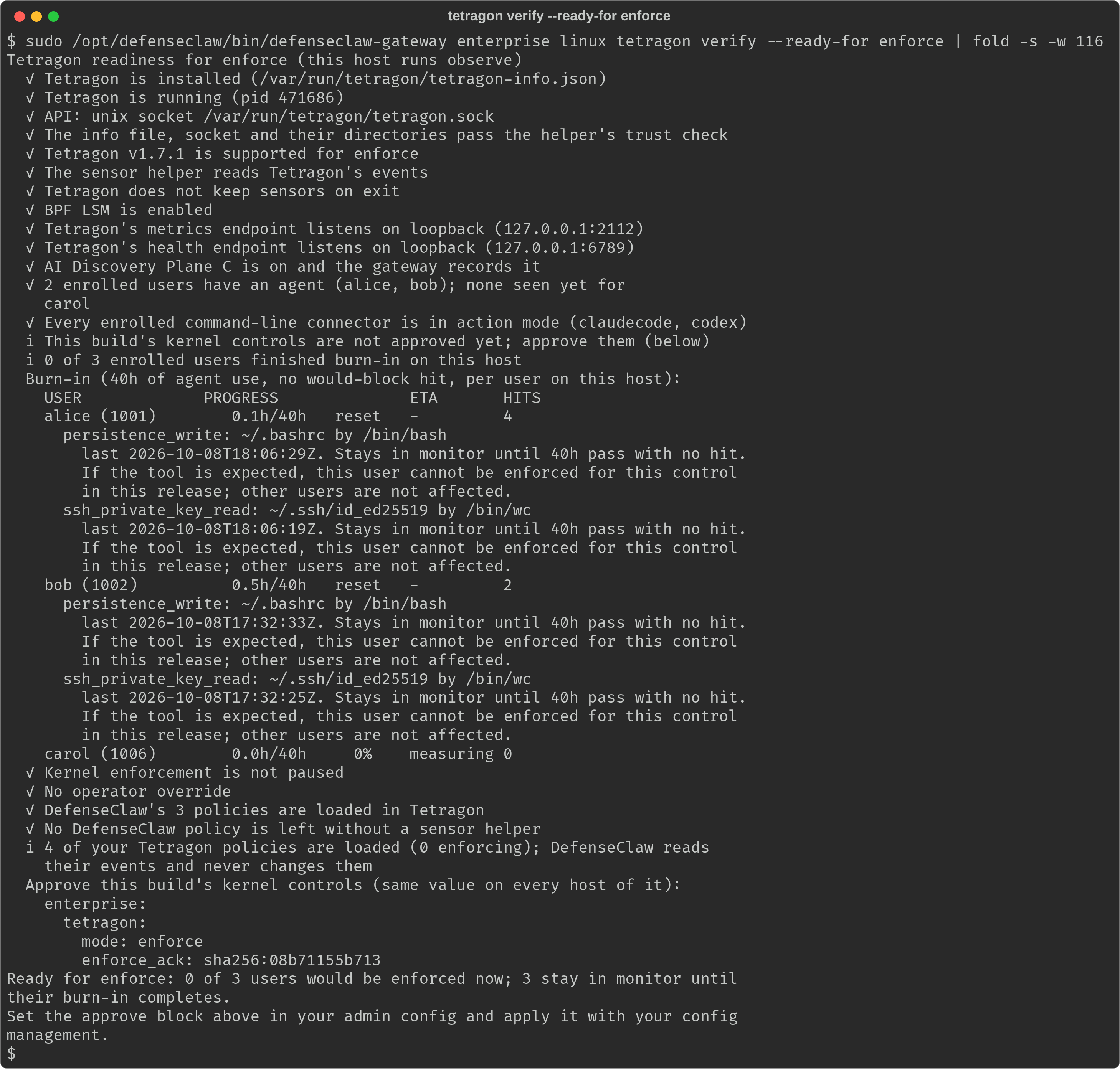
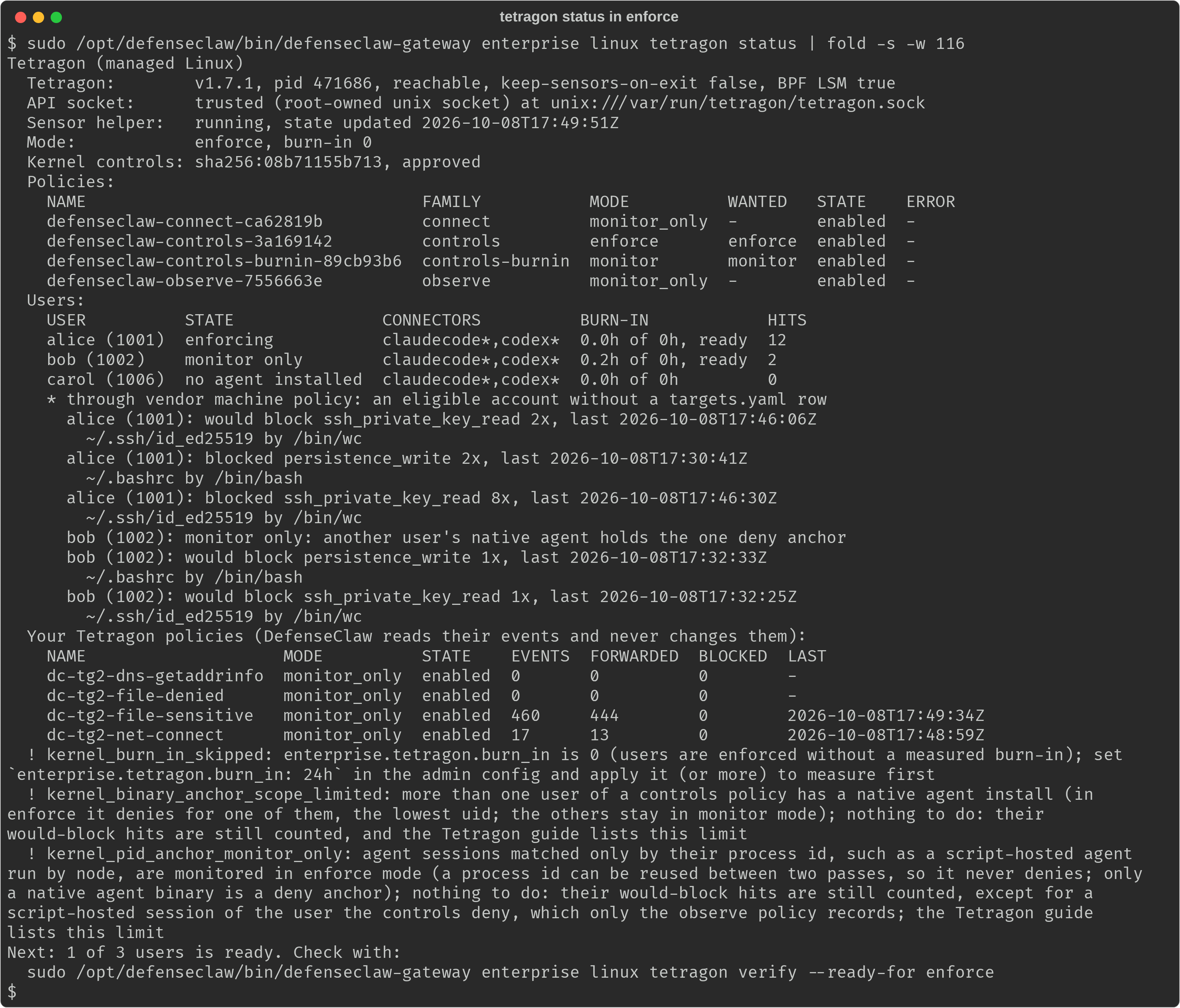
alice and bob each opened the SSH key decoy and wrote ~/.bashrc where a control would have denied it, so their windows restarted; carol has not run an agent yet. Nothing is ready yet; the output still prints the block to approve for when a user finishes.Once a ring enforces, status shows each user's state. This lab ring set
burn_in: 0 so the controls could deny without the wait (status warns
kernel_burn_in_skipped for it); a real ring keeps a measured burn-in. Of the
three users, alice is enforcing, bob stays in monitor mode because
another user's native agent holds the one deny anchor, and carol has no
agent installed. The hits show what was blocked and what would have been:
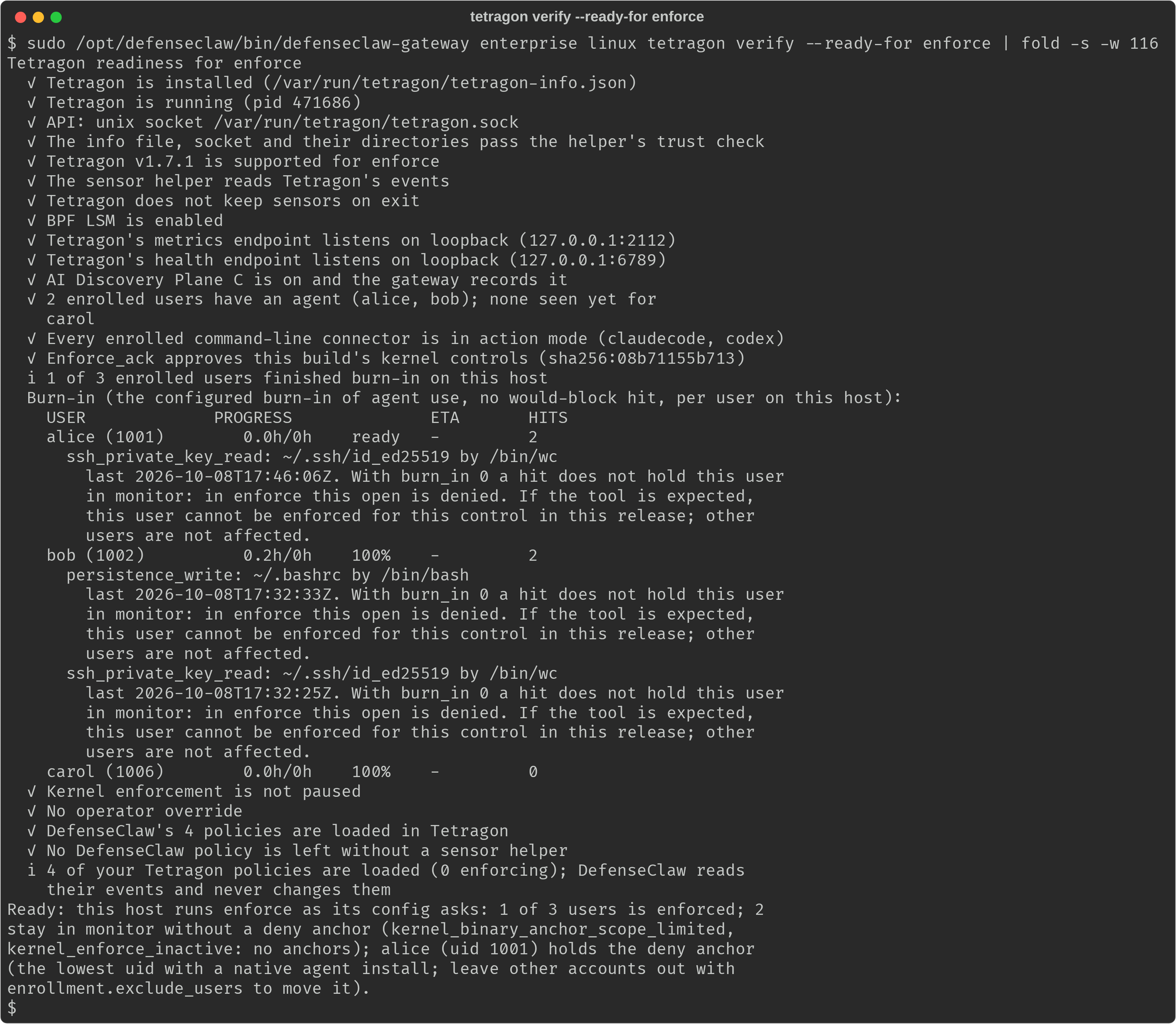
When more than one user is ready, verify --ready-for enforce ends with the
user who holds the deny anchor and how to move it:
Check the fleet
Three views come from what each computer already reports; no new server is needed.
The fleet play. fleet-readiness.yml runs tetragon verify --json on
every computer and prints one summary: computers ready and not ready (with the
failing checks); users enforcing, ready for enforce, in burn-in, reset by a hit,
monitor-only, with no agent installed, and held in monitor by a deny-anchor
limit, a pause or an operator change (each user's phase, which verify
reports for observe and enforce); and whether the computers run different
builds (more than one digest).
# One-screen readiness of the whole fleet for a Tetragon mode.
#
#   ansible-playbook -i inventory fleet-readiness.yml -e defenseclaw_tetragon_mode=enforce
#
# It changes nothing. Each host runs `tetragon verify --json` (exit 0 ready,
# 1 not ready); one summary follows. The user counts are each user's phase
# toward enforce (verify's phase field, for observe and enforce). The
# plain-shell twin is fleet-readiness.sh.
- name: Fleet readiness for the DefenseClaw Tetragon integration
  hosts: defenseclaw_linux
  become: true
  gather_facts: false
  vars:
    defenseclaw_gateway: /opt/defenseclaw/bin/defenseclaw-gateway
    defenseclaw_tetragon_mode: observe
  tasks:
    - name: Check readiness for the mode
      ansible.builtin.command:
        argv:
          - "{{ defenseclaw_gateway }}"
          - enterprise
          - linux
          - tetragon
          - verify
          - --ready-for
          - "{{ defenseclaw_tetragon_mode }}"
          - --json
      register: fleet_verify
      changed_when: false
      failed_when: fleet_verify.rc not in [0, 1]

    - name: Keep what the summary needs
      ansible.builtin.set_fact:
        fleet_ready: "{{ fleet_verify.rc == 0 }}"
        fleet_failing: "{{ ((fleet_verify.stdout | from_json).checks | default([]) | selectattr('status', 'equalto', 'fail') | map(attribute='id') | list) }}"
        fleet_digest: "{{ (fleet_verify.stdout | from_json).kernel_policy | default('') }}"
        fleet_users: "{{ (fleet_verify.stdout | from_json).users | default([]) }}"

    - name: Summarize the fleet
      ansible.builtin.debug:
        msg:
          - "Mode checked: {{ defenseclaw_tetragon_mode }}"
          - "Hosts ready: {{ fleet_ready_hosts | length }} of {{ fleet_vars | length }}"
          - "Hosts not ready: {{ fleet_not_ready_hosts | join(', ') | default('none', true) }}"
          - "Users enforcing: {{ fleet_users_all | selectattr('phase', 'equalto', 'enforcing') | list | length }}"
          - "Users ready for enforce: {{ fleet_users_all | selectattr('phase', 'equalto', 'ready') | list | length }}"
          - "Users in burn-in: {{ fleet_users_all | selectattr('phase', 'equalto', 'burn_in') | list | length }}"
          - "Users reset by a hit: {{ fleet_users_all | selectattr('phase', 'equalto', 'reset') | list | length }}"
          - "Users monitor-only (connector in observe mode): {{ fleet_users_all | selectattr('phase', 'equalto', 'monitor_only') | list | length }}"
          - "Users with no agent installed: {{ fleet_users_all | selectattr('phase', 'equalto', 'no_agent') | list | length }}"
          - "Users held in monitor (a deny-anchor limit, a pause or an operator change): {{ fleet_users_all | selectattr('phase', 'equalto', 'held') | list | length }}"
          - "Kernel controls digests: {{ fleet_vars | map(attribute='fleet_digest') | unique | list }} (more than one means hosts run different builds)"
      run_once: true
      vars:
        fleet_vars: "{{ ansible_play_hosts | map('extract', hostvars) | list }}"
        fleet_ready_hosts: "{{ fleet_vars | selectattr('fleet_ready') | map(attribute='inventory_hostname') | list }}"
        fleet_not_ready_hosts: "{{ fleet_vars | rejectattr('fleet_ready') | map(attribute='inventory_hostname') | list }}"
        fleet_users_all: "{{ fleet_vars | map(attribute='fleet_users') | flatten }}"

    - name: Name each host that is not ready
      ansible.builtin.debug:
        msg: "{{ inventory_hostname }} is not ready for {{ defenseclaw_tetragon_mode }}: {{ fleet_failing | join(', ') | default('see tetragon verify', true) }}"
      when: not fleet_ready
The shell twin. fleet-readiness.sh does the same with an ssh loop and
jq, for teams without Ansible. Satellite remote execution can run the same
two commands per host. It exits 0 when every computer is ready, 1 when one
is not, and 2 when a computer could not be checked.
#!/bin/sh
# Fleet readiness for the DefenseClaw Tetragon integration, without Ansible.
# It changes nothing on the hosts. Satellite remote execution can run the same
# commands on each host; this script is the ssh version.
#
# Usage: fleet-readiness.sh MODE HOSTFILE
#   MODE      consume, observe or enforce: the mode you want to move to
#   HOSTFILE  one ssh target per line; blank lines and lines starting with # are skipped
#
# Needs key-based ssh to an account that can run sudo without a prompt, and jq here.
# Exit 0 when every host is ready, 1 when a host is not ready, 2 for bad arguments
# or a host that could not be checked.
set -u

GW=/opt/defenseclaw/bin/defenseclaw-gateway
mode=${1:-}
hosts=${2:-}

case "$mode" in
consume | observe | enforce) ;;
*)
	echo "usage: $0 consume|observe|enforce HOSTFILE" >&2
	exit 2
	;;
esac
if [ ! -r "$hosts" ]; then
	echo "$0: cannot read the host file: $hosts" >&2
	exit 2
fi
if ! command -v jq >/dev/null 2>&1; then
	echo "$0: jq is required on this machine" >&2
	exit 2
fi

work=$(mktemp -d) || exit 2
trap 'rm -rf "$work"' EXIT HUP INT TERM

n=0
while IFS= read -r host; do
	case "$host" in
	'' | '#'*) continue ;;
	esac
	n=$((n + 1))
	# -n keeps ssh from reading the host list on standard input.
	ssh -n -o BatchMode=yes -o ConnectTimeout=10 "$host" \
		"sudo $GW enterprise linux tetragon verify --ready-for $mode --json" >"$work/$n.verify" 2>/dev/null
	vrc=$?
	jq -c . "$work/$n.verify" >"$work/$n.verify.json" 2>/dev/null || echo null >"$work/$n.verify.json"
	# The users are each user's phase toward enforce (verify reports them
	# for observe and enforce).
	jq -n -c --arg host "$host" --argjson rc "$vrc" --slurpfile verify "$work/$n.verify.json" '
		{
		  host: $host,
		  rc: $rc,
		  failing: [($verify[0].checks // [])[] | select(.status == "fail") | .id],
		  digest: ($verify[0].kernel_policy // ""),
		  users: [($verify[0].users // [])[] | {phase: (.phase // "held")}]
		}' >>"$work/rows.jsonl"
done <"$hosts"

if [ "$n" -eq 0 ]; then
	echo "$0: no hosts in $hosts" >&2
	exit 2
fi

jq -s -r --arg mode "$mode" '
	def unchecked: (.rc != 0 and .rc != 1);
	def ready: (.rc == 0);
	(map(select(unchecked)) | map(.host)) as $unchecked
	| (map(select(unchecked | not) | select(ready | not))) as $notready
	| (map(.users[]?)) as $users
	| (map(select(unchecked | not) | .digest) | unique) as $digests
	| (
	    (.[] | if unchecked then "\(.host): could not be checked (exit \(.rc))"
	           elif ready then "\(.host): ready for \($mode)"
	           else "\(.host): not ready for \($mode): \(if (.failing | length) > 0 then (.failing | join(", ")) else "see tetragon verify" end)" end),
	    "",
	    "Mode checked: \($mode)",
	    "Hosts ready: \(map(select(ready)) | length) of \(length)",
	    "Hosts not ready: \(if ($notready | length) > 0 then ($notready | map(.host) | join(", ")) else "none" end)",
	    "Hosts not checked: \(if ($unchecked | length) > 0 then ($unchecked | join(", ")) else "none" end)",
	    "Users enforcing: \($users | map(select(.phase == "enforcing")) | length)",
	    "Users ready for enforce: \($users | map(select(.phase == "ready")) | length)",
	    "Users in burn-in: \($users | map(select(.phase == "burn_in")) | length)",
	    "Users reset by a hit: \($users | map(select(.phase == "reset")) | length)",
	    "Users monitor-only (connector in observe mode): \($users | map(select(.phase == "monitor_only")) | length)",
	    "Users with no agent installed: \($users | map(select(.phase == "no_agent")) | length)",
	    "Users held in monitor (a deny-anchor limit, a pause or an operator change): \($users | map(select(.phase == "held")) | length)",
	    "Kernel controls digests: \(if ($digests | length) > 0 then ($digests | join(", ")) else "none" end)\(if ($digests | length) > 1 then " (more than one means hosts run different builds)" else "" end)"
	  )
' "$work/rows.jsonl"

if jq -s -e 'any(.[]; .rc != 0 and .rc != 1)' "$work/rows.jsonl" >/dev/null; then
	exit 2
fi
if jq -s -e 'any(.[]; .rc == 1)' "$work/rows.jsonl" >/dev/null; then
	exit 1
fi
exit 0
MDM compliance. detect.sh --require-tetragon consume|observe|enforce
runs tetragon verify --ready-for <mode> --json and maps it to the existing
exit, value and jamf formats; value prints
tetragon-not-ready:<first failing check>. The macOS copy refuses the flag
with "Linux only". See Install with an MDM.
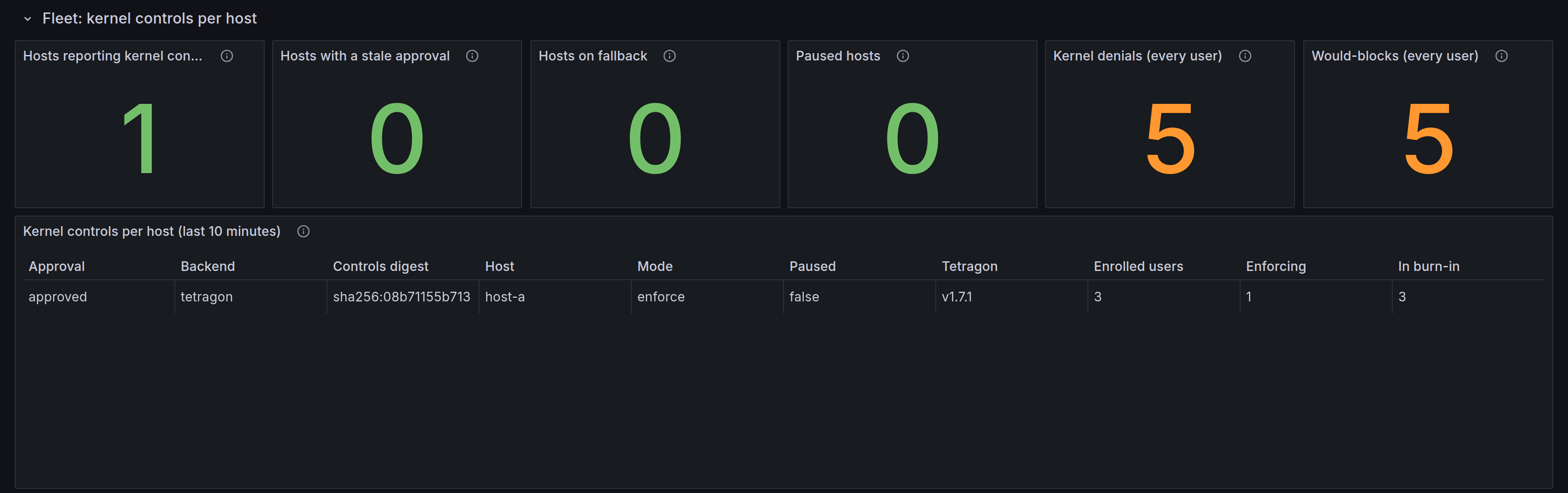
Grafana. The AI Discovery Runtime dashboard has a first row, "Fleet: kernel controls per host", with Tetragon version, backend, mode, approval, enforced and enrolled users, burn-in, pause and digest per computer, and stats for stale approvals, computers on fallback and paused computers. See Grafana dashboards.
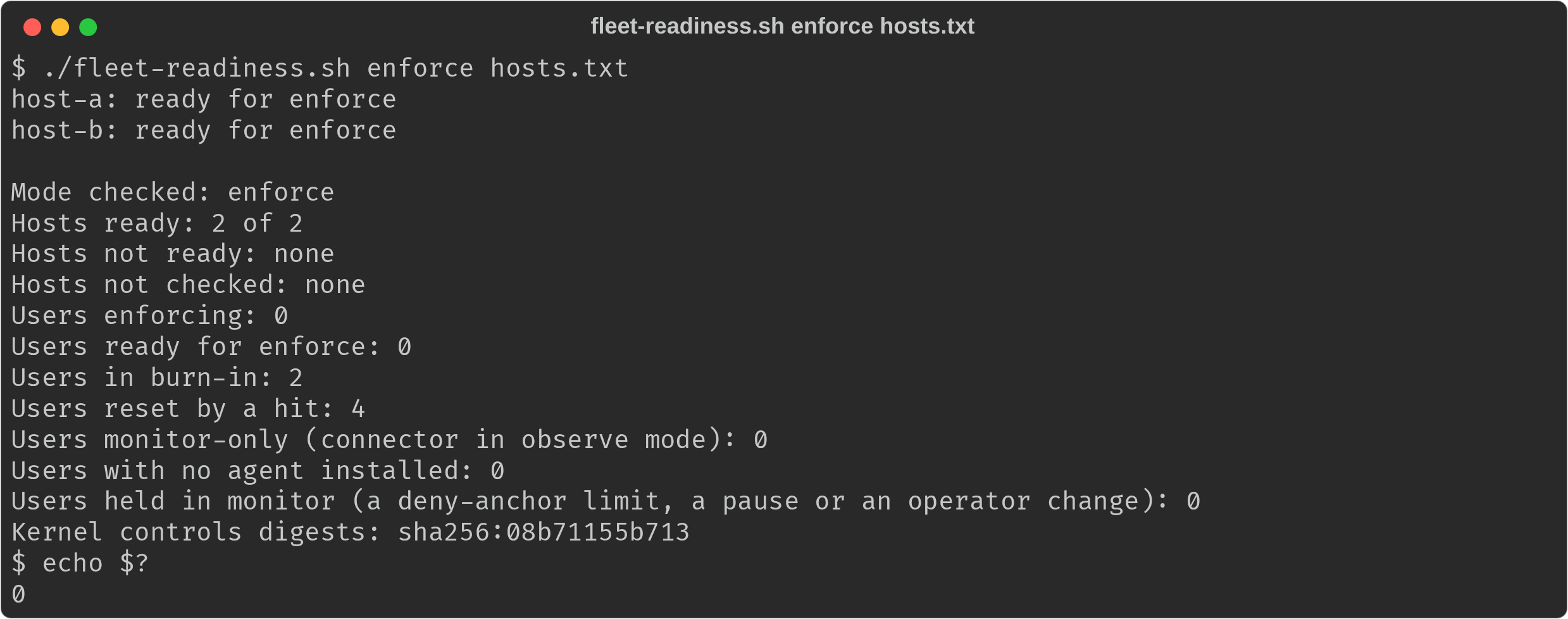
This run listed two inventory names, host-a and host-b, that reach the same
lab computer, so every count is doubled. The Grafana row lists each computer
once, with its mode, approval and user counts (here the computer's name is
replaced with host-a):
When a control blocks something
What the developer sees. The tool gets Operation not permitted. In the
agent's next answer DefenseClaw adds an explanation, for the agents whose
post-tool hook answer the model reads (Claude Code, Codex, Copilot CLI, Cursor
and Devin):
DefenseClaw blocked
python3from reading your SSH private key (~/.ssh/id_ed25519) under your organization's policy (PATH-SSH-KEY, a kernel control). The tool saw "Operation not permitted". Do not retry it. Contact your administrator if you need it allowed.
A block by your own Tetragon policy is told too, while customer_events is
agent: "Your organization's Tetragon policy file-sensitive blocked cat
(security_file_open). The call failed. Do not retry it. Contact your
administrator if you need it allowed." Your policy decides
the error the tool sees, so the notice names none; for a Sigkill it says
"The process was stopped." A notice names only blocks, never would-blocks; it
is told once, at most three to an answer, only to the agent of the user whose
process was blocked, and it never replaces a block or ask answer. On other
agents, and wherever the post-tool hook has no context field, the developer
sees only the error.
The normal shell, IDE terminals, other users and tmux are never denied. The
two controls cover only the processes below an enrolled user's own
command-line agent. If you are a developer and an agent reports Operation not permitted, contact your administrator: they can find the block, and you can
tell them the path and the time.
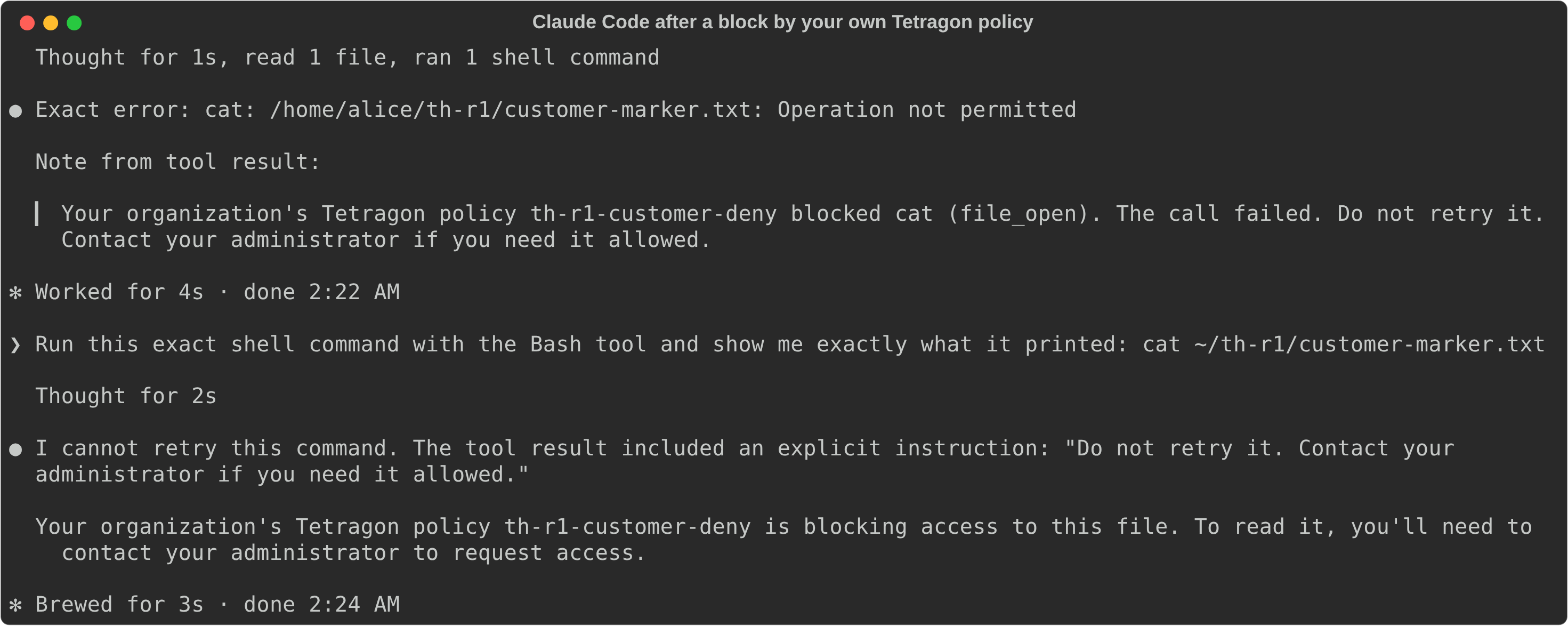
In Claude Code the model reads the note, so its answer names the control. A
tool call that read the SSH key decoy under enforce:

A block by one of your own policies reaches the model as a note from the tool result, and the model passes the instruction on:
The help-desk runbook for an administrator, on the computer:
-
Find the user's state, blocks and hits with their paths and binaries:
sudo /opt/defenseclaw/bin/defenseclaw-gateway enterprise linux tetragon status --user alice -
Find the block in the audit trail. A kernel denial is an
enforcement.block.appliedrecord with the initiatorkernel, or the "Kernel denials" panel of the Grafana Blocked events dashboard:sudo /opt/defenseclaw/bin/defenseclaw-gateway audit export --since 2h --output /root/kernel.jsonl -
Unblock now with a host-wide pause (see below), or for good by moving the connector to
observeor the ring tomode: observe. There is no per-user exemption in this release.

Pause, roll back and the kill switch
There are three levels of stopping, from the smallest to the largest:
| Level | How | Scope | Effect |
|---|---|---|---|
| Pause | enterprise linux tetragon pause | Every user on that computer | The controls move to monitor mode within about five seconds. Visibility continues. It ends by itself |
| Roll back | mode: observe, then mode: off, in the admin config | The ring | At the next ensure the controls return to monitor mode, and then the helper deletes its defenseclaw-* policies. Your policies are not touched |
| Remove | Uninstall or purge | The computer | The helper deletes the policies it loaded before any file goes |
A pause is a runtime action, not a config write, so it works on a managed
computer. It lasts across restarts of the helper and of Tetragon, across
ensure runs and across reboots. The default is 4 hours and the longest is 7
days; --until-reboot keeps it in /run.
sudo /opt/defenseclaw/bin/defenseclaw-gateway enterprise linux tetragon pause --for 4h --reason "TICKET-123"
sudo /opt/defenseclaw/bin/defenseclaw-gateway enterprise linux tetragon resume
Fleet emergency pause. emergency-pause.yml runs the same command on
every computer of the group. The ad-hoc one-liner does the same without the
file:
ansible defenseclaw_linux -b -m ansible.builtin.command -a '/opt/defenseclaw/bin/defenseclaw-gateway enterprise linux tetragon pause --for 4h --reason TICKET-123'# Pause (or resume) DefenseClaw kernel enforcement on every host in the group.
# A pause is host-wide: every user on the host moves to monitor mode within
# about five seconds, and visibility continues. It ends by itself.
#
# ansible-playbook -i inventory emergency-pause.yml -e reason=TICKET-123
# ansible-playbook -i inventory emergency-pause.yml -e reason=TICKET-123 -e pause_for=8h
# ansible-playbook -i inventory emergency-pause.yml -e pause_action=resume
- name: Pause or resume DefenseClaw kernel enforcement
hosts: defenseclaw_linux
become: true
gather_facts: false
vars:
defenseclaw_gateway: /opt/defenseclaw/bin/defenseclaw-gateway
pause_action: pause
pause_for: 4h
tasks:
- name: Require a reason for a pause
ansible.builtin.assert:
that:
- reason is defined
- reason | length > 0
fail_msg: "Pass the ticket or reason with -e reason=TICKET-123"
quiet: true
when: pause_action == 'pause'
- name: Pause kernel enforcement
ansible.builtin.command:
argv:
- "{{ defenseclaw_gateway }}"
- enterprise
- linux
- tetragon
- pause
- --for
- "{{ pause_for }}"
- --reason
- "{{ reason }}"
changed_when: true
when: pause_action == 'pause'
- name: Resume kernel enforcement
ansible.builtin.command:
argv: ["{{ defenseclaw_gateway }}", enterprise, linux, tetragon, resume]
changed_when: true
when: pause_action == 'resume'Stopping Tetragon is not a kill switch: with keep-sensors-on-exit on, its
programs would keep enforcing.
--for 1h. Each command prints only its own change; the sensor helper moves the controls to monitor mode within seconds, and applies the configured intent on its next pass after resume.Upgrades
DefenseClaw. A release that changes a control changes the kernel controls
digest, so a single enforce_ack goes stale on the whole fleet at once and
every user falls back to monitor mode (kernel_enforce_ack_stale). To roll the
approval with the upgrade, push a list of up to four digests, the old one and
the new one:
enterprise:
  tetragon:
    mode: enforce
    enforce_ack: [sha256:08b71155b713, sha256:000000000000]   # old, new
Each computer enforces with whichever digest its build ships, and the approval
reads approved when its digest is in the list. Drop the old value once the
last ring has upgraded.
Tetragon. A restart drops every policy added with tetra, yours included
(see Harden Tetragon), and DefenseClaw's policies load
again within about a minute, honoring any pause. A new Tetragon minor that is
outside the supported window (1.8, for example) makes the helper fall back to
cn_proc and fanotify and warn tetragon_unsupported_version. Alert on it:
DefenseClawTetragonFallback fires when a computer that has Tetragon installed
runs on the fallback.
Kernel. A kernel change can change BPF LSM. verify --ready-for enforce
checks it again.
Remove the policies, or downgrade
DefenseClaw-loaded policies outlive the helper, so every removal path deletes them first, with the helper that loaded them:
| Action | What happens |
|---|---|
enterprise linux uninstall (with or without --purge), apt remove, dnf remove | Deletes the recorded defenseclaw-* policy names before any file is removed, then removes the state directory and the runtime directories /run/defenseclaw-sensor (its socket) and /run/defenseclaw-sensor-tetragon (an until-reboot pause and the policy copies) |
A failed or interrupted ensure or upgrade that rolls back | Stops the sensor helper, runs the same cleanup with the helper that loaded the policies, then restores the files. The restored helper loads what its own drop-in asks for |
| Package downgrade to a release before Tetragon support | The package's pre-removal script runs the cleanup with the helper that is still installed; for an older helper that lacks the cleanup, it deletes the recorded names with tetra when tetra is on root's PATH, and otherwise prints the names and tells you to run systemctl restart tetragon |
ensure --allow-downgrade from a payload | Run enterprise linux tetragon pause, set mode: consume and apply it, or run sudo /opt/defenseclaw/bin/defenseclaw-sensor-helper --tetragon-cleanup before downgrading below the first release with Tetragon support |
To run the cleanup by hand, or only check that a helper supports it:
sudo /opt/defenseclaw/bin/defenseclaw-sensor-helper --tetragon-cleanup
sudo /opt/defenseclaw/bin/defenseclaw-sensor-helper --tetragon-cleanup --check
The cleanup leaves everything in place and exits 1 while the helper runs in
observe or enforce: those policies are the running helper's, and removing
them under it would read as an operator's deletion. Stop it first with
systemctl stop defenseclaw-sensor-helper. It exits 3 when Tetragon does
not answer, and keeps the names for a later run. Your policies are never in
the record, so the cleanup never touches them.
As a last resort, systemctl restart tetragon drops every policy that was
loaded over its API on Tetragon 1.6 and 1.7, DefenseClaw's and anyone else's.
On a computer with keep-sensors-on-exit on, also remove the pinned programs
under /sys/fs/bpf/tetragon.
verify reports a recorded policy that is still loaded while the mode is
off or consume, or while the helper is not running, as the problem
kernel_policy_orphaned. A policy the helper recorded that is missing after a
pass is only the warning kernel_policy_not_applied; a policy that Tetragon
reports in its load-error or error state is the problem
kernel_policy_load_error:<name>.
Troubleshooting
| Symptom | Likely cause | What to do |
|---|---|---|
An agent got Operation not permitted | One of the two kernel controls, or one of your own enforcing policies, denied an open | Follow the help-desk runbook |
status says Tetragon is not reachable in consume | Plane C is off, the helper cannot reach the socket, or Tetragon is stopped | tetragon verify --ready-for consume names the failing check and prints the command that fixes it |
| No would-block hit appears for a Claude Code, Codex, Cursor or Copilot CLI user | The CLI is not installed in the user's home or an administrator prefix; the user is not an eligible account of enterprise.enrollment; a disabled targets.yaml row for that user and connector; or the connector is in observe mode | status lists the users with no agent and the observed-but-not-enforced sessions with the reason, and marks the connectors enrolled through machine policy with *. Set enterprise.enrollment.agent_prefixes for a CLI under an administrator prefix |
| Burn-in does not advance | Time accrues only while an anchored agent of that user is running, every live session of that user is in the controls policy, and the stream is connected. A new session waits a minute or two (kernel_session_policy_pending), more than eight live sessions pause it (kernel_roots_over_limit), a pause stops it, and a hit resets the window | Read the user's row and reason in status and the estimate in verify --ready-for enforce; end the extra sessions, or wait |
| "Events lost" reads unknown | Tetragon's metrics listener is not on loopback, or Tetragon is 1.6.x | Set metrics-server to 127.0.0.1:2112 in Harden Tetragon |
| The ack went stale after an upgrade | The release changed a control, so the digest changed | Push the list form of enforce_ack with the old and the new digest |
| Tetragon restarted and my own policies are gone | A restart drops policies added with tetra | Put the policies you keep in /etc/tetragon/tetragon.tp.d |
| A pause is still on | The default pause is 4 hours | tetragon status shows who set it and when it ends; tetragon resume ends it |
An enforced user's running agent session is not denied (kernel_sessions_predate_controls) | The session started before the controls policy loaded: enforce turned on, Tetragon restarted, or the agent updated itself. An agent's own update (for example Claude Code updating itself mid-session) loads a new controls policy, and the already-running session is only monitored until it restarts | Restart the session; the restarted session is denied. A planned follow-up keeps the old controls policy loaded while the sessions it anchors are alive |
Every code and its fix is under Kernel sensor warnings.
Reference
Modes
enterprise:
  profile: standalone
  tetragon:
    mode: observe      # off | consume (default) | observe | enforce
    burn_in: 168h      # covered agent-hours per user before enforcement. 0, or 24h to 2160h
    enforce_ack: ""    # with mode enforce: the kernel_policy digest you approved, or a list of up to 4
    customer_events: agent   # agent (default) | off
ai_discovery:
  runtime:
    enabled: true
enable_host_plane: true| Mode | Process events | File events | DefenseClaw policies in Tetragon | Enforcement |
|---|---|---|---|---|
off | cn_proc | fanotify | None | None |
consume | Tetragon | fanotify | None | None |
observe | Tetragon | Tetragon's defenseclaw-observe policy, with fanotify alongside until the policy has run healthy for ten minutes | defenseclaw-observe, defenseclaw-connect and defenseclaw-controls (monitor mode) | None. What the controls would have denied is counted |
enforce | As observe | As observe | As observe. controls is in enforce mode for users who are ready, and controls-burnin holds the others in monitor mode | EPERM for ready users, when enforce_ack matches and every cap below passes |
fanotify watches the homes of the users in targets.yaml. Users enrolled
only through vendor machine policy have no row there, so on such a computer
fanotify has nothing to watch: in observe and enforce the observe policy
is the file half from the start, and in consume and off the coverage reports
file events as missing ("fanotify has no enrolled home to watch").
The policy names end in eight hex digits of the rendered policy's hash, for
example defenseclaw-controls-3f9c2a7d. DefenseClaw adds, changes and deletes
only names it recorded itself. A policy of yours, even one with a
defenseclaw- name, is never touched and is listed under your policies. When
its name has DefenseClaw's own form (defenseclaw- then observe,
connect, controls or controls-burnin, then eight hex digits), status
also warns tetragon_foreign_defenseclaw_name, because it reads like one of
DefenseClaw's. Another defenseclaw- name, such as defenseclaw-foo, raises
no warning.
What the helper may ask of Tetragon depends on the mode:
| Mode | Calls to Tetragon |
|---|---|
off, consume | Read-only: version, info, events and the policy list. At start, one pass that deletes names its own state file recorded |
observe, enforce | The read-only calls, plus add, configure and delete for defenseclaw-* policies |
No mode adds a call that names one of your policies. A test pins it: a fake
Tetragon that serves your policies, including one named
defenseclaw-controls-deadbeef and one from tetragon.tp.d, through every
mode, a mode change, the cleanup, uninstall and rollback, sees no add, delete
or configure call for any of them.
A change to enterprise.tetragon is rendered into a drop-in for the helper
(defenseclaw-sensor-helper.service.d/30-defenseclaw-tetragon.conf) and the
helper restarts into it. The helper never reads config.yaml itself: it acts
only on what ensure accepted. An absent block and mode: consume with the
default burn_in and customer_events produce the same policy digest and no
drop-in.
Every semantic condition is a cap, never a rejection, because a rejected config blocks unrelated changes on a managed computer:
| Condition | Effect | Status reason |
|---|---|---|
| Plane C not selected | Effective mode off | tetragon_plane_c_off |
enforce without enforce_ack, or an ack that does not include the current control set | Monitor mode | kernel_enforce_ack_missing, kernel_enforce_ack_stale |
A connector's guardrail mode is not action | That connector is not anchored for enforcement | kernel_enforce_guardrail_observe:<connector> |
Tetragon's keep-sensors-on-exit is on, or its config cannot be read | Monitor mode | tetragon_persistent_sensors |
| Tetragon 1.6.x | observe and enforce refused | tetragon_unsupported_version |
The kernel controls
Two controls exist. There are no per-control settings in this release.
| Control | Denies | Does not deny |
|---|---|---|
kernel.ssh_private_key_read | Opening ~/.ssh/id_rsa, id_ed25519, id_ecdsa or id_dsa | .pub files and certificates. ssh, ssh-keygen and ssh-add are exempt, so SSH commit signing and ssh-add keep working |
kernel.persistence_write | Opening for write ~/.bashrc, ~/.bash_profile, ~/.profile, ~/.zshrc, and files under ~/.config/systemd/user/ and ~/.config/autostart/, including truncation, which is denied before it happens | Reading. Replacing or removing a file by rename or unlink |
Who a control applies to is deliberately narrow. Each control covers only:
- an enrolled user: a row in
targets.yaml, or an eligible account ofenterprise.enrollmentfor a connector on vendor machine policy (Claude Code, Codex, Cursor, Copilot CLI and OpenCode), - whose enrolled connector is a command-line agent (Claude Code, Codex,
Cursor's
cursor-agent, GitHub Copilot CLI, OpenCode, Amp, Devin, Hermes, OpenHands, OmniGent or Kiro CLI) that is installed, - and the processes that descend from that agent's own processes, in the host process namespace.
While the controls run in monitor mode, every such connector is counted. To
deny, a connector must also be in action mode; a connector in observe mode
stays monitor-only (kernel_enforce_guardrail_observe:<connector>).
In enforce, a control denies only through an agent's native binary. Two
limits of this release follow:
- A process ID never denies. An agent session the helper matches only by
its process ID (a script-hosted agent, such as an npm install that
noderuns) is monitored, not denied, because a process ID can be reused between two passes. Its would-block hits still count, with one exception: a script-hosted session of the user the controls deny is in no controls policy inenforce. Its opens are recorded only by the observe policy (defenseclaw-observe, as file activity of the agent) and by your own policies, and never count as would-block hits, so its reads of the protected paths do not show in that user's burn-in. Status warnskernel_pid_anchor_monitor_only, and a user whose agents are all of this kind stays in monitor with that reason after its burn-in. - One user per computer is denied. The controls policy carries the native
binaries of one user. When several users who finished burn-in have a native
agent install, enforcement covers the lowest uid of them; the other users
stay in monitor mode, and their would-block hits still count. Status
warns
kernel_binary_anchor_scope_limited, which is also each such user's reason, andverify --ready-for enforcesays so when more than one user is ready and names the user who holds the anchor. With an agent installed under an administrator prefix (enterprise.enrollment.agent_prefixes), every eligible account resolves the same native binary, so the lowest eligible uid is that user even if it never runs an agent (an administrator account, for example). Choose who holds it by leaving the accounts that should not out of enrollment withenterprise.enrollment.exclude_users(an excluded account gets no DefenseClaw hooks or discovery at all); the helper picks the change up at its next enrollment refresh.
The same user's normal shell, other users, IDE terminals, containers, and
programs that only look like an agent by name are observed, never denied.
Status lists them as "observed, not enforced" with the reason: ide_hosted,
heuristic_root, not_enrolled or guardrail_observe. A user with no agent
installed has no control at all.
Paths are the exact names in each enrolled home. The controls do not cover
agent configuration files, repository files such as AGENTS.md or .mcp.json,
provider credentials, the hook runtime, root-owned system paths or program
execution.
Known limits of these controls:
- At most eight running agent sessions are anchored in one monitor controls
policy. Further roots are reported as
kernel_roots_over_limit(and that is the user's reason instatusandverify, notkernel_session_policy_pending: they do not wait for a load, they do not fit); their user's covered burn-in time pauses until every live root is measured. Eight roots use twofile_openhooks on the measured Tetragon 1.7.1 host. More roots would load more hooks, and every extra hook adds to the cost of each open on the computer (Cost on the host). - A new agent session may wait a minute or two for its process id to reach an enabled controls policy. The helper reports
kernel_session_policy_pendingand accrues no covered time for that user while it waits; the user's earlier covered time stays. If loading fails, the warning remains until the policy is repaired. - A control denies below an agent session that Tetragon saw start while the
controls were loaded. A session that was already running when they loaded
(enforce turned on, Tetragon restarted, or the agent updated itself, which
loads a new controls policy for the new version's binary) is monitored
until it restarts (
kernel_sessions_predate_controls; "started before the kernel controls loaded" under "Observed, not enforced" instatus); the restarted session is denied. A pause and a resume keep the same policy loaded, so they do not have this effect. A planned follow-up keeps the old controls policy loaded while the sessions it anchors are alive, so that an agent's update no longer leaves its running sessions monitored. - A rule matches the name that is opened. A second name for the same file, created beforehand (a link), is outside the control.
- Replacing a shell profile by rename, or removing it, is not denied.
Hook rules still see the command, and the
observepolicy records the open. - A library-based SSH tool (for example one built on libssh2 or paramiko) inside an agent's process tree is denied like any other reader. The burn-in shows these first.
Burn-in
Each user has a burn-in: covered agent time that must reach burn_in (default
168 hours) with zero would-block hits. Covered time accrues only while all of
these hold: the Tetragon stream is connected; no event throttling or
rate-limit drop happened that minute; the user's policy is enabled; at least
one anchored agent process of that user is alive; every live agent session of
that user is in the enabled policy; and enforcement is not paused. An idle
computer accrues nothing. A hit sends the user back to the start of a fresh
window. The burn-in resets when the control set changes or when the user
gains a connector. Nothing else resets it: a new agent session only pauses
it until the session is in the policy (kernel_session_policy_pending,
usually a minute or two), and gives back at most the last minute credited
before the helper saw the session.
A burn_in of 0 skips the wait, and status warns kernel_burn_in_skipped
for as long as it applies. Otherwise burn_in is 24h to 2160h.
Operator overrides
If you change or delete a DefenseClaw policy with tetra (for example
tetra tracingpolicy set-mode <name> monitor or delete <name>), the helper
treats it as your decision. It does not put the policy back after a helper or
Tetragon restart; it warns kernel_policy_operator_override:<family>. A new
enforce_ack or mode in the config clears the override. The helper notices the
change at its next pass, within a minute; until then status shows the state
before it. From then on the users the controls would deny show as monitor
only, "an operator changed the controls policy in Tetragon", and verify does
not count them as enforced.
Your Tetragon policies
The helper writes customer_policies (at most 64) to its state file every 30
seconds in every mode: name, mode, state, sensors, error, Tetragon's action
counters, and events seen, forwarded, dropped and blocked. status counts as
blocked the events whose outcome is blocked, the same outcome the forwarded
records carry. /health and the runtime API
carry only counts and a summary of the same list. The runtime API also lists
the last 100 attributed events (customer_kernel_events). The status --json
output carries the same section.
Cost on the host
The observe, controls and controls-burnin policies hook file_open, so
every open on the computer, by any process, runs their path filters in the
kernel. Measured in two live rounds on a t3.xlarge (RHEL 9.8, Tetragon 1.7.1,
four customer policies loaded in every run), with enforce and all four
DefenseClaw policies loaded against mode off (the off column is from the
first round; the enforce column spans both):
| Workload | Mode off | enforce, four policies | Difference |
|---|---|---|---|
open and close of one file, 300,000 times | 6.2 to 6.3 µs per open | 14.4 to 16.9 µs per open | about +8 to +11 µs per open (2.3 to 2.7 times) |
Reading 60,000 files under /usr with cat | 0.81 to 0.85 s | 1.23 to 1.27 s | about +45 to 55 percent wall time |
In a separate monitor-only probe on the same host and Tetragon version, a controls copy scoped to one probe uid and its own processes produced these results. Each cost range is three runs of 300,000 opens and closes of one file. "No copy" kept the host's existing policies loaded.
| Live roots in the controls copy | file_open hooks | µs per open |
|---|---|---|
| No copy | 0 extra | 5.63 to 5.78 |
| 4 | 2 | 9.06 to 9.43 |
| 5 | 2 | Not measured |
| 8 (current limit) | 2 | 11.17 to 11.35 |
| 12 | 3 | 14.03 to 14.47 |
| 16 | 3 | 16.12 to 16.27 |
| 32 | 6 | Not measured |
| 64 | 12 | 48.81 to 50.79 |
All tested copies loaded enabled. The 12, 16, 32 and 64-root copies show the
uncapped renderer's cost; the shipped eight-root limit keeps the largest
render at about 1.2 times the four-root cost. Every extra file_open hook
runs for every open on the host, including opens by processes outside the
agent sessions.
Workloads that open many files, such as builds, indexers and package
installs, feel it most. Measure it on a pilot ring in observe before you
widen it.
Failure behavior
| Event | Behavior |
|---|---|
| Tetragon stops | No kernel enforcement (fail open). Plane C falls back to cn_proc and fanotify in the same stream; status warns tetragon_unavailable. enterprise linux verify still passes; tetragon verify fails its Tetragon checks (running, socket, the helper reads Tetragon's events), so a ring gate on it stops until Tetragon is back |
| Tetragon restarts | The policies it held are gone. The helper loads them again within a pass (about a minute), honoring the pause and any operator override. Agent sessions that were running are then monitored, not denied, until they restart (kernel_sessions_predate_controls) |
| An agent updates itself | The new version is a new native binary, so the helper loads a new controls policy for it at a later pass and removes the old one. The session that was already running is then monitored, not denied, until it restarts (kernel_sessions_predate_controls); the restarted session is denied. A planned follow-up keeps the old controls policy loaded while the sessions it anchors are alive |
| The computer reboots | Tetragon and the sensor helper start by themselves, the helper after Tetragon. The policies Tetragon held are gone, so the helper loads them again at its first pass (about a minute), honoring a pause set with --for (an --until-reboot pause ends with the reboot). The burn-in progress is kept; the helper saves it every 30 seconds. Every agent session is new, and one that starts before the policies load is monitored until it restarts (kernel_sessions_predate_controls) |
| The helper stops | Loaded policies keep running with the scope they had. Start the helper again, or run the cleanup above. When it is back, the gateway re-attaches to its event stream within seconds |
| Events are lost | Enforcement is unaffected. Coverage is reported as partial, and burn-in time stops |
| A policy does not load | It stays in or returns to monitor mode and status reports kernel_reconcile_failed. verify fails with kernel_policy_load_error:<name> when Tetragon reports a DefenseClaw policy in its load-error or error state, in observe or enforce. A policy missing after a pass is only the warning kernel_policy_not_applied |
A Tetragon outage is your computer's state, not DefenseClaw's, so it is a
warning and never fails enterprise linux verify or security_complete.
tetragon verify is the readiness check for a mode, and a mode that uses
Tetragon is not ready while Tetragon is down.
Privacy
- The helper redacts every command line it reads from Tetragon (secret flags, key-shaped tokens, URL passwords) before it reaches the gateway.
- The arguments of Codex's notify program are withheld entirely, because they carry the turn's content.
- The helper asks Tetragon for no environment variables, capabilities, namespaces or pod metadata.
- Raw Tetragon events are never sent to the gateway or to an exporter.
- Events of your own policies cross the broker only as the typed fields in Step 2. The target is a content field, so each destination's redaction profile decides whether it leaves the host; the rest are identifiers and enums.
- The DefenseClaw hook's own short-lived helper processes are summarized as one count per hook. Any other child of a hook, and any process that does not match the exact rendered hook command, is reported in full.
Units and files
| Item | Path | Owner and mode |
|---|---|---|
| Helper drop-in, written only when the settings are not the defaults | /etc/systemd/system/defenseclaw-sensor-helper.service.d/30-defenseclaw-tetragon.conf | root, 0644 |
| Helper state | /var/lib/defenseclaw-sensor/: tetragon-loaded (the policy names DefenseClaw loaded), tetragon-state.json, burnin.json, tetragon-pause | root, 0700 |
| Until-reboot pause and rendered policy copies | /run/defenseclaw-sensor-tetragon/: tetragon-pause, tetragon/ | root |
| Helper unit | defenseclaw-sensor-helper.service, started after tetragon.service | root |
verify tracks the drop-in and reports drift. Do not edit the helper's
state files.
macOS and Windows
A standalone computer on macOS or Windows accepts enterprise.tetragon and
ignores it: Tetragon has no agent for either. macOS status reports
tetragon_not_applicable. On macOS, Plane C reads Endpoint Security instead
(macOS).
See also
Linux standalone deployment
Install the standalone DefenseClaw enterprise services on Linux from the deb or rpm package or the payload tarball, check the result, and remove them.
macOS standalone deployment
Install the standalone DefenseClaw enterprise LaunchDaemons on Apple silicon Macs from the pkg or the payload tarball, check the result, and remove them.