
Sandboxes on managed computers
Let people on managed Linux and macOS computers run Claude Code, Codex and other agents in NVIDIA OpenShell sandboxes under the policy their directory group selects. Covers the install modes, the sandbox section of a guardrail profile, requiring sandboxes per group and agent, asks, foreign sandboxes, what users see, and how to inspect and troubleshoot it.
A standalone managed install can run coding agents in NVIDIA OpenShell sandboxes, and the sandbox policy of each person follows the same identity rules as their guardrail policy. The directory group that picks a person's guardrail profile also picks their sandbox policy: whether they may use sandboxes, which agents must run in one, which hosts the agent may reach, what the person may approve, and which credentials and MCP servers go in.
Everything is set in the one admin config.yaml. The user types
defenseclaw sandbox run claude and gets a sandbox that runs as them,
enforces their profile and sends its hooks to the managed gateway under their
verified identity. For the user's side, see
What users see. For the open-source per-user feature, see
OpenShell sandboxes.
Where this applies
| Edition | Sandboxes |
|---|---|
| Standalone, Linux (RHEL, Ubuntu and similar, amd64 and arm64) | Yes, with the Docker driver. The MicroVM driver (vm) needs KVM and is optional. |
| Standalone, macOS (Apple silicon) | Yes, with OpenShell MicroVMs (vm). Intel Macs refuse. |
| Standalone, Windows | No. A required agent is refused with a neutral message, or alerted, per when_unavailable. |
| Secure Client | No. Every sandbox key is refused at load, and the behavior of this edition is unchanged. |
| Open-source per-user install | Yes, and unchanged. The user owns config.yaml, so the admin block is advisory there. See Authoritative and advisory admin blocks. |
The rest of this page assumes a standalone install: the enterprise rpm, deb,
pkg or Windows Setup with an admin-owned config.yaml. Policy reaches the host
with the package and enterprise <os> ensure --config; there is no MDM step.
Identity is whatever the host's account database already says, so an
Active Directory domain through SSSD (Linux) or a directory binding (macOS),
Okta through SSSD, and similar sources work. See
How DefenseClaw knows who a user is.
Limits in this release
- Copy mode only. A managed sandbox always works on a copy of the project,
and
sandbox runhas no flag that asks for a live mount. A pack or repository policy withworkspace.mode: mountis clamped to copy with a reason,--context(a read-only folder mount) is refused, and the changes come back withdefenseclaw sandbox pull. Skip-permissions mode is the default; a profile withallow_yolo: falsekeeps the agent's own prompts (the same as--safe). No flag loosens either limit. - One sandbox account per host at a time. The first account to run a sandbox holds the sandbox ports. Another account is told that sandboxes aren't available for it right now, without the name of the first account. Hosts shared by many people at once are a design topic, not a certified use.
- Docker is root-equivalent. On the Docker driver a member of the
dockergroup can already do anything root can. DefenseClaw contains the agent and keeps honest users inside the policy, and it does not stop a hostile local user. - A registration vouches for the account, not for a VM. The managed gateway learns from the kernel who calls, but it can't see the user's sandboxes. It relies on the user's own daemon to say which sandbox a registration is bound to and whether that sandbox runs. A user who imitates their own daemon's calls can get hook verdicts for a sandbox that doesn't exist, under their own profile only. That never loosens their policy and never reaches another account, and the audit record names them.
- No bundling. DefenseClaw never ships OpenShell in its packages. You
provide it (
prerequisite) or let each user's daemon download NVIDIA's release at first use (setup).
How it works
| Piece | Runs as | Job |
|---|---|---|
| Managed gateway | The service account | The policy authority. Decides each person's profile, resolves the sandbox policy, keeps the registrations and decisions, judges relayed hooks. Starts no sandbox and uses no docker or KVM. |
Sandbox daemon, defenseclaw-gateway sandbox-daemon | The user | Runs the sandbox manager, the hook ingress, the egress proxy, discovery and the process tree. Has no API port, no guardrails and no config file. Its CLI socket is the user's alone. |
| OpenShell gateway | The user | Creates the sandboxes. Rendered from enterprise.openshell (see below). |
Lifecycle (ensure, verify, repair, uninstall) | root | Verifies or installs the pieces, renders the OpenShell gateway settings, enables the user units, checks group membership, tears down per user. |
A sandbox run goes through five steps.
- The user runs
defenseclaw sandbox run claude. The root-owneddefenseclawlauncher starts the user's sandbox daemon if it is not running. - The daemon asks the managed gateway over the hook socket, as the user, for the policy of this run. The gateway reads the peer's uid from the kernel, matches the profile with the same rules as the guardrails, applies the tighten-only combination of the floor and the profile, and answers with the resolved policy. Nothing the daemon or the sandbox sends is trusted as identity.
- The daemon creates the sandbox and binds it to the registration the gateway made. From then on the registration follows the sandbox: the daemon reports at every stop and start, and every 60 seconds, whether the sandbox runs. A stopped sandbox's registration, or one the daemon has not reported running for five minutes, admits no relayed hook until the sandbox starts again. A registration bound to a sandbox the daemon reports as foreign is revoked.
- Every hook the agent sends inside the sandbox goes from the sandbox to the user's daemon, and from there, unchanged, to the managed gateway, which judges it under the person's verified identity and profile. A broken relay or an unreachable gateway fails the hook closed.
- When the config changes or the person's group changes, the gateway re-matches the live registrations (see Changes while sandboxes run).
The launcher, the user units, the rendered OpenShell settings and the stores live in these places.
| What | Linux | macOS |
|---|---|---|
Launcher (a link to defenseclaw-gateway) | /usr/bin/defenseclaw | /usr/local/bin/defenseclaw |
| User units | /usr/lib/systemd/user/defenseclaw-sandbox.socket, defenseclaw-sandbox.service, defenseclaw-openshell-gateway.service | /Library/LaunchAgents/com.cisco.defenseclaw.sandbox.plist, com.cisco.defenseclaw.openshell-gateway.plist |
| Rendered OpenShell gateway settings | /etc/defenseclaw/openshell/gateway.toml | /opt/cisco/defenseclaw/etc/openshell/gateway.toml |
| Sandbox packs | /etc/defenseclaw/policies/sandbox/ | /opt/cisco/defenseclaw/etc/policies/sandbox/ |
| Daemon socket | $XDG_RUNTIME_DIR/defenseclaw/sandbox.sock | ~/Library/Application Support/DefenseClaw Sandbox/sandbox.sock |
Daemon state (mode 0700, outside ~/.defenseclaw) | ~/.local/state/defenseclaw-sandbox | ~/Library/Application Support/DefenseClaw Sandbox |
| Registrations and decisions (service-owned, mode 0600) | /var/lib/defenseclaw/sandbox/ | /opt/cisco/defenseclaw/runtime/sandbox/ |
Two behaviors follow from running the daemon as the user. The daemon binds the
ingress and egress ports (18971 and 18972 by default) at the first sandbox
create and releases them when the user has no sandbox running, so the
first account to run a sandbox is the one that holds them. A daemon restart
(an upgrade, a changed setting) is deferred while any sandbox of that user runs:
ensure reports "pending restart" and the launcher restarts an idle, outdated
daemon on the next command. A user's own systemctl --user restart defenseclaw-sandbox.service keeps the running sandboxes: the new daemon binds
their ports again at once, and their hooks fail closed in between. A stop
(systemctl --user stop, or logging out) stops them. A daemon with no sandbox
and no CLI connection for 30 minutes exits, and the next command starts it
again.
Install OpenShell: the two modes
enterprise.openshell.install says who provides OpenShell on the host.
| Mode | Who installs | What ensure does | Choose it when |
|---|---|---|---|
prerequisite (default) | You, with your own packaging: the OpenShell deb, or an rpm plus the driver tarball on RHEL, or Homebrew or your own repackaged build on macOS | Verifies the version, the binaries, the driver, e2fsprogs (macOS), Docker or /dev/kvm, and the service settings against enterprise.openshell. A miss refuses sandboxes with openshell_prerequisite_missing and a fix line. It never installs anything. | You control software distribution and want one reviewed OpenShell build on every machine. |
setup | Each user's daemon, at the first sandbox, from NVIDIA's release tarballs into ~/.local/bin and ~/.local/libexec/openshell | Reports "user-installed, unmanaged". The daemon checks NVIDIA's SHA-256 file and a digest pinned in DefenseClaw, uses your enterprise.network proxy settings and fails clearly when offline. No sudo, no Podman, and RHEL gets the MicroVM driver. | You want no per-host packaging. Requires an exact version pin. |
In both modes the OpenShell gateway settings (listen address, compute driver,
MicroVM user and group) are rendered by ensure into a root-owned
gateway.toml that the user's daemon reads and never edits. In both modes the
user's OpenShell gateway is DefenseClaw's own user unit
(defenseclaw-openshell-gateway.service, or the LaunchAgent on macOS), which
runs the OpenShell gateway binary on that rendered file. The user's daemon
starts the unit and registers the gateway when a run needs it, and stops it
about a minute after the user's last sandbox stops, so the one gateway port is
free for the next account. A stop, delete or list of a kept sandbox starts it
again when it needs it. In prerequisite mode the unit runs the binary you installed
(/usr/bin, or /usr/local/bin on macOS); in setup mode it runs the user's
~/.local/bin copy. NVIDIA's own openshell-gateway.service is not used: it
reads the account's own gateway.toml and sets a umask that stops every
MicroVM. The unit's gateway never reads the user's own
~/.config/openshell/gateway.toml, so an edit there changes nothing; the
daemon checks the command line the gateway on the port runs instead. A
gateway that runs another file or extra flags (a drop-in that replaces the
unit's ExecStart, say), or a gateway of the user's own that the unit did not
start and whose settings differ from enterprise.openshell, pauses the user's
sandboxes (log.sandbox.settings_drift). When another gateway the user starts
overwrites the client certificates of the managed registration, the daemon
registers the managed gateway again.
Residual: a second gateway of the same account. The user owns every process
of their account, so DefenseClaw cannot keep the user from starting another
openshell-gateway by hand. Two gateways of one account share the MicroVM
driver's state directory (~/.local/state/openshell/vm-driver): the second
one sweeps the first one's sandboxes and can stop a running managed sandbox
before it was flushed. defenseclaw sandbox status and sandbox doctor list
such a gateway as "Other gateway" with its process id, so the user can stop it
before work is lost. Nothing the second gateway runs is a managed sandbox.
When the user registers it with the OpenShell CLI (openshell gateway add),
the daemon lists its sandboxes at every reconcile and stops or reports them
like any foreign sandbox (foreign_sandboxes). A gateway the CLI does not
have registered in the account's own configuration is outside DefenseClaw's
policy, and what the user starts in it is not listed.
Switching modes or drivers is deferred per user until no sandbox of that user
runs (the status shows "pending switch"). It then swaps the gateway and units,
removes a DefenseClaw-installed OpenShell under ~/.local, and rebuilds images
at the next run. Sandboxes left on the old driver are listed in
sandbox status, but they cannot start, and OpenShell drops them a few
minutes after the switch, with any work in them that was not brought back
(sandbox pull). Switching back later does not restore them, so ask users to
bring back their work before a driver switch.
Per-OS prerequisites
| Linux, Docker driver | Linux, MicroVM driver (optional) | macOS, MicroVM driver | |
|---|---|---|---|
| Hardware | Any supported host | KVM. On EC2, a nested-virtualization type (for example m8i) or a .metal size. Graviton needs metal. | Apple silicon |
| Group membership | The user is in docker | The user is in kvm (and /dev/kvm is readable and writable for them) and in docker, because the agent images are built in Docker for each user | None |
| Also needed | Docker Engine 28 or newer with BuildKit, Landlock (kernel 6.2 or newer) | e2fsprogs 1.43 or newer, a Docker socket for image builds | e2fsprogs (see below), and Docker Desktop running for the user: the agent images are built there, and sandbox doctor checks it |
| Service settings | Rendered gateway.toml, run by DefenseClaw's user unit | Rendered gateway.toml, run by DefenseClaw's user unit (it sets the umask the driver needs) | Rendered gateway.toml, run by DefenseClaw's LaunchAgent |
ensure never adds anyone to a group. Adding people to docker or kvm is
your decision, and ensure and verify only report a doctor row when a user
who needs a group lacks it.
sudo usermod -aG docker alice
sudo usermod -aG kvm alice
Plan for the group membership, because Docker access is root-equivalent: on a
host where several accounts log in, put only the sandbox user in docker.
Linger. By default Linux stops the user's service manager when the user's last login session ends; stopping the sandbox daemon stops that account's sandboxes. To keep these services running after logout on Linux, turn linger on for that user. Foreground harness sessions still end on a terminal hang-up, as described below.
sudo loginctl enable-linger aliceClosing a terminal or logging out. On Linux and macOS, a terminal close,
SSH drop or logout that sends SIGHUP or SIGTERM to a foreground
defenseclaw sandbox run or connect ends that harness session. Cleanup
normally stops a sandbox that the session started; its work is kept unless
the run requested removal. A sandbox that was already running, has a live
detached run, or has another attached session normally keeps running.
Check defenseclaw sandbox status NAME after reconnecting;
defenseclaw sandbox connect NAME starts a stopped sandbox and attaches a new
harness session. On macOS the user services run in the account's launchd
gui domain when available, otherwise its user domain; logout that removes
that domain also ends its services, so a detached run does not guarantee
survival of logout.
To preserve the same interactive terminal, launch inside your own tmux
session (tmux new -s sandbox), detach with Ctrl-B then D, and reattach with
tmux attach -t sandbox. This works while tmux and the user services remain
running. For a background prompt use sandbox run --detach --prompt "TASK"
and follow it with sandbox logs NAME -f; detached runs do not depend on the
launching terminal, but still depend on those services. Linux linger keeps
the services available after logout.
macOS e2fsprogs. DefenseClaw ships none. The MicroVM driver finds it only
in enterprise.openshell.e2fsprogs_dir (an absolute directory whose whole
chain is owned by root) or in the user's own ~/.local/opt/e2fsprogs.
Anything else, such as a Homebrew keg owned by another account, is refused
with openshell_prerequisite_missing and a message for the administrator.
Recipe: prerequisite mode
In install: prerequisite mode you install OpenShell yourself, once per host,
and do nothing per account. The steps, as root:
-
Install NVIDIA's
openshellandopenshell-gatewaypackages at the release this build supports (0.1.3). On Linux use the rpm or deb; the stock0.1.1rpm is too old for thedriver: vmchecks, and the package version wins over the CLI's whenensurecompares them. On macOS copy both binaries into/usr/local/binas root. Do not point at a Homebrew prefix: it belongs to whoever ranbrew, andensurerefuses a binary an account could have changed. -
MicroVM driver only (
driver: vm). NVIDIA's package does not install the driver. Downloadopenshell-driver-vm-<arch>-unknown-linux-gnu.tar.gz(or the macOS build) and its.sha256file from the OpenShell release, check the digest, extract it into/usr/local/libexec/openshell(on macOS also/opt/homebrew/libexec/openshellis searched) and make it root-owned, becausetarkeeps the builder's owner:sudo mkdir -p /usr/local/libexec/openshell sudo tar -xzf openshell-driver-vm-x86_64-unknown-linux-gnu.tar.gz -C /usr/local/libexec/openshell sudo chown -R root:root /usr/local/libexec/openshellensurerendersdriver_dirfrom the first of/usr/libexec/openshell,/usr/lib/openshelland/usr/local/libexec/openshell(macOS:/opt/homebrew/libexec/openshell,/usr/local/libexec/openshell) that holdsopenshell-driver-vm. Also installe2fsprogs1.43 or newer, and keep Docker for the image builds. -
Run
ensurewith the config (see Turn it on). It expects the policies folder to beroot:defenseclawmode 0750 and the rule pack folders to be owned by root. -
Add the people who need a group (
dockerfor the Docker driver,kvmfor MicroVMs), as above. Nothing else is per account: no drop-in for NVIDIA'sopenshell-gateway.service, noopenshell gateway add, nogateway.tomlin a home folder. A person's firstdefenseclaw sandbox runstarts their gateway unit and registers it.
status and verify print a fix line for each piece that is missing
(openshell_prerequisite_missing). When everything is in place they list what
they checked. These are the sandbox rows of verify on a RHEL host in
prerequisite mode with driver: vm and the Docker fallback:
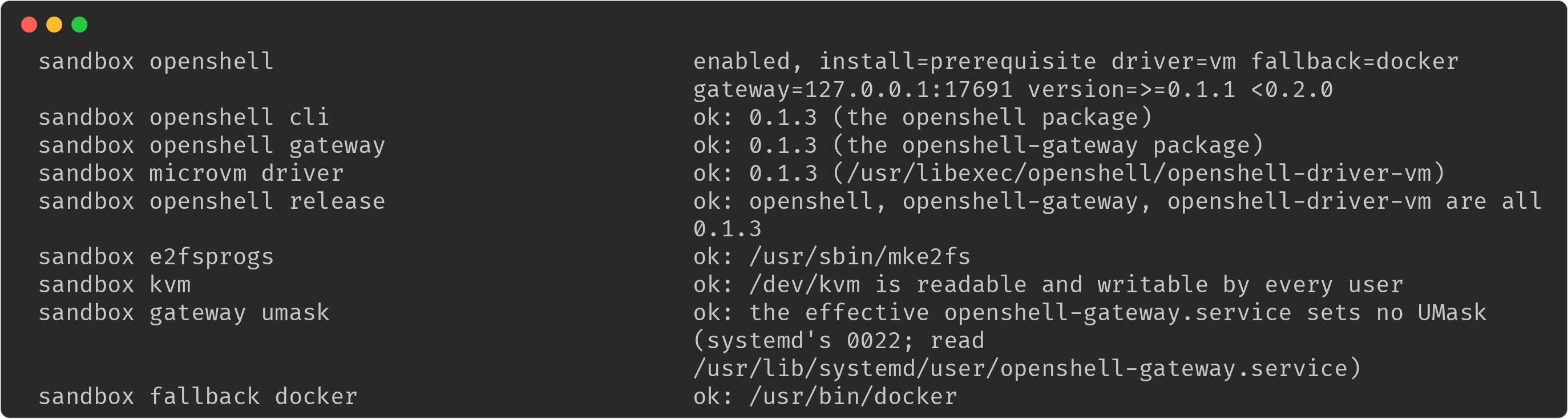
Recipe: setup mode
In install: setup mode nothing is installed per host by you. Each person's
sandbox daemon installs the pinned OpenShell release at their first sandbox, as
that person, with no sudo. The steps, as root:
- Pin an exact release. Set
enterprise.openshell.versionto a release this DefenseClaw build can install ("0.1.3"). A range, an empty value or an unknown release is a failed row inensurethat lists the releases it can install. NVIDIA publishes no tarballs for Intel Macs, sosetupis refused there too. - Prepare what OpenShell needs and DefenseClaw does not bring. Docker for the
agent images, the
dockerandkvmgroups for the people who need them (Linux), ande2fsprogsfor the MicroVM driver (the MicroVM driver).ensurechecks the driver prerequisites in this mode too. - Allow the download. The daemon downloads NVIDIA's release tarballs, checks
NVIDIA's SHA-256 file and a digest pinned in DefenseClaw, and uses the proxy
settings in
enterprise.network. On a computer with no route it fails with a message that says so. - Run
ensurewith the config (Apply the sandbox configuration).statusreports OpenShell as "user-installed, unmanaged".
A person sees the first-use step once: Installing OpenShell 0.1.3 for your account and starting it (first run only)…. Switching between the modes later is
deferred until no sandbox of that person runs (see
Install OpenShell: the two modes).
Turn it on
Stage packs before a fresh Linux package install
If the config names custom sandbox packs, create the service group before
staging them. The package creates the service account using that group.
For an RPM install, put your complete admin config in config.yaml and the
pack directories in packs/ in the current folder, then run:
getent group defenseclaw >/dev/null || sudo groupadd --system defenseclaw
sudo install -d -o root -g defenseclaw -m 0750 /etc/defenseclaw /etc/defenseclaw/policies /etc/defenseclaw/policies/sandbox
sudo cp -R "$PWD/packs/." /etc/defenseclaw/policies/sandbox/
sudo chown -R root:defenseclaw /etc/defenseclaw/policies/sandbox
sudo find /etc/defenseclaw/policies/sandbox -type d -exec chmod 0750 {} +
sudo find /etc/defenseclaw/policies/sandbox -type f -exec chmod 0640 {} +
sudo install -o root -g defenseclaw -m 0640 "$PWD/config.yaml" /etc/defenseclaw/config.yaml
sudo dnf install ./defenseclaw-enterprise-*.rpm
sudo /opt/defenseclaw/bin/defenseclaw-gateway enterprise linux ensure --from-package --json
Use real directories and files owned by root, with no symlinks or ACL entries
that grant write. Each pack is under sandbox/<name>/, and the config must
point to the staged policies. Mode 0750 gives the service group read and
traverse access; mode 0640 gives it read access to the files. Keep parent
folders traversable by that group. Mode 0755 is refused because "every
account can read the sandbox policy of every profile"; mode 0750 with
root:root is refused when the service account cannot read the packs.
Apply the sandbox configuration
Add the keys to the admin config.yaml, then apply it.
openshell:
  enabled: true
  admin:
    egress_block: [pastebin.com, transfer.sh]
    allow_upstream_telemetry: false
    foreign_sandboxes: stop
    request_access: "it-security@example.com, https://help.example.com/ai-sandbox"

enterprise:
  openshell:
    install: setup            # or prerequisite
    driver: auto              # docker, vm or auto; default: vm on macOS, docker on Linux
    driver_fallback: docker   # Linux, vm or auto: docker (default) or none where KVM is not available
    version: "0.1.3"          # exact pin for setup; a range inside ">=0.1.1 <0.2.0" for prerequisite
    gateway_port: 17670       # OpenShell gateway, loopback only
sudo /opt/defenseclaw/bin/defenseclaw-gateway enterprise linux ensure --from-package --config "$PWD/config.yaml" --json
sudo /opt/cisco/defenseclaw/bin/defenseclaw-gateway enterprise macos ensure --from-package --config "$PWD/config.yaml" --jsonRun the first command on Linux and the second on macOS. After that, the apply
service re-runs ensure whenever config.yaml or the policies directory
changes. See Change the config.
enterprise.openshell key | Meaning |
|---|---|
install | prerequisite (default) or setup. |
driver | docker, vm or auto. The default is vm on macOS and docker on Linux. auto is the MicroVM driver where the user's KVM probe passes when a sandbox starts, and docker where it does not (Linux; macOS runs the MicroVM driver only, so auto is vm there). vm or auto with install: prerequisite on Linux is judged by ensure: it needs the driver binary, and the stock OpenShell rpm has none (see Recipe: prerequisite mode). |
driver_fallback | Linux, driver: vm or auto. What a sandbox gets when KVM is not available for the user: docker (the default) or none. See The docker fallback. |
version | The OpenShell release. setup needs an exact version such as "0.1.3"; prerequisite also accepts a range inside >=0.1.1 <0.2.0. |
gateway_port | The OpenShell gateway's loopback port, 1024 to 65535, default 17670. It may not equal the API, hook, ingress or egress port. |
e2fsprogs_dir | macOS only. An absolute directory whose chain is owned by root. |
These keys are lifecycle settings: changing one is applied by ensure and
needs a restart of the user daemons, which waits for running sandboxes. The
openshell.* keys stay hot-reloadable.
A required agent is refused on a host where sandboxes cannot run (Windows, an
Intel Mac, no Docker or KVM for the user, OpenShell missing). That is the
default, when_unavailable: refuse. See Require sandboxes.
Check a candidate config before you apply it
A profile with a contradiction never reaches your people: the gateway refuses the whole file and keeps the previous one. You can find out first, in this order, without changing anything on the computer until step 2.
- Validate the file.
defenseclaw-gateway config validate ./config.yamlruns the compiler and loader the gateway runs, including every profile's sandbox section combined withopenshell.admin. It exits 1 where the gateway would refuse, and a refusal names the setting and the profile. - Apply it.
enterprise <os> ensure --config ./config.yamlvalidates again, then applies. A refused file is reported and the running config stays. - Look at one person.
enterprise <os> profile-explain --user alice --connector claudecodeandenterprise <os> policy verify --user aliceshow the profile that person gets and the sandbox rows (Inspect and verify as an administrator). - Ask the person.
defenseclaw sandbox policy explainprints the same policy in plain words.
This is ensure refusing a profile whose allowed: false would leave a
required agent nowhere to run:

Other combinations that cannot be satisfied are refused the same way: two
allowed_harnesses lists with nothing in common, an egress_allow_only that
leaves no destination once the floor is applied, allowed_credentials: [none]
together with other providers, an unknown required_for connector, or a pack
outside <policy_dir>/sandbox/ or looser than the floor's.
The docker fallback
On Linux, driver: vm or driver: auto wants OpenShell's MicroVM driver. When
KVM does not work for the user, the sandbox runs on the docker driver
instead, so it is still sandboxed and nobody waits for a fix. This is the
default (driver_fallback: docker).
- When the check runs. The check runs for each user when a sandbox starts.
It never runs at login. It looks for the CPU's virtualization flags (
vmxorsvm), opens/dev/kvmfor reading and writing as the user (the same test the driver makes), and looks foropenshell-driver-vmin the rendereddriver_dir,~/.local/libexec/openshelland the system directories. If any of these fails, the sandbox uses the fallback. - Same checks and the same policy. The fallback needs the same Docker
access as the
dockerdriver: the user is in thedockergroup and Docker runs. Every floor of the user's profile applies unchanged. Only the MicroVM isolation is missing. - A sandbox keeps its driver. A running sandbox never switches driver. The
user's OpenShell gateway restarts only while none of the user's sandboxes
runs, and then on the configuration that fits:
gateway.tomlfor the MicroVM driver, orgateway-docker.tomlfor the fallback.ensurerenders both next to each other in<ConfigDir>/openshell. - Refuse instead.
driver_fallback: nonerefuses the sandbox. The refusal gives the reason and the contact inrequest_access, for exampleyour organization requires MicroVM sandboxes on this computer, and they can't run here: KVM not available on this computer. A profile can setsandbox.driver_fallback: nonefor its users (tighten only). No profile can turn the fallback back on when the host oropenshell.adminsaysnone. - Where it shows. The launch banner shows the driver and the reason, for
example
Driver docker (fallback: KVM not available on this computer). So dosandbox status,sandbox policy explainand theSandbox driverrow ofsandbox doctor, which is a warning while the fallback runs. Each sandbox's record, its registration (enterprise <os> sandbox list,sandbox explain --registration) and its telemetry also have them, asdefenseclaw.sandbox.driveranddefenseclaw.sandbox.driver_reason(configured,kvm_available,kvm_missing,kvm_access,cpu_virtualization,vm_driver_missing,vm_prerequisite_missing). - What the administrator sees.
enterprise linux statusandverifyaddfallback ...rows for the fallback's own prerequisites. A MicroVM prerequisite the host lacks while the fallback is ready is the warningopenshell_driver_fallback, notopenshell_prerequisite_missing: users still get sandboxes. The groups row asks for bothkvm(where/dev/kvmis not open to everyone) anddocker.
This is the launch banner of a person on a Linux computer where the CPU shows no hardware virtualization, with the default fallback:
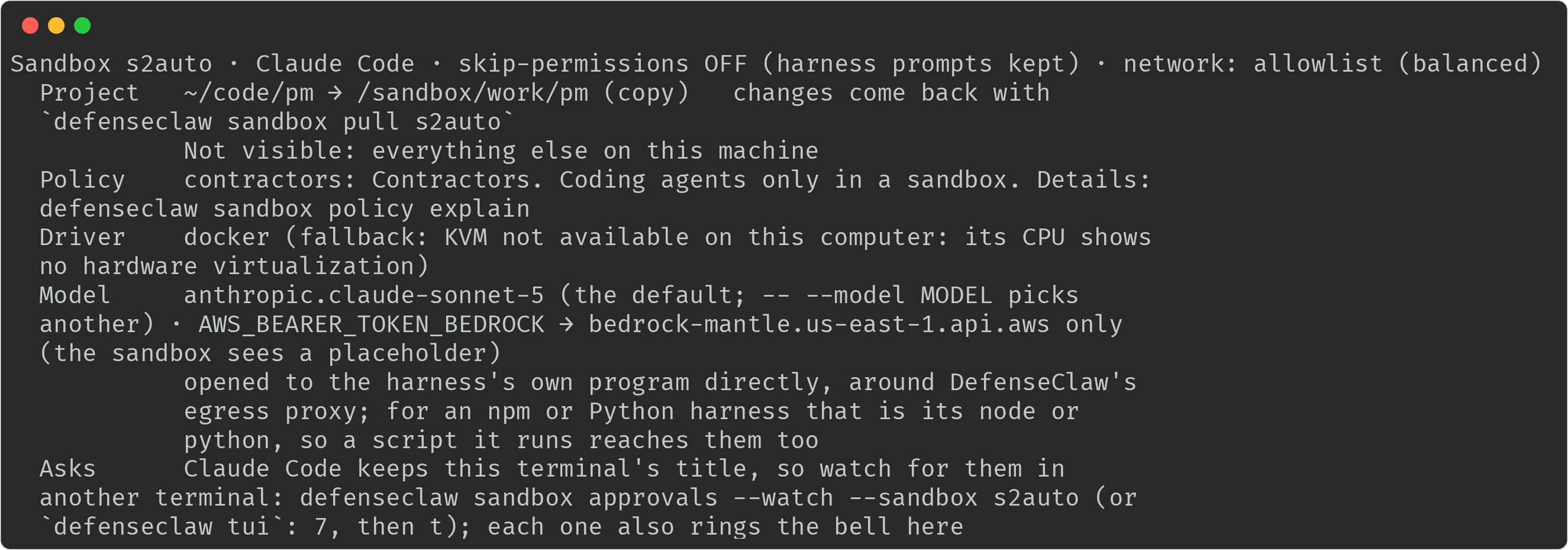
And this is a person whose account is not in the kvm group when the
organization set driver_fallback: none. status says why sandboxes aren't
available, doctor fails the runtime row with the contact, and sandbox run
refuses with the same sentence:
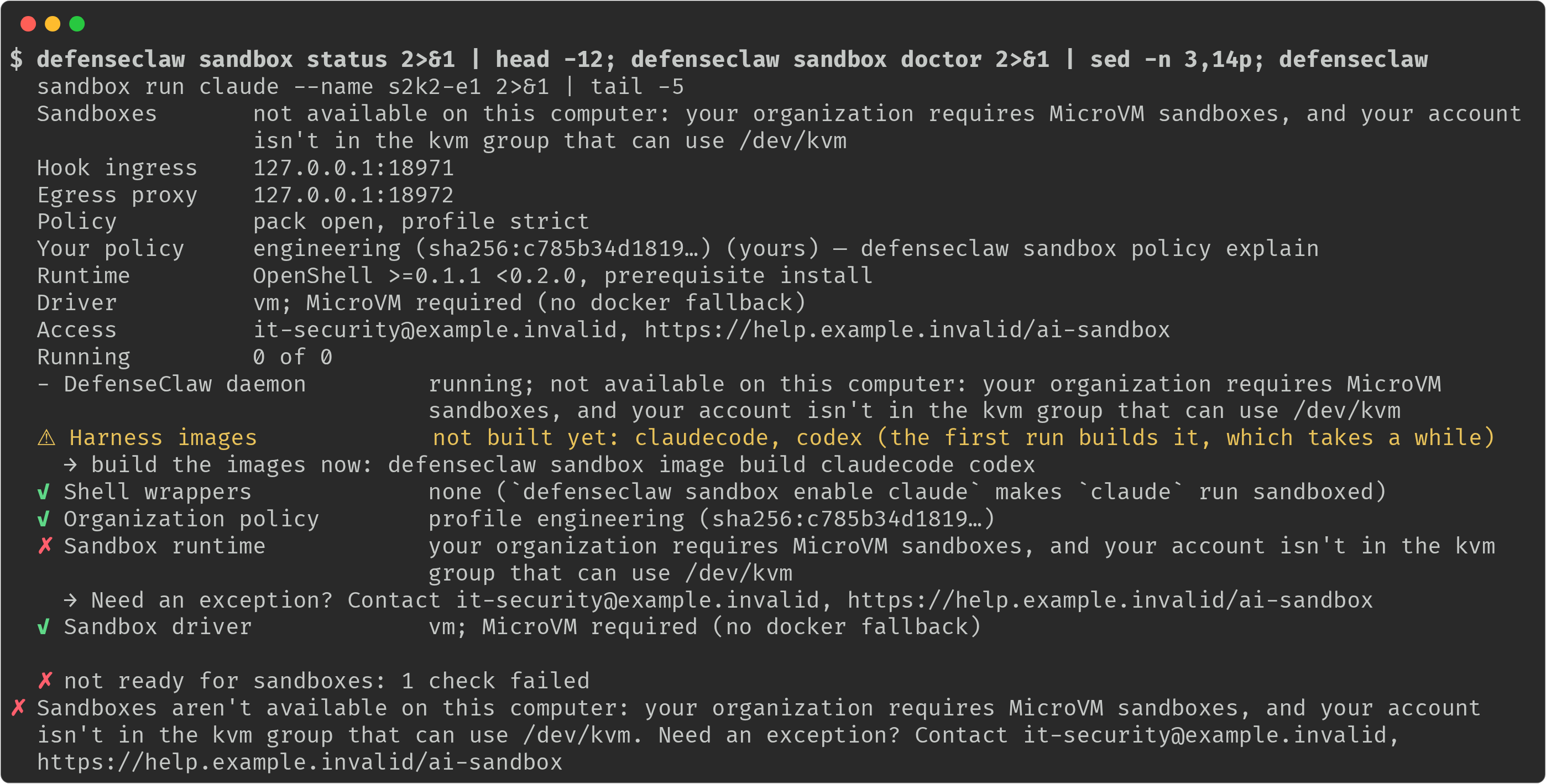
The MicroVM driver
The MicroVM driver runs each sandbox in a small virtual machine of its own
instead of a container. It is the only driver on macOS (Apple silicon) and an
option on Linux (driver: vm, or auto with the Docker fallback). This is what
the lifecycle checks for it.
| Check | Linux | macOS |
|---|---|---|
| Hardware | /dev/kvm exists and the CPU shows vmx or svm. On a cloud VM that takes nested virtualization or a bare-metal size. | Apple silicon. An Intel Mac is refused (os_unsupported). |
| Access | /dev/kvm is readable and writable for the person, directly or through the kvm group | Nothing to arrange |
| Driver binary | openshell-driver-vm at the OpenShell release you run. In prerequisite mode you extract NVIDIA's tarball (the recipe); in setup mode each person's daemon downloads it. | The same, from NVIDIA's macOS build |
e2fsprogs | 1.43 or newer on the host (mke2fs) | In e2fsprogs_dir (a root-owned directory) or the person's ~/.local/opt/e2fsprogs. Another account's Homebrew keg is refused. |
| Docker | Needed for the agent images, and for the fallback | Docker Desktop running for the person: the agent images are built there |
| Gateway settings | Rendered gateway.toml, run by DefenseClaw's user unit, which sets the umask the driver needs | Rendered gateway.toml, run by DefenseClaw's LaunchAgent |
| When it can't run | The Docker fallback (default) or a refusal with driver_fallback: none | No fallback: the sandbox is refused with the reason |
As the administrator, enterprise <os> verify prints a row for every piece
(the screenshot under Recipe: prerequisite mode).
As the person, defenseclaw sandbox doctor ends with the Sandbox runtime and
Sandbox driver rows, and defenseclaw sandbox status shows the driver. Group
changes (kvm, docker) reach a running host within about 30 seconds, because
the answer for an account is cached that long.
Write the sandbox policy
There are two places, and they share one type.
openshell.adminis the organization floor. It is the loosest anyone gets. Everything in Admin constraints plus the keys in the table below goes here.guardrail.profiles.<name>.sandboxis a profile overlay. It uses the same keys, can only tighten the floor, and is selected by the sameprofile_assignmentsanddefault_profilethat choose the guardrail profile.
Strict settings belong in profiles and in default_profile; the floor is the
most permissive case. A profile cannot loosen the floor. The one key that
replaces instead of tightens is request_access.
guardrail:
  profiles:
    contractors:
      description: Contractors. Coding agents only in a sandbox.
      mode: action
      sandbox:
        required_for: [claudecode, codex]
        when_unavailable: refuse
        allowed_harnesses: [claudecode, codex]
        egress_allow_only: [api.anthropic.com, "*.amazonaws.com", github.com]
        allow_mount: false
        allow_unblock: false
        user_approvals: session
        allowed_credentials: [bedrock]
        process_tree: true
        delete_stopped_after: 14d
    engineering:
      sandbox:
        allowed_harnesses: [claudecode, codex, opencode, hermes]
        on_silence: stop
        max_silence_after: 5m
    offline-floor:
      sandbox:
        # Offline and unverified users get this profile, so it repeats every
        # setting of the strictest profile above.
        required_for: [claudecode, codex]
        when_unavailable: refuse
        min_profile: strict
        allowed_harnesses: [claudecode, codex]
        egress_allow_only: [api.anthropic.com, "*.amazonaws.com", github.com]
        allow_mount: false
        allow_unblock: false
        user_approvals: session
        allowed_credentials: [bedrock]
        process_tree: true
        on_silence: stop
        max_silence_after: 5m
        delete_stopped_after: 14d
  profile_assignments:
    - profile: contractors
      match: {groups: ["contractors@corp.example.com"]}
    - profile: engineering
      match: {groups: ["engineering@corp.example.com"]}
  default_profile: offline-floor
default_profile is what a person gets when DefenseClaw cannot read their
groups, for example while the domain controller and the SSSD cache are both
unavailable, so offline-floor repeats every setting of contractors and
engineering. A default_profile that is looser than an assigned profile
gives that person less than the assigned profile would, and ensure prints a
warning for each such setting (see
Inspect and verify as an administrator).
If you pin a pack for one profile with required_pack and required_pack_digest, pin it for
default_profile too, or ensure warns that the default lacks it.
The first assignment that matches the verified user and the agent's connector
wins. When none matches, or the user's groups cannot be read, default_profile
applies, and when that is empty the floor applies alone. match.agents is
ignored for sandboxes, because agent ids are not stable and are claimed by the
caller. A sandbox is marked provisional while its directory lookup is cold (see
Changes while sandboxes run).
Write each group in the spelling the host reports (group@domain on Linux with
SSSD fully qualified names, DOMAIN\group on macOS and Windows). A bare group
name also selects the members of a local group of the same name on the host,
which a person with root on that host can create, and ensure warns when a
bare entry is ambiguous that way. profile-explain shows whether a matched
group came from the directory, the local group database or both. See
User and group policies.
A real example you can copy from is
packaging/identity/ad/sandbox-profiles.example.yaml
in the identity kit.
The keys and how they combine
The first table lists the keys that already existed under openshell.admin.
The second lists the keys added for managed sandboxes. A profile overlay can
use all of them.
| Key | How a profile tightens the floor | Applies |
|---|---|---|
required_pack, required_pack_digest | The profile's pack must be at least as strict as the floor's pack in every setting, and sit in the policies directory | At create |
min_profile | The stricter profile wins | At create |
allow_yolo, allow_host_ports, allow_learn_mode | false wins | At create (learn mode: live) |
allow_mount, require_copy_for | false wins; the lists are joined | At create |
allowed_harnesses | Intersection | At create |
egress_block, egress_allow_only, block_large_uploads | Block lists are joined, allow-only lists intersect, true wins | Live |
allow_unblock | false wins | Live |
max_resources | The minimum | At create |
locked | The lists are joined | At create |
| New key | Type | Meaning | How a profile tightens the floor | Applies |
|---|---|---|---|---|
allowed | bool | May this person use sandboxes at all | false wins | At create |
required_for | connector names | Agents that must run in a sandbox on this computer | Union | Host hooks |
when_unavailable | refuse, alert | What a required agent gets where sandboxes cannot run. The default is refuse. | refuse wins; alert needs the floor and the profile to both say alert | Host hooks |
user_approvals | none, session | What the person may approve (see Asks) | The stricter wins | Live |
allowed_credentials | provider names, or [none] | Which model credentials may enter a sandbox | Intersection. none stands alone. | At create |
on_silence | stop, alert | The response when a user-tier agent works without its hooks | stop wins | Live |
max_silence_after | duration, 1m or more | How long a user-tier agent may work without hooks | The minimum | Live |
process_tree | bool | Sample the sandbox's process tree | true wins | Live |
foreign_sandboxes | stop, alert | What to do with a sandbox DefenseClaw did not start. The default on a managed host is stop. | stop wins | Live |
allow_upstream_telemetry | bool | Let OpenShell send its own usage telemetry. Off on a managed host unless set. | false wins | At create |
delete_stopped_after | duration or Nd, 1h or more | Delete a sandbox that has been stopped, or has completed (its main process ended), this long; one in the error phase is left to its owner | The minimum | Live |
request_access | text, up to 512 bytes | Who the person contacts for an exception | A profile value replaces the floor's | Live |
driver_fallback | docker or none | none refuses a Linux sandbox that wants the MicroVM driver where KVM is not available, instead of the docker fallback | none wins; docker never loosens it | At the next sandbox start |
An unset key adds no constraint. A list left out is "no constraint", and an
empty list is refused by the schema; to allow no credentials, write
allowed_credentials: [none]. A combination that cannot be satisfied is an
error when the config loads, for example allowed: false together with
required_for, or two allowed_harnesses lists with nothing in common.
required_for takes connector names such as claudecode, codex, cursor
and copilot. request_access falls back to "contact your IT help desk"
when empty.
Packs
Custom packs for managed hosts live under the policies directory in
sandbox/<name>/, and a required_pack outside it is refused. A profile's
required_pack must be at least as strict as the floor's (with no floor pack,
as the default pack: openshell.pack, else balanced) in network and
approvals modes, workspace, MCP, hooks.fail_mode, on_tamper, on_silence,
silence_after and the egress lists, and must match its
required_pack_digest when it has one; ensure and the config load refuse
anything else and keep the previous config, and every create checks again and
fails closed. A run whose profile names no pack gets the default pack
(openshell.pack, else balanced; never open). Managed computers run every
sandbox on a copy of the project, so a profile's pack that sets
workspace.mode: mount is refused as looser than the default pack, and a
repository policy that asks for a mount is clamped to copy with a reason.
Under a required pack, sandbox run --pack takes a pack that is at least as
strict in every setting and refuses a looser one, naming your profile and the
setting it loosens. extends helps you write a pack and guarantees nothing. The
packs directory must be owned by root:defenseclaw (macOS
root:_defenseclaw) with mode 0750: every ensure refuses one that other
accounts can read, and verify fails on it. ensure and verify also warn,
field by field, where default_profile is looser than an assigned profile,
and name a custom pack without a digest. See
Sandbox policy packs for the pack format.
Hook silence
Claude Code, Codex, Copilot, Cursor and OmniGent images own their hooks as root,
so the agent cannot switch them off, and silence on those only alerts. on_silence
and max_silence_after bind the user-tier agents, such as OpenCode and Hermes.
sandbox policy explain shows the response that applies to the agent in
question.
Silence counts only while the agent works: its model calls and other
connections, with no hook request for max_silence_after. An agent idle at
its prompt, or waiting on a long tool call that its hooks reported (a build,
or sleep 180), is not silent and keeps running. See
the silent hooks response for what counts
as work.
Require sandboxes
required_for lists the agents that must run in a sandbox on this computer.
When such an agent starts on the host, its machine-owned hook refuses the first
blockable event (session start where the agent has one, otherwise the prompt
and every tool call) before any evaluation, and records it. The refusal tells
the person what to run. A sandboxed run of the same agent is not refused,
because its hooks arrive from a live registration through the relay.
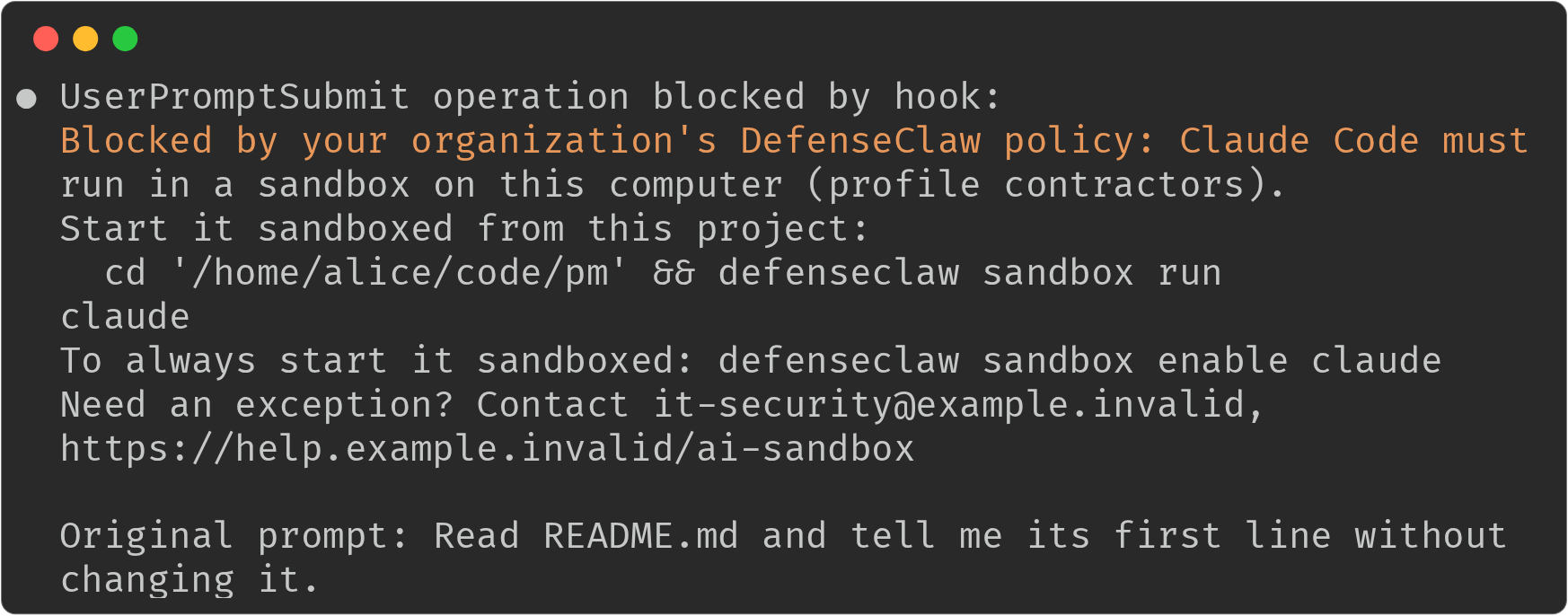
Blocked by your organization's DefenseClaw policy: Claude Code must run in a sandbox on this computer (profile contractors).
Start it sandboxed from this project:
  cd '/home/alice/src/api' && defenseclaw sandbox run claude
To always start it sandboxed: defenseclaw sandbox enable claude
Need an exception? Contact it-security@example.com
This is what a contractor sees in Claude Code when the agent starts outside a sandbox. Claude Code shows it as the reason its first prompt was blocked, and the command to run is ready to paste.
- Where sandboxes cannot run (Windows, an Intel Mac, no OpenShell, no Docker
group or KVM access for the user):
when_unavailable: refuse(the default) gives "Claude Code must run in a sandbox, and sandboxes aren't available on this computer (OpenShell is not installed)", with the reason code to quote when the person asks for an exception (the reason codes).alertlets the run through and emitslog.sandbox.host_run_unavailable.alerttakes effect only when the organization floor (openshell.admin.when_unavailable) and the matched profile both sayalert. An unset floor counts asrefuse, so a profile that setswhen_unavailable: alertalone cannot loosen it: the person is still refused, andprofile-explainshowsrefuse. To allow the alert for a group, setalertin the floor and keeprefusein the profiles that must stay strict. - Exempt users.
exempt_users(enrollment) exempts a person from enrollment and from this requirement only: a required agent is not refused for them, but their guardrail profile still inspects and blocks their calls, and any sandbox they start still gets its full policy.profile-explainshows the exemption. - It is a policy control, not an exec deny. It covers the connectors that
have a machine-owned hook (Claude Code, Codex, Cursor and Copilot).
Setting
DEFENSECLAW_NO_SANDBOX=1or a forged nested-run variable only makes a host run, which the gate refuses. A person who runs an agent that has no machine-owned hook is not stopped by it. - Root is refused on every sandbox route, including when you inspect.
ensure warns about a required_for connector that has no machine-owned hook
on the OS.
Windows computers
Sandboxes do not run on Windows or under WSL2, but the sandbox policy still
reaches a Windows computer, because required_for is enforced by the
machine-owned hook of the agent. The guardrail profile is chosen from the
person's directory groups by SID, as for every other guardrail setting. A person
whose profile requires Claude Code or Codex in a sandbox is refused when the
agent starts, with the reason os_unsupported:
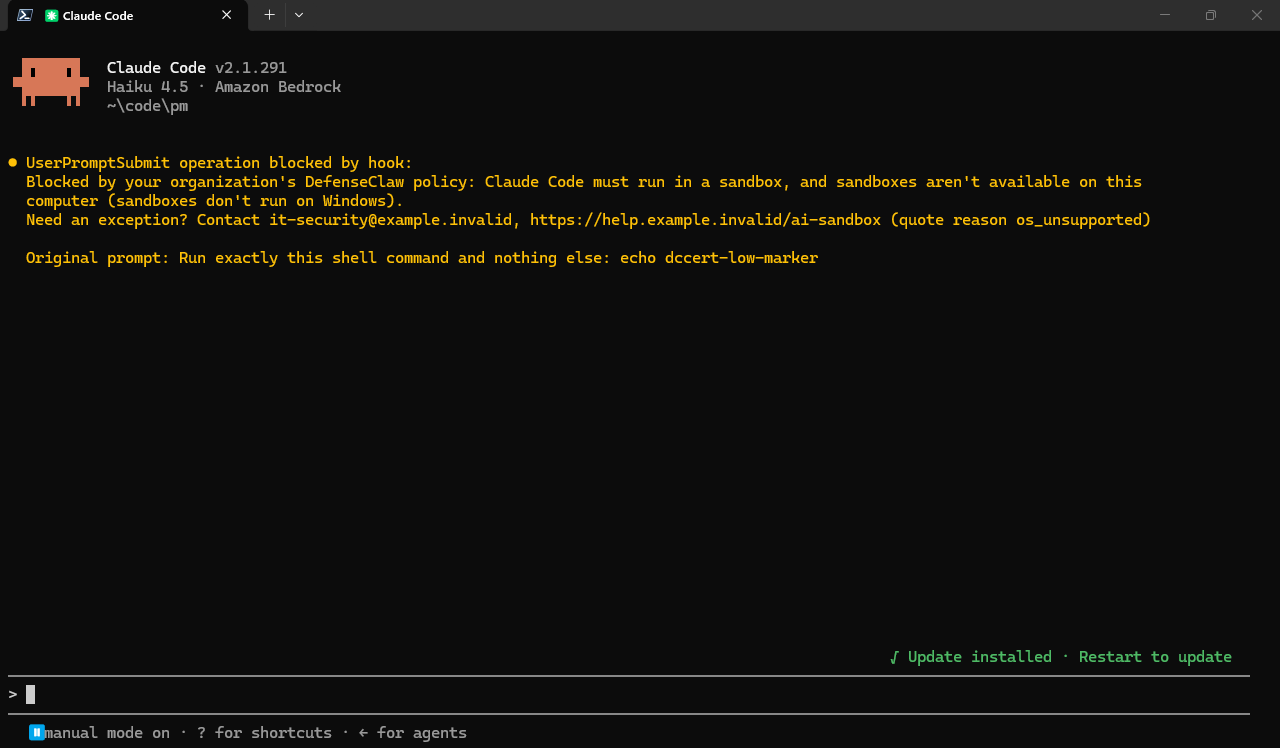
when_unavailable: refuseis the default.alertlets the agent run on the host and recordslog.sandbox.host_run_unavailablewith the actionallow, but only where the floor (openshell.admin.when_unavailable) and the profile both sayalert.- Put
required_foronly in the profiles whose people must not run these agents unsandboxed, and give the people on Windows a profile without it, if they should keep working. A group that spans Windows and Linux computers gets the refusal on Windows and a sandbox on Linux. enterprise windows profile-explainshows the profile and its sandbox section for a person, andensurewarns about the samedefault_profileand advisory conditions as on Linux and macOS.- The administrator's sandbox commands exist on Windows too, from an elevated
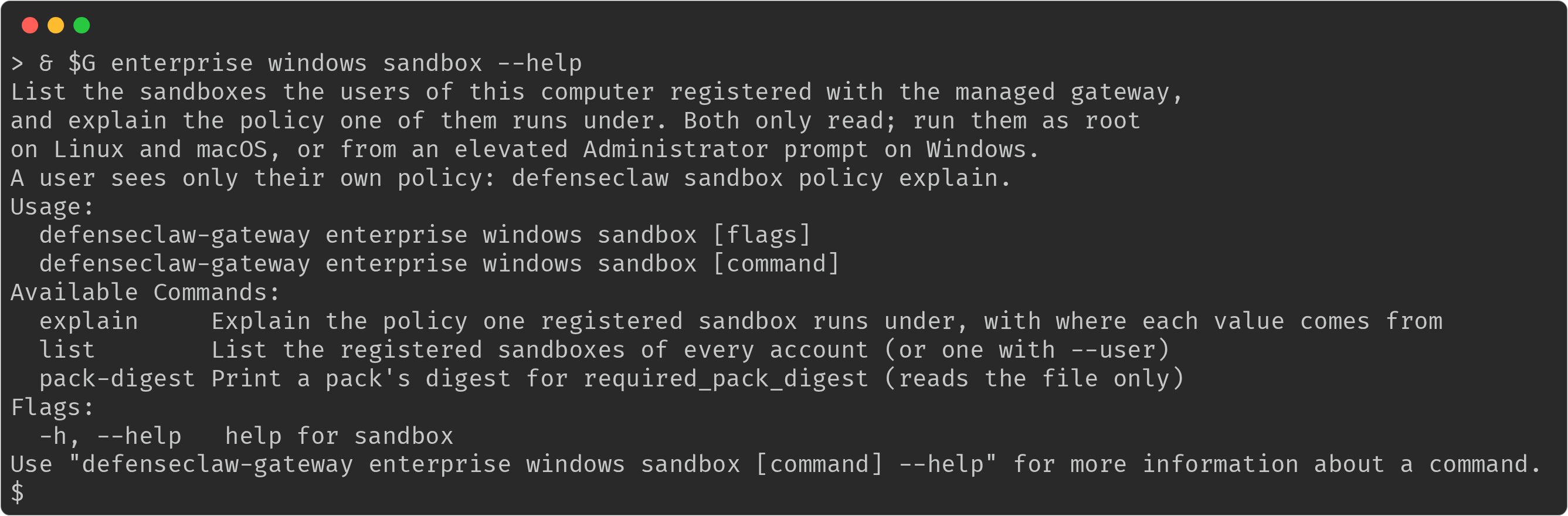
Administrator prompt. No Windows computer registers a sandbox, so
listandexplainhave no registration to show.pack-digestworks there, so one workstation can print the digest arequired_pack_digestpins.
Asks and saved decisions
An ask is a connection the sandbox's egress proxy does not decide for itself. On a managed host the gateway, not the daemon, decides and stores the answer, and it never passes the organization's floor.
user_approvals | allow_unblock | Allow for this session | "Always" | Lift a block |
|---|---|---|---|---|
| unset | true or unset | Yes | Yes, stored | Yes |
| unset | false | Yes | No | No |
session | true or unset | Yes | No | For the session only |
session | false | Yes | No | No |
none | any | No | No | No |
An answer for the session lasts while the sandbox runs: once it stops, its next session asks again. Only an "Always" answer outlives the stop.
With user_approvals: session and allow_unblock: false, the person can approve
an ask for this session only. A request for "always" and an unblock are both
refused, with the rule that refused them and the contact:
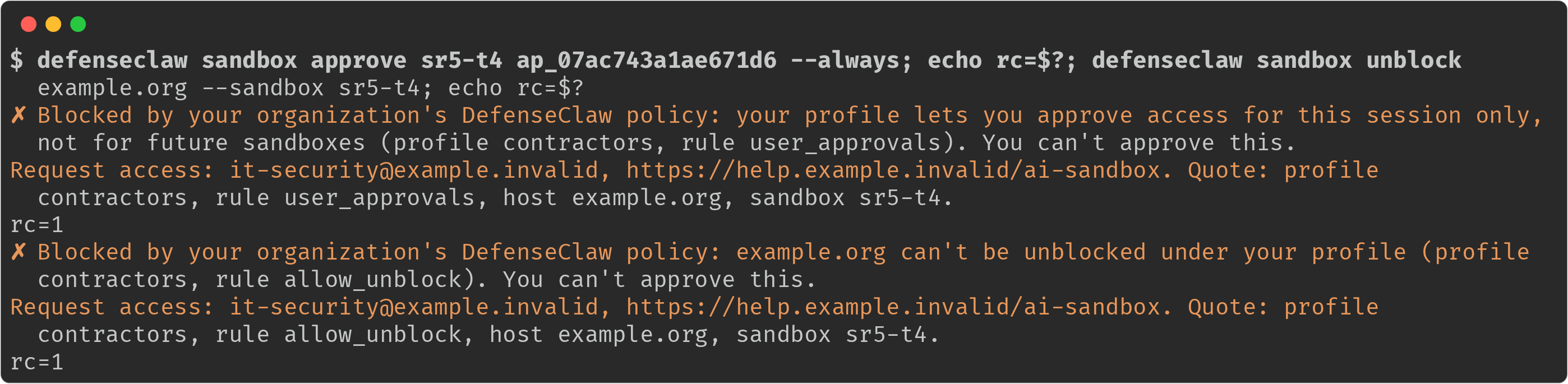
A refused answer carries the request-access text and the exact rule, so the person knows what to ask for.
Blocked by your organization's DefenseClaw policy: api.example.net is not on your profile's allowed hosts (profile contractors, rule egress_allow_only). You can't approve this.
Request access: it-security@example.com. Quote: profile contractors, rule egress_allow_only, host api.example.net, sandbox brave-otter.
The same refusal in the person's activity feed. The agent asked for a host outside the profile's allowed list, DefenseClaw refused it, and the entry carries the sentence to send to the administrator:

An ask the profile lets the person answer shows up in sandbox approvals, and the
agent is told that the ask is waiting:

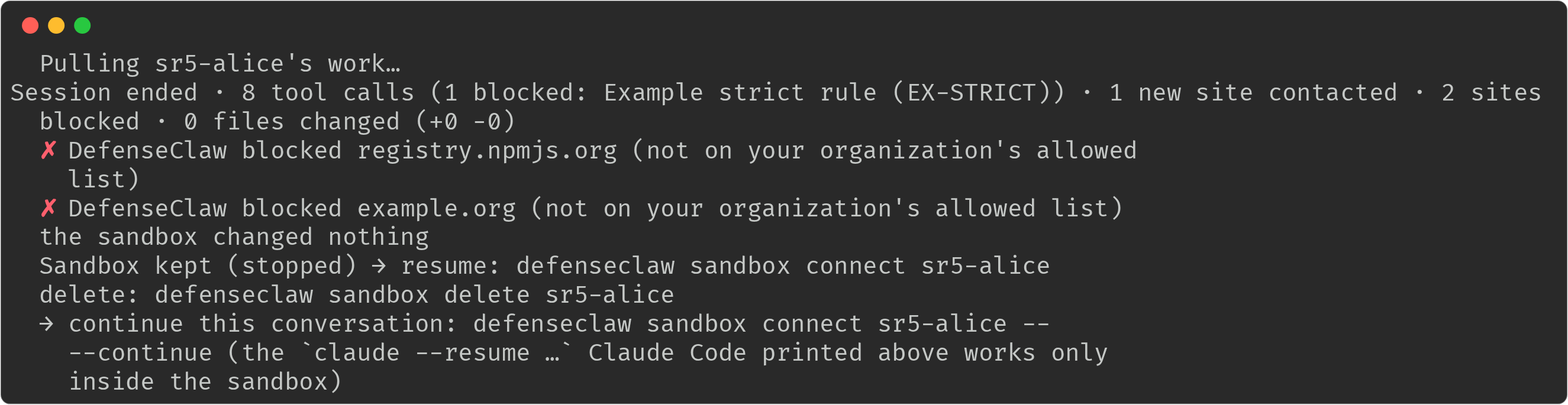
When the session ends, its summary lists what DefenseClaw blocked, so the person can ask for it, and says how to resume or delete the kept sandbox:
Saved decisions are per person (decisions/<uid>.json, service-owned, mode
0600), record who answered (not an operator), and are capped by the floor every
time the policy is resolved. A call straight to the decisions route is checked
against the same table. A block the person adds always stores, because it only
tightens. With user_approvals: none, every rule that came from a user is
removed.
Foreign sandboxes, rules and containers
On a managed host the daemon lists every sandbox on the user's OpenShell gateway at each reconcile, and on every other local gateway registered with the user's OpenShell CLI that answers: everything those run is foreign.
-
A sandbox without DefenseClaw's labels and a registration is stopped (
foreign_sandboxes: stop, the default) or alerted on (alert), withlog.sandbox.foreign_sandbox. The person is told that the sandbox wasn't started withdefenseclaw sandbox run, which the organization requires. A sandbox OpenShell won't stop yet (still provisioning or starting, or in error) is deleted instead; if that fails, the next reconcile tries again. A sandbox that is still there after OpenShell took its delete (a MicroVM still provisioning, say) is announced as being removed and deleted again at every reconcile; after three reconciles the person is told to remove it withopenshell sandbox delete. This is the notice after a person created a sandbox with rawopenshell sandbox createwhile it was still provisioning, shown instatusandlist: The record reaches the managed gateway even when the person has no
registered sandbox, so someone who only runs raw
The record reaches the managed gateway even when the person has no
registered sandbox, so someone who only runs raw openshellis audited too. The administrator'ssandbox listshows registrations only, and a foreign sandbox never had one, so it is not listed there: look forsandbox.foreign_sandboxin the audit log, orlog.sandbox.foreign_sandboxin telemetry. -
A network rule DefenseClaw did not render and no stored decision covers is removed and audited (
sandbox.policy.foreign_rule). A repeat stops the sandbox. -
An agent process in a container DefenseClaw did not create is only alerted on (
log.sandbox.foreign_container), so ordinary dev containers keep working. The daemon checks containers at every reconcile, and also while the user's OpenShell gateway is down. An agent is found by its command's name or, under another name (a copied or renamed binary or script), by its package name in the command line or in the program it runs, which the daemon reads from the container withdocker cp(nothing runs in the container). Foreign sandbox and container records carry the person's own guardrail profile match and the connector of the agent found in the item, whether or not the person has a registered sandbox. On Linux with a rootful Docker engine every account in thedockergroup sees every container: a container whose agent runs as another account whose sandbox daemon is running is reported by that account's daemon only, so the alert names its owner. A container whose agent runs as root, or as an account without a running daemon, is reported by every daemon that sees it, each under its own person. An agent in a plain container or in the user's own virtual machine is not stopped. This is a limit, not a hole in the design: the control is the sandbox policy and the alert, not control over every container on a Docker host.
Changes while sandboxes run
The managed gateway re-matches each live registration when the config changes, or when a person's directory facts change: their principal, directory, tenant or groups, or a slow lookup that has now resolved. The daemon learns of it from the next relayed hook or from a poll every 60 seconds. A renamed or recycled account is different: the registration is revoked (see the last paragraph of this section), not re-matched.
| Kind of field | What happens |
|---|---|
Live fields (egress lists, approvals, request_access, silence, process tree, retention) | Switch at once, tighter or looser, and the person sees a status line |
| Tighter create-time fields (for example mounts no longer allowed) | The violating sandbox is stopped; the notice begins "This sandbox was stopped: your profile no longer allows" and names the field and the command to start again. Only after a verified match, never on a failed lookup. |
| Looser create-time fields | Apply at the next run |
A person whose group changes to one that no longer allows sandboxes sees this
when the sandbox stops under them. The session summary says where the work is,
and sandbox pull still reads it:

When a directory lookup is cold, the create waits up to 10 seconds for it
and then starts under default_profile, marked
provisional. A later verified match re-evaluates it and can stop it. A slow
or failed lookup never refuses a create or a hook. A sandbox still running two
minutes after it should have stopped is revoked, and a recycled or renamed
account (the same uid with a different name) revokes its registrations.
What users see
Users get a defenseclaw command that offers only the sandbox commands.
Anything else prints "This computer is managed; only defenseclaw sandbox
commands are available here." and exits 2. The administrator commands remain
defenseclaw-gateway enterprise …, which only root can use for the lifecycle. Run
it by its packaged path (/opt/defenseclaw/bin/defenseclaw-gateway on Linux,
/opt/cisco/defenseclaw/bin/defenseclaw-gateway on macOS): the folder is not on
the PATH of a fresh root login shell.
defenseclaw sandbox --help speaks for the organization too. It describes copy
workspaces, not live mounts, and says that your administrator sets up and
repairs sandboxes on this computer. There is no sandbox setup to run: the
command is not offered, and running it answers that there is nothing for the
person to set up and asks them to contact the administrator. sandbox enable
records only the shell wrapper in the person's rc file and shows the one-time
bypass hint only for an agent the organization does not require in a sandbox.
A banner line shows the person's profile and its description, and only that.
Policy   contractors: Contractors. Coding agents only in a sandbox. Details: defenseclaw sandbox policy explain
Policy   offline-floor (provisional): your directory couldn't be reached; your organization's default applies. Details: defenseclaw sandbox policy explain
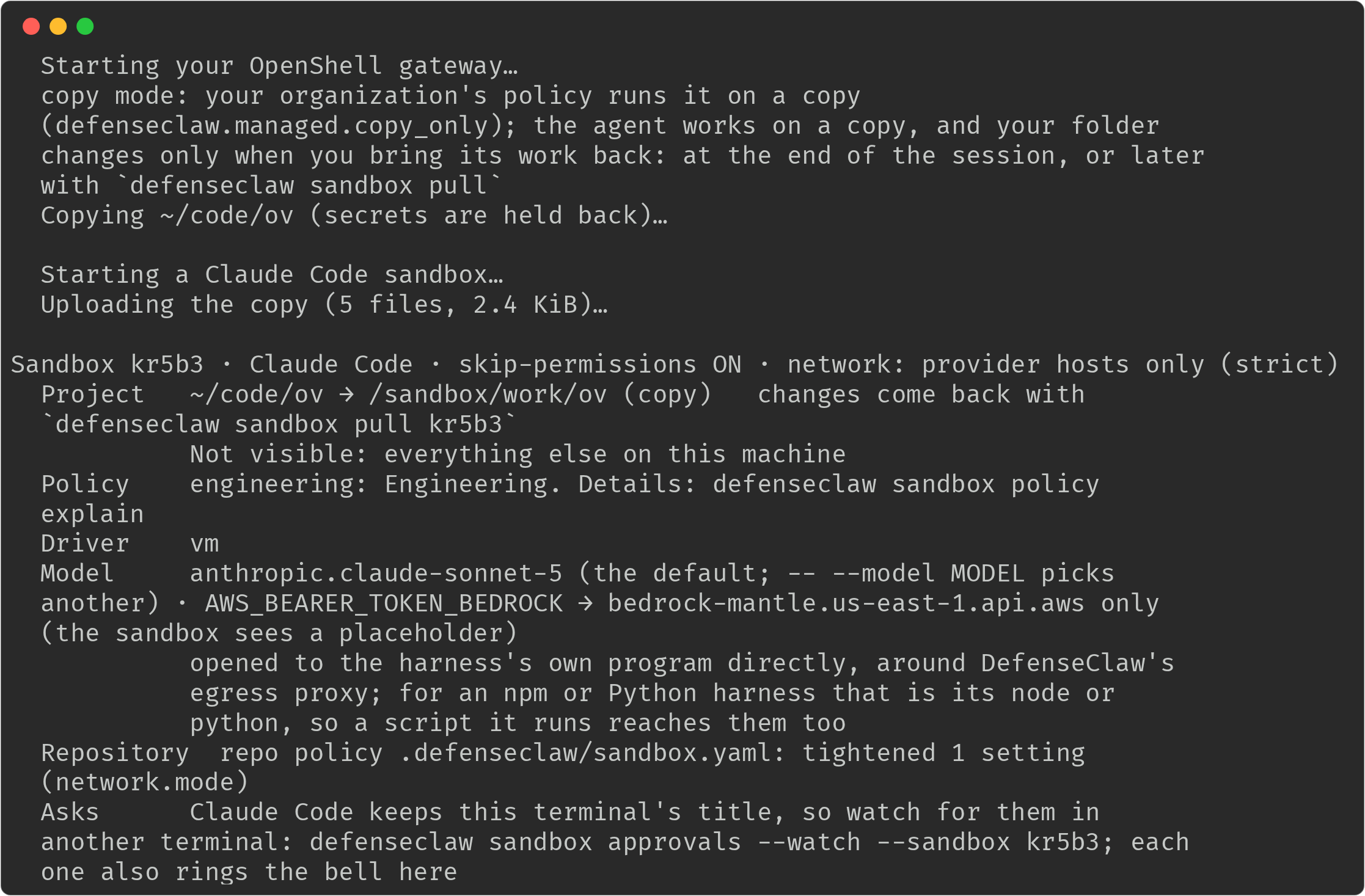
The banner of a first run, on a computer that runs the MicroVM driver. The
Policy line names the person's profile, Driver the driver in force, and a
project's own .defenseclaw/sandbox.yaml shows as the Repository line, here
with the one setting it tightened. The copy-mode notice comes first, because a
managed sandbox always works on a copy.
defenseclaw sandbox policy explain shows the person's own policy in plain
words. --sources tags each row with where its value comes from (the
organization, the profile, a pack, the repository or a flag), and nothing it
prints names another profile.
Your sandbox policy on this computer
  Organization profile  contractors   matched: your group contractors@corp.example.com
                        Contractors. Coding agents only in a sandbox.
  Required              claude and codex run only in a sandbox on this computer
  Agents                only claude and codex may run in a sandbox
  Pack                  contractors (required); network allowlist, approvals manual
  Credentials           only bedrock may go into a sandbox
  Egress                only 3 hosts are reachable (api.anthropic.com, *.amazonaws.com, github.com); 2 hosts are always blocked (pastebin.com, transfer.sh)
  Approvals             you may approve asks for this session only; you can't unblock destinations
  MCP                   2 of your servers included; 1 blocked by your organization
  Workspace             copy mode; no mounts; no host ports; skip-permissions off
  Driver                vm; docker where KVM is not available
  Hooks                 the process tree is watched
  Cleanup               a stopped sandbox is deleted after 14d
  Policy id             sha256:f065b4e9ebc5… (yours), updated 2 min ago; access: it-security@example.com
The Organization profile row is the guardrail profile your administrator
assigned to your directory group. It is not the network profile of the pack
(balanced, strict), which the Pack row names. A profile without
required_for reads "no agent has to run in a sandbox".
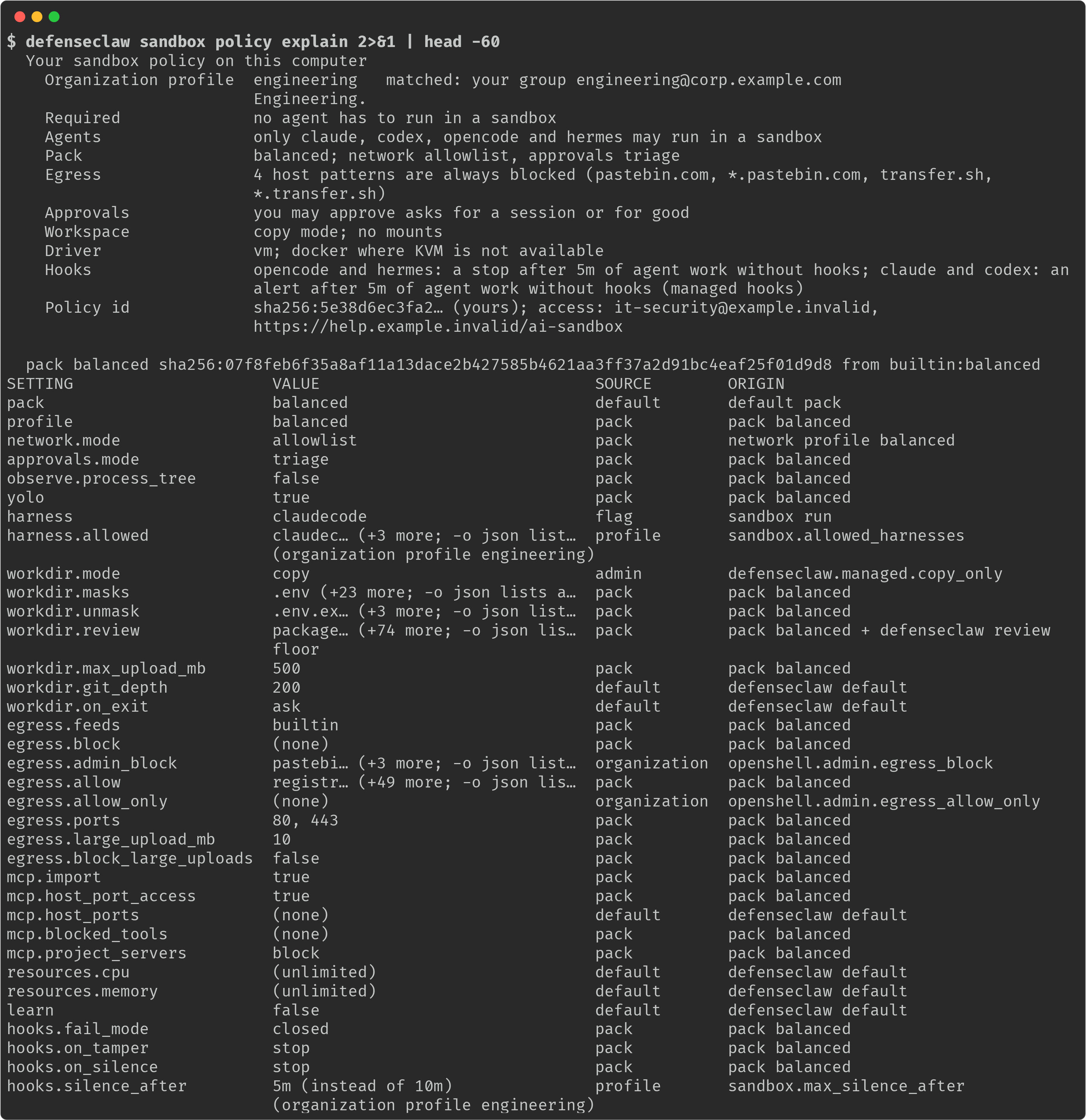
Below the summary, policy explain prints the pack and a table of every
setting with its value, its SOURCE (default, pack, profile,
organization, flag or admin) and the ORIGIN that names the pack, the
profile or the openshell.admin key behind it. A long list is cut with a count
(pastebi… (+3 more; -o json lists all)), and -o json prints it whole.
--sources adds a tag such as [from organization, profile] to each row of the
summary. This is an engineering profile on a MicroVM computer, whose 5-minute
silence limit comes from its profile:
defenseclaw sandbox doctor checks the person's own account (platform and
user) and then reports what their sandbox service got from the managed
gateway: the OpenShell release, driver, install mode and gateway port the
organization set, whether sandboxes are available for them and why not (the
same prerequisite facts enterprise <os> verify reads), their profile, and
their images and hooks. It does not inspect Homebrew, Docker Desktop, the
gateway service or other accounts' files, and every fix it prints is either
one the person can apply or a pointer to the IT help desk.
defenseclaw sandbox setup is refused: there is nothing for the person to
set up.
policy test, policy suggest and pack list and pack show use the same
route and show only the packs in the person's own chain. The TUI's sandbox view
has a Policy section with the same fields where the Python TUI is installed;
the enterprise packages do not install it in this release.
policy test judges your own sandbox policy on a managed computer. No
sandbox is needed: without --sandbox, it tests the policy a new run in this
folder would get. Add --harness to test your own policy for that agent:
defenseclaw sandbox policy test --host api.example.com --port 443
defenseclaw sandbox policy test --harness claude --host api.example.com --port 443
Omit --pack and --profile on a managed computer; the organization decides
them for you. Naming either is refused:
$ defenseclaw sandbox policy test --pack balanced --host registry.npmjs.org --port 443
✗ on this computer the policy test judges your own sandbox policy; leave out --pack and --profile, or name a sandbox with --sandbox
To test an existing sandbox's policy, including its approved unblocks, name
one of your sandboxes (defenseclaw sandbox list shows them):
defenseclaw sandbox policy test --sandbox myapp-7f3a --host api.example.com --port 443Do not combine --sandbox with --pack, --profile or --harness: a named
sandbox already has its own policy.
Privacy. Each person sees only their own policy.
| Surface | What it may show |
|---|---|
Policy routes, pack list and pack show | The caller's own policy, profile, matched group and request_access. Another person's registration is "not found". |
| Daemon socket | The user's own sandboxes, mode 0600 and a peer-uid check. |
| Refusals, banner, status, doctor | The caller's profile. Another account on the sandbox ports is "another account", with no name or PID. A configuration error says only that the policy can't be loaded. |
| Files | Nothing beyond the admin files: config.yaml is mode 0640, packs 0750, the runtime descriptor has no sandbox fields, the stores are service-owned and 0600, and daemon state is 0700. |
| Admin views | Everything, to root only. Principals are hashed unless ai_discovery.include_user_principal is set. |
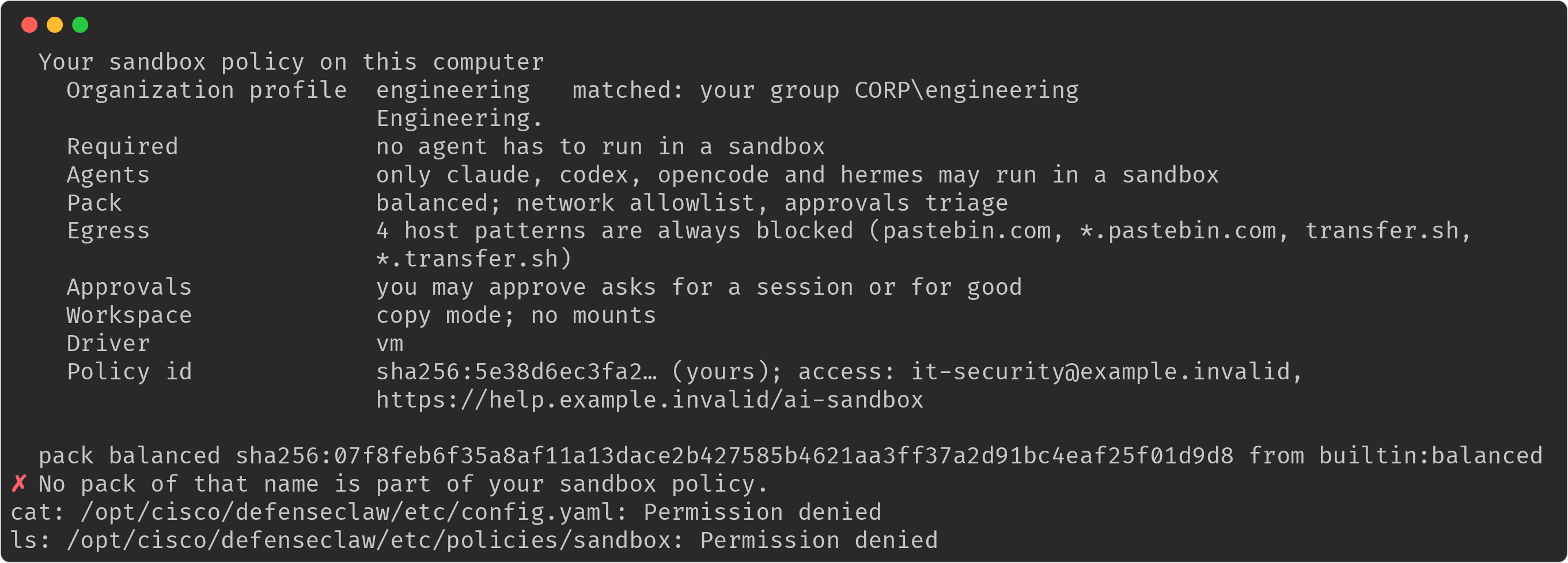
This is a person trying to look past their own policy. policy explain and
pack show stay inside the pack chain they were given (a pack of another
profile is "not part of your sandbox policy"), and the organization's own
config and the sandbox policy folder answer "Permission denied":
Residual: the process list. The sandbox daemon is an ordinary process of the account that runs it, so the operating system decides who can see it in the process list. DefenseClaw does not hide it.
- macOS has no
hidepid. Any account can runps -axo user,command see the user name and executable path of another account's sandbox daemon and OpenShell processes, for example thatalicehas a sandbox daemon running, and their arguments are visible as well. What the daemon holds stays private: its socket, state folder, policy and decisions are the owner's alone, and another account still gets "another account" and no profile or policy. Treat the fact that an account runs sandboxes as visible on a shared Mac. - Linux shows the same by default. To hide other accounts' processes, mount
/procwithhidepid=2(and agid=exception for your monitoring group); DefenseClaw does not change the mount options of the host.
The other messages a person can get are below. The text column quotes stable fragments; the complete notice adds the sandbox name, phase, affected setting or request-access contact when applicable.
| Case | Text |
|---|---|
| Foreign sandbox stopped | "was stopped: it wasn't started with" |
| Foreign sandbox removed | "was removed: it wasn't started with" |
| Foreign sandbox outlives its delete | "is being removed: it wasn't started with" |
| Foreign sandbox still present after three reconciles | "DefenseClaw couldn't remove sandbox"; use the openshell sandbox delete command in the notice |
Foreign sandbox reported under foreign_sandboxes: alert | "wasn't started with" and "your organization was told." |
| Settings drift | "Sandboxes are paused: your OpenShell settings differ from your organization's" and "Ask IT to repair them." |
| Policy can't load | "Your organization's sandbox policy can't be loaded on this computer." |
| Another account holds the ports | "Sandboxes aren't available for your account on this computer right now: another account is using them" and "Try again when that account has no sandbox running." |
| Directory lookup is provisional | "Your organization's directory couldn't be reached, so its default policy applies for now. Try again in a moment." |
| Access request exceeds the profile | "You can't approve this."; the notice gives the request-access contact and the caller's profile, rule, host and sandbox to quote |
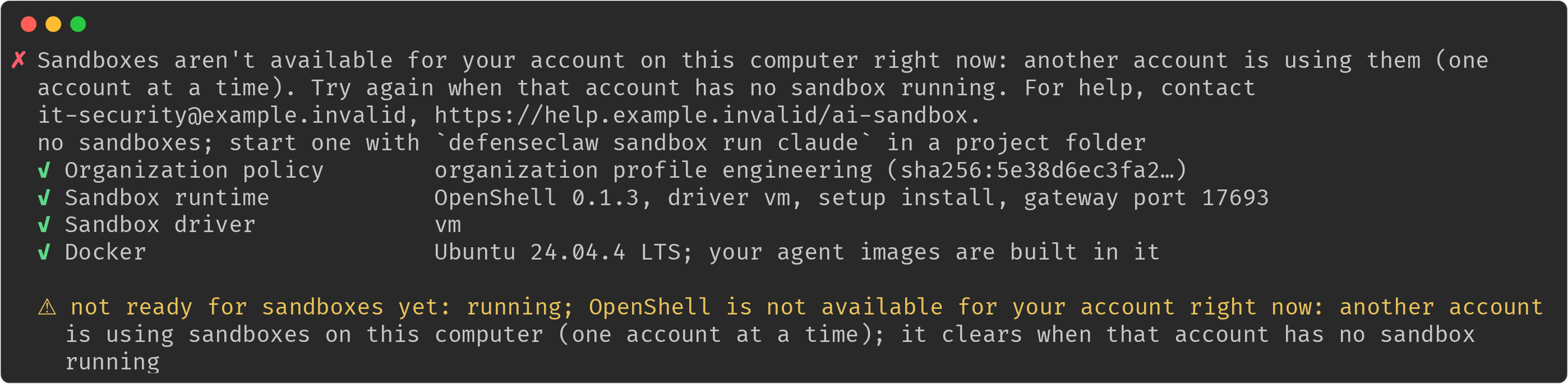
What a second account sees while the first holds the sandbox ports. The text
names no one, doctor explains the same thing, and it clears by itself:
Inspect and verify as an administrator
Run these as root. A standard user is refused.
sudo /opt/defenseclaw/bin/defenseclaw-gateway enterprise linux profile-explain --user alice --connector claudecode
sudo /opt/defenseclaw/bin/defenseclaw-gateway enterprise linux sandbox list --user alice
sudo /opt/defenseclaw/bin/defenseclaw-gateway enterprise linux sandbox explain --registration reg-example
sudo /opt/defenseclaw/bin/defenseclaw-gateway enterprise linux policy verify --user alice
sudo /opt/defenseclaw/bin/defenseclaw-gateway enterprise linux sandbox pack-digest /etc/defenseclaw/policies/sandbox/contractors/pack.yaml
On macOS use /opt/cisco/defenseclaw/bin/defenseclaw-gateway enterprise macos
instead. They show:
profile-explainaddseffective.sandboxwith the source of each value;sandbox listlists the registrations of every account, or of one with--user, filtered with--state pending|expired|live|stopped|revoked, with--json. Each row shows the state now: a pending registration that no sandbox bound to within 30 minutes isexpired(a run that never started), and a registration whose sandbox is not running isstopped;sandbox explainshows one registration the way the person sees it, then the sources: organization (the floor for everyone) and profile;policy verify --useradds the sandbox rows: each required agent, the required pack (present, and its digest matchesrequired_pack_digest; an unpinned pack is a warning that prints the digest), the resolved floor's digest with the keys the organization and the profile set, and the docker or kvm group on Linux.enterprise policy verifyis the same command;sandbox pack-digestprints the digest thatrequired_pack_digestpins. It reads only the file and needs no sandbox daemon.
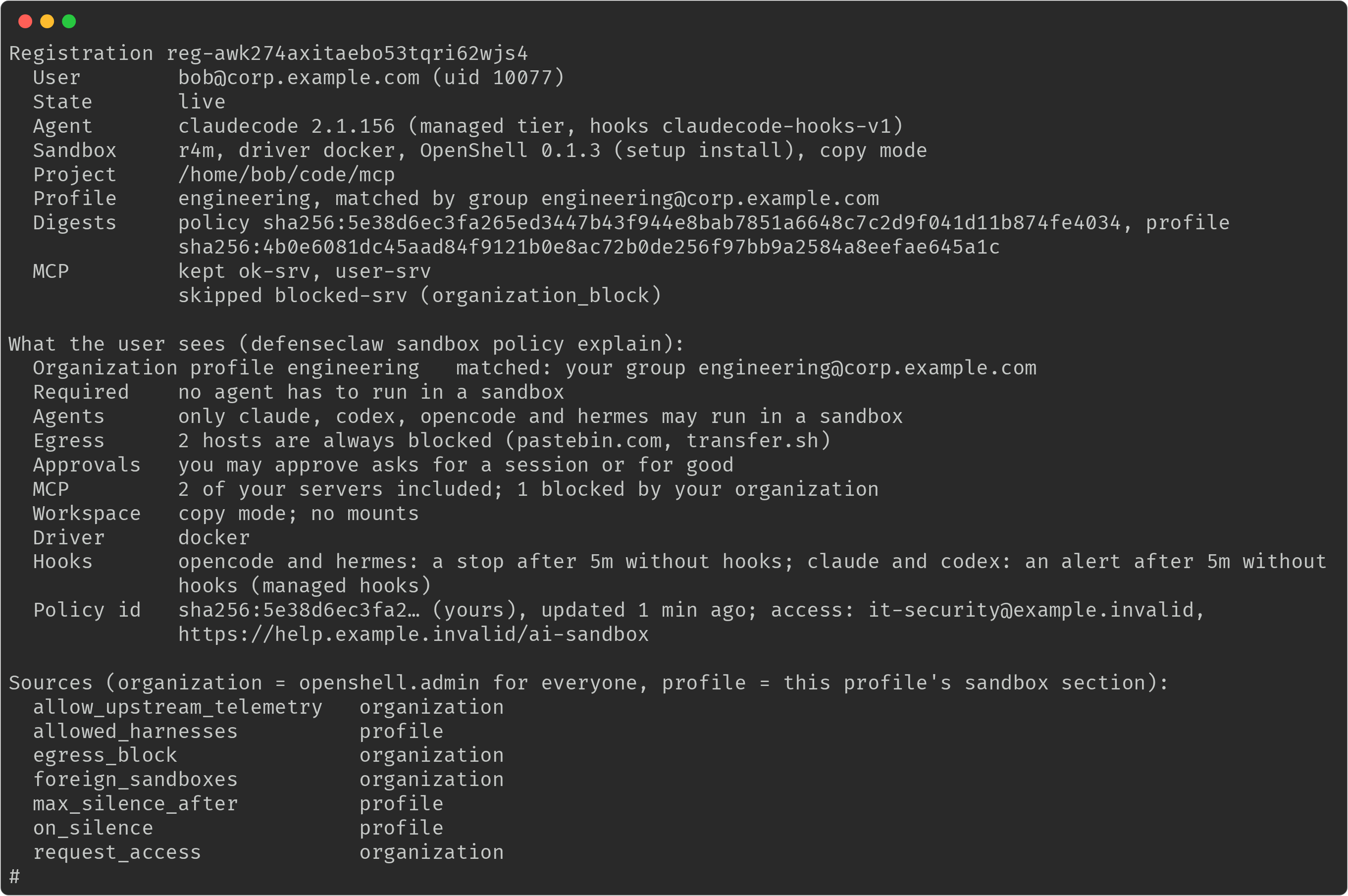
sandbox list as root. Each row is a registration with its state, profile, how
the profile matched (group), agent, sandbox name and driver. These four are
revoked; sandbox explain --registration gives the reason, here
policy_changed:

sandbox explain --registration shows one registration the way the person sees
it, then where each key comes from. The MCP lines show which of the person's
MCP servers were kept and which the organization blocked:
profile-explain, sandbox list, sandbox explain and policy verify refuse
a standard user, the sandbox administrator included, with the administrator
command and exit 1. With --json the refusal is a JSON document with
errors[0].code elevation_required.
ensure and verify print warnings, never failures, for configurations that
work but that you probably did not intend:
default_profileis looser than an assigned profile, for example "default_profile lacks required_for [claudecode] from contractors". Offline and unverified users get the default, so it matters most.- A floor reachable only through
match.agentsormatch.connectors. - A
required_forconnector with no machine-owned hook on the OS. - An empty
request_access.
ensure also validates the packs, their digests and their strictness, and
refuses a packs directory that others can read.
Telemetry and the fleet view
Every sandbox record carries the profile (name, digest, match, matched group),
the policy digest and generation, the registration id, whether the policy is
provisional, the OpenShell version and install mode, and a keyed subject
hash. Principals are hashed unless ai_discovery.include_user_principal is on. The
Grafana Sandboxes board has a managed fleet section, and the Splunk saved
searches and Splunk Observability charts cover the same questions: running
sandboxes by profile, refused and unavailable host runs, access refusals,
asks, foreign items, silence stops, re-matches, provisional rates and drift.
See Sandbox telemetry.
Upgrade, roll back, uninstall
- Upgrade.
ensurerestarts each user's daemon only when no sandbox of that user runs; otherwise it reports "pending restart" and the launcher restarts an idle, outdated daemon on the next command. A MicroVM upgrade waits for running sandboxes. - Roll back. The lifecycle snapshot covers the user units and the launcher. A
setup-installed OpenShell under~/.localis removed with the user's teardown. - Uninstall and purge. Root runs each user's teardown as that user.
purgealso removes the daemon state, MicroVM disks, images, both stores and the renderedgateway.toml.
Troubleshooting
| What you see | What it means | What to do |
|---|---|---|
openshell_prerequisite_missing | In prerequisite mode the version, a binary, the driver, e2fsprogs, Docker or KVM is missing for this user | Read the fix line; install it, or switch to setup |
| "Sandboxes are paused: your OpenShell settings differ from your organization's" | The running OpenShell gateway differs from enterprise.openshell (log.sandbox.settings_drift) | Run ensure; remove the gateway of the user's own that the message names, or point it back at the rendered settings |
| "Sandboxes aren't available for your account on this computer" | Another account holds the sandbox ports | It clears when that account has no sandbox running |
| A required agent says sandboxes aren't available | Windows, Intel Mac, no OpenShell, or no docker or kvm group for that user. The reason code is in Why a sandbox is unavailable | Fix the reason named in the message, or set when_unavailable: alert in the floor and the profile (a profile alone cannot loosen the default refuse) |
sandbox_registration_unknown (404), sandbox_registration_revoked or sandbox_registration_expired (410) | The registration is gone, revoked, or the five-minute pending window passed | Start the sandbox again |
sandbox_registration_stopped (403) | The sandbox is not running: its daemon reported it stopped, or has not reported it running for five minutes | Start it again with defenseclaw sandbox start |
sandbox_subject_changed (409) | The account behind the uid was renamed or recycled | Start the sandbox again |
sandbox_relay_files_unsupported (400) | A client sent mount-mode file bytes; managed hosts are copy-only | Use copy mode |
enterprise_managed_rate_limited (429) | A flood of relayed hooks hit the per-user budget | The hook fails closed for that call, so the agent sees a blocked or failed hook; check the agent for a loop. Normal use stays under the sandbox-hook budget of 100 per second with a burst of 200 |
enterprise_managed_root_denied (403) | root called a sandbox route | Run sandboxes as the user |
| "on this computer the policy test judges your own sandbox policy; leave out --pack and --profile, or name a sandbox with --sandbox" | A managed policy test named a pack or profile | Omit --pack and --profile. Without --sandbox, test your own policy, optionally with --harness. |
| "--sandbox tests that sandbox's own policy; leave out --pack, --profile and --harness" | A policy test combined --sandbox with policy selection flags | Keep --sandbox alone to test that sandbox's policy. |
| A user's policy differs from what you expect | Their groups did not match, or the lookup failed and default_profile applied | Run profile-explain --user and sandbox explain; see troubleshooting identity |
Why a sandbox is unavailable
When a sandbox can't run for a person, the refusal says why in words and the
record carries a short reason code. The code is the reason of
log.sandbox.host_run_unavailable (a refused or alerted host run of a required
agent) and log.sandbox.host_run_refused, and the Windows refusal asks the
person to quote it. The person's group and driver settings are read again
within about 30 seconds, so a fix takes effect on the next run.
| Reason code | What it means | What to do |
|---|---|---|
required_group | Not a failure. The person's profile lists this agent in required_for and the agent started on the host. This is the normal refusal ("Claude Code must run in a sandbox on this computer"). | The person runs defenseclaw sandbox run. Nothing to fix. |
os_unsupported | Windows, WSL2, an unsupported operating system, or an Intel Mac | None; sandboxes can't run there. Give the people on it a profile without required_for, or alert in the floor and the profile |
sandboxes_off | openshell.enabled is off on this computer | Turn it on and run ensure |
root_account | The account is root | Run as a standard user |
account_unverified | DefenseClaw could not verify the account behind the call | profile-explain --user NAME; check the identity source (identity) |
no_docker | Docker is not running (Docker driver) | Start Docker for the person |
no_docker_access, no_docker_group | The Docker socket isn't read-write for the account, or the account is not in the group that can use it | Add the person to the group the message names (docker) |
no_kvm_group, no_kvm_access | driver_fallback: none and the account can't open /dev/kvm | Add the person to the group the message names (kvm), or allow the Docker fallback |
no_kvm | driver_fallback: none and the CPU shows no virtualization or /dev/kvm is missing | Enable hardware (nested) virtualization, or allow the Docker fallback |
driver_unsupported | The organization's driver isn't one this computer can run | Set a driver the OS supports (the two modes) |
prerequisite_missing | OpenShell or Docker is missing or not set up; the sentence names the piece | status and verify print the fix line (openshell_prerequisite_missing) |
account_busy | Another account holds the sandbox ports | Clears when that account has no sandbox running |
What ensure, status and verify report
These codes appear in the warnings and failed rows an administrator sees, in
text and in --json. None of them is raised for a person.
| Code | Meaning | What to do |
|---|---|---|
config_invalid | The candidate config does not load, with the setting and the profile named. The previous config stays in force | defenseclaw-gateway config validate FILE, then fix the setting named |
openshell_prerequisite_missing | A version, binary, driver, e2fsprogs, Docker or KVM that the mode and driver need is missing | Read the fix line |
openshell_driver_fallback | A MicroVM prerequisite is missing but the Docker fallback is ready, so people still get sandboxes | Fix the prerequisite if you want MicroVMs, or set driver: docker |
openshell_launcher_conflict | The launcher path (/usr/bin/defenseclaw, or /usr/local/bin/defenseclaw on macOS) holds a file that is not DefenseClaw's link, a Python install for example, so people don't get defenseclaw sandbox | Move that file aside, then run ensure |
sandbox_user_groups | People who need docker or kvm are not in it. ensure never adds anyone | Add them (Per-OS prerequisites) |
sandbox_pending_restart | A user's daemon is outdated and waits for that user's sandboxes to stop | None; the user's next idle defenseclaw sandbox command restarts it |
sandbox_user_state | A per-user change could not be applied or removed (units, a file that changed after DefenseClaw wrote it, a teardown) | Read the message; the next run tries again, or finish by hand as it says |
sandbox_default_profile_looser | default_profile is looser than an assigned profile for a field | Make default_profile repeat the stricter setting |
sandbox_policy_advisory | A floor that works but probably isn't what you meant (an empty request_access, a pack without a digest, a required_for agent with no machine-owned hook) | Read the message |
sandbox_packs_dir_untrusted | Other accounts can read the packs folder, or its owner or mode is not as required. ensure refuses it and verify fails | Make it root:defenseclaw (macOS root:_defenseclaw), mode 0750 |
openshell_failed | A sandbox step of the lifecycle failed (for example removing a link) | Read the message |
Relay refusals
The sandbox routes answer with an HTTP status and a sandbox_* reason. The user
sees the sentence; the code appears in the audit record, in --json output and
in the daemon log. The three registration reasons (sandbox_registration_*) and
sandbox_subject_changed are in the table above.
| Reason (status) | Meaning | What to do |
|---|---|---|
sandbox_connector_mismatch (403) | A hook arrived for an agent other than the one the registration was made for | Run the agent only through defenseclaw sandbox run for its own sandbox |
sandbox_not_allowed (403) | The person's profile doesn't allow this sandbox: allowed: false, or the agent isn't in allowed_harnesses. The sentence is "your organization doesn't allow this sandbox" | Change the profile, or point the person to the request-access contact |
sandbox_decision_refused (403) | An ask, unblock or "always" past what user_approvals and allow_unblock allow | The notice carries the quote to send; change the profile if the person should be allowed |
sandbox_unavailable (503) | Sandboxes aren't available for the account right now; the reason is one of the codes above | Fix the reason |
sandbox_policy_unloadable (503) | The organization's sandbox policy can't be loaded on this computer. The person is told only that | Run config validate and verify; check the packs folder |
Related
- Sandbox CLI reference: every
sandboxcommand and flag, including how they behave on a managed computer. - Sandbox policy packs and admin controls: the floor keys, packs and examples.
- Identity and authentication and How DefenseClaw knows who a user is.
- Linux and macOS: the standalone lifecycle.
Machine policy
How the standalone profile protects each AI agent on Windows, Linux and macOS, which machine-wide policy files it writes, which settings each OS honors, and how to inspect, export and verify the result.
Identity and authentication
Which directory identities DefenseClaw attributes agent activity to on Linux, Windows and macOS, how agents get their own stable identity, and guides for joining a Linux host to AD, assigning a guardrail profile to a group, checking what DefenseClaw knows about a user, and turning the identity data off.