
Routing rules and budgets
Limit which models each group may use and cap model spend per user, group or connector, on one device or across the fleet with the opt-in budget store.
Routing rules and budgets are part of routing.admin in config.yaml. On a standalone managed device they come from the signed bundle and users cannot change them. On other installs a deny is reported, never enforced.
Rules and budgets need routing on (routing.enabled: true) and DefenseClaw 1.0.10 or later. Sign the bundle with --min-product-version 1.0.10.
Rules
routing:
  admin:
    rules:
      - id: secrets-stay-local
        match: {severity_at_least: HIGH}
        allow: [local]
        default: local
      - id: contractors-no-cloud
        match: {groups: ["EXAMPLE\\contractors"]}
        action: deny
message: "Contractors may not use cloud models. Contact IT."- Every matching rule applies. A deny wins,
allowlists intersect, and the first matchingdefaultthat is allowed is used. A default is a preference: when it cannot serve the request (a Bedrock Converse alias cannot answer the Responses API Codex calls, it lacks a capability the request needs, or it has no credential), the next alias of the rule'sallowlist that can serve it is used, in list order, rather than refusing a request that an allowed model could answer. A rule with nodefaulttries nothing extra, and a request whose model the rule does not allow is still refused with the rule named. allowalso binds a request that is not routed: its own model must be one of the allowed models.matchkeys:groups,users,connectors,agents,categories,severity_at_least. Keys combine with AND, values of one key with OR.- Groups and users match only a verified caller, with the same proof rules as profile assignments. On a managed device, when DefenseClaw cannot confirm a fact, a constraining rule applies and a deny rule refuses.
- One AD group is one name on every OS:
eng@example.comandEXAMPLE\engselect the same group on Linux, macOS and Windows, so a group budget written either way pools the spend of all of them. A group of another domain never matches.defenseclaw config validateanddefenseclaw doctorwarn (routing_admin_group_unmatched) about a rule or group budget whose group the host knows by no spelling: its deny never acts there. - While the classifier is down, every category rule applies on a managed device, so their
allowlists must share a model. - Route-only connectors run no guardrail scan, so severity rules never apply to them.
Route-only on managed devices
Rules and budgets act on routed calls only. Claude Code and Codex listed in routing.route_only.connectors are routed on managed Linux, macOS and Windows: the hook guardian writes each enrolled account its own route settings (the base URL and its own route credential in ~/.claude/settings.json env, or the defenseclaw_route provider in ~/.codex/config.toml) as that account, never into a machine-wide file. On Linux and macOS, where Claude Code and Codex are hooked by machine policy, this gives every enrolled account with the agent installed a protected-target row even with enrollment.unenrolled_users: inspect; root and exempt_users accounts are not routed, and a user whose only installs are refused surfaces is refused, not routed. Turning routing off, removing the connector from the list or leaving the enrollment takes the settings back on the next guardian pass. Restart the agent after a change. defenseclaw doctor and the gateway health show how many enrolled accounts have a route credential and fail the route-only row while none has; enterprise verify reports route_config_drift for an account whose settings are missing or stale. When the guardian cannot derive an account's route credential (on Linux and macOS the per-user credential key, which the guardian creates on its next pass; on Windows the route epoch the gateway publishes in the machine data folder), enterprise verify lists route_config_drift for that account with the cause, and /health route-only is not ready while the Windows gateway has not published its route epoch. Releases before 1.0.10 do not serve or take back these settings: turn routing off before you go back to one (Lifecycle: going back with route-only on); the older package refuses while routing is on.
Budgets
routing:
  admin:
    budgets:
      - id: per-user-daily
        scope: user        # user, group or connector
        subject: "*"       # each user has their own limit
        period: day        # day, week (from Monday), month; UTC
        limit_usd: 20
on_exceed: downgrade:faston_exceediswarn,deny(managed devices only) ordowngrade:<alias>[,<alias>](aliases fromrouting.models).- Budgets count the cost of agent calls: the computed cost (tokens times
observability.pricing), else the cost the provider reported. Judge and decision-model calls are not counted. - Budgets need
observability.tokenomics.enabled: truewith cost computed and the agent role recorded. On a managed device also setobservability.pricing.unknown_model: fallback, so every model has a price. - Calls already running when a limit is reached still finish.
Spend across devices: the budget store (optional)
Without a store, each device counts its own spend; a user with two devices has two limits. The opt-in budget store sums spend across devices. Each device gets its own credential, which names only that device's users and the budgets they are in.
-
On an administrator workstation, create a tenant secret once and keep it there (
openssl rand -base64 32 > tenant-secret; chmod 600 tenant-secret). No device and no store holds it. -
Run the store as its own service account with a TLS certificate. Copy the bundle's
routing.admin.budgetsinto its config, so it knows the group and connector limits:# config.yaml on the store host config_version: 9 routing: admin: budgets: [] # the same budgets as the device bundle budget_store: server: listen: 0.0.0.0:8443 tls_cert_file: /etc/defenseclaw-budget-store/cert.pem tls_key_file: /etc/defenseclaw-budget-store/key.pem db_path: /var/lib/defenseclaw-budget-store/store.db device_daily_cap_usd: 500 # the most one device may add per UTC daydefenseclaw-gateway budget-store serve --config /etc/defenseclaw-budget-store/config.yaml -
Issue a credential for each device, naming its users (UPN or SID) and the groups of theirs that budgets name:
defenseclaw-gateway budget-store device issue --config bundle-config.yaml --secret-file ./tenant-secret \
  --user alice@example.com --group "EXAMPLE\\eng" \
  --credential-out laptop-17.cred --record-out laptop-17.record
Install
laptop-17.credon the device as the protected credentialrouting-budget-store-devicewith your MDM. Copylaptop-17.recordto the store host and register it:defenseclaw-gateway budget-store device add --config /etc/defenseclaw-budget-store/config.yaml --record laptop-17.recordDelete both files after. On Windows, run
device issuein a folder only Administrators and SYSTEM can read; it refuses to leave the files anywhere else.Name each person the same way on every device (the SID when you have it): a UPN on one device and a SID on another count as two people. Issue a device again, add it and revoke the old credential when its users or groups change, or when you add a per-user (
subject: "*") budget to the bundle; until then that budget counts on each device only. -
In the device bundle:
routing:
  admin:
    budget_store:
      url: https://budgets.example.internal:8443
      ca_file: /etc/defenseclaw/budget-store-ca.pem   # recommended with a private CA
Manage devices and read fleet totals on the store host:
defenseclaw-gateway budget-store device list   --config /etc/defenseclaw-budget-store/config.yaml
defenseclaw-gateway budget-store device revoke --config /etc/defenseclaw-budget-store/config.yaml d3f1...
defenseclaw-gateway budget-store report        --config /etc/defenseclaw-budget-store/config.yaml --since 2026-11-01
What the store sees:
| Sent | Not sent |
|---|---|
| Device id, budget id, a keyed hash for each user, group and named user, connector names, UTC days, dollar amounts | User, group, device or host names, prompts, models |
What a device may do:
- Add spend only for its own users and the budgets its credential names. Anything else is refused.
- Spend only grows: the store ignores a lower value, and only today's and yesterday's spend (UTC) can grow.
- Read the fleet spend of its own users. For a group or connector budget it learns only whether the limit is reached, never the total. Once the limit is reached, every device in that budget learns it.
- Group and connector totals and every device's spend are read on the store host only (
report); the store has no network API for them. - A revoked device is refused within 10 seconds. Its spend so far stays counted;
device revoke --drop-spend-from 2026-11-01also deletes its spend from that day on (for example forged spend that tripped a group's deny budget).report --by-deviceshows each device's spend.device adddoes not bring a revoked device back unless you pass--reactivate. - One device adds at most
device_daily_cap_usdper UTC day over all its keys (or its own--cap-usd);device listshows the last day a device reached it. - The cap counts per UTC day of the spend. Yesterday's spend can still grow for a day (a call that started before midnight), so just after midnight a device can add up to two caps within a few hours.
- One device may run at most 16 gateway processes at once, store spend from at most 64 gateway processes a day, and use at most 64 connector names a day beyond its credential's keys.
- Spend made while a device cannot reach the store for more than a day counts on that device only; it never reaches the fleet total.
- A budget you remove from the bundle is no longer sent or asked about. Remove it from the store config only after the new bundle has reached every device.
More:
- Every request, and every answer to an authenticated request, is signed with the device's key, over HTTPS. The device refuses plain HTTP, redirects, proxies from the environment and spend answers the store did not sign (for example rewritten by a TLS-inspecting proxy). Any other answer only makes it count on this device.
- Set
ca_fileto your private CA. Without it the device trusts the system roots, including any TLS-inspection root on the device. - The store must know every group and connector budget: when its config lacks one, devices count on their own spend and
defenseclaw routing budgets listnames the missing budget. - When the store is down or refuses, budgets keep counting this device only.
defenseclaw routing budgets listanddoctorsay so, and the fleet total comes back when the store answers. - A user the device's credential does not name, or with no verified SID or UPN, is counted on that device only.
- A local administrator of a device can read and add spend for that device's users and its groups, up to its daily cap; revoke the device to stop it. They cannot reach other users.
- New network traffic: each managed device's gateway connects to the store URL every
sync_interval(30 seconds by default) and when a new user starts an agent. Allow it in your firewall, and expose the store only to the devices' network. The store sees each device's address and when it sends. - If the tenant secret leaks, the hashes of names can be computed: make a new secret and issue every device again. Spend counted under the old secret no longer adds up.
- The store's database holds every device's secret: protect it and its backups like the TLS key. Anyone with a copy can act as any device within that device's keys.
- Budget ids and connector names reach the store as they are: do not put a person's name in a budget id.
- Turning the store on in the middle of a period starts per-user, group and named-user budgets again on each device.
- Devices behind one NAT address share a high request limit (20 times
rate_limit_per_minute); a busy host on that address can push them to per-device counting for a minute. - After a gateway restart, a user's spend on other devices is read within seconds; calls made in those seconds see only this device's spend.
- The TLS key must be owned by the account that runs the store and readable only by it. It may be a link, for example into
/etc/letsencrypt/live, when the file it points to meets that rule. - A stream that the user stops, or that the upstream breaks, after the answer started has no final token count. For most providers the user's own budget then reads as unknown for 10 minutes (a deny budget refuses on a managed device). In 1.0.10 an Anthropic Messages or Bedrock stream cut before its last message is not unknown: it is charged as its input plus one output token, so a client that drops the stream right after the answer arrives is under-charged. 1.0.11 charges it as unknown.
What you see
The models list, rules list and budgets list commands show what is set and the spend so far in the period.

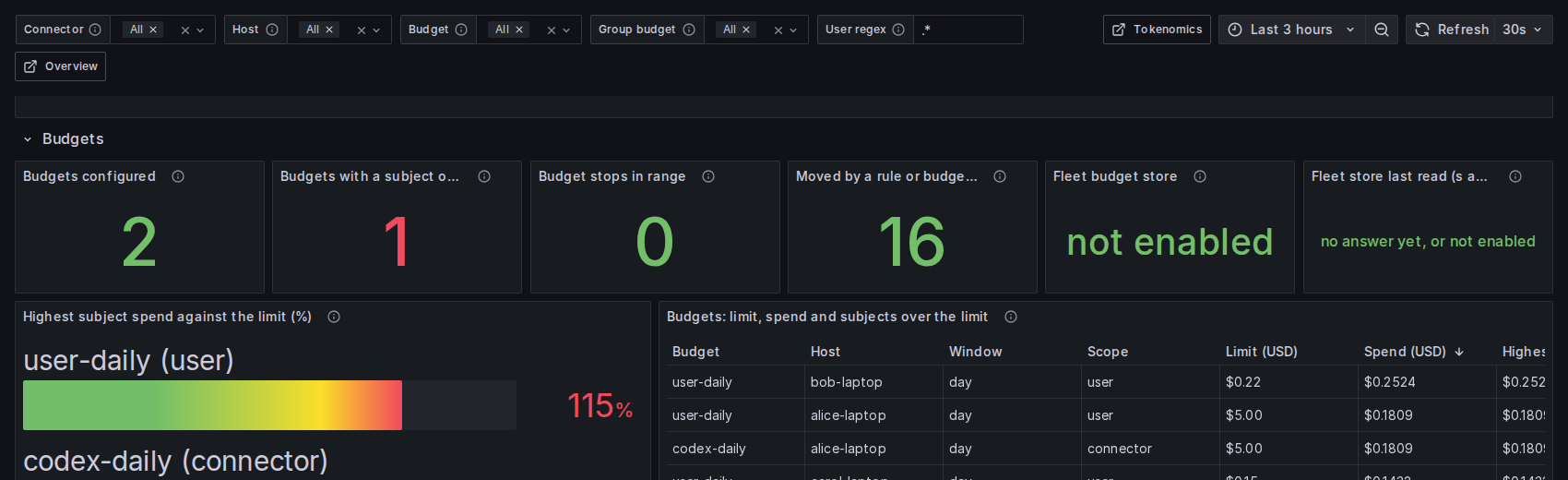
The Routing, Savings & Budgets board in Grafana shows each budget against its limit. The bar turns red at the limit, and the stats count the budgets with a subject over the limit and the calls a rule or budget moved to another model.
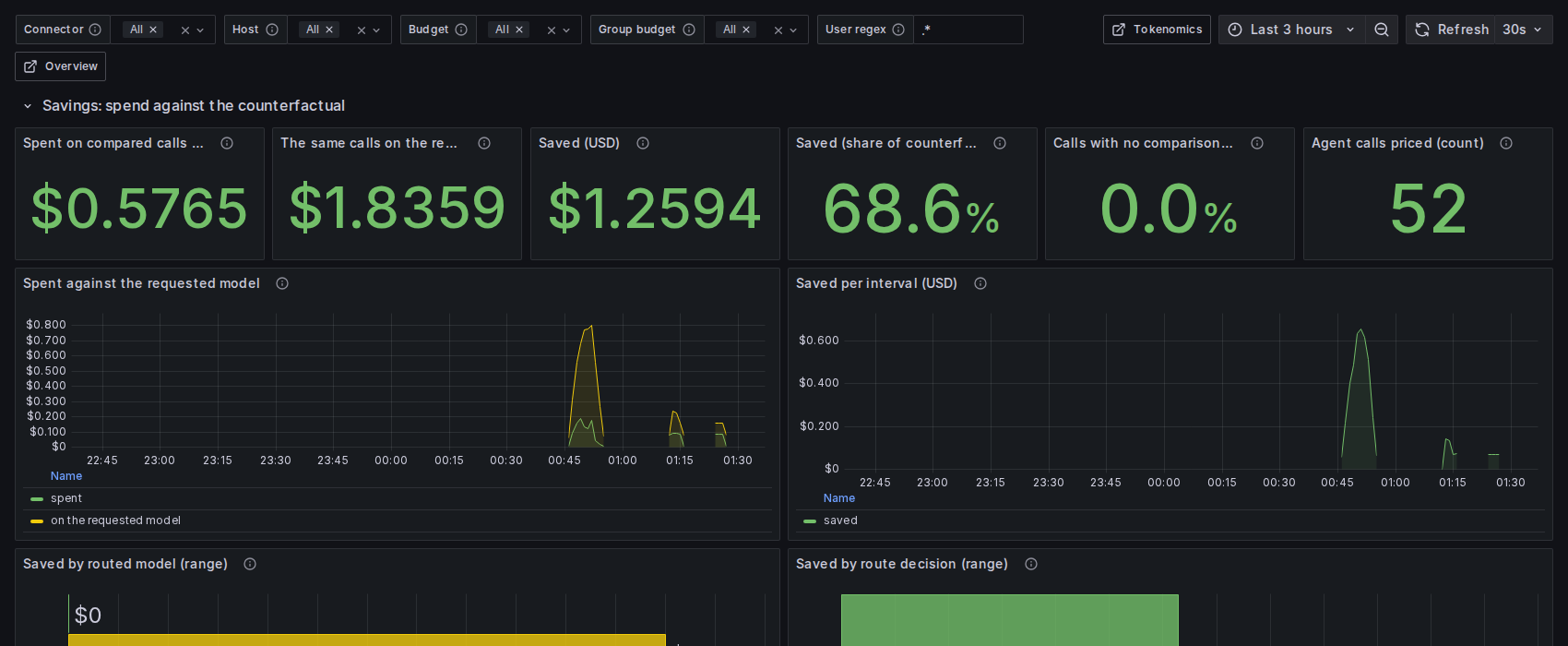
The same board shows what the routed calls cost against the same calls on the model the agent asked for.
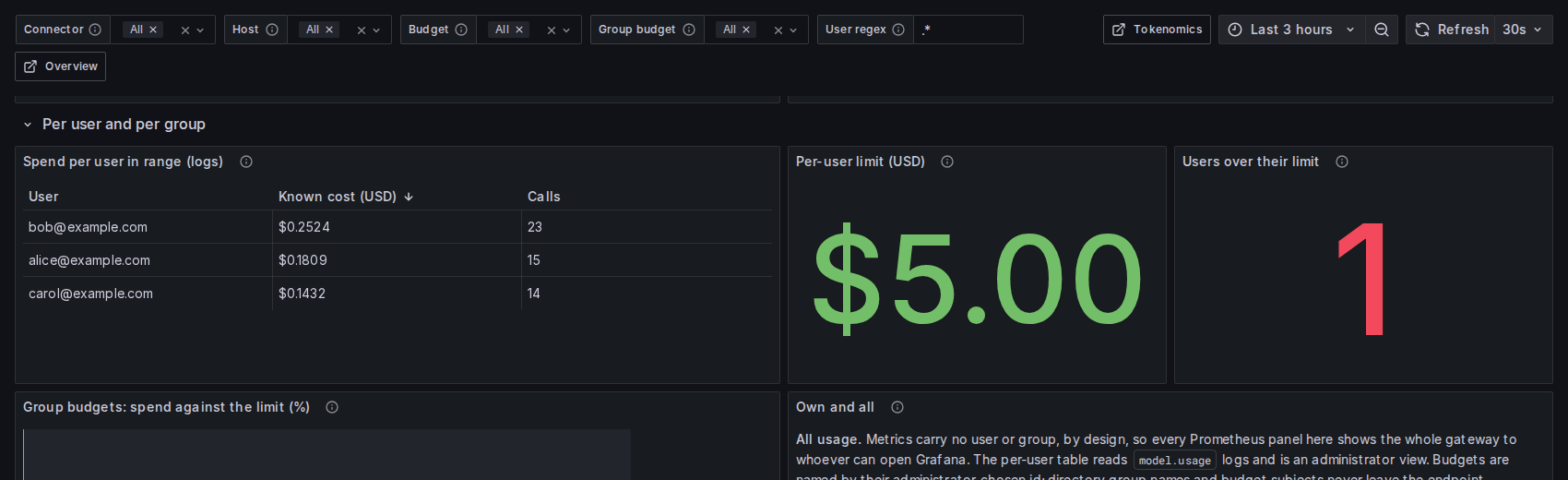
An administrator sees spend per user. Metrics carry no user, so the per-user table reads the usage records.
Check it
On a managed computer the defenseclaw launcher reads routing; it does not write it or run a dry run (see Managed command availability):
defenseclaw routing status          # your routing, recent decisions and budgets
defenseclaw routing rules list      # the routing rules: all of them for an administrator, none for a standard account
defenseclaw routing budgets list    # spend this period, and whether it is the fleet or this device only
defenseclaw routing explain REQUEST_ID
A routing command that changes the config (enable, models add, rules add, budgets add, pricing set) or a dry run (routing test) answers with the key the administrator config owns and exits 3; nothing is changed. To dry-run a rule, run it on a workstation with the per-user install and the same admin config:
defenseclaw routing test "write a parser" --as-user EXAMPLE\\alice   # which model, which rule
defenseclaw routing rules list      # rules and notes on rules that do less than they look
On a managed device a standard user runs status, budgets list and explain and sees only their own decisions and budgets: the gateway answers on its hook socket (Linux, macOS) or its service pipe (Windows) for the account that asks. routing.admin.visibility.users_see: none turns that off.
defenseclaw status on a managed Linux or macOS device also has a Routing row: on (claudecode, codex routed) names the route-only connectors that route this account. When the gateway cannot resolve a home directory for the account (a directory account that sets none, so HOME is /var/empty, or a home path that does not exist, or a directory lookup that did not answer), the per-user route settings are not known to exist, so the row says on (not routed for this account: home directory not resolved). It says what is known: it does not say the account has no home. Give the account a home directory, or run defenseclaw status again once the directory answers, then restart its agent. The Windows own-status pipe does not make this check. See Managed command availability for what a managed computer runs.
Semantic model routing
Send each model call to the model that fits it. A built-in rules classifier (or System One, or the vLLM Semantic Router) picks the model, for proxy agents and, through route-only mode, for Claude Code and Codex.
Policies
How DefenseClaw decides — OPA/Rego policy, structured tool-call rules, regex and judge detection, scanner policy, and noise suppression.